heater puzzle (Deponia 3, "Goodbye Deponia")
Introduction
how to use this guide
Players who haven't clicked anything and are starting from the default configuration can choose any one of the 4 solutions below. Obviously YOU don't need more than one solution; the extras are provided for the benefit of players who HAVE clicked stuff and are NOT starting from the default configuration...
Look through the patterns involved with the solutions and see if any match the one that's holding you up in-game. These basic patterns are all symmetrical, so if yours is asymmetrical, you should either try to make yours symmetrical before searching the patterns, or check the 3 asymmetrical pattern groups at the end of the guide.
If you can't find your pattern anywhere here, try clicking a few buttons (in your game, that is) and then look through the guide again. Aim for symmetry if possible. If you feel like telling me about your unrepresented pattern, i'd be interested to hear it...just know that i only check the comments in March (long story), so it may be a while before you get any acknowledgement.
how to play
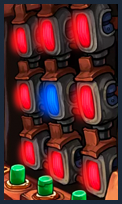 ...pressing "Button on the Diagonal" (over there by the pie machine) creates this: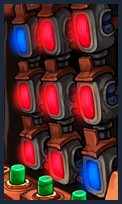
In the three cells affected by the Diagonal button, both reds have changed to blue, and the blue cell has turned red.
"Button on the Side" toggles the center row ( ↔ ). The Left, Middle, and Right Buttons toggle their corresponding columns ( ↕ ).
The Lever (lower left corner) flips the whole board horizontally, which would change the previous example to this: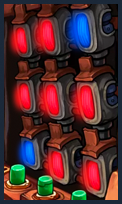
When all 9 lights are blue, you win!
If you don't see 3 images above, it's not my fault; the files are becoming corrupted on the server months after i upload them :(
solution 1
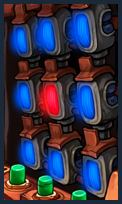
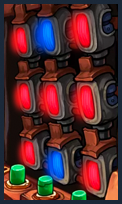
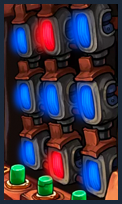
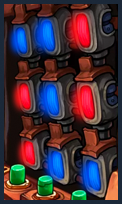
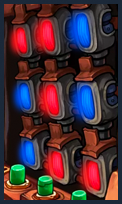
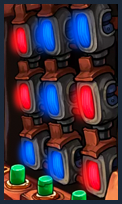
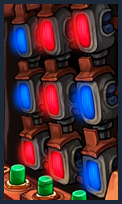
result: 3 horizontal stripes
Next step: click Button on the Side to toggle center row.
Result: all lights are now the same color (variation A = all blue, variation B = all red).
Next step, variation B only: use Left, Middle, and Right Buttons to switch all columns to blue.
If you don't see all 8 images above, it's not my fault; the files are becoming corrupted on the server months after i upload them :(
solution 2
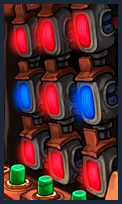
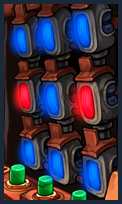
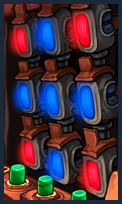
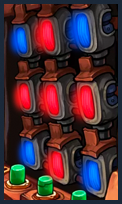
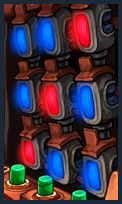
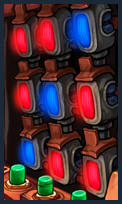
result: a backslash (like pattern
"slash ▞," but going the other way)
Next step: click Button on the Diagonal.
Result: all lights are now the same color (variation A = all blue, variation B = all red).
Next step, variation B only: use Left, Middle, and Right Buttons to switch all columns to blue.
If you don't see all 8 images above, it's not my fault; the files are becoming corrupted on the server months after i upload them :(
solution 3
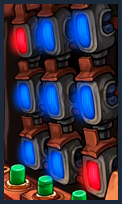
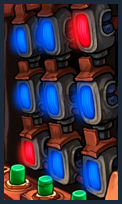
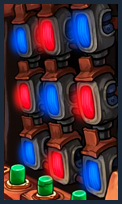
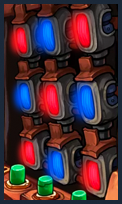
result: 3 vertical stripes
Next step(s): use Left, Middle, and/or Right Button(s) to switch red column(s) to blue.
If you don't see all 8 images above, it's not my fault; the files are becoming corrupted on the server months after i upload them :(
solution 4
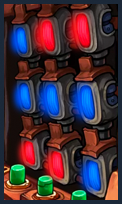
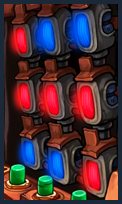
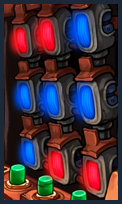
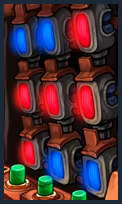
result: 3 vertical stripes
Next step(s): use Left, Middle, and/or Right Button(s) to switch red column(s) to blue.
If you don't see all 8 images above, it's not my fault; the files are becoming corrupted on the server months after i upload them :(
pattern "curly brace"
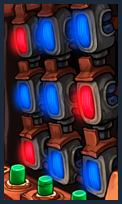
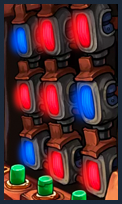
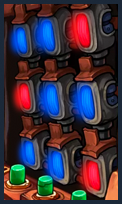
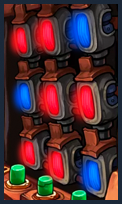
Result: pattern "plus."
Next step: go to solution 2.
If you don't see 4 images above, it's not my fault; the files are becoming corrupted on the server months after i upload them :(
pattern "question mark"
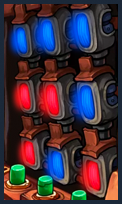
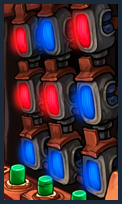
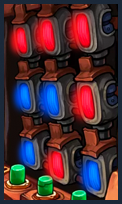
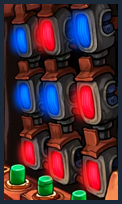
If you see your pattern in group 1: click Left Button.
Result: a diagonal line, like a backslash.
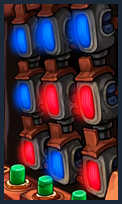
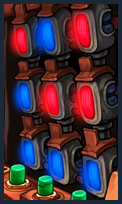
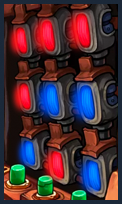
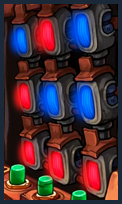
If you see your pattern in group 2: click Right Button.
Result: a diagonal line, like a slash.
If you don't see all 8 images above, it's not my fault; the files are becoming corrupted on the server months after i upload them :(
pattern "bar chart"
So named because in its right-side-up orientation (as in the first image in each group below) it has 3 vertical lines of differing heights, much like the "bar chart" emoji (📊).
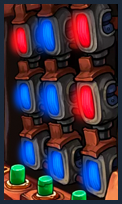
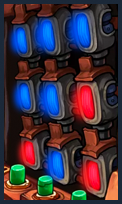
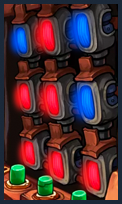
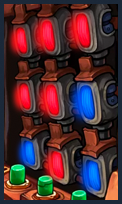
If you see your pattern in group 1: click Left Button.
Result: pattern "z 1".
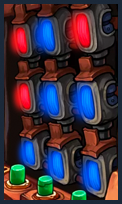
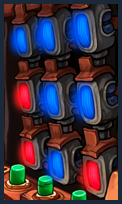
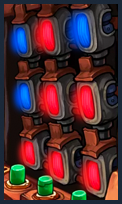
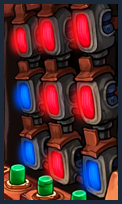
If you see your pattern in group 2: click Right Button.
Result: pattern "z 2".
If you don't see all 8 images above, it's not my fault; the files are becoming corrupted on the server months after i upload them :(
Link to my Deponia 3 walkthrough
- Deponia 1 walkthrough with missable achievements★ 5 (857)26k views1.3k ♥104 minUpdated 2 Mar
- Deponia Walkthrough: Game 1 (Deponia)★ 4 (127)19k views240 ♥24 minUpdated 4 Oct, 2016
- Deponia: The Complete Journey Достижение Король свалки.★ 5 (382)17k views365 ♥1 minRussianUpdated 18 Aug, 2014
- Achievement guides for all parts of Deponia (English&German)★ 5 (261)15k views411 ♥3 minUpdated 14 Aug, 2016
- Deponia 2 walkthrough with missable achievements★ 5 (581)15k views858 ♥129 minUpdated 17 Mar
- Гайд по достижениям Deponia: The Complete Journey ✔ (105 / 105)★ 5 (691)15k views981 ♥18 minRussianUpdated 23 Sep, 2019


- Upgrading to PremiumTeam Fortress 2★ 5 (20k)1441k views11k ♥6 minUpdated May 11, 2022
- No More Room in Hell Official ManualNo More Room in Hell★ 5 (2.8k)569k views2.1k ♥29 minUpdated Apr 22, 2019
- NMRiH Community Hosting GuidesNo More Room in Hell★ 5 (526)351k views653 ♥1 minUpdated Aug 10, 2022
- ULTIMATE GUIDE FOR GAME DEV TYCOONGame Dev Tycoon★ 5 (5.8k)326k views10k ♥4 minUpdated 23 Jan, 2014
- How to 'Git Gud' Soon™MORDHAU★ 5 (2k)318k views3k ♥68 minUpdated Nov 16, 2024
- Лучшие кооперативные игры SteamPAYDAY 2★ 5 (1.5k)315k views2.1k ♥56 minRussianUpdated Apr 27, 2025






This guide was created by its original author on the Steam Community. Are you the author and want it removed? Request removal.