~How to Adjust your HUD Colors~
How to Change your Colors!
First up, find the file located somewhere around here:
Non-Steam version:
C:\Program Files (x86)\Frontier\EDLaunch\Products\FORC-FDEV-D-1002 (obviously change drive letter to suit your pc, the folder is sometimes a different number)
Steam Version:
D:\Steam\steamapps\common\Elite Dangerous\Products\elite-dangerous-64
(Or where ever you have your SteamLibrary file located, mine is on my D: drive.
Mac Version:
Library > Application Support > Steam > SteamApps > Common > Elite Dangerous > Products > FORC-FDEV-D-1010 > right-click EliteDangerous and click Show package contents > Contents > Resources >
The file is called:
"GraphicsConfiguration.xml"
Right click it and open it with notepad.
PLAYERS! THIS IS AT YOUR OWN RISK! ALWAYS KEEP A BACK UP OF THE ORIGINAL!!
Edit this section:<Default>
<LocalisationName>Standard</LocalisationName>
<MatrixRed> 0, 0.3, 0 </MatrixRed>
<MatrixGreen> 0, 1, 0 </MatrixGreen>
<MatrixBlue> 0, 0.3, 0 </MatrixBlue>
</Default>
Color Matrix Generator (Use this for a Quick Preview):
http://arkku.com/elite/hud_editor/
YouTube tutorial:
DARKB1KE Setup for a nice blue:<MatrixRed> 0, 0.4, 0.7 </MatrixRed>
<MatrixGreen> 0, 0, 0 </MatrixGreen>
<MatrixBlue> 1, 1, 1 </MatrixBlue>
 My Current Setup:
<MatrixRed> 0, 1, 0 </MatrixRed>
<MatrixGreen> 0, 0, 0 </MatrixGreen>
<MatrixBlue> 1, 0, 0 </MatrixBlue>

Adjusting your HUD Brightness
If you find that a HUD color setup you like is too bright, or the words are hard to read, you can fix this by reducing the HUD brightness.
To do this:
- Press the 4 key to open your status panel.
- Navigate to the "FUNCTIONS" tab
- Scroll down to the "Interface Brightness"
- Reduce it down to a setting where the text becomes easier to read, or the HUD brightness is easier on your eyes. (I have it set to 1 pip for my green HUD)

Enjoy!
Links to Premade HUDs
http://www.reddit.com/r/EliteDangerous/comments/2p3784/you_can_manually_customize_the_gui_colors/
Imgur: (More settings to choose from)
http://imgur.com/gallery/GB7Dd
Download HUD Editor
http://www.drkaii.com/tools/edprofiler/
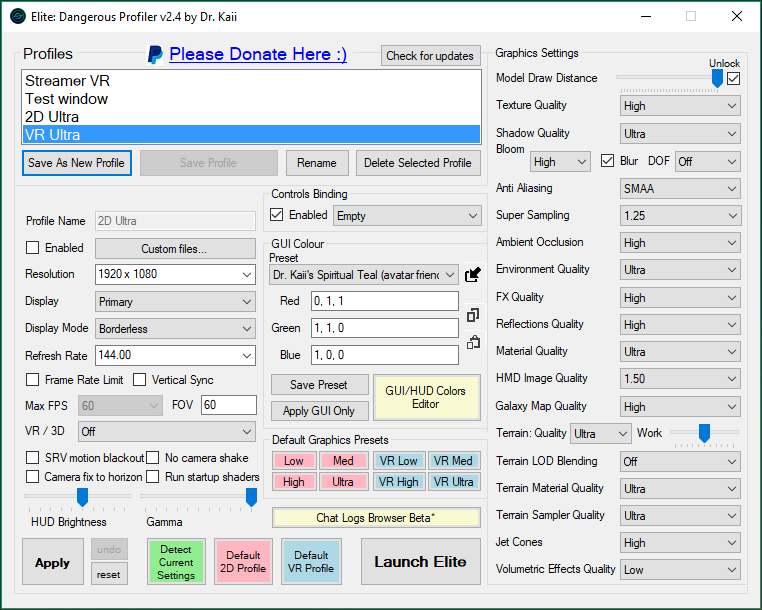 If you want to find the configuration file generated by EDProfiler you can find it here: C:\Users\username\AppData\Local\Frontier Developments\Elite Dangerous\Options\GraphicsGraphicsConfigurationOverride.xml
- Efficient Keyboard and Mouse Controls★ 5 (817)48k views1.8k ♥13 minUpdated 10 Oct, 2024
- The Guide for Almost Everything★ 5 (1.5k)42k views2.9k ♥131 minUpdated 14 Aug, 2018
- Все об Elite Dangerous (гайд и справочник)★ 5 (1.1k)26k views2.6k ♥218 minRussianUpdated 15 Nov, 2020
- ШАХТЕРСТВО★ 5 (735)17k views1.3k ♥11 minRussianUpdated 15 Feb, 2021
- Помощь новичкам - как получить ускоритель Стражей★ 5 (716)13k views1k ♥7 minRussianUpdated 25 Aug, 2021
- Соединение с серверами Frontier невозможно как исправить?★ 4 (173)12k views78 ♥1 minRussianUpdated 5 Jun



- Upgrading to PremiumTeam Fortress 2★ 5 (20k)1441k views11k ♥6 minUpdated May 11, 2022
- No More Room in Hell Official ManualNo More Room in Hell★ 5 (2.8k)569k views2.1k ♥29 minUpdated Apr 22, 2019
- NMRiH Community Hosting GuidesNo More Room in Hell★ 5 (526)351k views653 ♥1 minUpdated Aug 10, 2022
- Лучшие кооперативные игры SteamPAYDAY 2★ 5 (1.5k)315k views2.1k ♥56 minRussianUpdated Apr 27, 2025
- Desert Eagle Heat Treated | Blue GemCounter-Strike 2★ 5 (1.6k)292k views1.5k ♥2 minUpdated Jan 16
- Treasure Hunt Puzzle SolutionsTotal War: WARHAMMER II★ 5 (6.9k)281k views15k ♥3 minUpdated Aug 19, 2021






This guide was created by its original author on the Steam Community. Are you the author and want it removed? Request removal.