How to downgrade Rome 2 version
Getting started - Steam depot downloader
Download and unpack zip wherever you like. Your folder should look somewhat like this:
Figuring out which depots do you actually need
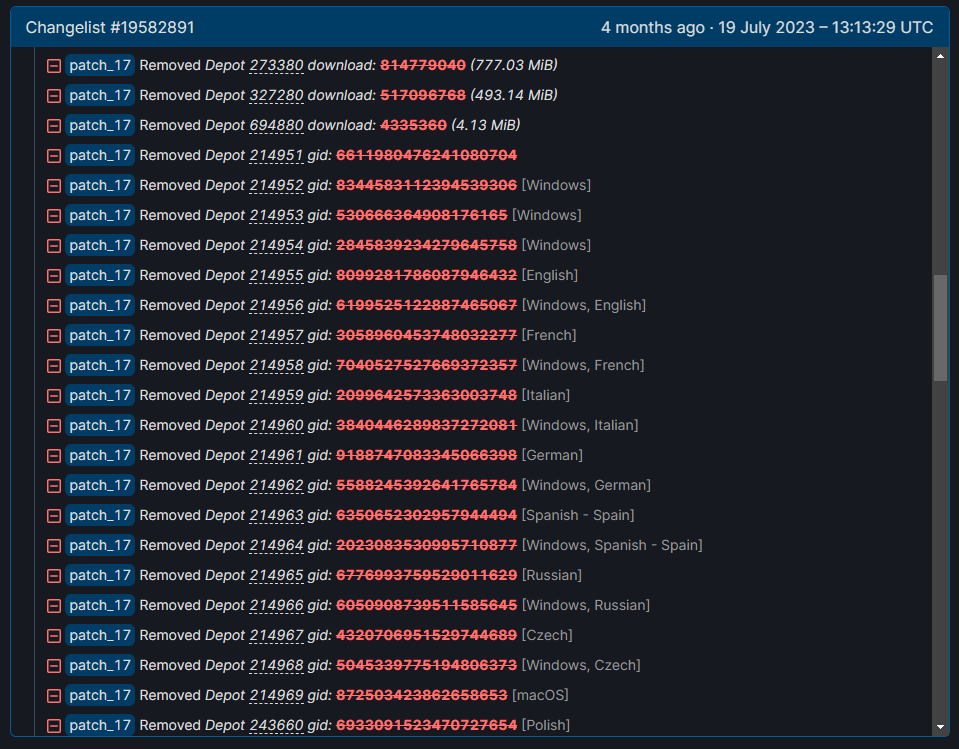
In square brackets there are one-word explanations what each depot holds. English/Russian/etc depots - localisation files, Windows/Linux - relative OS files, DLC - specific DLC files. You'll have to figue out which depots you need by yourself, using both your brains, appmanifest file and this guide.
Appmanifest file for Rome 2 is located at steam/steamapps/appmanifest214950.acf
There you will see which depots you have for your current version of the game, their id number and overall amount usually stays the same, so you can use this as a pointer.
Once you figured out which depots you need, check back with steamdb and look for their gid - this is the manifest number you'll need.
For example:

To downgrade depot 214951 to patch 17 version, you need manifest id of 6611980476241080704.
To downgrade depot 214952 to patch 17 version, you need manifest id of 8344583112394539306.
Since I wanted to downgrade to patch 17, here is the list of depots and their manifests for that version of the game.
Depot 214951 manifest: 6611980476241080704 - game files
Depot 214952 manifest: 8344583112394539306 - game files
Depot 214953 manifest: 530666364908176165 - game files
Depot 214954 manifest: 2845839234279645758 - game files
Depot 214955 manifest: 8099281786087946432 - english loc
Depot 214956 manifest: 6199525122887465067 - english loc
Depot 243665 manifest: 5900761351392481546 - directx and vcredist
Depot 258270 manifest: 531774820576119012 - nomadic dlc
Depot 259800 manifest: 2493728255929854531 - blood dlc
Depot 261050 manifest: 9046138251750580628 - DLC files
Depot 273380 manifest: 9036858069920286274 - DLC files
Depot 327280 manifest: 3163681413143281999 - DLC files
Downloading depots
 Press enter and you should have a command promt window open.
Here you need to type in the following command:
dotnet DepotDownloader.dll -app (APPID HERE) -depot (DEPOT ID HERE) -manifest (MANIFEST ID HERE) -username (YOUR USERNAME HERE) -password (YOUR PASSWORD HERE)
APPID for Rome 2 is 214950.
As for the rest - we've already fetched everything we need so it should be a simple copy-paste from here.
For example, command to download first depot for patch 17 is "dotnet DepotDownloader.dll -app 214950 -depot 214951 -manifest 6611980476241080704 -username JuliusCaesar -password BrutusSuxKox".
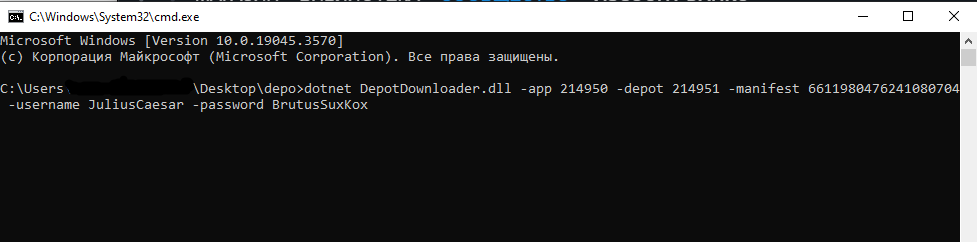
Hit enter and download should start. If you have steam guard on your account, it will ask your for authentication code, put it right into the command promt window. Your steam credentials are required to check whether you allowed to download specific depots from steam servers - you won't be able to download DLC files or games you don't own using this method.
Once this depot is downloaded, rinse and repeat for all for them. In case of patch 17 you have to download 12 separate depots.
Assembling the game
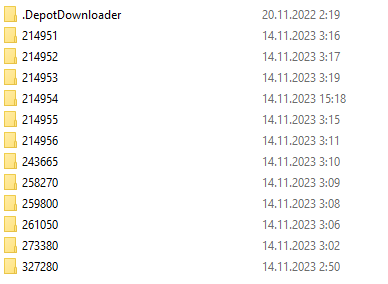
.DepotDownloader folder can safely be ignored. Inside each and every depot folder is another .DepotDownloader folder as well, those should be ignored as well and are not required for game assembly process.
Now all downloaded depots should be combined into a single folder, thus creating the required build of a game, in case of this tutorial - patch 17. Go into every depot folder (e.g. 214953) and then into the build folder (e.g. 11535779) inside of it, and move all files and folders there into the new, separate folder. Rinse and repeat for every other depot folder. After all manipulations your "common" new folder should look like this:
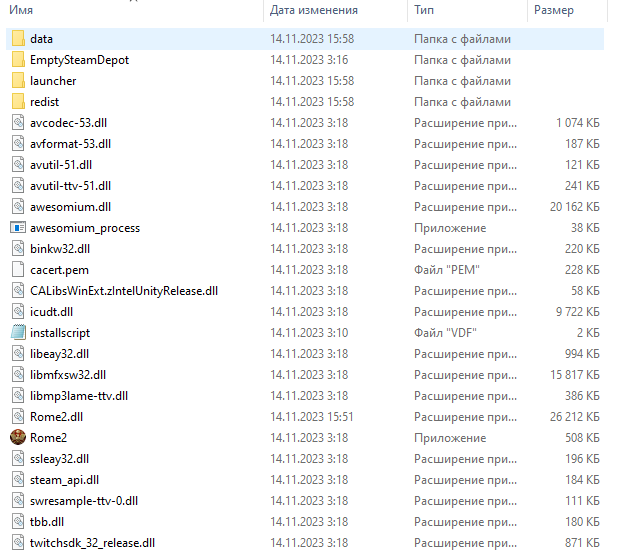
Delete launcher folder.
Replacing current game version with an assembled build
Now we just need to replace our latest Rome 2 build with the one we've created. Go to your Rome 2 install directory, you can easily do it via going into your steam library, right-clicking on Rome 2 entry, selecting "properties" and picking an option "Browse local files" under "Local files" tab.
- Delete everything in this folder except for launcher folder (back up files just in case something doesn't work).
- Move everything from the "common" folder in previous step to this location.
Congratulations, you've just downgraded your game version! As far as patch 17 goes, everything works just like it used to in regards to singleplayer campaign and custom battles. Not sure if multiplayer will work.
- The Noob's Guide To: Taking A City Without Going Into "Total War"★ 5 (758)57k views667 ♥4 minUpdated Aug 15, 2021
- Rome 2: Formations (unit control tips)★ 5 (1k)49k views1.5k ♥5 minUpdated Sep 21, 2013
- ROME 2... EMPEROR EDITION. Easy public order and money income guide★ 5 (1.4k)47k views2.9k ♥33 minUpdated Feb 1, 2019
- A Comprehensive Guide to the Power & Politics System★ 5 (575)45k views1.1k ♥13 minUpdated Jul 5, 2018
- The one and only mod list for Rome II★ 5 (649)44k views1.6k ♥7 minUpdated Oct 19, 2023
- Ancient Roman Battle Formations★ 5 (650)34k views1.1k ♥38 minUpdated Mar 31, 2015


- Upgrading to PremiumTeam Fortress 2★ 5 (20k)1441k views11k ♥6 minUpdated May 11, 2022
- No More Room in Hell Official ManualNo More Room in Hell★ 5 (2.8k)569k views2.1k ♥29 minUpdated Apr 22, 2019
- NMRiH Community Hosting GuidesNo More Room in Hell★ 5 (526)351k views653 ♥1 minUpdated Aug 10, 2022
- ULTIMATE GUIDE FOR GAME DEV TYCOONGame Dev Tycoon★ 5 (5.8k)326k views10k ♥4 minUpdated 23 Jan, 2014
- How to 'Git Gud' Soon™MORDHAU★ 5 (2k)318k views3k ♥68 minUpdated Nov 16, 2024
- Лучшие кооперативные игры SteamPAYDAY 2★ 5 (1.5k)315k views2.1k ♥56 minRussianUpdated Apr 27, 2025






This guide was created by its original author on the Steam Community. Are you the author and want it removed? Request removal.