How to get the most out of the game
Graphics
First find your config file, I'm using Linux so it's located at ~/.frictionalgames/Amnesia/Main/main_settings.cfg windows I believe they are located in your Documents folder and under Engine options set fps limit to off as seen here.
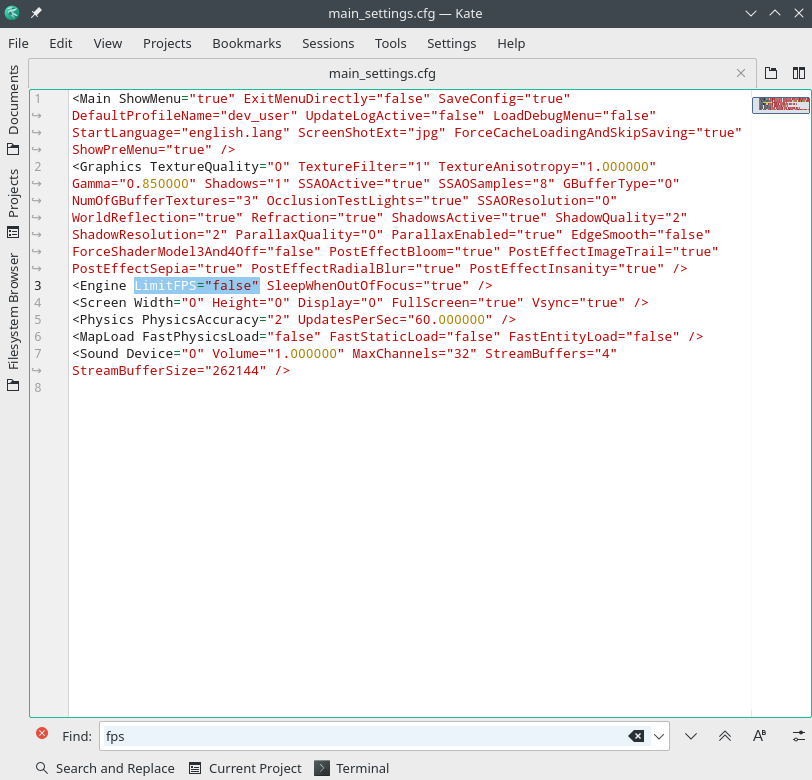
When you start the game now you'll find the fps is unlocked (very nice on my 144hz) however when the trailing effect is used it will cause the objects like windows to be frozen even when moving your camera around, so then you'll want to decide weather to use Vsync or turn off the trailing effect this can be done through the in game settings if so desired. In my case I choose Vsync since I still get 144 fps and the trailing effect does contribute to ambiance.
When you start the game now you'll find the fps is unlocked (very nice on my 144hz) however when the trailing effect is used it will cause the objects like windows to be frozen even when moving your camera around, so then you'll want to decide weather to use Vsync or turn off the trailing effect this can be done through the in game settings if so desired. In my case I choose Vsync since I still get 144 fps and the trailing effect does contribute to ambiance.
Sound
I recommend enabling hrtf in OpenAL. if your not familiar with hrtf, it provides 3D audio with a decent pair of headphones.
Here is a per recorded example of 3D audio for headphones.
The how to enable guide or reddit
Reddit how to enable HRTF
Here is a per recorded example of 3D audio for headphones.
The how to enable guide or reddit
Reddit how to enable HRTF
More Amnesia: The Dark Descent guides
- Idiotic Monsters and You: A Guide for Outwitting the Grunts and Brutes★ 5 (586)24k views504 ♥18 minUpdated Nov 16, 2017
- Insanity Incarnate: 100% Achievement Guide (Does Not Include Masochist Achievement)★ 5 (1k)23k views1k ♥14 minUpdated Mar 29, 2020
- A Simple guide to Amnesia★ 5 (361)23k views365 ♥7 minUpdated Mar 25, 2013
- Достижения Amnesia: The Dark Descent★ 5 (811)19k views867 ♥3 minRussianUpdated Oct 12, 2018
- Dark Descent + Justine: Collectibles locations maps★ 5 (832)16k views1k ♥1 minBulgarianUpdated Dec 29, 2016
- 100% Achievement Guide [Amnesia: The Dark Descent] 💯✅★ 5 (453)15k views928 ♥40 minUpdated Feb 18, 2025



🔥 Popular guides
- Upgrading to PremiumTeam Fortress 2★ 5 (20k)1441k views11k ♥6 minUpdated May 11, 2022
- No More Room in Hell Official ManualNo More Room in Hell★ 5 (2.8k)569k views2.1k ♥29 minUpdated Apr 22, 2019
- NMRiH Community Hosting GuidesNo More Room in Hell★ 5 (526)351k views653 ♥1 minUpdated Aug 10, 2022
- ULTIMATE GUIDE FOR GAME DEV TYCOONGame Dev Tycoon★ 5 (5.8k)326k views10k ♥4 minUpdated 23 Jan, 2014
- How to 'Git Gud' Soon™MORDHAU★ 5 (2k)318k views3k ♥68 minUpdated Nov 16, 2024
- Лучшие кооперативные игры SteamPAYDAY 2★ 5 (1.5k)315k views2.1k ♥56 minRussianUpdated Apr 27, 2025






This guide was created by its original author on the Steam Community. Are you the author and want it removed? Request removal.