How to give yourself money for the career mode (V0.38)
Using the Beamng console (Faster)
This new method was suggested by The Epic Plush God
This method consist in using the console of the game to directly modify the file containing the carrer informations.
Open the carreer mode and open the systeme console. You can check the key used for that in controls, by writing 'console'. I recommend changing the default key to a random letter to be sure it will work. DO NOT CONFUSE THE SYSTEM CONSOLE WITH THE UI CONSOLE, USE THE SYSTEME CONSOLE.
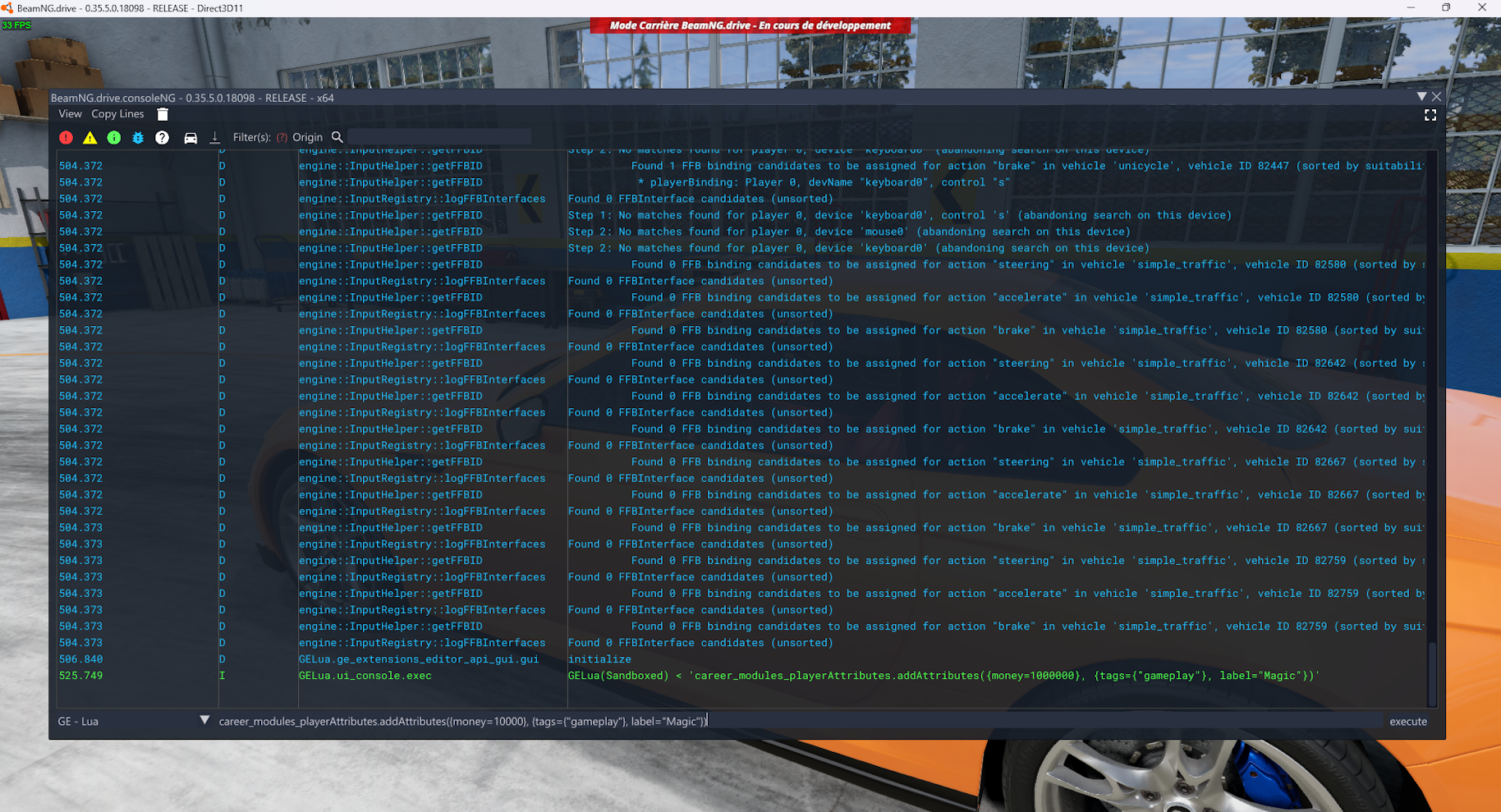
Once you have this menu, paste and enter this command directly : career_modules_playerAttributes.addAttributes({money=10000}, {tags={"gameplay"}, label="Magic"})
You can change the value after 'money=' to the amount of money you want.
You should have direct results, no need to restart anything.
Enjoy !
Editing the file (slower)
/\ If the method doesnt work for you you must be editing the wrong autosave folder, i try the method every version to make sure it still works /\
You need to find the playerattributes.json file.
First press win + r, write %appdata% and press enter.
Then go back 1 time and go in Local.
Find the 'Beamngdrive' folder and click on 'Latest' to go to the latest version of the game.
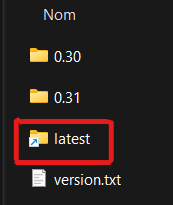
Then click on the following folders: 'Settings' > 'Cloud' > 'Saves' > '*your career name*' > 'autosave'> 'career' and open the 'playerAttributes.json' text file. (If multiples autosaves, use the latest. If no latest, repeat the next step for each autosave, to be sure it will work in game.)
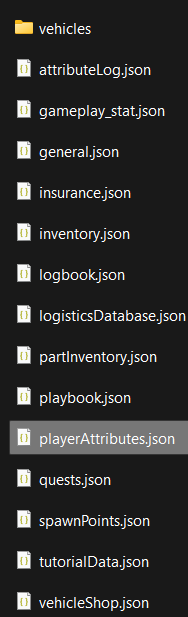
After opening 'PlayerAttributes.json' you wanna look for the line that says 'Money'
There should be a line under with a variable called 'value'
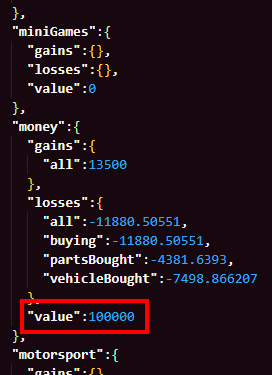
You can change the value and input the money you want :)
- Мультиплеер BeamNG.drive: настройка BeamMP★ 5 (700)83k views1.3k ♥3 minRussianUpdated Dec 2, 2025
- BeamNG.Drive Vehicle Mods Part 2 (21 Mods!)★ 5 (476)43k views915 ♥4 minUpdated Jun 11
- BeamNG.Drive Vehicle Mods (15 Cars!)★ 5 (417)34k views836 ♥2 minUpdated Mar 27, 2024
- БОЛЬШАЯ сборка лор-модов для BeamNG.Drive★ 5 (371)27k views796 ♥12 minRussianUpdated Jun 28, 2024
- Formula 1 Tracks (F1 Map Mods) | BeamNG★ 5 (409)20k views720 ♥5 minUpdated Dec 12, 2024
- Lego Cars in BeamNG (Mod)★ 5 (330)17k views350 ♥1 min




- Upgrading to PremiumTeam Fortress 2★ 5 (20k)1441k views11k ♥6 minUpdated May 11, 2022
- No More Room in Hell Official ManualNo More Room in Hell★ 5 (2.8k)569k views2.1k ♥29 minUpdated Apr 22, 2019
- NMRiH Community Hosting GuidesNo More Room in Hell★ 5 (526)351k views653 ♥1 minUpdated Aug 10, 2022
- ULTIMATE GUIDE FOR GAME DEV TYCOONGame Dev Tycoon★ 5 (5.8k)326k views10k ♥4 minUpdated 23 Jan, 2014
- How to 'Git Gud' Soon™MORDHAU★ 5 (2k)318k views3k ♥68 minUpdated Nov 16, 2024
- Лучшие кооперативные игры SteamPAYDAY 2★ 5 (1.5k)315k views2.1k ♥56 minRussianUpdated Apr 27, 2025






This guide was created by its original author on the Steam Community. Are you the author and want it removed? Request removal.