How to install savegames GTA 4/Установка сохранений GTA 4
[RUS]
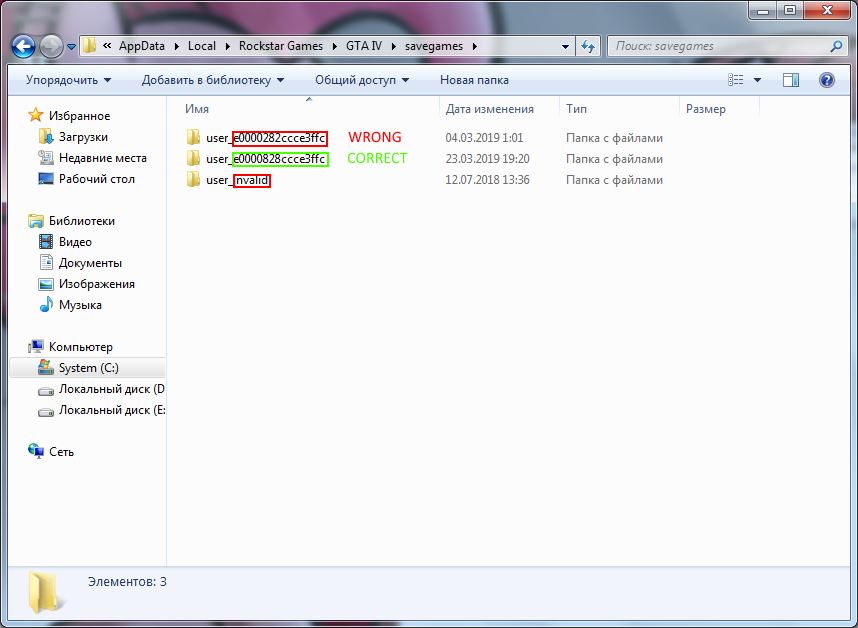
Все сохранения находятся в
"C:\Users\Username\AppData\Local\Rockstar Games\GTA IV\savegames"
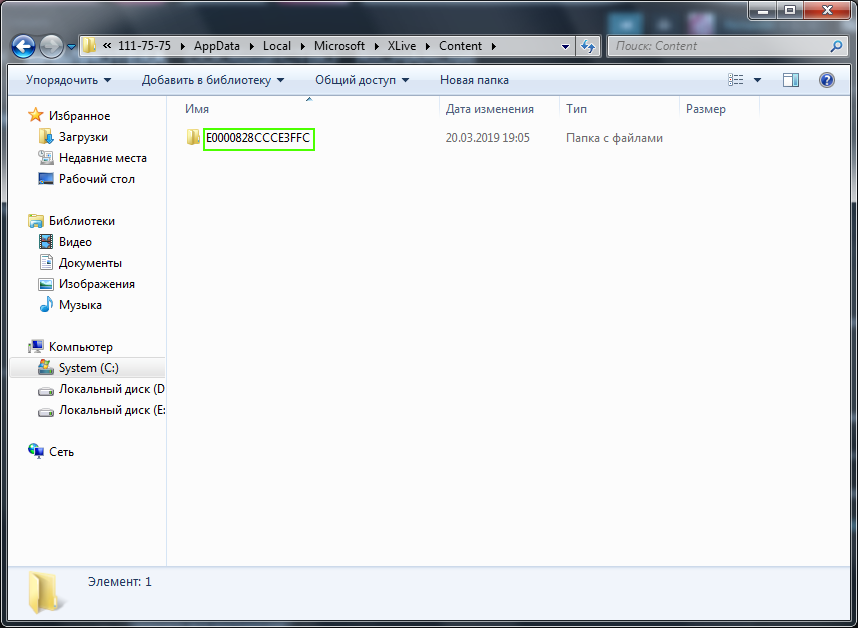
в папке с символами и номером, а профиль XLive
"C:\Users\Username\AppData\Local\Microsoft\XLive\Content"
также в папке с символами номером.
При заходе в профиль в игре, сохранения подгружаются из той папки сохранений, номер которой совпадает в номером профиля XLive.
Для того, чтобы игра увидела ваши сохранения, вам необходимо их скопировать в папку сохранений, символы и номер которой совпадает с символами и номером папки, где лежит ваш профиль.
Если такой папки не существует, то запустите игру, и игра создаст эту папку.
"C:\Users\Username\AppData\Local\Rockstar Games\GTA IV\savegames"
в папке с символами и номером, а профиль XLive
"C:\Users\Username\AppData\Local\Microsoft\XLive\Content"
также в папке с символами номером.
При заходе в профиль в игре, сохранения подгружаются из той папки сохранений, номер которой совпадает в номером профиля XLive.
Для того, чтобы игра увидела ваши сохранения, вам необходимо их скопировать в папку сохранений, символы и номер которой совпадает с символами и номером папки, где лежит ваш профиль.
Если такой папки не существует, то запустите игру, и игра создаст эту папку.
[ENG]
All savegames connected to XLive profile. If you loose connection to that profile you won't be able to access to your savegames.
All savegames located at
"C:\Users\Username\AppData\Local\Rockstar Games\GTA IV\savegames"
in folder with symbols and number. Profile XLive located at
"C:\Users\Username\AppData\Local\Microsoft\XLive\Content"
in folder with symbols and number too.
If you want game to see your savegames you need to put them to folder named as same symbols and number as symbols and number of folder with your profile.
If those folder is not exist you should start the game and it will be created.
All savegames located at
"C:\Users\Username\AppData\Local\Rockstar Games\GTA IV\savegames"
in folder with symbols and number. Profile XLive located at
"C:\Users\Username\AppData\Local\Microsoft\XLive\Content"
in folder with symbols and number too.
If you want game to see your savegames you need to put them to folder named as same symbols and number as symbols and number of folder with your profile.
If those folder is not exist you should start the game and it will be created.
Example
Here some example screenshots
More Grand Theft Auto: Episodes from Liberty City guides
- [CURRENTLY NOT WORKING] Restore GTA IV/EFLC removed soundtracks★ 5 (163)8.9k views225 ♥1 minUpdated Apr 12, 2020
- 100% ПРОХОЖДЕНИЕ GRAND THEFT AUTO: TBOGT1.4k views48 ♥2 minRussianUpdated Jun 12, 2019
- 100% Completion Guide for GTA IV: The Ballad of Gay Tony★ 4 (27)1.1k views49 ♥3 minUpdated Jan 25
- 100% Completion Guide for GTA IV: The Lost and Damned901 views51 ♥3 minUpdated Jan 25
- Cheat Codes for GTA IV: The Ballad of Gay Tony853 views14 ♥1 minUpdated Jan 20
- 100% ПРОХОЖДЕНИЕ GRAND THEFT AUTO : TLAD767 views46 ♥2 minUpdated Jun 12, 2019






This guide was created by its original author on the Steam Community. Are you the author and want it removed? Request removal.