How to Launch The Game - 2023
Launching The Game
1. First install the game, it's a small game compared to file sizes of today's standard so it shouldn't take long to download.
2. The first step I took was just launching the game straight up which in hindsight wasn't going to work. With people such as myself having operating systems such as Windows 11 that just can't run such old games. At this stage of configuration the game launches, there is an icon of the game on the taskbar and my mouse is unable to move to my second monitor. As if the game is in full screen mode. There is currently no display of the game on my screen.
3. Verifying Game Files was the next step I took, it said that there were two files missing which it then proceeds to download however re-verifying the files says they were still missing and bobs your uncle the game still doesn't launch properly. The game is still launching in the same state as mentioned above.
4. The next step is to change the properties of the game file. It might sound complicated but it's very easy to do.
- Click on your steam library scroll to the game, in this case War Of The Ring.
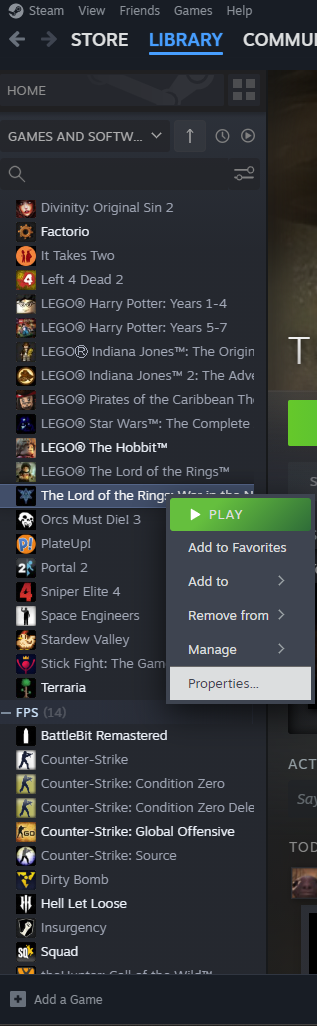 - Right Click on it go to Properties -> Installed Files -> Browse. Alternatively click Manage
-> Browse Local Files
- This should open up your folder. Look for a file called witn.exe it should have an icon
whereas a lot of the other files don't.

- Right click on it and got to properties -> compatibility
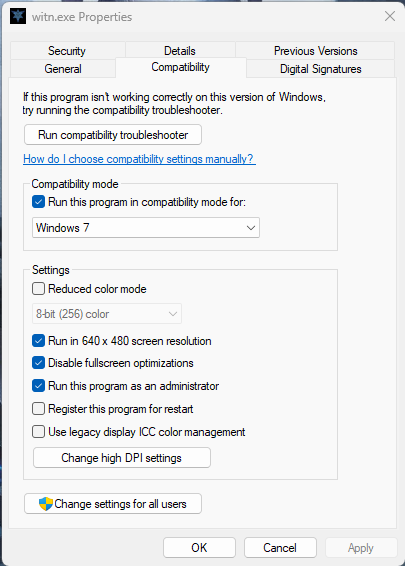
- Just follow what I've ticked/selected and your game should now properly launch after applying the changes. Just re-launch the game on steam.
2. The first step I took was just launching the game straight up which in hindsight wasn't going to work. With people such as myself having operating systems such as Windows 11 that just can't run such old games. At this stage of configuration the game launches, there is an icon of the game on the taskbar and my mouse is unable to move to my second monitor. As if the game is in full screen mode. There is currently no display of the game on my screen.
3. Verifying Game Files was the next step I took, it said that there were two files missing which it then proceeds to download however re-verifying the files says they were still missing and bobs your uncle the game still doesn't launch properly. The game is still launching in the same state as mentioned above.
4. The next step is to change the properties of the game file. It might sound complicated but it's very easy to do.
- Click on your steam library scroll to the game, in this case War Of The Ring.
- Right Click on it go to Properties -> Installed Files -> Browse. Alternatively click Manage -> Browse Local Files
- This should open up your folder. Look for a file called witn.exe it should have an icon
whereas a lot of the other files don't.
- Right click on it and got to properties -> compatibility
- Just follow what I've ticked/selected and your game should now properly launch after applying the changes. Just re-launch the game on steam.
Side Note
I have written this guide just after being able to run the game so I don't know if there will be any other issues such as crashes whilst playing etc. Maybe changing to an even earlier operating system might be better I don't know. My whole reason for writing this guide is to document how I launched the game for other people who might be lost on how to do so, and for the information to all be in one place.
I'm no tech wizard, i just followed advice from random threads on the internet and decided to compile my findings here so don't ask me questions as I most likely won't be able to help you sorry.
Links I found that helped:
https://www.youtube.com/watch?v=gXuz8F4Tg_Q&ab_channel=Yaakab12YHW
https://steamcommunity.com/app/32800/discussions/0/1354868867708519270/
https://www.reddit.com/r/gaming/comments/nuas9b/lotr_war_in_the_north_not_working_from_steam/
I'm no tech wizard, i just followed advice from random threads on the internet and decided to compile my findings here so don't ask me questions as I most likely won't be able to help you sorry.
Links I found that helped:
https://www.youtube.com/watch?v=gXuz8F4Tg_Q&ab_channel=Yaakab12YHW
https://steamcommunity.com/app/32800/discussions/0/1354868867708519270/
https://www.reddit.com/r/gaming/comments/nuas9b/lotr_war_in_the_north_not_working_from_steam/
More The Lord of the Rings: War in the North guides
- 10 hardest achievements★ 4 (173)13k views171 ♥3 minUpdated Feb 15, 2014
- WitN General Guide + Farin In-Depth (Solo+Co-Op)★ 4 (121)8.8k views121 ♥30 min
- How to play War in the North in COUCH CO-OP ON PC! (2-3 Gamepads!/One Gamepad + Kb/m)(1-3 SCREENS)★ 4 (46)7.1k views90 ♥9 minUpdated Oct 14, 2016
- The Lidless Eye - Achievement Screenshots Guide★ 5 (187)7k views206 ♥4 minUpdated Mar 17, 2024
- Описание навыков класса Ведунья (Андриэль).★ 5 (170)6.3k views82 ♥6 minRussianUpdated Sep 8, 2016
- Описание навыков класса Следопыт (Эрадан).★ 4 (132)6.3k views65 ♥6 minRussianUpdated Apr 30, 2013


This guide was created by its original author on the Steam Community. Are you the author and want it removed? Request removal.