HOW TO MOD MGS:TPP
START THE GAME
/!\ Attention /!\ IF THE GAME IS NOT INSTALLED YOU CAN'T PLAY NOW

MODDED VERSION ( SERIOUS PART )
I WILL TALK ABOUT SNAKEBITE MOD MANAGER NOT ANY OTHER LOADER SO BE CAREFUL
- a legit version of MGS: TPP ( Metal Gear Solid : The Phatom Pain )
- Install SnakeBite : https://www.nexusmods.com/metalgearsolidvtpp/mods/106
- locate your game files ( usually it's C:\Program Files (x86)\Steam\steamapps\common\MG_TPP )
(for me the files directory is separated from my C:/ and the steam application files) - WHEN SNAKE BITE ASK YOU TO MAKE BACKUP FILES ACCEPT
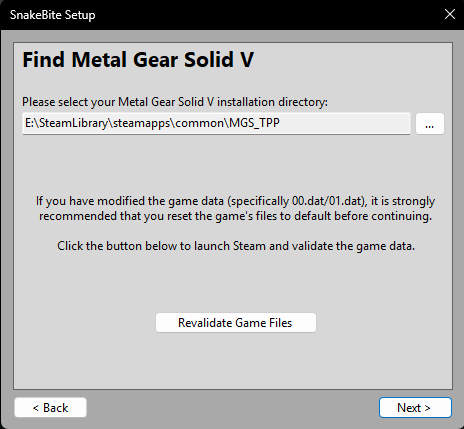
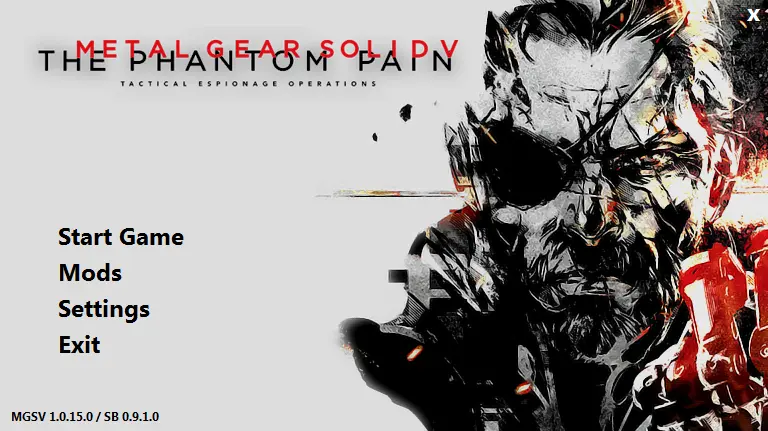
Once you finished installation process you got this screen
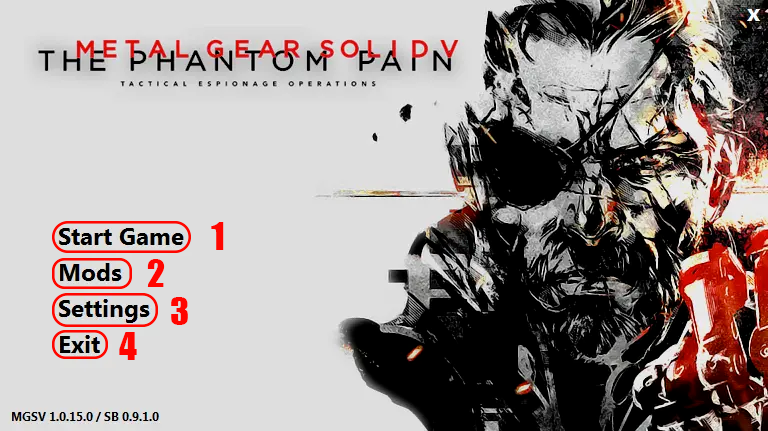
1: Start the game with your activated mods
2: Mods interface where you can manage your mod ( install or uninstall them )
3: settings of the launcher so not very usefull
4: Exit the mod manager /!\ NOT THE GAME /!\
INSTALL MODS
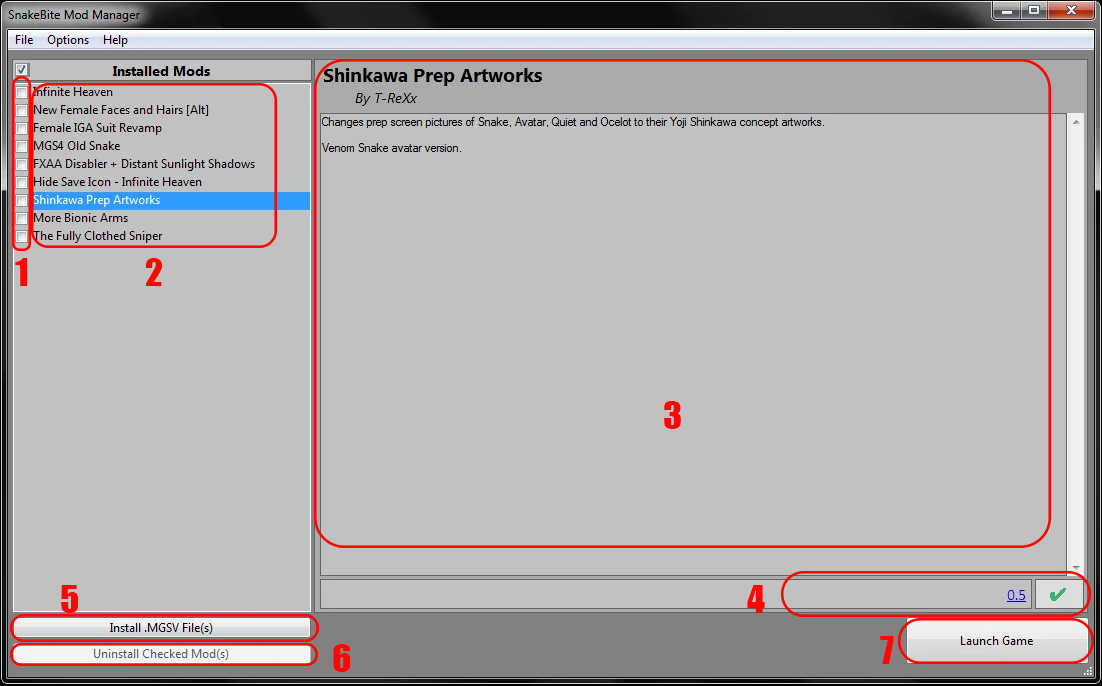
1: selected mods for action ( ticks does not mean actived/desactivated )
2: Mods Names
3: details of the highlighted mod ( one click on the name to highlight )
4: Version and compatibility of the game ( the version is link to the mod but sometime even outdated mods work )
5: Install button that open the installation screen
6: Uninstall ticked mods ( Only modded part in the game files )
7: Launch game like the start button of the main menu
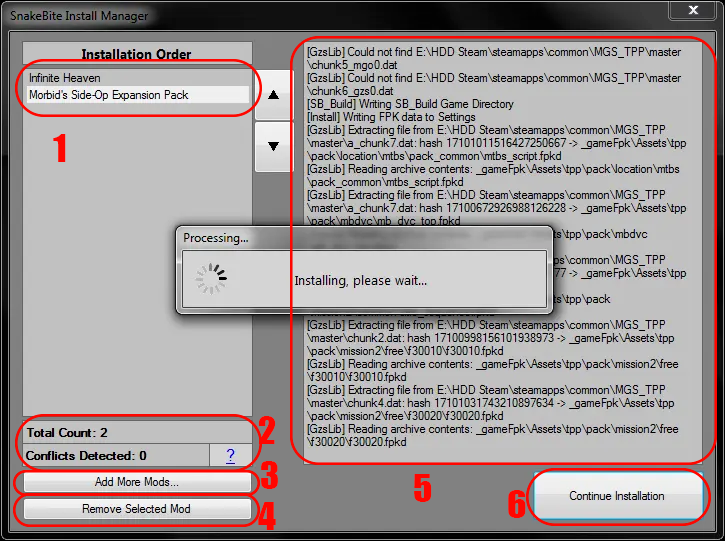
1: Mod in installation queue
2: Number of Mods and conflics check
3: add more mods button to add more on the queue
4: remove mods from the queue ( select them before by clicking on it )
5: Live feed of the mods instalation process to debug ( not important )
6: start the instalation of the mods in queue
IMPORTANT
Thank you

- The Water Pistol: A serious guide about a "joke" weapon★ 5 (919)78k views802 ♥6 minUpdated Nov 4, 2019
- Advanced Game Mechanics★ 5 (1.5k)45k views2.1k ♥12 minUpdated Oct 1, 2021
- Guide to S Ranking Missions★ 5 (1.3k)35k views2.7k ♥43 minUpdated May 10, 2016
- Recommended Mods for Custom Missions, Side Ops and Beyond★ 5 (866)32k views1.8k ♥10 minUpdated Sep 1, 2022
- All Hideo Kojima Games★ 5 (250)19k views228 ♥19 minUpdated Sep 9, 2025
- FEMALE S++ SOLDIERS (EASIEST WAY POSSIBLE I SWEAR)★ 4 (150)14k views244 ♥3 minUpdated Feb 26, 2025


- Upgrading to PremiumTeam Fortress 2★ 5 (20k)1441k views11k ♥6 minUpdated May 11, 2022
- No More Room in Hell Official ManualNo More Room in Hell★ 5 (2.8k)569k views2.1k ♥29 minUpdated Apr 22, 2019
- NMRiH Community Hosting GuidesNo More Room in Hell★ 5 (526)351k views653 ♥1 minUpdated Aug 10, 2022
- ULTIMATE GUIDE FOR GAME DEV TYCOONGame Dev Tycoon★ 5 (5.8k)326k views10k ♥4 minUpdated 23 Jan, 2014
- How to 'Git Gud' Soon™MORDHAU★ 5 (2k)318k views3k ♥68 minUpdated Nov 16, 2024
- Лучшие кооперативные игры SteamPAYDAY 2★ 5 (1.5k)315k views2.1k ♥56 minRussianUpdated Apr 27, 2025






This guide was created by its original author on the Steam Community. Are you the author and want it removed? Request removal.