How to not have bad fps when playing Mirrors Edge
Going to the ingames settings of the game and turning off PhysX
All you have to do is:
Go into the settings then click on video and turn off PhysX, which is useless, by the way
And thats about it no more bad fps.....
Go into the settings then click on video and turn off PhysX, which is useless, by the way
And thats about it no more bad fps.....
Bonus guide: How to get more fps
If you want more fps (more than the ingame cap), all you have to do is:
Step 1: Double click on the File Explorer (it should be pinned on your taskbar, if not, just search for it on your computer, idk)
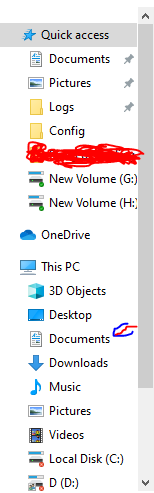
Step 2: In your File Explorer, you should see a panel on the left side of the screen (image shown below). Open the "Documents"
Step 3: Open Notepad (this part is essential, because you are going to need to tweak some stuff)
Step 4: In the Documents, open the EA Games folder, and then open the Mirrors Edge folder
Step 5: Open the TdGame folder
Step 6: Open the Config folder, and then look for the TdEngine configuration file
Step 7: Drag the TdEngine configuration file into Notepad (like in the image shown below)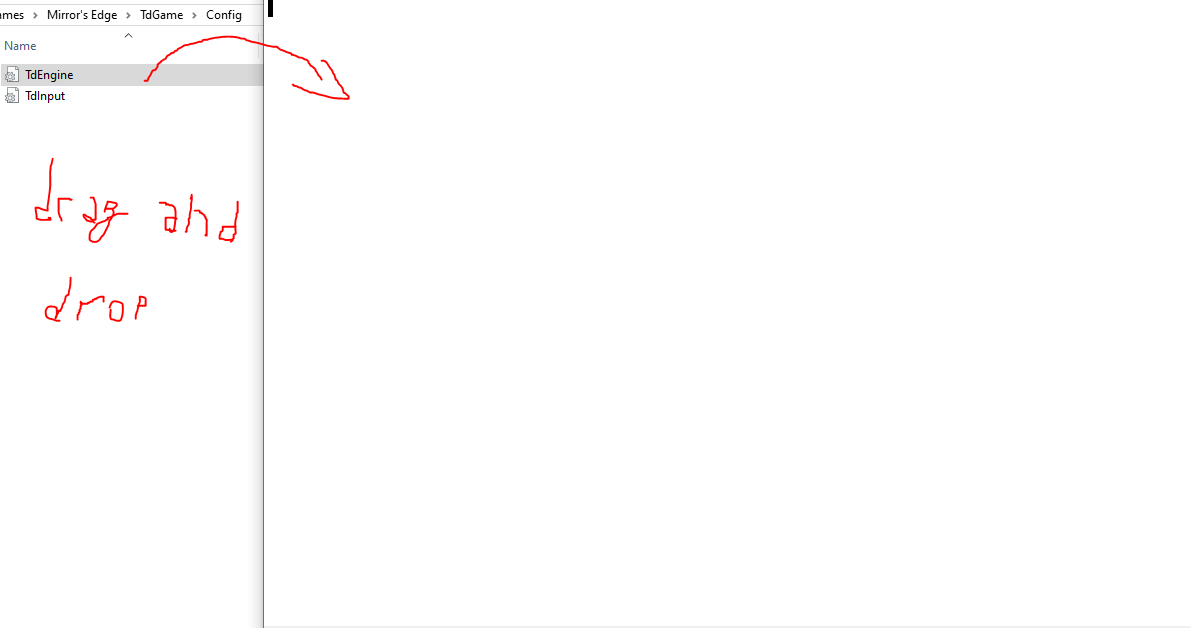
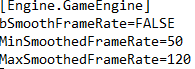
Step 8 (optional): Under [Engine.GameEngine], find a text called: bSmoothFrameRate, it should be set to TRUE, but we're gonna be setting it to FALSE (only do this if you want uncapped frames)
Step 9: After that, find texts called MinSmoothedFrameRate and MaxSmoothedFrameRate, they should be under bSmoothFrameRate.
Step 10: Set MinSmoothedFrameRate to be the minimum amount of frames you're gonna get, and set MaxSmoothedFrameRate to be the maximum amount of frames you're gonna get (shown in the image below)
After all of that, exit and if it asks you to save, then save, now when thats done, boot up Mirrors edge and your original problem is fixed, with gained frames (wink)
Step 1: Double click on the File Explorer (it should be pinned on your taskbar, if not, just search for it on your computer, idk)
Step 2: In your File Explorer, you should see a panel on the left side of the screen (image shown below). Open the "Documents"
Step 3: Open Notepad (this part is essential, because you are going to need to tweak some stuff)
Step 4: In the Documents, open the EA Games folder, and then open the Mirrors Edge folder
Step 5: Open the TdGame folder
Step 6: Open the Config folder, and then look for the TdEngine configuration file
Step 7: Drag the TdEngine configuration file into Notepad (like in the image shown below)
Step 8 (optional): Under [Engine.GameEngine], find a text called: bSmoothFrameRate, it should be set to TRUE, but we're gonna be setting it to FALSE (only do this if you want uncapped frames)
Step 9: After that, find texts called MinSmoothedFrameRate and MaxSmoothedFrameRate, they should be under bSmoothFrameRate.
Step 10: Set MinSmoothedFrameRate to be the minimum amount of frames you're gonna get, and set MaxSmoothedFrameRate to be the maximum amount of frames you're gonna get (shown in the image below)
After all of that, exit and if it asks you to save, then save, now when thats done, boot up Mirrors edge and your original problem is fixed, with gained frames (wink)
Like And Favorite
You better like and favorite this guide, because when you dont, i will get drunk and take out my anger on my kids and lock them in the closet for a month
(again)
Also, if i did anything wrong, feel free to berate me
(again)
Also, if i did anything wrong, feel free to berate me
More Mirror's Edge guides
- How to change your FOV in Mirror's Edge★ 5 (901)49k views844 ♥1 minUpdated Apr 10, 2013
- How to disable the FPS lock - Mirror's Edge Guide★ 5 (436)36k views423 ♥1 minUpdated Jun 8, 2018
- Physx Performance Improvement Guide (NVIDIA)★ 5 (378)22k views395 ♥1 minUpdated Feb 12
- How to give the "V-sign" in Mirror's Edge★ 5 (185)21k views151 ♥2 minUpdated Sep 7, 2013
- Speedrunning Techniques from a Pro★ 5 (354)17k views459 ♥10 minUpdated Jun 24, 2015
- Enemies, Combat and Weapons in Mirror's Edge★ 5 (201)13k views189 ♥29 minUpdated Dec 4, 2016


This guide was created by its original author on the Steam Community. Are you the author and want it removed? Request removal.