How to remove the Beast and DL2 ads
Removing the Dying Light: The Beast ad
Open file explorer and follow these steps:
>This PC
>Select your storage device
>Click on Program Files (x86)
>Click on Steam
>Click on Steamapps
>Click on Common
>Click on Dying Light
>Click on DW
>Click on Data
>Click on Menu
>Click on Movies
>Delete the "dltb_video.bik" file
This is what the file path looks like

This is the file you are deleting
 This removes the ANNOYING ad for Dying Light: The Beast that screams at you every time you open the game.
>This PC
>Select your storage device
>Click on Program Files (x86)
>Click on Steam
>Click on Steamapps
>Click on Common
>Click on Dying Light
>Click on DW
>Click on Data
>Click on Menu
>Click on Movies
>Delete the "dltb_video.bik" file
This is what the file path looks like
This is the file you are deleting
This removes the ANNOYING ad for Dying Light: The Beast that screams at you every time you open the game.
Removing the Dying Light 2 select screen ad
Go to Dying Light in your library on Steam and follow these steps:
>Click on the gear icon under the game's banner art
>Click on Properties
>Make sure "General" is selected
>Click on the "Launch Options" bar
>Type -nologos into the bar
>Close the window
It should look like this
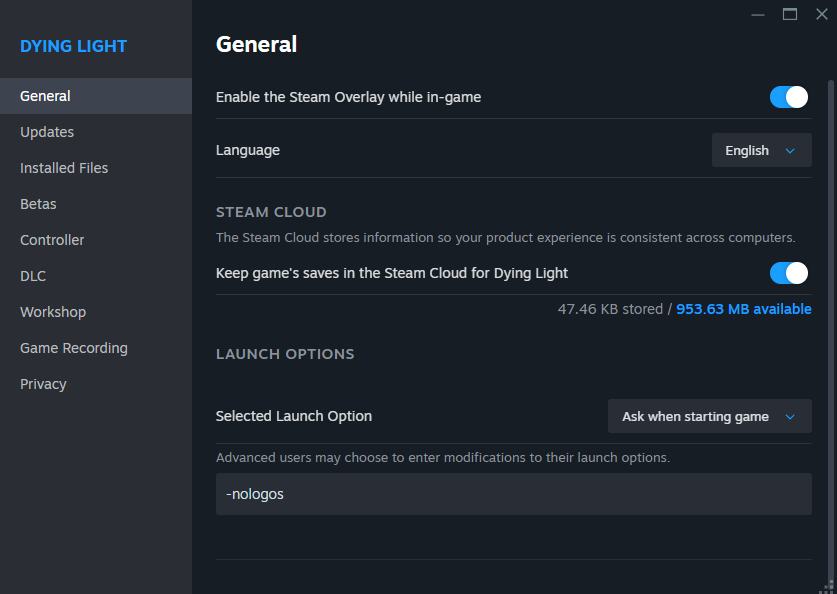 This will remove the annoying game selection ad for Dying Light 2 from the game, and removes all title screen intros.
>Click on the gear icon under the game's banner art
>Click on Properties
>Make sure "General" is selected
>Click on the "Launch Options" bar
>Type -nologos into the bar
>Close the window
It should look like this
This will remove the annoying game selection ad for Dying Light 2 from the game, and removes all title screen intros.
More Dying Light guides
- Dying Light Docket Codes [UPDATED]★ 5 (3.3k)96k views4.3k ♥2 minUpdated 27 Nov, 2024
- Dying Light 100%. Все Достижения/All Achievements + The Bozak Horde, The Following, Hellraid [RUS/ENG]★ 5 (3.5k)71k views5.1k ♥24 minUpdated 12 Jul, 2025
- Dying Light - All Collectible Locations★ 5 (2.2k)48k views4k ♥34 minUpdated 22 Feb, 2016
- Русская озвучка Dying Light★ 5 (402)32k views1k ♥1 minRussianUpdated 8 Jan, 2025
- Dying Light | Русификатор звука от R.G. MVO + Достижения★ 5 (327)31k views579 ♥2 minRussianUpdated 29 Jun, 2025
- Русская озвучка для Dying Light★ 5 (274)27k views520 ♥2 minRussianUpdated 7 Jun, 2025


🔥 Popular guides
- Upgrading to PremiumTeam Fortress 2★ 5 (20k)1441k views11k ♥6 minUpdated May 11, 2022
- No More Room in Hell Official ManualNo More Room in Hell★ 5 (2.8k)569k views2.1k ♥29 minUpdated Apr 22, 2019
- NMRiH Community Hosting GuidesNo More Room in Hell★ 5 (526)351k views653 ♥1 minUpdated Aug 10, 2022
- Лучшие кооперативные игры SteamPAYDAY 2★ 5 (1.5k)315k views2.1k ♥56 minRussianUpdated Apr 27, 2025
- Desert Eagle Heat Treated | Blue GemCounter-Strike 2★ 5 (1.6k)292k views1.5k ♥2 minUpdated Jan 16
- Treasure Hunt Puzzle SolutionsTotal War: WARHAMMER II★ 5 (6.9k)281k views15k ♥3 minUpdated Aug 19, 2021






This guide was created by its original author on the Steam Community. Are you the author and want it removed? Request removal.