How to run MAFIA on Windows 10/11
Introduction
Anyway, in this guide you will find the procedure to start the Steam version of the game MAFIA. Since Windows 8, the problem has become that the game does not start via Steam or via the .EXE file in the game folder. Here's how to start the game successfully!
Procedure
1) So if you can't start the game in the normal way, go to the folder where you have the MAFIA game installed
1.1) There you get either through the Steam library or from memory to the folders of Steam and then Mafia
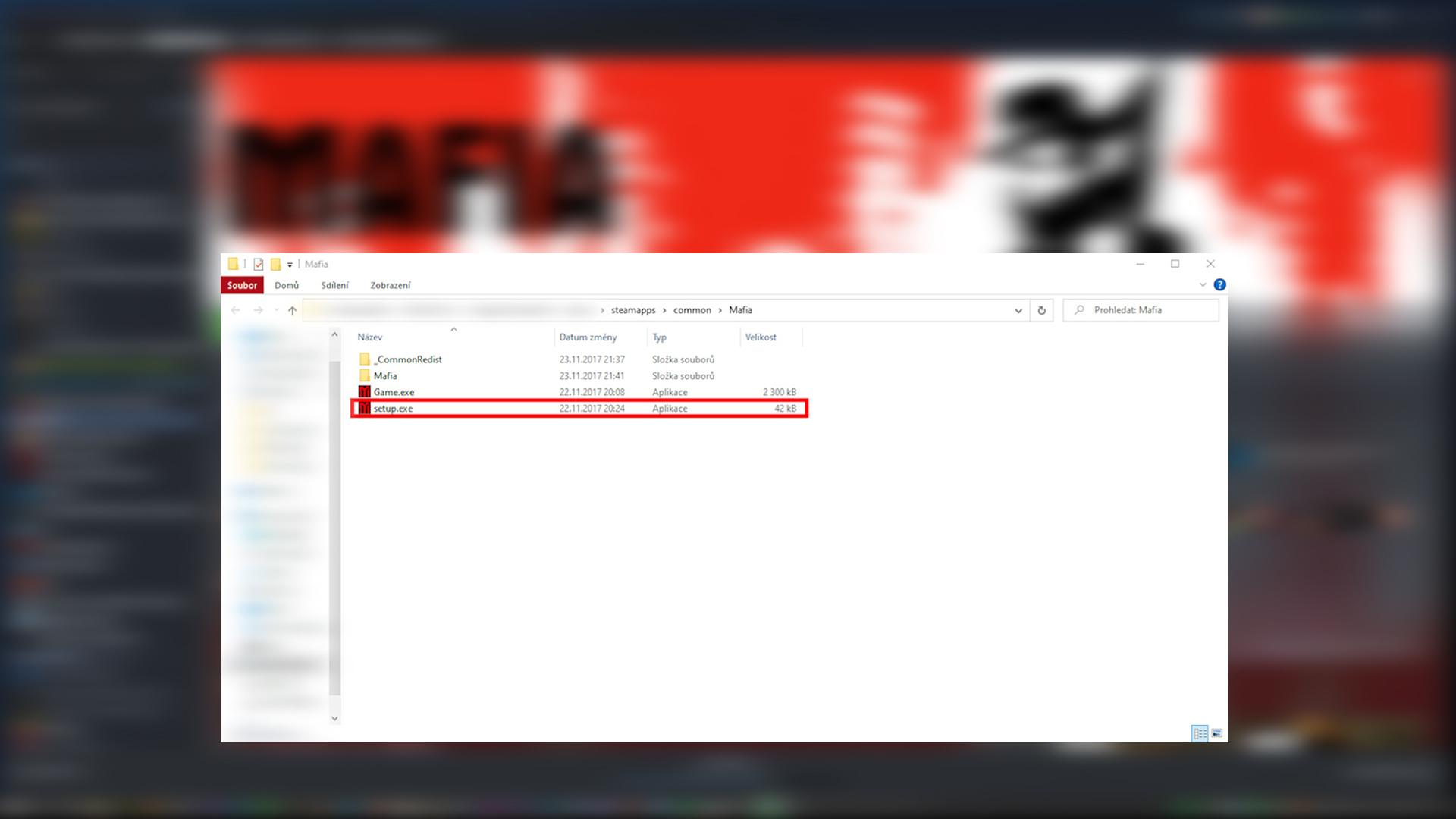
2) In the main MAFIA folder, click and run SETUP.EXE as in the attached image (there is also GAME.EXE in the folder, but do not run it yet)
3) In SETUP, set everything according to yourself - Resolution, game settings ... Give OK / Save and SETUP will turn off
4) Then you can start the game - I recommend first to run the already mentioned GAME.EXE, which is in the same folder as SETUP.EXE
5) After the first successful launch of the game via GAME.EXE, you can start the game normally via Steam!
1.1) There you get either through the Steam library or from memory to the folders of Steam and then Mafia
2) In the main MAFIA folder, click and run SETUP.EXE as in the attached image (there is also GAME.EXE in the folder, but do not run it yet)
3) In SETUP, set everything according to yourself - Resolution, game settings ... Give OK / Save and SETUP will turn off
4) Then you can start the game - I recommend first to run the already mentioned GAME.EXE, which is in the same folder as SETUP.EXE
5) After the first successful launch of the game via GAME.EXE, you can start the game normally via Steam!
CONCLUSION
If the guide really helped you, I will be happy for the comment and possibly the award, it's all up to you... :-)
FUNCTIONAL FOR: Windows 8/8.1, Windows 10, Windows 11
More Mafia guides
- Не запускается Mafia | Решение★ 5 (742)32k views475 ♥1 minRussianUpdated Jan 13, 2025
- Исправление проблемы с запуском/Startup issues fix (RU/EN)★ 5 (732)26k views627 ♥1 minRussianUpdated Dec 30, 2017
- How to restore the original music to MAFIA: TCoLH★ 5 (576)22k views628 ♥1 minUpdated Dec 4, 2024
- Mafia doesn't start (FIX)★ 5 (188)21k views300 ♥5 minUpdated Apr 17, 2024
- Mafia Graphics Improvements + HD mod (Texture Upscaling)★ 5 (180)15k views354 ♥4 minUpdated Jun 5, 2021
- Возвращение музыки. Сочетание текста и звука.★ 5 (632)15k views733 ♥1 minRussianUpdated Nov 24, 2017



This guide was created by its original author on the Steam Community. Are you the author and want it removed? Request removal.