How to stop the game from crashing
The Scenario
So, after years of not being able to play The Stanley Parable obviously because you were busy getting the Go Outside achievement or simply because you were busy playing the newly released Stanley Parable Ultra Deluxe, you decided it would be a great change of pace to start up the good old Stanley Parable again and get that feeling of nostalgia only the 2013 original can bring you.
The game starts up fine, you change some settings and eager to get into the game you press Play hoping for the best.
You see the Loading bar filling up and just as it is about to reach the right side of the screen your body freezes in horror as the game black-screens and closes on itself!

No! you exclaim. This can't be happening. Why isn't it working?
Well, your reaction is completely understandable. But luckily for you, there is an easy way to fix all of this and return back to normalcy. To get the the game back to a playable state.
The game starts up fine, you change some settings and eager to get into the game you press Play hoping for the best.
You see the Loading bar filling up and just as it is about to reach the right side of the screen your body freezes in horror as the game black-screens and closes on itself!
No! you exclaim. This can't be happening. Why isn't it working?
Well, your reaction is completely understandable. But luckily for you, there is an easy way to fix all of this and return back to normalcy. To get the the game back to a playable state.
The Solution
To not bore you with more exposition let's just get to the simple solution.
All you have to do to get the original Stanley Parable to run again is to first open your steam library then right click The Stanley Parable and select Properties.
After doing all that you go to the General tab and go to the Launch Options section.
Now, here comes the important part. In the Launch Options you enter "-threads 1" without the parentheses.
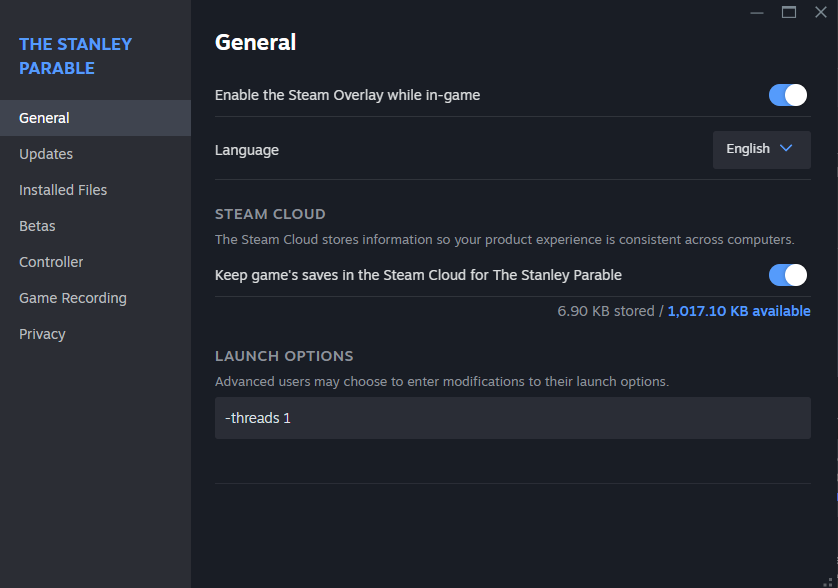
This should stop the game from crashing and best of all, this should also work with the Demo.
All you have to do to get the original Stanley Parable to run again is to first open your steam library then right click The Stanley Parable and select Properties.
After doing all that you go to the General tab and go to the Launch Options section.
Now, here comes the important part. In the Launch Options you enter "-threads 1" without the parentheses.
This should stop the game from crashing and best of all, this should also work with the Demo.
Why this works. (and what to do if it still doesn't)
From what I've gathered the game simply can't handle graphic cards with more than 4 cores, so if you have a modern graphics card chances are that the game will not be able to allocate those 4 cores and will therefore crash.
The threads launch-command limits the amount of cores the game uses. It isn't as simple though as just putting -threads 4 in the launch options, because atleast for me the only way I found to get the game not to crash was by putting -threads 1.
I experimented with what number to put, so if -threads 1 doesn't work for you, maybe 2, 3 or 4 will.
If for some reason the threads launch-command still doesn't work for you another option would be to go into the games Properties again, go to the Installed Files tab and click on Verify integrity of game files. This will scan the game files, check if there are any corrupted files and automatically replace them.
I hope this guide was helpful and you're able to play the original Stanley Parable again.
The threads launch-command limits the amount of cores the game uses. It isn't as simple though as just putting -threads 4 in the launch options, because atleast for me the only way I found to get the game not to crash was by putting -threads 1.
I experimented with what number to put, so if -threads 1 doesn't work for you, maybe 2, 3 or 4 will.
If for some reason the threads launch-command still doesn't work for you another option would be to go into the games Properties again, go to the Installed Files tab and click on Verify integrity of game files. This will scan the game files, check if there are any corrupted files and automatically replace them.
I hope this guide was helpful and you're able to play the original Stanley Parable again.
P.S.
Should the game get very dark after getting an ending also disable Multicore Rendering and VSync in the advanced options.
More The Stanley Parable guides
- Endings, Achievements, and Secrets [Spoilers]★ 5 (1.6k)102k views1.8k ♥12 minUpdated Feb 4, 2015
- The Stanley Parable- Achievement Guide★ 5 (1.5k)90k views1.5k ♥4 minUpdated Nov 7, 2014
- Achievement Commitment Guide★ 5 (404)47k views227 ♥1 minUpdated Jan 9, 2014
- Все 10 достижений★ 5 (1.6k)38k views1.3k ♥5 minRussianUpdated Aug 31, 2017
- The Stanley Parable - The Guide To All Achievements★ 5 (574)36k views707 ♥4 minUpdated Jul 4, 2017
- The Stanley Parable - All Endings and Secrets★ 5 (336)30k views294 ♥1 minBulgarian


This guide was created by its original author on the Steam Community. Are you the author and want it removed? Request removal.