How to transfer save files from any device to Steam version
From Android to Steam
1º - The first step to obtaining your save file is to go to storage/sdcard/Android/data/com.bethsoft.falloutshelter/files on your Android device. You can use ES File Explorer for this or simply doing the transferal on your PC using a microUSB to USB cable to connect your android device.
2º - Once you are in the file location specified above, you will notice a few files (depending on how many saves you have) called "VaultX.sav" and "VaultX.sav.bkp" (For exemple: Slot 1 = vault1.sav)
3º - Copy the both files.
4º - Now, type %AppData% in your Search Bar and open the paste Roaming
5º - Click here to go back to AppData.
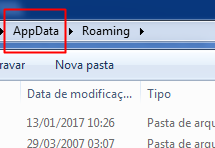
6º - Now, lets go to Local and then FalloutShelter
7º - Paste your files here. Careful, if you already have a Slot 1, rename the Android files to another slot (vault2.sav and vault2.sav.bkp).
Done. Open the game and load the save game.
From Bethesda to Steam
It's more simple:
1º - Navigate to C:\Users\Admin(Your name here)\Documents\My Games\Fallout Shelter
2º - Copy vaultX.sav and vaultX.sav.bkp
3º - Do the same steps as the android version from the 4º.
From iOS to Steam
1º - Install the program “iExplorer” on your PC (even the DEMO mode will suffice).
2º - Connect your device and run de program.
3º - Browse through the list of options on the left: Backups/ Backups Explorer (it might take some time for the loading to complete)
4º - Select AppDomain-com.bethsoft.falloutshelter and open Documents
5º - The two save files will be there: VaultX.sav and VaultX.sav.bkp, copy both.
6º - Do the same steps as the android version from the 4º.
From Windows Store to Steam
1º - Lets go to C:\Users\user_name\AppData\Local\Packages\BethesdaSoftworks.FalloutShelter_3275kfvn8vcwc\SystemAppData\wgs\BIG_CRYPTIC_NUMBER\ANOTHER_BIG_CRYPTIC_NUMBER (mine was C:\Users\user_name\AppData\Local\Packages\BethesdaSoftworks.FalloutShelter_3275kfvn8vcwc\SystemAppData\wgs\00090000026CAD6D_0000000000000000000000007FACC08D for example).
2º - There will be three files in the end. Two of those have a size of 1kb, while the other one is bigger (about 64kb at the start). This is the File we are looking for.
3º - Discover what is the code from the save you want and rename it to vault1.sav (For exemple: 'BB81E4B38B64413D9D5C886B7F9B580B' is renamed to 'vault1.sav')
4º - Now, follow the same steps as the android version from the 4º.
Credits to den
Please rate up xD

- Ответы на вопросы игры «Потеряй голову»★ 5 (1.3k)53k views1.5k ♥2 minRussianUpdated Mar 30, 2017
- S.P.E.C.I.A.L Stats in the Wasteland★ 5 (4.3k)46k views2.8k ♥2 minUpdated Jan 14
- Как накрутить крышки,ланчбоксы,навыки и т.д.★ 5 (710)46k views1.2k ♥1 minRussianUpdated Jul 25, 2019
- Ностальгия★ 5 (729)28k views842 ♥4 minRussianUpdated Nov 28, 2019
- Fallout Shelter: Ультимативный гайд★ 5 (597)27k views1.1k ♥18 minRussianUpdated Dec 27, 2023
- A Cheesy Guide to 100% Achievements in Fallout Shelter★ 5 (559)27k views1.1k ♥13 minUpdated Jan 10, 2024




- Upgrading to PremiumTeam Fortress 2★ 5 (20k)1441k views11k ♥6 minUpdated May 11, 2022
- No More Room in Hell Official ManualNo More Room in Hell★ 5 (2.8k)569k views2.1k ♥29 minUpdated Apr 22, 2019
- NMRiH Community Hosting GuidesNo More Room in Hell★ 5 (526)351k views653 ♥1 minUpdated Aug 10, 2022
- How to 'Git Gud' Soon™MORDHAU★ 5 (2k)318k views3k ♥68 minUpdated Nov 16, 2024
- Лучшие кооперативные игры SteamPAYDAY 2★ 5 (1.5k)315k views2.1k ♥56 minRussianUpdated Apr 27, 2025
- Desert Eagle Heat Treated | Blue GemCounter-Strike 2★ 5 (1.6k)292k views1.5k ♥2 minUpdated Jan 16





This guide was created by its original author on the Steam Community. Are you the author and want it removed? Request removal.