How to Upload Custom Stories to The Workshop
Introduction
Hello! This guide will teach you how to upload a Custom Story to the steam workshop!
Uploading a New Custom Story to The Workshop
It is very simple to upload a custom story to the steam workshop. For that, you will need to use the workshop mod uploader tool provided in the game files.
Follow the guide carefully:
- Navigate to the main game folder. You can do this by accessing the game's properties from your steam library.
- Locate the file WorkshopModUploader.exe and launch it.
-
- Select the custom story you want to upload. Navigate to the custom story folder, and select the custom_story_settings.cfg file.
Verify the mod is selected. The window should look like this:
-
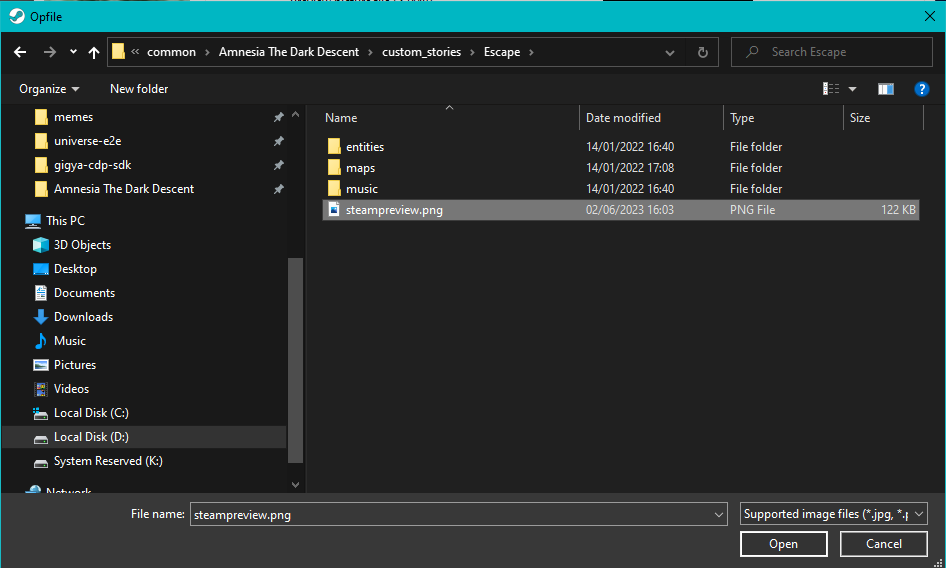
- Click next. Now you will need to upload a preview picture file. A few things to keep in mind:
- The preview picture file must be included inside the custom story folder.
- The preview picture file must be square. Meaning the same height and width.
Select the preview picture file.
-
- The preview picture file must be included inside the custom story folder.
- You can modify the release notes if you wish, or leave it as default.
- Click publish. The tool will begin uploading your custom story to the workshop.
Note: The custom story will be uploaded in private visibility by default, meaning other people can't see it. You will need to change this manually after the upload finishes.
After the upload is done, you will get the following message:
-
- Close the window. You can now navigate to your workshop items in Steam and view it. Remember: Your item is private by default. Don't forget to set it to public!
That's it!
The custom story is uploaded, and you should be able to see it in the custom stories menu!Updating a Custom Story Workshop Item
TBD
More Amnesia: The Dark Descent guides
- Idiotic Monsters and You: A Guide for Outwitting the Grunts and Brutes★ 5 (586)24k views504 ♥18 minUpdated Nov 16, 2017
- Insanity Incarnate: 100% Achievement Guide (Does Not Include Masochist Achievement)★ 5 (1k)23k views1k ♥14 minUpdated Mar 29, 2020
- A Simple guide to Amnesia★ 5 (361)23k views365 ♥7 minUpdated Mar 25, 2013
- Достижения Amnesia: The Dark Descent★ 5 (811)19k views867 ♥3 minRussianUpdated Oct 12, 2018
- Dark Descent + Justine: Collectibles locations maps★ 5 (832)16k views1k ♥1 minBulgarianUpdated Dec 29, 2016
- 100% Achievement Guide [Amnesia: The Dark Descent] 💯✅★ 5 (453)15k views928 ♥40 minUpdated Feb 18, 2025



🔥 Popular guides
- Upgrading to PremiumTeam Fortress 2★ 5 (20k)1441k views11k ♥6 minUpdated May 11, 2022
- No More Room in Hell Official ManualNo More Room in Hell★ 5 (2.8k)569k views2.1k ♥29 minUpdated Apr 22, 2019
- NMRiH Community Hosting GuidesNo More Room in Hell★ 5 (526)351k views653 ♥1 minUpdated Aug 10, 2022
- ULTIMATE GUIDE FOR GAME DEV TYCOONGame Dev Tycoon★ 5 (5.8k)326k views10k ♥4 minUpdated 23 Jan, 2014
- How to 'Git Gud' Soon™MORDHAU★ 5 (2k)318k views3k ♥68 minUpdated Nov 16, 2024
- Лучшие кооперативные игры SteamPAYDAY 2★ 5 (1.5k)315k views2.1k ♥56 minRussianUpdated Apr 27, 2025






This guide was created by its original author on the Steam Community. Are you the author and want it removed? Request removal.