How use Hot Patch 1.99 to1.96 (Downgading Patch)
Preparing game to install Hot Patch 1.99 to 1.96
1.Install Arma: Cold War Assault
2.Start game, set and save settings
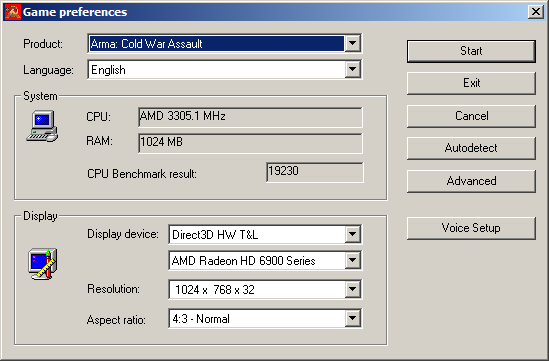
3.If game successfully started - exit game and go to next part this guide.
2.Start game, set and save settings
3.If game successfully started - exit game and go to next part this guide.
Install Hot Patch 1.99 to 1.96
1.Download and start Hot Patch 1.99 to 1.96[clan.4rise.tech]
2.ATTENTIVELY check location of your game.
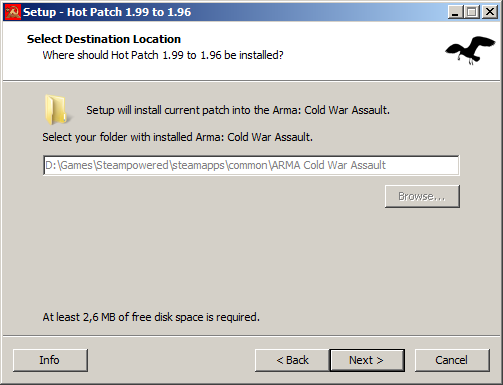
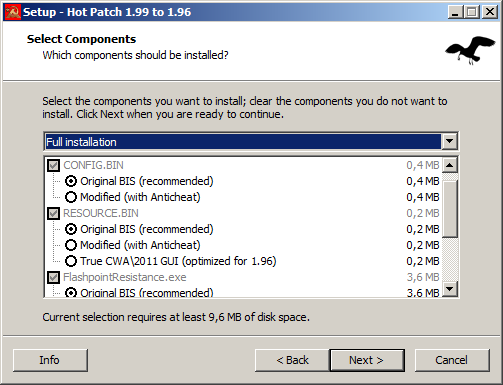
3.Choose components. It is recommended to change nothing, however
you can remove "☑ Server". Also, you can choose other language package.
! Since v96 this patch contained experemental "modified by [4RTech] OFP Clan" FlashpointResistance.exe with working game server browser. Uses it executable at your own risk.
4.It is recommended create shortcut on desktop! Game will be started without Steam service - start version 1.96 is carried out ONLY from a shortcut on desktop.
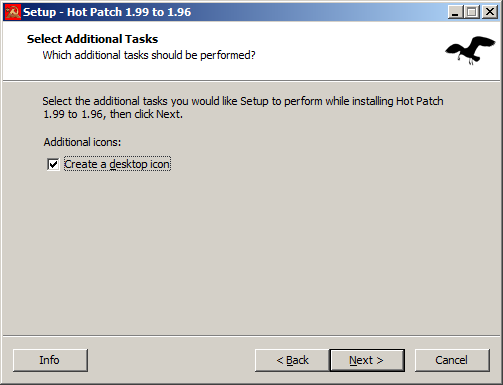
5. Click "Next >" button and move to next step this guide Hot Patch 1.99 to 1.96
2.ATTENTIVELY check location of your game.
3.Choose components. It is recommended to change nothing, however
you can remove "☑ Server". Also, you can choose other language package.
! Since v96 this patch contained experemental "modified by [4RTech] OFP Clan" FlashpointResistance.exe with working game server browser. Uses it executable at your own risk.
4.It is recommended create shortcut on desktop! Game will be started without Steam service - start version 1.96 is carried out ONLY from a shortcut on desktop.
5. Click "Next >" button and move to next step this guide Hot Patch 1.99 to 1.96
First start Hot Patch 1.99 to 1.96
1.Start Flashpoint Resistance on desktop shortcut or start FlashpointResistance.exe from folder where installed steam version Arma: Cold War Assault.
example (Your_Steam_location\SteamApps\common\ARMA Cold War Assault)
2.The first start will open the program of settings of game.
In "Product" list it is necessary to choose "Operation Flashpoint: Resistance", as shown in picture:
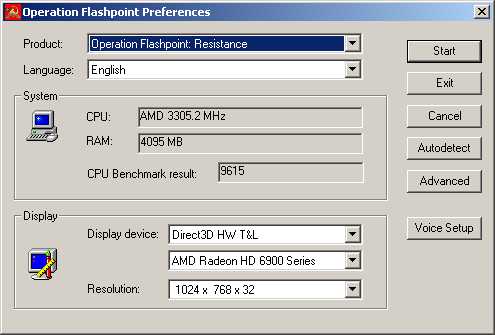
and click "Start".
3.Settings complete! Enjoy game!
example (Your_Steam_location\SteamApps\common\ARMA Cold War Assault)
2.The first start will open the program of settings of game.
In "Product" list it is necessary to choose "Operation Flashpoint: Resistance", as shown in picture:
and click "Start".
3.Settings complete! Enjoy game!
Reinstall Hot Patch 1.99 to 1.96
1.If you need to reinstall game or Hot Patch - ALWAYS uninstall Hot Patch via HPRemover.exe (v95), which is in the Your_Steam_location\SteamApps\common\ARMA Cold War Assault
2.If you see this error:
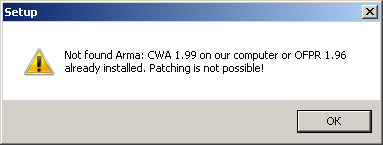
you must perform following steps:
2.1.Start REGEDIT.EXE (C:\Windows\regedit.exe)
2.2.Delete strikeout folder: HKEY_LOCAL_MACHINE\SOFTWARE\Wow6432Node\Codemasters\Operation Flashpoint
HKEY_LOCAL_MACHINE\SOFTWARE\Codemasters\Operation Flashpoint (If exists).
2.3.Start Arma: CWA Preferences and game. If game was successfully started - exit game and try to establish Hot Patch again.
2.If you see this error:
you must perform following steps:
2.1.Start REGEDIT.EXE (C:\Windows\regedit.exe)
2.2.Delete strikeout folder: HKEY_LOCAL_MACHINE\SOFTWARE\Wow6432Node\Codemasters\Operation Flashpoint
HKEY_LOCAL_MACHINE\SOFTWARE\Codemasters\Operation Flashpoint (If exists).
2.3.Start Arma: CWA Preferences and game. If game was successfully started - exit game and try to establish Hot Patch again.
More Arma: Cold War Assault Remastered guides
- [RU] Полная русификация ARMA: CWA Legacy★ 5 (333)10k views437 ♥3 minRussianUpdated Jul 20
- Installing addon Red Hammer★ 5 (215)9.2k views196 ♥1 minUpdated May 21, 2014
- Руководство к выживанию в ArmA:Cold War Assault // ArmA:Cold War Assault Survival Guide★ 5 (325)6.5k views166 ♥6 minUpdated Jul 13, 2018
- Arma: Cold War Assault Русификатор★ 4 (166)6.1k views165 ♥1 minRussianUpdated Jun 21, 2016
- Полезное барахло для OFP★ 4 (100)4.7k views189 ♥1 minRussianUpdated Jan 8, 2023
- Widescreen FIX★ 4 (59)4.4k views63 ♥1 minUpdated Aug 4, 2014




This guide was created by its original author on the Steam Community. Are you the author and want it removed? Request removal.