Infinite Loading FIX
Pre-edited .exe
This section contains a KidGame.exe file that's already been hex-edited. If you would prefer to hex-edit the .exe yourself: please visit the "Do-It-Yourself" section in this Steam guide.
With that out of the way -- I've put the .exe in a compressed .zip folder and the download link is here:
https://www.dropbox.com/s/6ibeoq3wb123or1/KiD%20.exe%20%28edited%29.zip?dl=1
All you need to do, once you've extracted the downloaded file, is to then move it into: C:\Program Files (x86)\Steam\SteamApps\common\KillerIsDead\Binaries\Win32\
Do-It-Yourself
For those of you who want to hex-edit the KidGame.exe file yourself, I'll gladly point out the steps:
http://mh-nexus.de/en/downloads.php?product=HxD
2. Extract the HxD .zip file, run its “setup.exe” file and then install the HxD program.
3. Open HxD and a new window should appear.
4. From here, click the “File” menu and then click “Open…”.
5. Locate and select the “KidGame.exe” file, which can be found in this directory-path:
C:\Program Files (x86)\Steam\SteamApps\common\KillerIsDead\Binaries\Win32\
6. Next, click the "Search" menu and select "Find".
7. A new window will come up. Next to "Datatype:" is a dropdown bar. Click it and choose "Hex-values" instead of "Text-string".
8. In the same window, paste in the "Search for:" bar the following: C67D088BF03BC7 , and hit the "Enter" key on your keyboard.
9. You should've located the line shown in the below screenshot. Make sure that it matches the same Offset on the left hand side like the screenshot too. Now change the "7D" portion of the line that's highlighted to "EB".
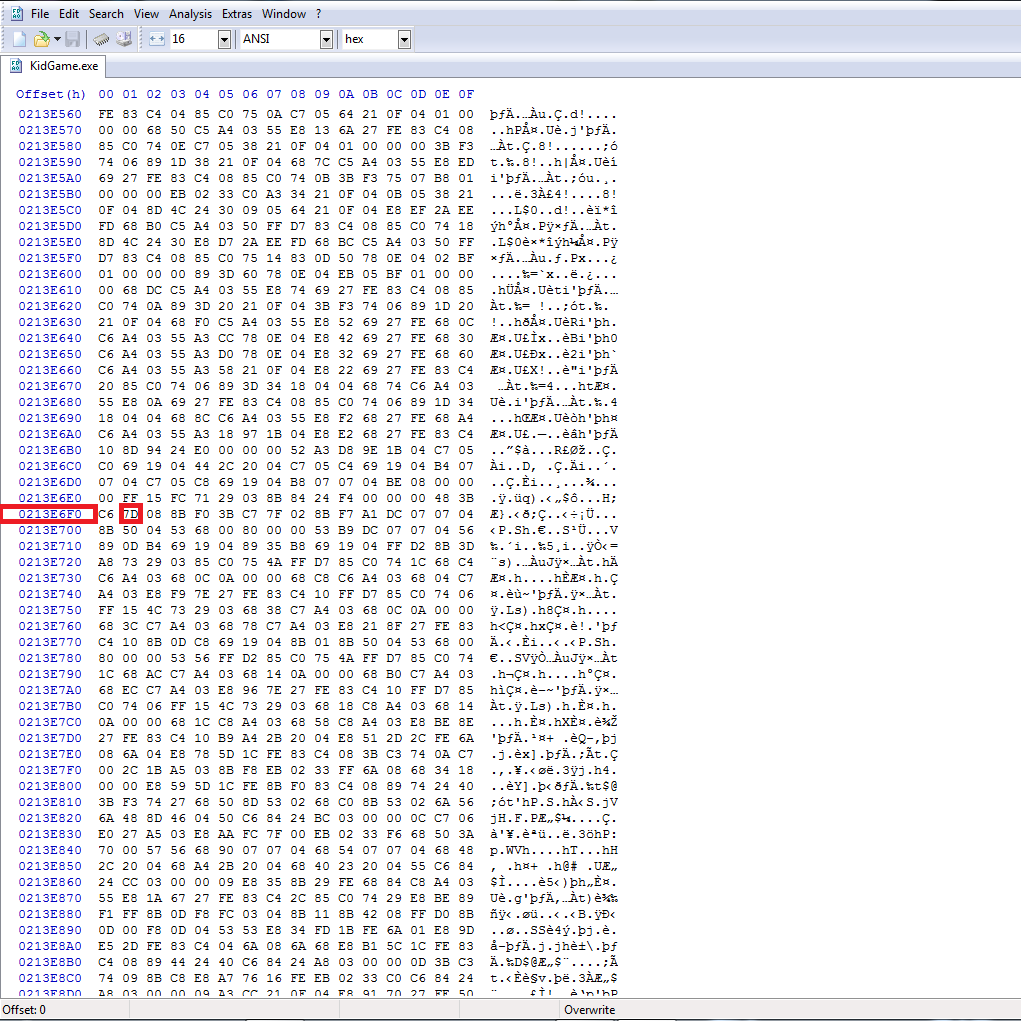
10. Once done, click the “File” menu and then click “Save”.
- How to Change FPS from 30 to 60 / 120★ 5 (852)41k views924 ♥2 minUpdated 7 Nov, 2023
- Mondo Girl's Guide★ 5 (433)21k views527 ♥8 minUpdated 12 Jan, 2016
- Scarlett Location Guide★ 5 (536)13k views565 ♥12 minUpdated 26 Jun, 2014
- 100% Achievement Guide (by THN)★ 5 (620)12k views660 ♥14 minUpdated 7 Jan, 2021
- How to make Mika revival work at higher framerates★ 5 (187)11k views192 ♥1 minUpdated 23 May, 2014
- AAA rank guide★ 5 (348)8.6k views462 ♥5 minUpdated 30 Nov, 2024



- Upgrading to PremiumTeam Fortress 2★ 5 (20k)1441k views11k ♥6 minUpdated May 11, 2022
- No More Room in Hell Official ManualNo More Room in Hell★ 5 (2.8k)569k views2.1k ♥29 minUpdated Apr 22, 2019
- NMRiH Community Hosting GuidesNo More Room in Hell★ 5 (526)351k views653 ♥1 minUpdated Aug 10, 2022
- ULTIMATE GUIDE FOR GAME DEV TYCOONGame Dev Tycoon★ 5 (5.8k)326k views10k ♥4 minUpdated 23 Jan, 2014
- How to 'Git Gud' Soon™MORDHAU★ 5 (2k)318k views3k ♥68 minUpdated Nov 16, 2024
- Лучшие кооперативные игры SteamPAYDAY 2★ 5 (1.5k)315k views2.1k ♥56 minRussianUpdated Apr 27, 2025






This guide was created by its original author on the Steam Community. Are you the author and want it removed? Request removal.