Inventory Management Simplified
Overview
Action RPG style gameplay is a core part of DD2's design. As such inventory/loot management are important and necessary aspects of the gameplay. The inventory in the game is similar to other action rpg games but it does have some unique charicteristics and features that lend itself to DD2's gameplay design.
* press i to open the inventory, you can do this from anywhere, anytime, with the only exception being when you are in combat phase.
* The inventory can also be accessed through the escape menu.
* The inventory is not specific to any hero, it is for your account. Heroes themselves do not have inventory space.
* The inventory is split into tabs, referred to as bags. You can purchase more bags for more inventory space (up to 8 bags total).
* To add items to the inventory you can pick them up off the ground when they drop from mobs. Also when you purchase items from shops they are added to your inventory. Additionally there is a way to auto-collect item drops, which I will show how to configure below.
* To move an item from one bag to another the easiest way is to left click it, then mouse over the icon of the bag you want to move it to and then right click.
* The more explicit alternative method of item movement is as follows: Left click it, then left click the bag icon, then left click an empty space to place it. If you click on another item, then they will swap places. Note: this explicit method only works currently if auto-sort is set to false!
* Loot in this game is instanced per-player, i.e. players in a multi-player match cannot see nor interact with each others loot drops.
Auto-Collection
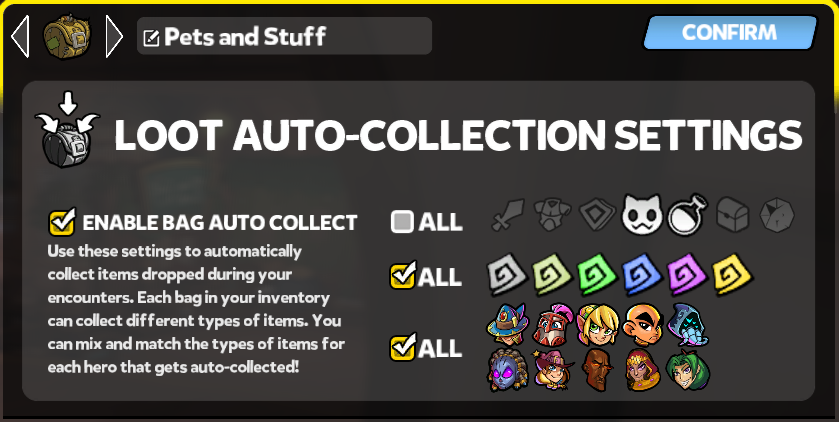
To reduce/eliminate tedium of manually picking up and sorting item drops during gameplay the inventory has an auto-collection feature where you can specify which bags you want to auto-collect into as well as what items, quality tiers, and for which heroes the items are for.
* This auto-collection happens each time the player initiates combat phase, and when the player leaves the match.
* If your bags are near full or full you will see a warning on the HUD notifying you about the situation.
* Items that are not auto-collected due to filters or lack of space remain on the field until the player leaves the match at which point they are discarded!
* Items that fall out of bounds (out of reach of the player) are auto-collected by the scavenger npc, which you can find hanging out in the town and tavern if you want to check what he caught.
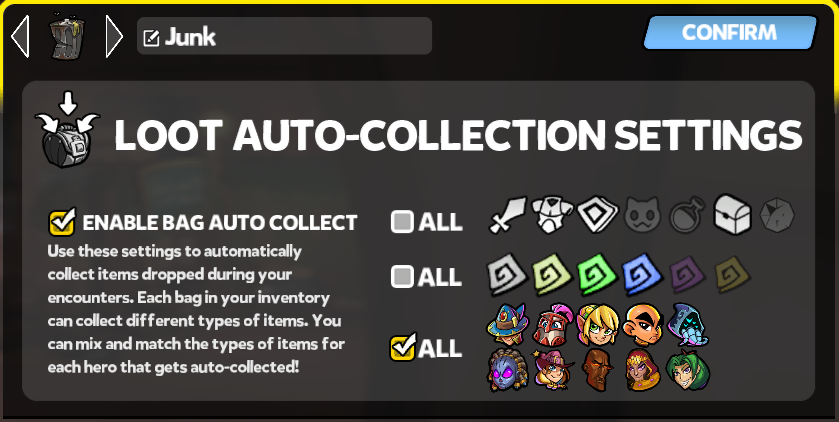
So, in other words it is desireable to collect everything that drops so that you can make sure you can sell it for gold which you can subsequently use to upgrade the items that you do not sell! In order to facillitate this, I recommend you allocate 1 or 2 bags dedicated to collecting sell-able junk, which you can then easily use the sell ALL feature on such bags to easily clear them out after each round.

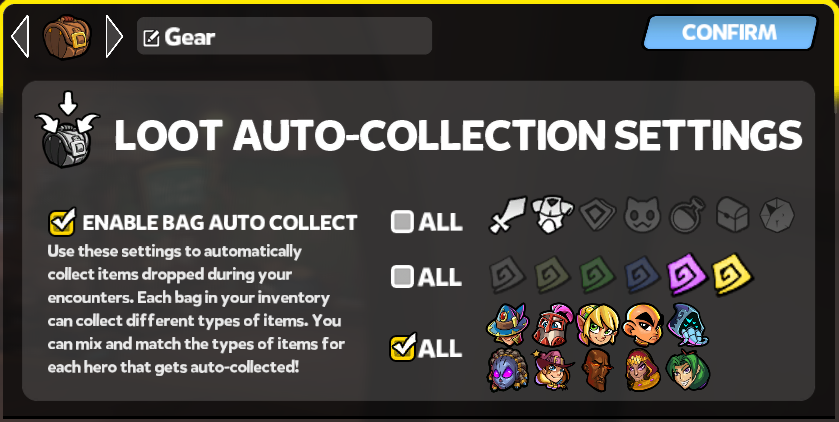
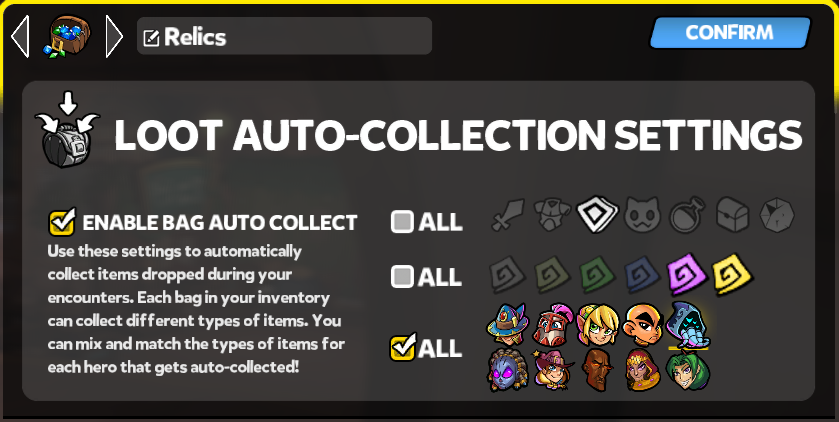
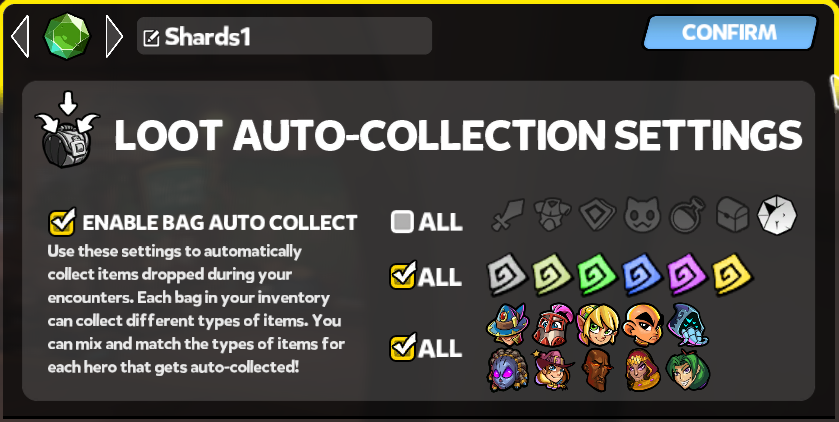
The following are my recommended bag configurations, note in my case I have 8 bags, 2 for junk, 1 for gear, 1 for relics, 3 for shards (derp), and 1 for pets and consumeable stuff. Note that this setup is intended for chaos levels, if your playing thru campaign you may want to make the tier filters more optimistic on gear/relics, and you wont need as many shard bags.
Space Management
The game has quite the limit on inventory space, therefore forcing the player to actively keep their inventory clean, often a player will need to manage their inventory after each match, if not sell items after each combat phase! Also the item churn on heroes can be quite high, where the player is expected to upgrade their gear frequently (this slows down in chaos levels). Combine that with the fact a player can have 10+ heroes, it means the player really has to make the most efficient use of the space and to often do upgrade passes on their heroes gear. So the following are some tips on how to deal with this.
* Sell your junk often, even as often as after each combat phase!
* Do not be afraid to sell gear items (weapons/armor), the churn on these is very high. The same is true of relics, although to a lesser degree.
* You can sequester shards by placing them into relics. Although this does make it more inconvenient to browse them.
* You can have up to 64 heroes to an account, so you can have mule heroes that simply hold gear, relics, and pets by equiping such unto them.
Misc
Dealing with relics is a bit convoluted at the moment, here is what ya need to know.
* Do not right-click on an relic in the inventory, this is the assignement shortcut for gear, but in the case of relics, you cant specify for which tower thru this method so it just assigns it to the first tower. Instead the correct way to assign a relic to a tower is to left click it to pick it up and then left click again on the tower slot you want it to be assigned.
* Right-clicking while you have a relic (or any item type) held, will return that to the inventory in the same spot that you picked it up from. I mention this specifically since it is contextual use of the same button I just said to not use :p
* To compare relics in the inventory to equiped relics you must pick up the relic from the inventory and then mouse over the equiped relic you wish to compare to, then you will see the comparison windows display.
Well that is all for now, hope you found this helpful!
- [Outdated!] Complete Beginners Guide to DD2 (Class Overview and Builds)★ 5 (1.1k)55k views1.7k ♥56 minUpdated Aug 29, 2022
- Dungeon Defenders II Ultimate FPS Guide★ 4 (161)26k views166 ♥3 minBulgarianUpdated Jun 1, 2017
- NM4 April 2016 Gear Guide for Primary Building Characters★ 5 (363)16k views672 ♥8 minUpdated Apr 25, 2016
- How to be a badass , ultimate noob friendly guide v1★ 4 (124)14k views271 ♥49 minUpdated Feb 15, 2020
- [Archived] SAS Soft Caps★ 5 (172)13k views285 ♥8 minUpdated Mar 9, 2017
- How to farm EXP | Level up fast★ 4 (77)13k views95 ♥4 minUpdated Oct 26, 2015



- Upgrading to PremiumTeam Fortress 2★ 5 (20k)1441k views11k ♥6 minUpdated May 11, 2022
- No More Room in Hell Official ManualNo More Room in Hell★ 5 (2.8k)569k views2.1k ♥29 minUpdated Apr 22, 2019
- NMRiH Community Hosting GuidesNo More Room in Hell★ 5 (526)351k views653 ♥1 minUpdated Aug 10, 2022
- ULTIMATE GUIDE FOR GAME DEV TYCOONGame Dev Tycoon★ 5 (5.8k)326k views10k ♥4 minUpdated 23 Jan, 2014
- How to 'Git Gud' Soon™MORDHAU★ 5 (2k)318k views3k ♥68 minUpdated Nov 16, 2024
- Лучшие кооперативные игры SteamPAYDAY 2★ 5 (1.5k)315k views2.1k ♥56 minRussianUpdated Apr 27, 2025






This guide was created by its original author on the Steam Community. Are you the author and want it removed? Request removal.