Kenshi Optimization Guide for Performance with max Visual Quality
Introduction
https://kenshi-modding.fandom.com/wiki/Kenshi_Modding_Wiki:SCAR%27S_Performance_Optimization_Guide
Guide collect multiple System Settings/Programs/Mods players can use to make kenshi run very fast
Focused on most impactful choices for Kenshi
You can pause/play after each successful step and return later or skip things you don't wanna do now
Important Basics
SSD help reduce loading and hold consistency while traveling thru the large map
Game will work from HDD, its just far worse experience
Especially load time from the menu to existing save, but everything will load longer...
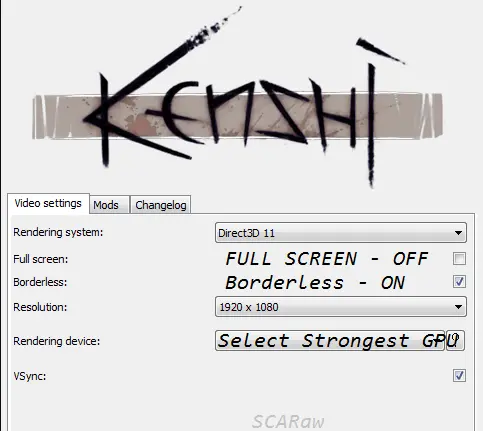 if your launch settings are different than this, you are running the game wrong
- FullScreen - make aplication run simultaniously to your system, instead of under your system, it normally provide some performance related benefits, but in kenshi its less stable and also perform worse :)
- Borderless - modern fullscreen it make aplication run under your system as another window and let you Alt+tab normally and don't crash your system or mouse when game crash
- You wanna run and optimize your game around running in your native resolution if you can, however resolutions above 1920x1080 can have problems and bugs
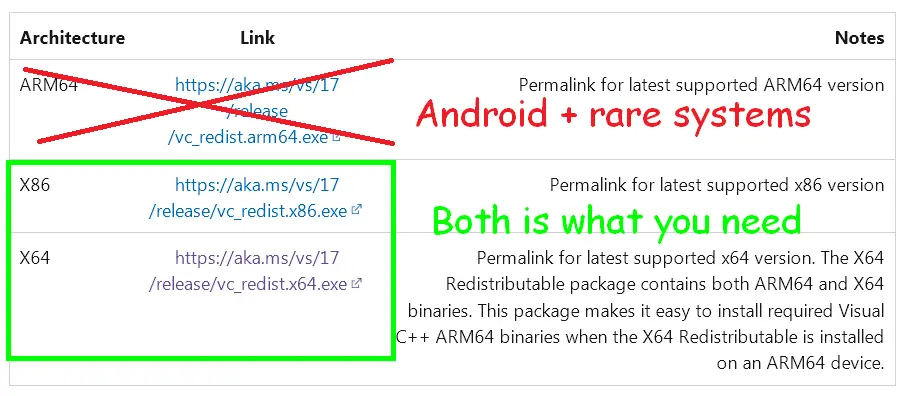 Helps running the games and programs under C languages, very good to have
 Microsoft things Framework:
https://dotnet.microsoft.com/en-us/download/dotnet-framework/net481
 can help throw error at you if something is broken, rarely can give you DLLs to run software
its more microsoft things - i do not own microsoft even if i should xD
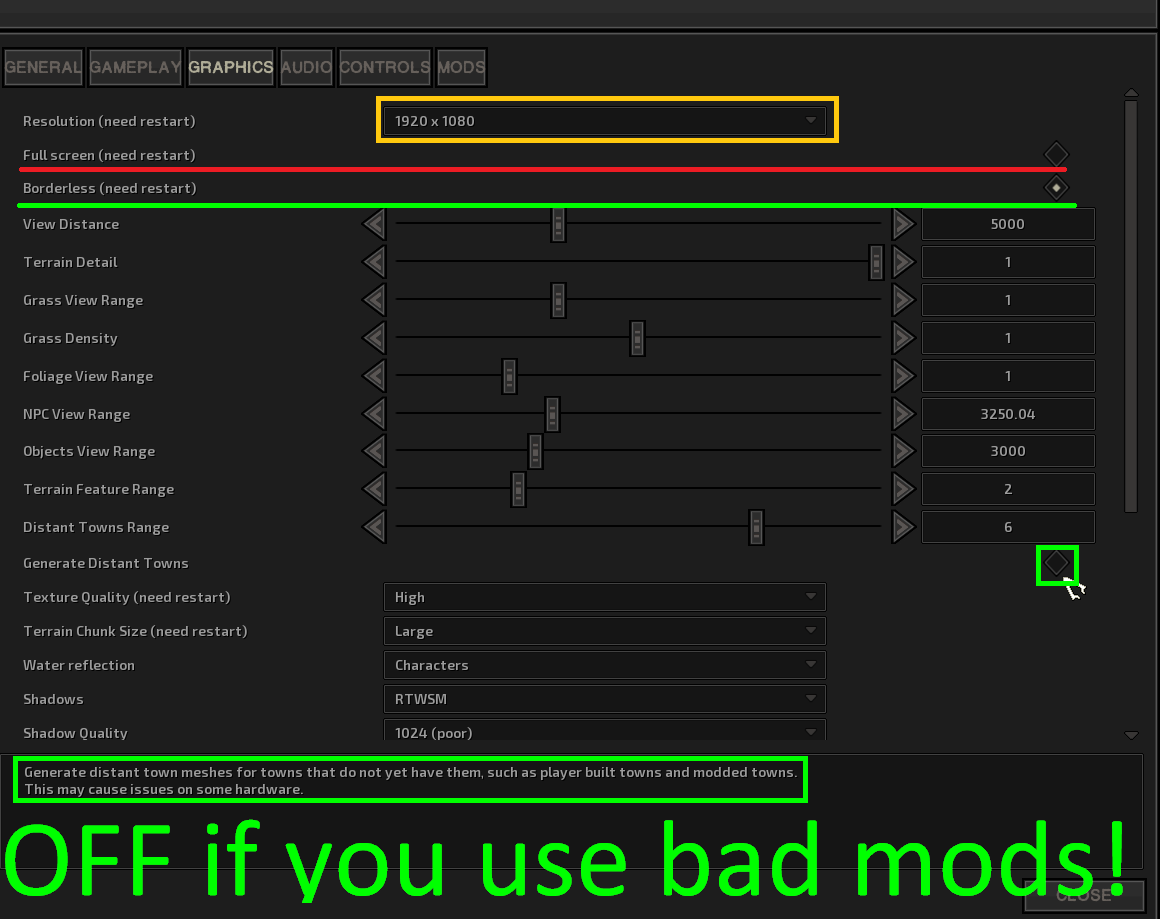 by BAD MODS i refer to mods that add/edit cities made by lazy authors
everybody could generate proper distant files for their city-mod and include in package
OR at least instruct people to have it off when using mod, however since some poeple prefer to just ignore everything make quality of their mod sub-optimal and cause my blood to boil here we have this section...
- Sometimes lofi themselves might not have every distant in update package, however since all .mod files are in game installation folder they should generate without causing any crashes
- image all your city tweaker "advanced overhaul" need to do is go to data/buildings/distant and take over newly generated ones to the mod before uploading!...go ahead excuse your favorite lazy-ass i will wait...
- Start > Control Panel > System.
- Under Tasks, click Advanced system settings
- In the System Properties window, click the Advanced tab.
- Click Settings under Performance.
- Click the Advanced tab, and click Change under Virtual Memory.
- Select Custom size and set Initial size (MB) and Maximum size (MB). For the initial size,
- I Recommend going for something like 8096 to 12144.
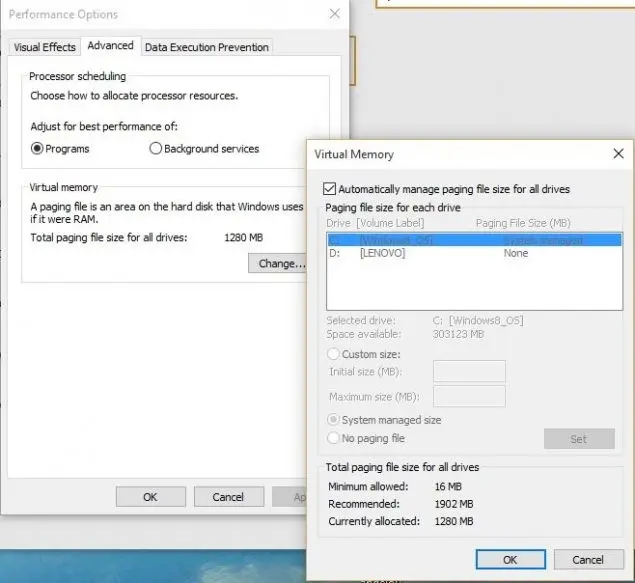
Your game works slow not because you have bad PC or because you need to lower graphics...
There are more settings you can check in order to improve the situation, but i wanna finish today
Advanced knowledge and minor black magic
https://www.nexusmods.com/kenshi/mods/804
on any GPU - if you got the mod you can skip this step
Lets make the magic Happen:
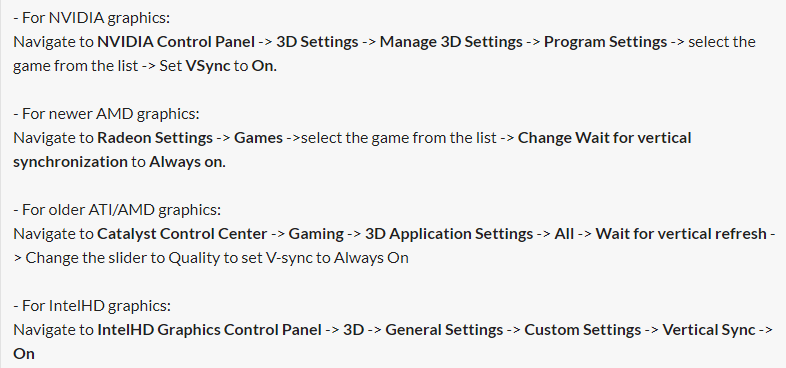 Woah big magic, turn on Vsync :)
don't worry its a start:
- Find "Overlay" and switch it "off". I don't know what it does, in theory this enables OpenGL overlay planes, but no idea if they are used in Kenshi and how.
- Find "Exported pixel types" and disable that thing. This might be placebo, but my game ran faster without it and I can't notice any differences in the visuals, or anything else for that matter.
- Find Threaded optimization and turn it off - Kenshi does not support multi-core CPUs so by forcing it off every calculation will be send directly to CPU0 without delays or problems with resource mismanagement.
- Find "power management" and set "Optimal performance" or "driver controlled" if you have this option. Maximum performance only sounds good and even for a weaker PC you should not use it because it only diverts additional power to the GPU regardless of whether or not it is required
- Find "multiple screen boost/different GPU processors" and set "one screen mode". This force instant decision making about where to display the game and how to manage multiple screens.
- Find "memory allocation" and select "apply to needs". I need better testing with this option, seems like the aggressive setting made my game starting slower
- The description for this function was too cryptic for me, but from what I have seen "apply to needs" slightly improves game launch speed.
- Find "Anisotropic filtering" and set it to "off"
- This option allows Kenshi to render textures in higher resolutions and scale them down, turned off save resources, but can make game less graphically appealing (barely noticeable on a strong PC, and I can't spot the difference on a weak one)
- Find "triple buffering" and set it to "on" - if you have Vertical sync turned on in Kenshi options.
- Turning everything off doesn't necessarily provide performance boosts, this option doesn't (according to Nvidia and my tests). Important note, this boosts performance only when V sync is on in Kenshi settings.
https://www.nvidia.com/content/Control-Panel-Help/vLatest/en-us/mergedProjects/nv3d/Manage_3D_Settings_(reference).htm
+ sources listed under Nvidia mods
+ my own tests and knowledge
+ digs from ancient forums
Advanced Black magic - good mods
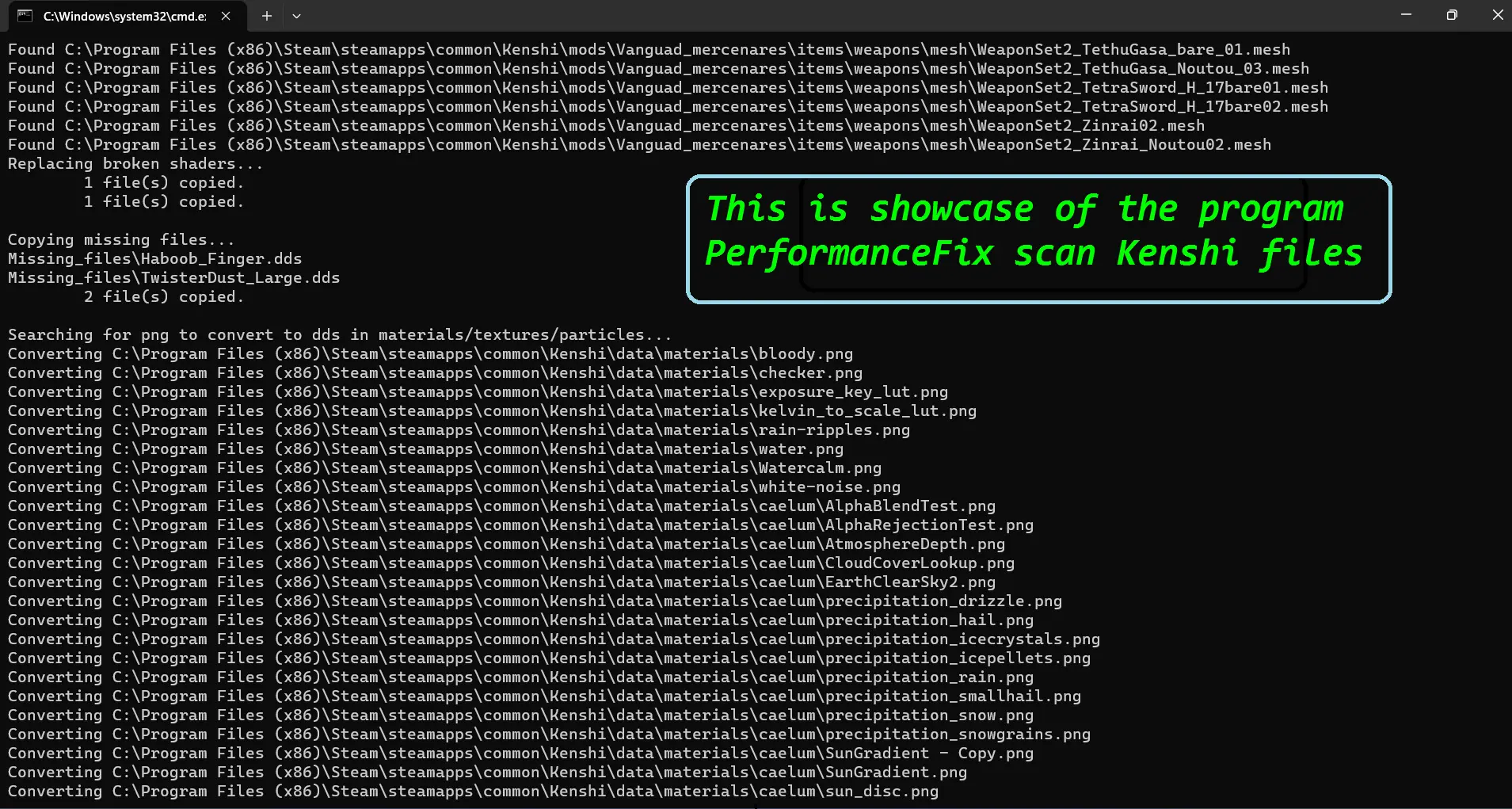 Most complex Kenshi structure solution that does not modiify Exe
this mod scan the files and optimize than, scan the references and fix them
results are quite pleasing, but installation is also quite long (automated)
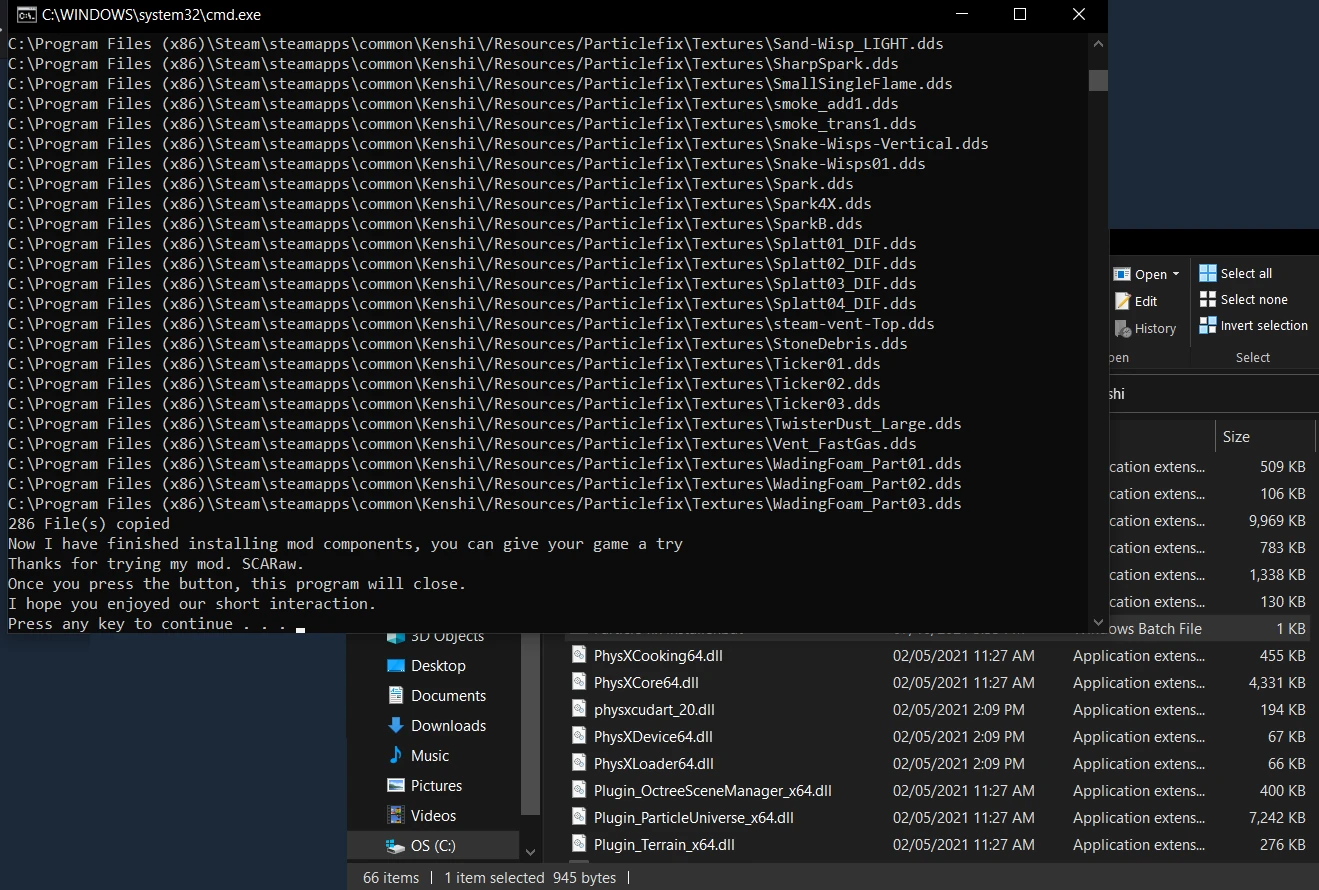 First and most advanced and most updated Particle Replacer, this comes with replaced scripts, fixed textures, crash prevention and couple of more performance related buzzword that are better explain in the mod description
however now mod is capable to save Navmesh data
together with mesh updater it makes silver bullet performance solution
Updated meshes are more likely to load correctly and saved in perfect form!
https://www.nexusmods.com/kenshi/mods/506
Cool, more text
https://www.nexusmods.com/kenshi/mods/1212
 Mod started as Performance Fix older brother
Currently totally outperformed on the field on game files found new purpose in scanning mods
Performance fix and my code take poorly to request of scanning and Structure i use (basic windows code bash with advanced tools) does not identify DLLs to allow steam/gog check
Mod is pretty solid and much faster which i prefer for mods/quick change checks
either by using dedicated mod (currently up to date):
https://www.nexusmods.com/kenshi/mods/1294
or DXVK directly (we base new versions on DXVK and just compile new DLL with changes):
https://github.com/doitsujin/dxvk/releases
its not for every game or everybody, but generally its worth a shot
as result of clever coding mod provide boost to inventory processing
for shopkeepers, shop inventory, containers with limbs and player inventories
https://steamcommunity.com/sharedfiles/filedetails/?id=2515950648
"in Vanilla game check if object icon is autogenerated or not (most limbs and all the prosthetic are)
game check if icon was generated before, game load icon if it was generated or set the mesh, set the camera, set the texture and generate it"
all of this is skipped by the mod
Less Foliage Mod that doesn't block your doors
- its basic less foliage mod with Quality Control :)
- i believe we might have better solution in the future, im looking forward for mod: FASTR that might turn into essential foliage mod, but for now i chose this thing
Remix of vanilla assets and files to decorate world better
with better performance too
i believe it can be better solution later down the line
use only one Foliage Mod
this 0 screenshots mod helps with performance
i tried to make the script to do it, but no dice xD
turns out you just need someone to do 400 models for you
it sux to have so good mod under "do not copy or edit" cause
https://steamcommunity.com/sharedfiles/filedetails/?id=3498912211&tscn=1749904773
Okey let me explain, mod fix the missing link in FCS data and fix crashes as result
very cool small mod that improve stability of the game for no performance cost
there should be small performance gain from it due to engine not having to rebound itself
(when engine face missing link it need to improvise missing data or stop working)
Recommended in-game settings and why
Character Rendering Range (view distance actors, whatever)
from what i know it does not work above 5000 - default value
so you can set it to whatever and it will not work, but it might take additional resources
i would recommend keeping it at 5000 since its max functional range
Visible Shadow Range
This above 4k in most places and above 3k in some places
can cause visible shadow distortions
they looks kind of ugly so you might make your game look better by lowering this xD
and yes you will gain performance
Shadow Quality 1024
Personally i know higher quality provide better looking shadows
however you just throw dark texture on shadowmaps...
Performance cost is not justified by higher settings on this
Fast Zone Hopping - OFF
it cost too much memory and CPU to maintain
if you use Performance fix and other optimizations switching zone should be much faster
even with this OFF since you still would have to load everything into graphics
*feel free to test this one for yourself, i never owned PC with 64GB ram so it might not be universally truth
Need more TESTS, but:
i think setting Chunk sizes to Large is better
its definitely better for person in base and in city-house
and for person who spend time in cities for longer than brief 1 store visit
on Older/Weaker PC its also better for map travel
i need more tests to confirm if its universally better option
This is all i can confidently state for now
Conclusions and closure
from most basic to advanced so everybody can have entry point to playing at solid framerate
you can find multiple modlists and guides sharing similar tips so i don't think its revolutionary, its just nice to have all of this together imo
https://steamcommunity.com/id/SCARaww/myworkshopfiles/?appid=233860§ion=guides
https://next.nexusmods.com/profile/SCARaw/mods
i also mod a lot of games, not just kenshi, kenshi was just in dire needs to not dip bellow 30FPSes when i played it and i decided to go to war with all the loadings and lag spikes in the game!
this doc is massive and it contain a lot of formulas and tools to calculate nearly everything player can dig out from the game info
basically excel recreation to the game engine. logic and mechanics xD without junky consistency errors of kenshi gaming
i recently been posting more memes to steam and nexus, idk how you call it where you post 1 meme everywhere so people just find it where they feel comfortable
- i still don't wanna use twitter, i hate this place
- Proper Load Order & You.★ 5 (1.8k)78k views3.6k ♥10 minUpdated 20 Oct, 2022
- Save Editing 101★ 5 (729)51k views1.6k ♥28 minUpdated 16 Aug, 2025
- Roadmap for New Players and Basebuilding (Up-to-date)★ 5 (807)51k views2.4k ♥76 minUpdated 23 Apr, 2019
- Tips and Tricks of a Veteran Kenshi Player★ 5 (551)38k views1k ♥15 minUpdated 18 Nov, 2024
- Quickstart Newbie Walkthrough 1.0★ 5 (562)35k views1.5k ♥54 minUpdated 20 May, 2025
- Новички, я научу Вас выживать и наслаждаться КЕНШИ!★ 5 (380)23k views789 ♥34 minRussianUpdated 28 Oct, 2025


- Upgrading to PremiumTeam Fortress 2★ 5 (20k)1441k views11k ♥6 minUpdated May 11, 2022
- No More Room in Hell Official ManualNo More Room in Hell★ 5 (2.8k)569k views2.1k ♥29 minUpdated Apr 22, 2019
- NMRiH Community Hosting GuidesNo More Room in Hell★ 5 (526)351k views653 ♥1 minUpdated Aug 10, 2022
- ULTIMATE GUIDE FOR GAME DEV TYCOONGame Dev Tycoon★ 5 (5.8k)326k views10k ♥4 minUpdated 23 Jan, 2014
- How to 'Git Gud' Soon™MORDHAU★ 5 (2k)318k views3k ♥68 minUpdated Nov 16, 2024
- Лучшие кооперативные игры SteamPAYDAY 2★ 5 (1.5k)315k views2.1k ♥56 minRussianUpdated Apr 27, 2025






This guide was created by its original author on the Steam Community. Are you the author and want it removed? Request removal.