Linux User's Guide to Beat Saber Mods
Why mod?
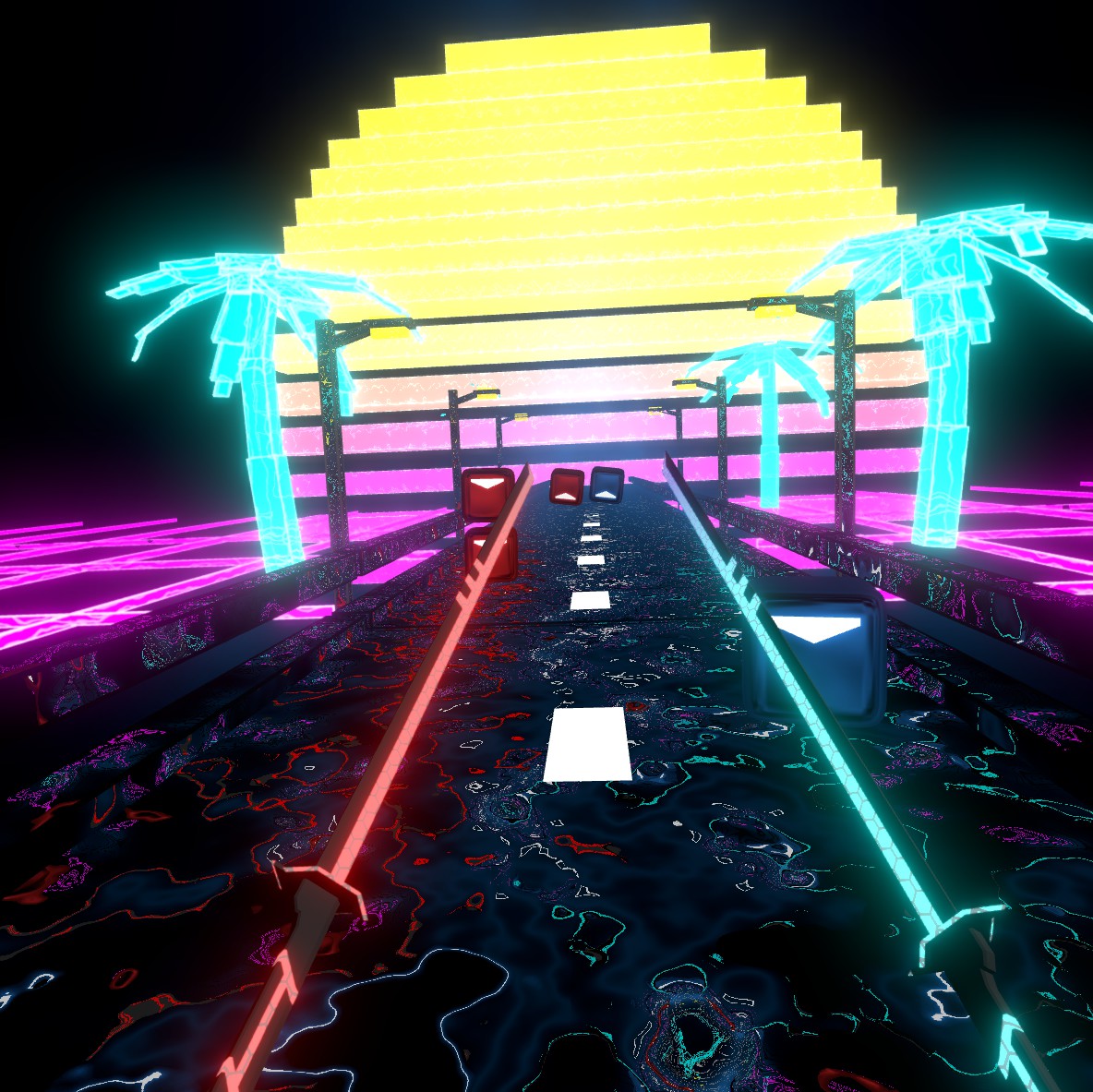 Modding allows you to get a lot more customization, control and even content out of your game. There are mods for improving the camera, removing visual clutter, adding extra functionality to custom levels, quality-of-life fixes, and more. Most mods have little to no performance impact so there's no reason not to check them out!
 Image: Custom level Midnight Lady[beatsaver.com] running with Noodle Extensions and Custom Sabers
Method 1: Using BSManager
BSManager[www.bsmanager.io] is a tool used to manage game versions, mods, maps and more. It is currently the most streamlined method of modding Beat Saber. In this guide, I will only covering everything you need to get the game up and running. If at any point you feel you need a deeper explanation on something in BSManager, they have a very well-documented wiki I recommend checking out.[github.com] I will be referencing it throughout this guide.
BSManager requires a Steam/Oculus login to verify game ownership. While the code for the launcher is public and generally considered safe to use, if this is something that makes you uncomfortable then I would recommend following Method 2 for a more manual install.
BSManager has a variety of methods for installation.[github.com] In this guide, we will be using the Flatpak, as it's the most likely to work for your distribution.
- Flathub[flathub.org] repo configured for Flatpak.
- Proton installed through Steam.
- Download the latest .flatpak release[github.com] and install it with: flatpak install --user <FILE PATH>
- Run the application from your app launcher.
- When asked for the path to the Proton folder:
For the Steam distro-native package (deb, rpm, etc.):~/.local/share/Steam/steamapps/common/Proton <version>/For the Steam Flatpak:
- Download a version of the game. The version labeled "Recommended" will have the most mod support.
- When asked, login with Steam or Oculus.[github.com] *Not currently supported
- Select the downloaded version and move over to the "Mods" tab. Select the mods you would like to install.
- Launch the game from the launcher and enjoy a modded Beat Saber!
Method 2: Using BeatSaberModManager
To use BeatSaberModManager:
- Make sure you have launched Beat Saber in VR at least once.
- Download the latest release of BeatSaberModManager (click)[github.com]
- Extract the zip and run the executable (you may need to mark it as executable through right click > Properties)
- Right-click on the game in your Steam library, go to Properties > Local Files > Browse...
- Copy the path of the directory and paste it where prompted in BeatSaberModManager.
- Ensure BeatSaberModManager is set to the correct, latest version of Beat Saber.
- Check each mod you want and install.
Installing Mods Not Listed in the Mod Manager
To install these mods:
- Make sure you have downloaded and used either BSManager or BeatSaberModManager (or have installed BSIPA).
- Download the mod's DLL file.
- Select the version you're using.
- Drag and drop the mod DLL into the window.
- Click on the version options button at the top-right corner, then select "Open Folder."
- Navigate to your Plugins folder and copy-paste the DLL.
- Right-click on the game in your Steam library, go to Properties > Local Files > Browse...
- Navigate to your Plugins folder and copy-paste the DLL.
- Read the mod's description! Some mods require certain dependencies to work properly, so make sure you read the mod's description in order to make sure it works properly.
Notes on Mod Breakage
Mod functionality is not guaranteed! While I personally have not run into any issues, keep in mind that most mods are not tested for use on Linux.
Game updates will break mods! Most patches will cause mods to stop working. This is at no fault of the game's developers, as mods are not officially supported. If you use BSManager, this isn't a concern, since it will keep using the version of the game you installed and not update to a new one until you decide to.
If you are not using BSManager, you may be interested in other methods of preventing the game from updating or downgrading to an older version with mod compatibility.
Regardless of what you use to install mods, you should always check every so often for new updates to ensure the best stability and feature set.
Installing Custom Songs
- Select the version you would like to use.
- Move to the "Maps" tab to browse your installed songs and to download new ones.
- Install the BeatSaverDownloader mod.
- Go to the game's main menu.
- Look left to the "mods" panel and click "More songs".
- Search for the song you want and click Download!
- Download the song's ZIP file.
- Right-click on the game in your Steam library, go to Properties > Local Files > Browse...
- Navigate to Beat Saber_Data > CustomLevels
- Extract the custom song's folder into the CustomLevels directory.
Extra notes:
- Some songs require extra mods! Most commonly these are Chroma, Mapping Extensions and/or Noodle Extensions. If you can't load a song, you can check what mods it needs by selecting the "?" in the top right of its panel.
- Some great sites for finding songs are BeatSaver[beatsaver.com] and BeastSaber.[bsaber.com] BeatSaver offers a more robust search while BeastSaber has Curator Recommended songs that are great for finding something new.
Conclusion
- Consult the BSManager[github.com] or BeatSaberModManager[github.com] documentation.
- Browse the BSMG Wiki[bsmg.wiki]
- Ask the users of the BSManager Discord[discord.gg] or the Beat Saber Modding Group[discord.gg]
- Leave a comment on this guide, myself and others will be able to help you.
affederaffe[github.com] - for developing BeatSaberModManager and keeping it updated!
muffn[muffnlabs.de] - for his beautiful MS Paint art!
You - for reading my guide!
- How to install older versions of Beat Saber using Steam★ 5 (1.4k)90k views2.4k ♥11 minUpdated May 28
- Beat Saber Modding Guide [upd. 2019/03/26]★ 4 (149)58k views240 ♥1 minUpdated Aug 5, 2021
- How to prevent Beat Saber from updating★ 5 (369)28k views719 ♥2 min
- Beat Saber - Добавление музыки и модов в игру с помощью Mod assistant★ 4 (77)22k views149 ♥1 minRussianUpdated Sep 30, 2024
- How to get better at Beat Saber★ 5 (457)21k views84 ♥1 minUpdated Nov 12, 2020
- 🩺 Quick Warm-Up for Beat Saber (2 mins)★ 5 (1.1k)18k views1.7k ♥4 minUpdated Jan 31, 2023



- Upgrading to PremiumTeam Fortress 2★ 5 (20k)1441k views11k ♥6 minUpdated May 11, 2022
- No More Room in Hell Official ManualNo More Room in Hell★ 5 (2.8k)569k views2.1k ♥29 minUpdated Apr 22, 2019
- NMRiH Community Hosting GuidesNo More Room in Hell★ 5 (526)351k views653 ♥1 minUpdated Aug 10, 2022
- How to 'Git Gud' Soon™MORDHAU★ 5 (2k)318k views3k ♥68 minUpdated Nov 16, 2024
- Лучшие кооперативные игры SteamPAYDAY 2★ 5 (1.5k)315k views2.1k ♥56 minRussianUpdated Apr 27, 2025
- Desert Eagle Heat Treated | Blue GemCounter-Strike 2★ 5 (1.6k)293k views1.5k ♥2 minUpdated Jan 16





This guide was created by its original author on the Steam Community. Are you the author and want it removed? Request removal.