Making Card Games
Basics
Making a deck of cards is simple. It consists of three main elements: The back of the card, the faces of the cards, and what is shown if the card is in a users hand face up (so you know if a players is viewing their cards without knowing what the card is). Each deck can consist of up to 69 unique cards. To play a game that requires more than 69 cards, you may spawn in multiple decks, which can then stack like a normal deck and function as a single deck.
The back of the card should be it's own .jpg image, containing only the image for the back of the card, while the 'faces' of the card, as well as the card that appears on it's own sheet, should appear in a single image, sequentially, in 7 rows of 10 columns each. Because you will have the chance to specify how many cards each 'sheet' contains, a deck containing less than 70 cards should include blank areas for the rest of the cards. The final space from this template will specify the card that will be shown if another player has the card in his hand.
Cards should follow roughly this template:
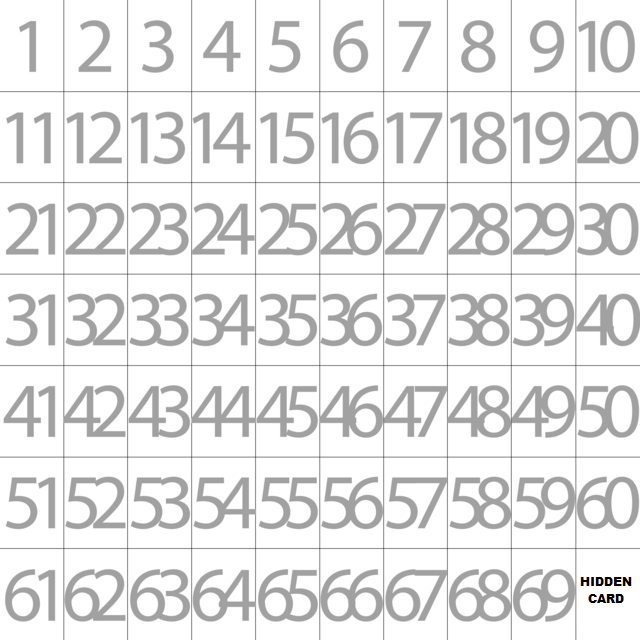 Note: Cards do not need to follow these dimension rules! See Dimensions below for specifics on getting the perfect fitting card!
The back of the card should be it's own .jpg image, containing only the image for the back of the card, while the 'faces' of the card, as well as the card that appears on it's own sheet, should appear in a single image, sequentially, in 7 rows of 10 columns each. Because you will have the chance to specify how many cards each 'sheet' contains, a deck containing less than 70 cards should include blank areas for the rest of the cards. The final space from this template will specify the card that will be shown if another player has the card in his hand.
Cards should follow roughly this template:
Note: Cards do not need to follow these dimension rules! See Dimensions below for specifics on getting the perfect fitting card!
Usage
To load a custom deck, simply click Spawn Objects, then Cards, then Custom Deck. A display will come up asking you to enter in the URL for the back of the card, the sheet containing the various card fronts, and how many cards the card sheet contains.
If your card sheets or card backs are not hosted online, instead of a URL you may also use "file:///C:/PATHNAME/image.jpg". For example, if I wanted to access "Ticket_To_Ride_Back.jpg" for my image back, I could enter the following in the 'back' space: file:///C:/Users/QQuixotic/Downloads/Tabletop/Ticket_To_Ride_Back.jpg
For obvious reasons, using locally hosted (file:///...) card paths is useless online, as other players will likely not have the same image at the same location on their machine.
If your card sheets or card backs are not hosted online, instead of a URL you may also use "file:///C:/PATHNAME/image.jpg". For example, if I wanted to access "Ticket_To_Ride_Back.jpg" for my image back, I could enter the following in the 'back' space: file:///C:/Users/QQuixotic/Downloads/Tabletop/Ticket_To_Ride_Back.jpg
For obvious reasons, using locally hosted (file:///...) card paths is useless online, as other players will likely not have the same image at the same location on their machine.
Uploading
Images can be uploaded to any source that can be publicly accessed. Dropbox, Photobucket, and Imgur are popular choices. Simply visit the site, make an account (if required), and begin your free uploads. Don't forget to post your images here on the content creation forum for all to enjoy, though!
Dimensions
A single 'card sheet' doesn't have to have any specific dimensions to work. The sheet will automatically be sliced into 70 spaces like in the 7x10 grid shown above.
To have optimal, uniformly fitted cards, all cards (including ones on the sheet and the back) should have a 5x7.2 ratio. For games without precise artwork, minor stretching from having different dimensions will likely go unnoticed.
To have optimal, uniformly fitted cards, all cards (including ones on the sheet and the back) should have a 5x7.2 ratio. For games without precise artwork, minor stretching from having different dimensions will likely go unnoticed.
Quick Reference
*Card sheets can be on any dimension, it will divide 7x10 to the best of it's ability
*Card ratios are 5x7.2. Usually not worth worrying over this, though.
*Local files may be used instead of URL's by using file:///C:/PATH/name.jpg for Windows machines. Please comment on how to do this for non-Windows machines!
*Card ratios are 5x7.2. Usually not worth worrying over this, though.
*Local files may be used instead of URL's by using file:///C:/PATH/name.jpg for Windows machines. Please comment on how to do this for non-Windows machines!
More Tabletop Simulator guides
- D&D Setup [Up to 9 Players]★ 5 (513)35k views1.6k ♥5 minUpdated Nov 26, 2021
- Achievement Guide★ 5 (550)34k views880 ♥7 minUpdated Nov 9, 2024
- Learning Lua - A beginner's guide to scripting★ 5 (576)29k views1.5k ♥15 minUpdated Jul 3, 2017
- [RUS] Тайный Гитлер / Secret Hitler★ 5 (582)27k views1.1k ♥8 minRussianUpdated May 5, 2019
- 100% Achievements: A Comprehensive Guide★ 5 (303)26k views515 ♥7 minUpdated Jul 11
- Crash Course in Tabletop Simulator★ 5 (329)19k views1.1k ♥10 min




🔥 Popular guides
- Upgrading to PremiumTeam Fortress 2★ 5 (20k)1441k views11k ♥6 minUpdated May 11, 2022
- No More Room in Hell Official ManualNo More Room in Hell★ 5 (2.8k)569k views2.1k ♥29 minUpdated Apr 22, 2019
- NMRiH Community Hosting GuidesNo More Room in Hell★ 5 (526)351k views653 ♥1 minUpdated Aug 10, 2022
- ULTIMATE GUIDE FOR GAME DEV TYCOONGame Dev Tycoon★ 5 (5.8k)326k views10k ♥4 minUpdated 23 Jan, 2014
- How to 'Git Gud' Soon™MORDHAU★ 5 (2k)318k views3k ♥68 minUpdated Nov 16, 2024
- Лучшие кооперативные игры SteamPAYDAY 2★ 5 (1.5k)315k views2.1k ♥56 minRussianUpdated Apr 27, 2025






This guide was created by its original author on the Steam Community. Are you the author and want it removed? Request removal.