Mulderland's Enhancement Pack for Hitman: Blood Money
Description of this Enhancement Pack
This enhancement pack contains everything to get the best experience today with Hitman: Blood Money, in an easy and automated way. It's a one-click installer that will :
This Enhancement Pack has been tested succesfuly with the GOG and the Steam release.
- Set the Max Quality INI
- Install elishacloud's dxWrapper (latest version)
- Install nemesis2000's Widescreen Fix
- Install dgVoodoo2 (latest version, or 2.81.3 if Linux/Proton is detected)
- Install DXVK (latest version)
- Configure all this together + lock framerate to 60 FPS to prevent bugs
- Add Controller support (v10 by JerichoRex)
- Install Blood Money Premastered v1.5: an incredible Upscaled Textures Pack (by V01DXIX)
- Add MulderConfig, a Config UI to configure Wide & Ultrawide resolution, choose API (DX 11, Vulkan, DX9), etc.
This Enhancement Pack has been tested succesfuly with the GOG and the Steam release.
About Mulderland & MulderLoad
If you don't know me or my project, I create open-source installers to modernize video games and I publish them on my website, Mulderland. These installers are written with NSIS, and I call them "MulderLoad".
Each MulderLoad installer source code is viewable on the Github Repository here: https://github.com/Mulderland/MulderLoad . The installers themself are also built (compiled) automatically thanks to Github Actions.
For example, the "recipe" (source code for one specific installer) of Hitman: Blood Money is here: https://github.com/Mulderland/MulderLoad/blob/main/games/hitman-blood-money/enhancement-pack.nsi
Each MulderLoad installer source code is viewable on the Github Repository here: https://github.com/Mulderland/MulderLoad . The installers themself are also built (compiled) automatically thanks to Github Actions.
For example, the "recipe" (source code for one specific installer) of Hitman: Blood Money is here: https://github.com/Mulderland/MulderLoad/blob/main/games/hitman-blood-money/enhancement-pack.nsi
Apply the Enhancement Pack
1) Get the latest version of the installer here:
https://www.mulderland.com/games/hitman-blood-moneyClick on "Download" to get the file "hitman-blood-money-enhancement-pack.exe"
2) Run the installer
Double click on the executable.No need to run it as admin. If the installer refuses to run, read the section "A MulderLoad installer refuses to run" on my help page: https://www.mulderland.com/help
3) Follow instructions
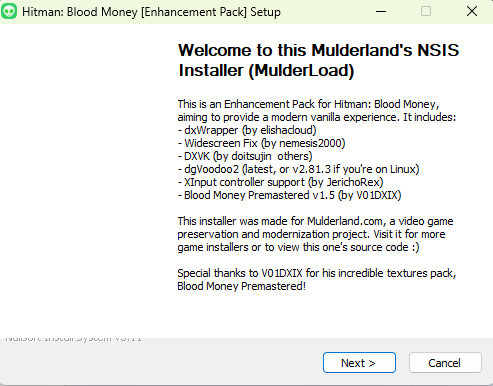
You should see this:Screen 1:
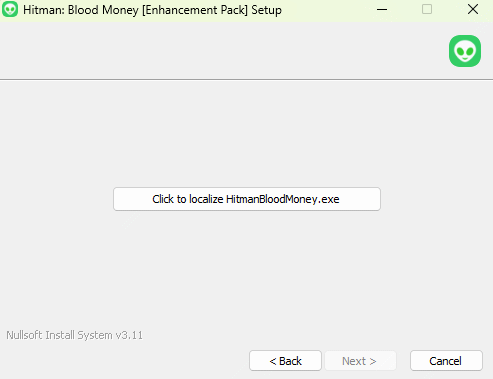
Screen 2:
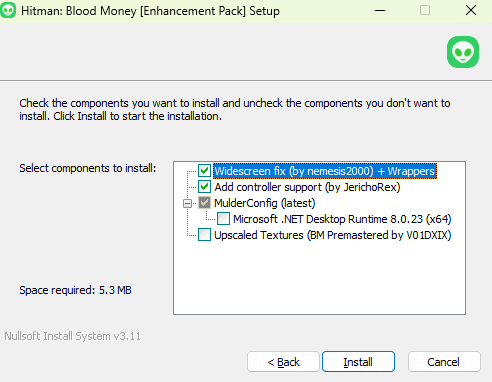
Screen 3: here, if you want the Upscaled Textures (Blood Money Premastered), be sure to check it. I don't check it by default because it's very big (5GB to download).
Also, I have not checked by default the .NET Desktop Runtime, because you probably have it already. But in doubt, check it.
Screen 4:
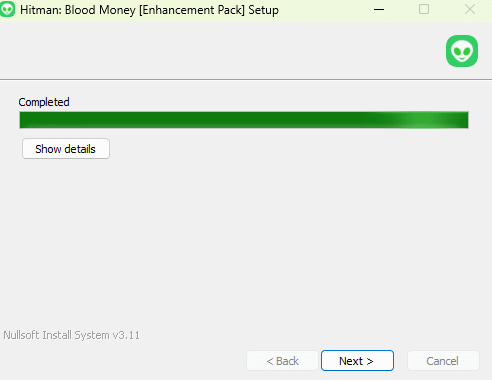
And it's done!
At the end of the installation, you will be proposed a README and to run MulderConfig.
You probably want, at least, to run MulderConfig.
If it doesn't run, see Troubleshoot section.
MulderConfig
MulderConfig is located in your game installation folder, so you can of course launch it later, and change a setting easily whenever you want.
Here is a screenshot of the option it offers:
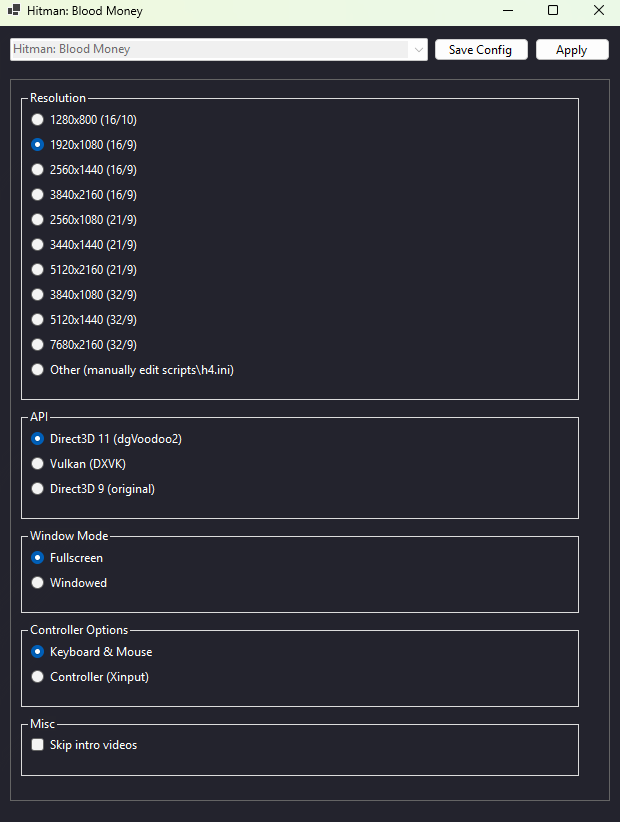
I recommend trying DXVK. If it works for you, it’s probably the most stable and best-performing option. Initially, it was the default API, but some people reported experiencing a black screen in full-screen mode. So I decided to set dgVoodoo2 as the default API instead.
When you've made your selection, be sure to both click on
Here is a screenshot of the option it offers:
I recommend trying DXVK. If it works for you, it’s probably the most stable and best-performing option. Initially, it was the default API, but some people reported experiencing a black screen in full-screen mode. So I decided to set dgVoodoo2 as the default API instead.
When you've made your selection, be sure to both click on
- Save Config (this button saves your preferences "inside" MulderConfig, so that next time you launch it, you see your previous selection)
- Apply (this apply really your preferences into the game)
Troubleshoot / FAQ
1) MulderConfig does not run
This is probably because you don't have "Microsoft .NET Desktop Runtime 8" installed (and you haven't checked it during the install).
Install it from here : https://dotnet.microsoft.com/en-us/download/dotnet/8.0
2) How to run again MulderConfig ?
MulderConfig is located in the game folder installation.
In Steam, right click on "Hitman: Contracts" > Manage > Browse Local Files, and you will find it.
3) Where is the README ?
It is located in a "@mulderload" subfolder of the game folder installation.
In Steam, right click on "Hitman: Contracts" > Manage > Browse Local Files, and then open the "@mulderload" folder.
4) I have another problem
Please, read the README first :)
It contain some useful informations.
If it doesn't solve your problem, please post a comment here - I will try to help you, or fix the Pack if you've found a bug.
Outro
Thanks for reading this guide, and I hope it will help you.
Please note that all I do is automate and simplify the installation and configuration. While this still represents a significant amount of work, none of it would be possible without the mods and fixes created by others. I always make sure to credit their work properly and never claim it as my own.
Please give a positive rating (thumbs up) if you enjoy my Enhancement Pack, it helps visibility.
You may also be interested by my other Hitman Enhancement Packs here:
https://steamcommunity.com/sharedfiles/filedetails/?id=3670766439
https://steamcommunity.com/sharedfiles/filedetails/?id=3651348236
https://steamcommunity.com/sharedfiles/filedetails/?id=3678751899
Finally, I have much more content on my website, come take a look at www.mulderland.com
Please note that all I do is automate and simplify the installation and configuration. While this still represents a significant amount of work, none of it would be possible without the mods and fixes created by others. I always make sure to credit their work properly and never claim it as my own.
Please give a positive rating (thumbs up) if you enjoy my Enhancement Pack, it helps visibility.
You may also be interested by my other Hitman Enhancement Packs here:
https://steamcommunity.com/sharedfiles/filedetails/?id=3670766439
https://steamcommunity.com/sharedfiles/filedetails/?id=3651348236
https://steamcommunity.com/sharedfiles/filedetails/?id=3678751899
Finally, I have much more content on my website, come take a look at www.mulderland.com
More Hitman: Blood Money guides
- Русификатор "Новый Диск" (текст, звук, видео)★ 5 (1.3k)44k views1.5k ♥4 minRussianUpdated Jul 13, 2016
- Русификатор ~ Hitman: Blood Money (Полный)★ 5 (454)29k views784 ♥1 minRussianUpdated Apr 15, 2021
- Hitman Bloodmoney: For Noobs★ 4 (364)25k views424 ♥10 minUpdated Jan 27, 2016
- Traducción "Hitman: Blood Money" castellano de España Textos, voces y vídeos★ 5 (341)10k views323 ♥9 minSpanishUpdated Aug 26, 2017
- Полная русификация Hitman Blood Money, текст+звук от "Нового диска"★ 4 (92)10k views171 ♥1 minRussianUpdated Feb 10, 2021
- КАК СДЕЛАТЬ РУССИФИКАЦИЮ ИГРЫ Hitman: Blood Money (ТУТОР)★ 4 (89)9.5k views224 ♥3 minRussian




This guide was created by its original author on the Steam Community. Are you the author and want it removed? Request removal.