[OUTDATED] Controller setup guide - using AntiMicroX
Introduction
This is a guide that will teach you how to setup a controller to play Creativerse with. We will be using a software called AntiMicroX. This software is used to bind keyboard or mouse keys to controller buttons. AntiMicroX can be an alternative to Steam's builtin controller setup/configs (which you are more than able to use, I just prefer the customization of AntiMicroX).
How to download and install AntiMicroX
Here is a link to the GitHub page: https://github.com/AntiMicroX/antimicrox/releases/latest
Download the file shown here: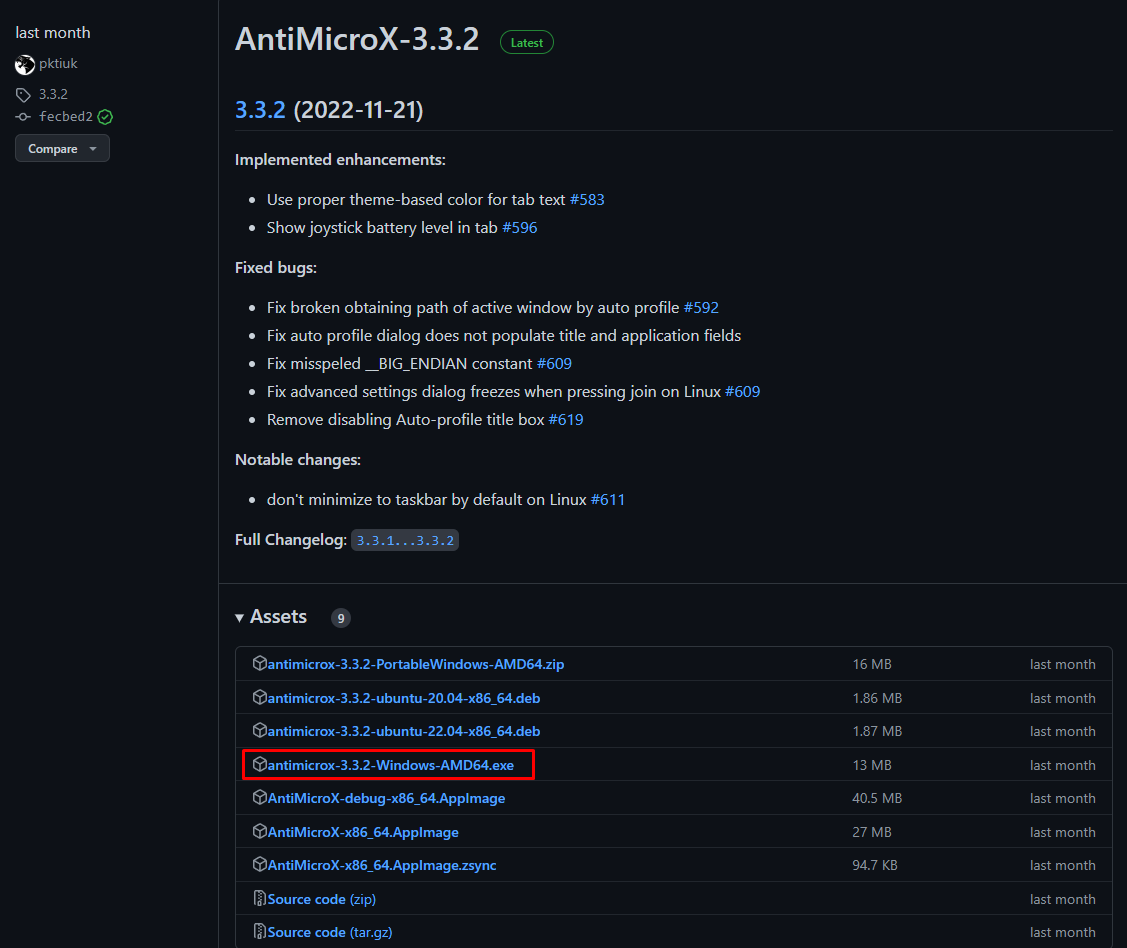
Go through the installer. If it asks for administrator access, allow it.
At this point, it should be installed.
(WIP) Manually setup AntiMicroX for Creativerse
This might take a while...
How to use my premade AntiMicroX config for Creativerse
Go to my website I made specifically for the sake of this guide: https://roshi617.github.io/antimicrox-configs/
Click the underlined text that says "Creativerse config" and save it somewhere convenient on your computer.
Then open AntiMicroX and let it detect your controller. Click "Load" and then select the config I had you download.
Study the premade control scheme and use it or modify it to your liking. The choice is yours.
NOTE: The config will work for as long as AntiMicroX is open. Close it when you no longer want to use the config or if you want to play a different game with the same controller.
- Useful Tips & Tricks★ 5 (306)18k views373 ♥3 minUpdated 10 Jan, 2017
- Getting Started in Creativerse★ 5 (252)17k views248 ♥5 minUpdated 10 Jul, 2017
- Все о Ресурсах★ 5 (208)8k views248 ♥3 minRussianUpdated 14 Nov, 2015
- Русификатор игры7.5k views55 ♥1 minRussianUpdated 27 Dec, 2022
- Секреты, хитрости и тонкости...★ 5 (166)6.7k views233 ♥8 minRussianUpdated 26 Feb, 2016
- How To Setup Machines★ 4 (111)3.2k views144 ♥16 minUpdated 15 Mar, 2017


- Upgrading to PremiumTeam Fortress 2★ 5 (20k)1441k views11k ♥6 minUpdated May 11, 2022
- No More Room in Hell Official ManualNo More Room in Hell★ 5 (2.8k)569k views2.1k ♥29 minUpdated Apr 22, 2019
- NMRiH Community Hosting GuidesNo More Room in Hell★ 5 (526)351k views653 ♥1 minUpdated Aug 10, 2022
- ULTIMATE GUIDE FOR GAME DEV TYCOONGame Dev Tycoon★ 5 (5.8k)326k views10k ♥4 minUpdated 23 Jan, 2014
- How to 'Git Gud' Soon™MORDHAU★ 5 (2k)318k views3k ♥68 minUpdated Nov 16, 2024
- Лучшие кооперативные игры SteamPAYDAY 2★ 5 (1.5k)315k views2.1k ♥56 minRussianUpdated Apr 27, 2025






This guide was created by its original author on the Steam Community. Are you the author and want it removed? Request removal.