Recommended/useful console commands
How to open the console
You have to assign a button to open it. By default, it's usually that button above TAB and below ESC (varies from keyboard to keyboard).
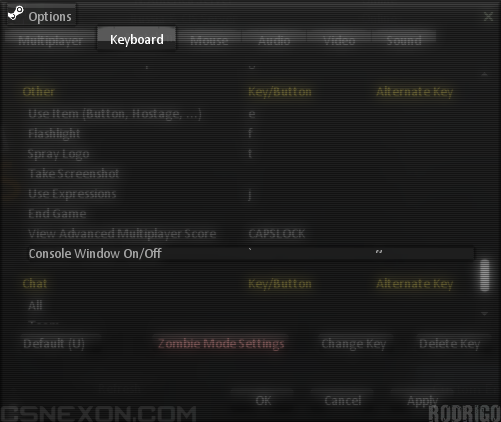
This how the console looks like (it can opened in the menu and in-game):
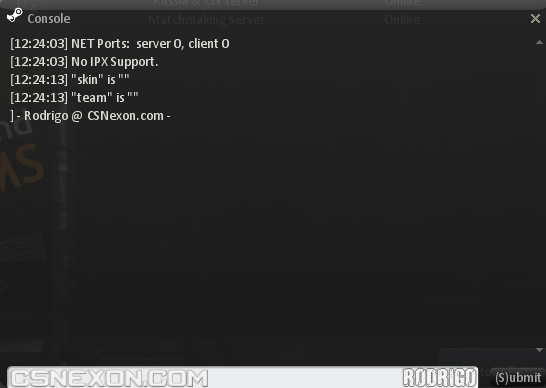
This how the console looks like (it can opened in the menu and in-game):
List of console commands
Below is a list of commands I tested in-game and the values I recommend for them (this will be regularly updated). If you know any more which you consider important for the list, let me know!
(more coming soon!)
FPS
- cl_showfps 1
- fps_max 101
Crosshair
- cl_crosshair_color "500 500 500" (this allows you to use colours for the crosshair which aren't in the options menu — click here[pastebin.com] for various values)
- cl_dynamiccrosshair 0 (prevents crosshair from changing its size while shooting — helps with aiming for some players)
- cl_crosshair_translucent 1
Graphics
- r_detailtextures 1 (better quality textures)
- gl_vsync 0
- violence_hblood 1 (this is on by default - set to 0 if you don't want blood in your game)
- violence_ablood 1 (this is on by default - set to 0 if you don't want blood in your game)
- cl_minmodels 0 (this is off by default - set to 1 to hide all non-classic costumes and classes)
Netgraph
- net_graph 3 (shows realtime data about FPS, MS and package loss)
- net_graphpos 2 (centres the aforementioned graphic in the bottom middle - 1 is for bottom right and 3 for bottom left)
HUD
- hud_fastswitch 1
(more coming soon!)
r_detailtextures
r_detailtextures 0

r_detailtextures 1

More Counter-Strike Nexon guides
- Большое руководство по медалям в CSN:S (264 / 264)★ 5 (358)7.7k views363 ♥419 minRussianUpdated 13 Apr, 2024
- Основа из основ (Описание, Обзор, Гайд)★ 4 (216)7.2k views122 ♥9 minRussianUpdated 2 Jul, 2016
- Как "быстро" выполнить достижение [Мастер Клинка]★ 4 (134)4.1k views99 ♥1 minRussianUpdated 1 Nov, 2014
- Conquistas de Counter-Strike Nexon Zombies★ 5 (221)3.7k views153 ♥1 minPortugueseUpdated 1 Aug, 2020
- The pistols you should own in Counter-Strike Nexon: Zombies★ 4 (60)3.7k views44 ♥2 minUpdated 26 Jun, 2015
- How to be a good Scenario Player.★ 4 (40)3.3k views27 ♥1 minUpdated 20 Oct, 2014





🔥 Popular guides
- Upgrading to PremiumTeam Fortress 2★ 5 (20k)1441k views11k ♥6 minUpdated May 11, 2022
- No More Room in Hell Official ManualNo More Room in Hell★ 5 (2.8k)569k views2.1k ♥29 minUpdated Apr 22, 2019
- NMRiH Community Hosting GuidesNo More Room in Hell★ 5 (526)351k views653 ♥1 minUpdated Aug 10, 2022
- How to 'Git Gud' Soon™MORDHAU★ 5 (2k)318k views3k ♥68 minUpdated Nov 16, 2024
- Лучшие кооперативные игры SteamPAYDAY 2★ 5 (1.5k)315k views2.1k ♥56 minRussianUpdated Apr 27, 2025
- Desert Eagle Heat Treated | Blue GemCounter-Strike 2★ 5 (1.6k)293k views1.5k ♥2 minUpdated Jan 16





This guide was created by its original author on the Steam Community. Are you the author and want it removed? Request removal.