Rome2 Mod Manager Mac
📖 Introduction
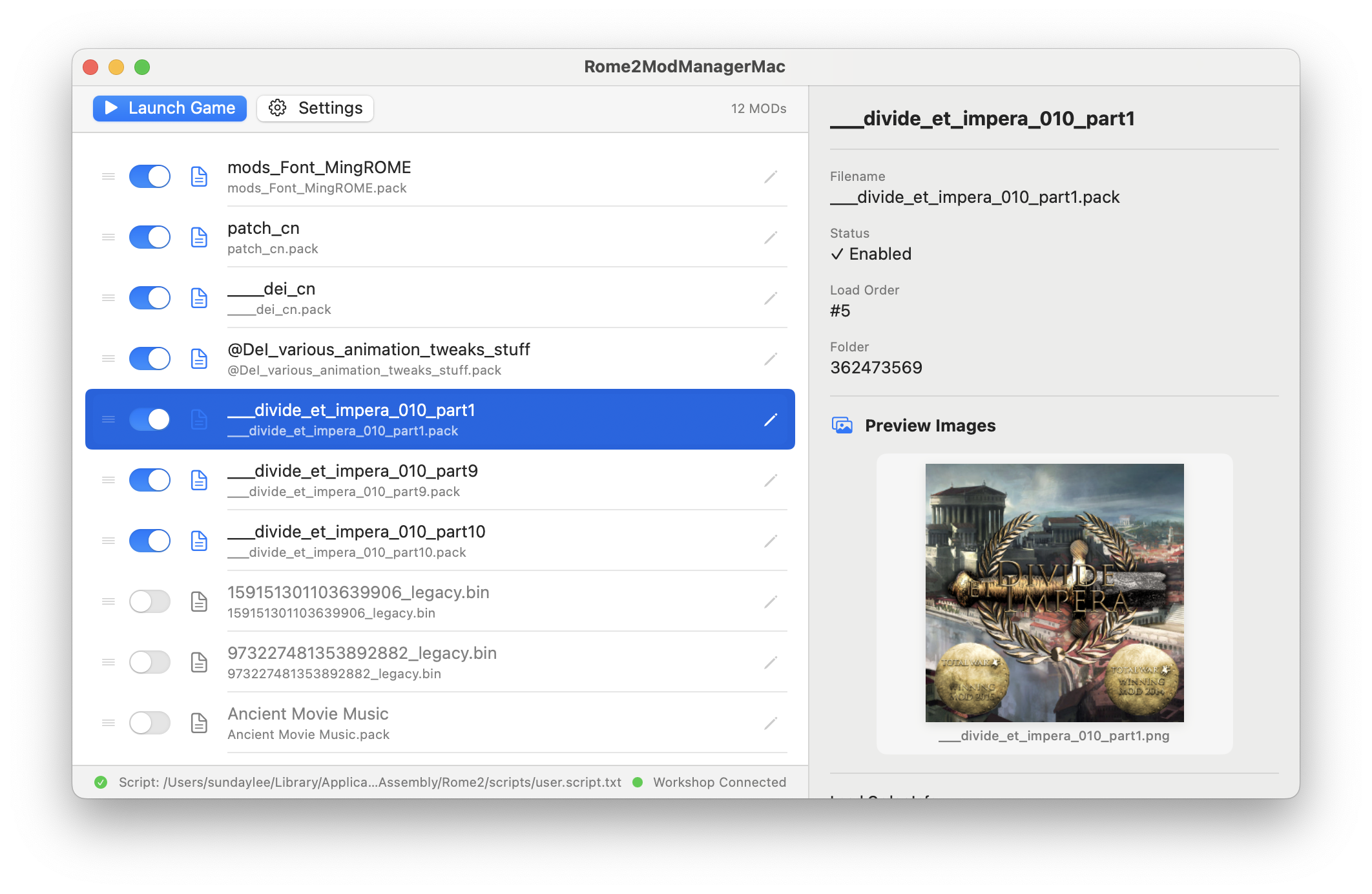
Rome2 Mod Manager Mac is a native macOS MOD manager purpose-built for Total War: ROME II.
Crafted with SwiftUI and seamlessly adapted to macOS design conventions, it lets you manage your Steam Workshop MODs effortlessly: scan, enable/disable, reorder, rename, and launch the game — all from one elegant interface.
✨ Features
Core
Advanced
- 🔍 Auto Scan — Automatically detects Steam Workshop directory and scans all .pack MOD files
- ✅ One-Click Enable — Check/uncheck to enable or disable MODs instantly
- 📝 Auto-Generate Script — Automatically writes user.script.txt based on your selection — no manual editing
- 🚀 Launch Game — Built-in one-click game launcher, automatically saves script before launching
- ↔️ Drag & Drop Sort — Drag MODs to adjust load order (top loads first)
- ✏️ Custom Rename — Double-click any MOD to rename it; names persist across restarts
- 🖼️ Preview Thumbnails — Auto-scans MOD folders for preview images, visible during rename too
Advanced
- 🌐 Bilingual UI — Supports Chinese / English, or auto-follow system language
- ⚙️ Custom Paths — Customizable Workshop directory, user.script.txt path, and Rome2.app path
- 🩺 Diagnostics — Built-in path diagnostics to quickly troubleshoot "MOD not found" or "cannot write script" issues
- 💾 Data Persistence — Enabled list, load order, and custom names are all persisted via UserDefaults — survive restarts
- 🔔 Toast Notifications — Real-time feedback for all operations
🚀 Quick Start
Grab the latest .app from the Releases page and drag it into /Applications.
https://github.com/sundaylee91/Rome2ModManagerMac/releases
https://github.com/sundaylee91/Rome2ModManagerMac/releases
🧭 Usage Guide
Typical Workflow:
- Launch App → Auto-scans Workshop MODs
- Check desired MODs → Drag to adjust order
- Click a MOD to see its preview thumbnail
- Double-click the pencil icon → Rename to something readable
- Press ⌘Enter → Auto-writes script & launches game ✅
- How: Select a MOD → click the pencil icon (or double-click the row)
- Effect: Only changes the display name in the manager; .pack files are untouched
- Persistence: Names survive app restarts, system reboots — permanently saved
- Reset: Settings panel → Reset Defaults → Clear all custom names
Settings Panel:
- Click the ⚙️ toolbar icon to open settings:
- UI Language: Chinese / English / Auto
- Game Path: Custom Rome2.app location (auto-detects Steam install by default)
- Workshop Directory: Custom MOD scan directory
- user.script.txt Path: Custom script output location
- Diagnostics: Check path statuses for quick troubleshooting
📄 License
This project is open-sourced under the MIT License.
Copyright © 2026 Sunday Lee
Copyright © 2026 Sunday Lee
🙏 Acknowledgments
- Total War: ROME II — Creative Assembly
- Steam Workshop platform
- SwiftUI & AppKit community
- DeepSeek V4 Pro — AI assistance
- Google NanoBanana 2 — AI assistance
More Total War: ROME II - Emperor Edition guides
- The Noob's Guide To: Taking A City Without Going Into "Total War"★ 5 (758)57k views667 ♥4 minUpdated Aug 15, 2021
- Rome 2: Formations (unit control tips)★ 5 (1k)49k views1.5k ♥5 minUpdated Sep 21, 2013
- ROME 2... EMPEROR EDITION. Easy public order and money income guide★ 5 (1.4k)47k views2.9k ♥33 minUpdated Feb 1, 2019
- A Comprehensive Guide to the Power & Politics System★ 5 (575)45k views1.1k ♥13 minUpdated Jul 5, 2018
- The one and only mod list for Rome II★ 5 (649)44k views1.6k ♥7 minUpdated Oct 19, 2023
- Late Republic and Principate Army Composition (Historical)★ 5 (729)30k views1.3k ♥25 min



🔥 Popular guides
- Upgrading to PremiumTeam Fortress 2★ 5 (20k)1441k views11k ♥6 minUpdated May 11, 2022
- No More Room in Hell Official ManualNo More Room in Hell★ 5 (2.8k)569k views2.1k ♥29 minUpdated Apr 22, 2019
- NMRiH Community Hosting GuidesNo More Room in Hell★ 5 (526)351k views653 ♥1 minUpdated Aug 10, 2022
- ULTIMATE GUIDE FOR GAME DEV TYCOONGame Dev Tycoon★ 5 (5.8k)326k views10k ♥4 minUpdated 23 Jan, 2014
- How to 'Git Gud' Soon™MORDHAU★ 5 (2k)318k views3k ♥68 minUpdated Nov 16, 2024
- Лучшие кооперативные игры SteamPAYDAY 2★ 5 (1.5k)315k views2.1k ♥56 minRussianUpdated Apr 27, 2025






This guide was created by its original author on the Steam Community. Are you the author and want it removed? Request removal.