Sandbox 2 editor Windows 10 fix
Introduction
Crysis's Sandbox 2 editor for some reason seems to hate graphics tablets. If you try running it with a graphics tablet driver installed (IE a wacom) it will always crash.
The only way around this is to uninstall the driver however the other problem is under Windows 10 the default tablet service is always running and will also crash the editor. Thankfully there is a fix illustrated bellow.
The only way around this is to uninstall the driver however the other problem is under Windows 10 the default tablet service is always running and will also crash the editor. Thankfully there is a fix illustrated bellow.
The fix
- Go to your start menu and type in "Services"
- Navigate to "Touch Keyboard and handwriting panel service"
- right click it and go to properties
- change "startup type" to disabled"
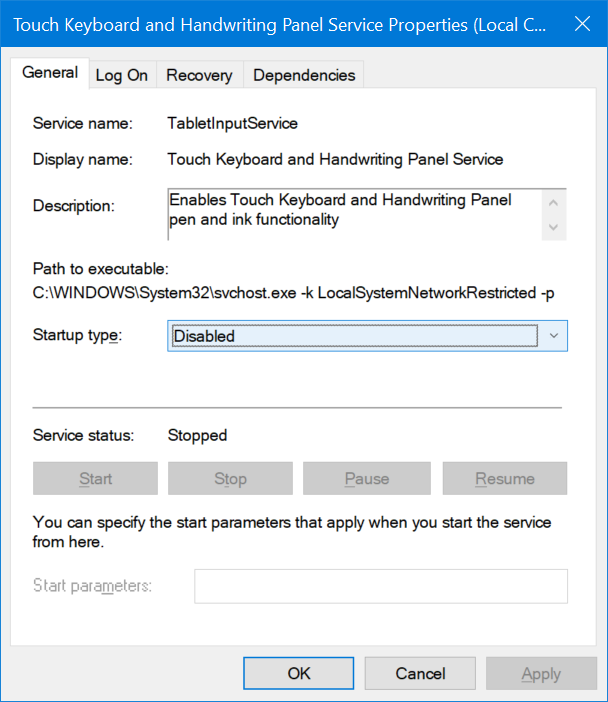
Restart your computer, and start the editor it now should work
Conclusion
Unfortunately you cannot run the Sandbox 2 editor with a graphics tablet installed on the same computer. However this does allow you to run it regardless of operating system, as Windows 10 by default runs the tablet PC service.
More Crysis guides
- Fix for launching Crysis on Windows 7/8/10 (64-bit) [English guide/Русское руководство]★ 5 (756)35k views692 ♥5 minUpdated Feb 12, 2023
- Crysis Console Commands★ 5 (412)24k views691 ♥2 minUpdated Feb 6, 2013
- Не запускается Crysis, небольшой фикс и запуск на 64-битной системах...★ 5 (517)22k views476 ♥2 minRussianUpdated Dec 4, 2023
- Windows 10 64Bit - How to make this game work★ 5 (313)20k views424 ♥3 minUpdated Feb 12, 2023
- Crysis HUD off | Free Camera | HD Textures | Tiledshot★ 5 (523)13k views336 ♥3 minBulgarianUpdated Apr 29, 2016
- Чит консольные команды Crysis на Русском★ 5 (203)12k views267 ♥1 minUpdated Mar 3, 2013


This guide was created by its original author on the Steam Community. Are you the author and want it removed? Request removal.