🔥Save your GPU from near certain death🔥
tl/dr
Cap framerate to 30 in your graphics driver - it´s good!
Preface
This game might very well kill your GPU!
(due to excess heat &/or dying fans)Have you ever wondered why your PC struggles especially on the campaign map?
Are you confused, because during battles everything runs perfectly and quietly on Ultra settings at 60FPS?
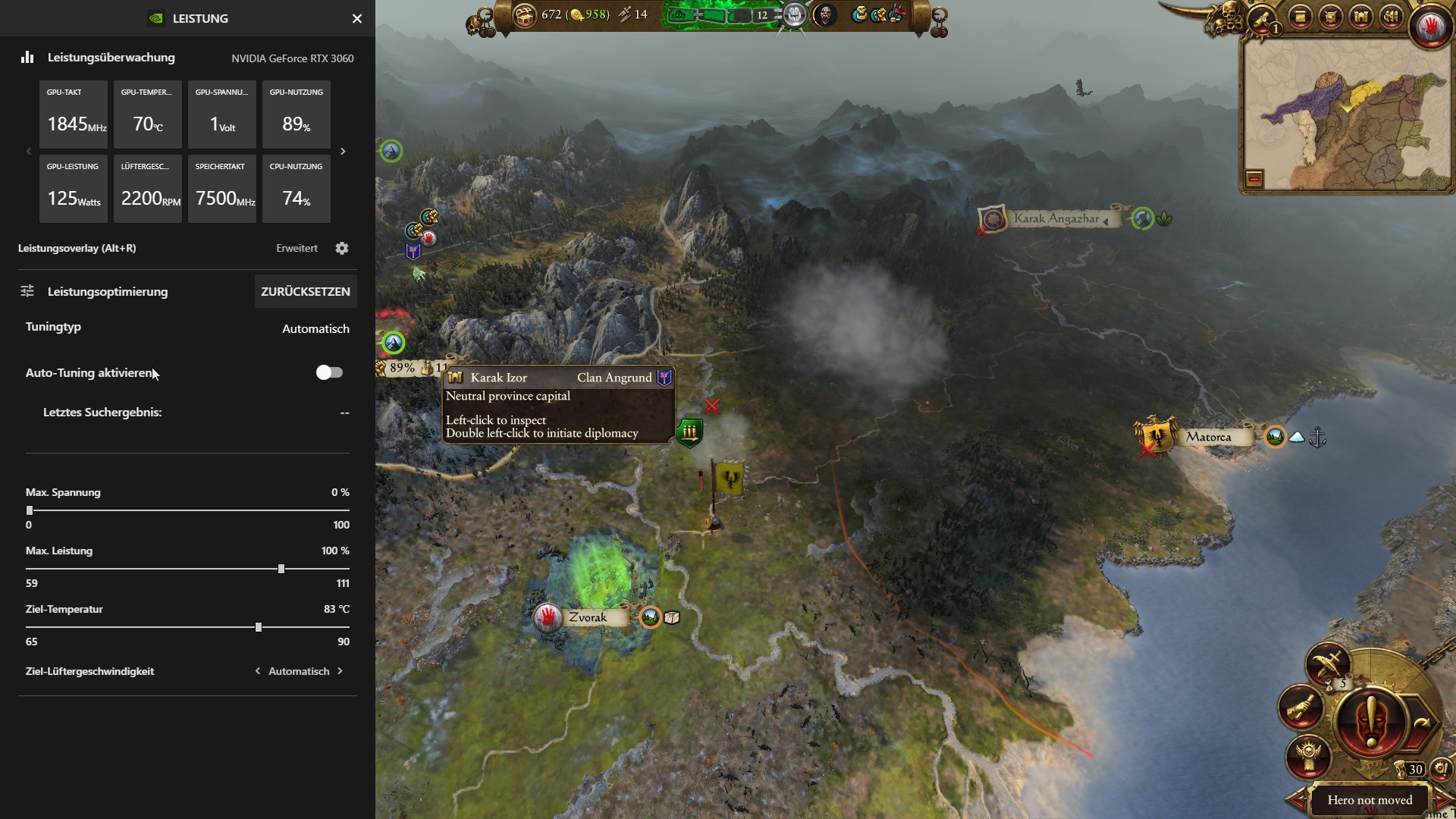 Simple answer: On Campaign Screen, the game will draw all the power it can from your GPU, feasible or not. You could compare this to driving your car in 2nd gear on the motorway doing 45 mph at 8000 RPM. Fun bonus fact: Mining Crypto is less demanding than running the campaign map screen! 😮
I´m no PC Hardware Expert, Financial Advisor, or Car Mechanic, so take anything stated with a grain of salt.
(This problem definately affects Total War: Warhammer 2, but my searches for a solution unearthed various reports for the same problem accross different games - e.g.: Shogun 2, Rome 2, TW:Warhammer)
Solution
If there´s any doubt you can read about non-working methods in the next section, maybe you´ve tried one of those before. Here we´ll focus on the one solution that really works!
There´s one downside: FPS are also capped in battles. No way around this.
For NVIDIA GPU:
For ATI GPU:
There´s one downside: FPS are also capped in battles. No way around this.
For NVIDIA GPU:
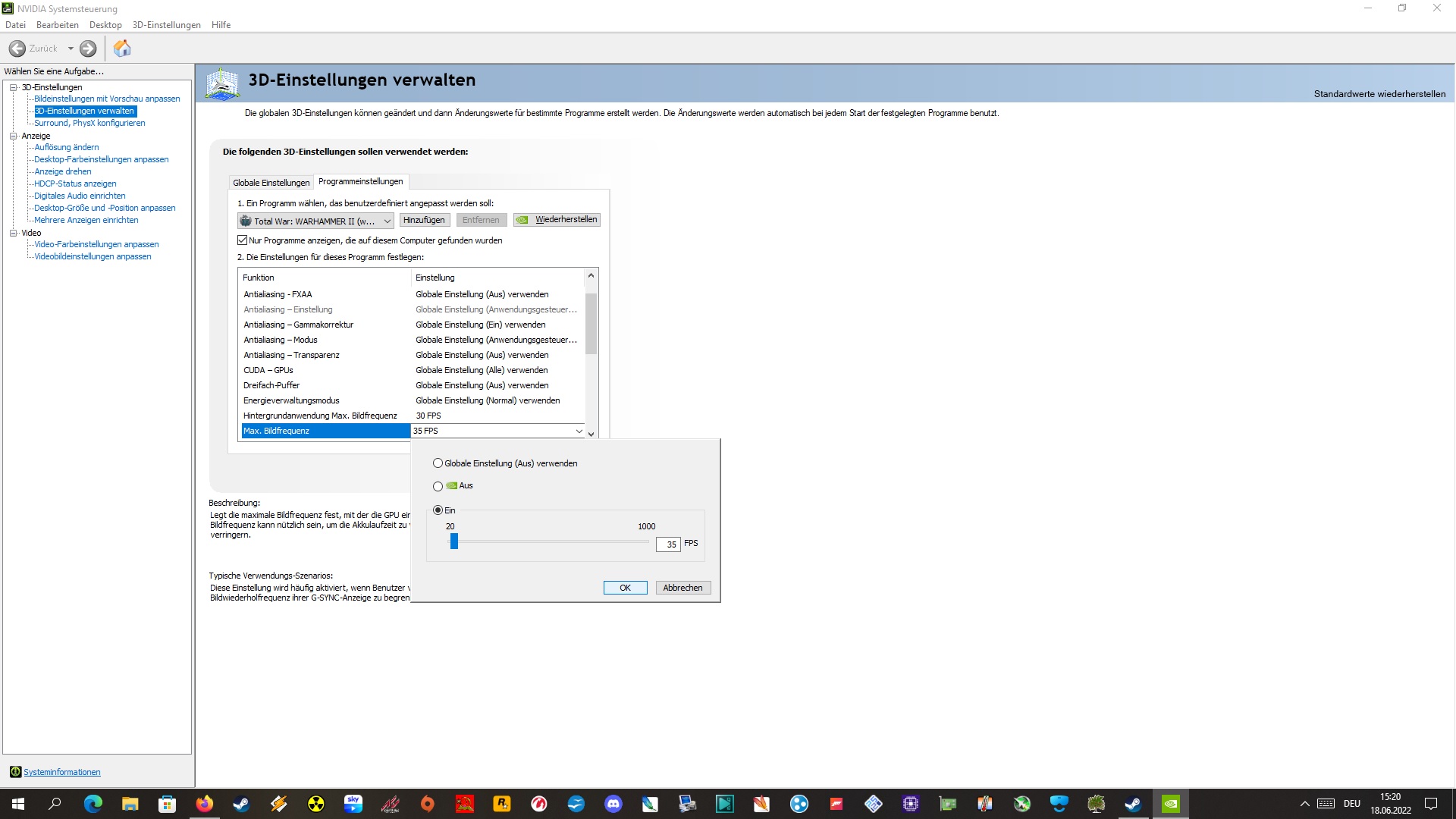
- Open Control Panel -> 3D Settings -> Program Settings
- Add/Search "Total War: Warhammer 2" entry
- Set "Max Frame Rate" to anything between 30-40 FPS*
- Return to playing Warhammer unhindered by the earrape dying noise of your costly GPU!!! \🤩/
*You can check back & forth what´s working best for you. I´ve set mine to 35 FPS which makes the 3060 pull only 60 Watts @53° - instead of 125 Watts @70° running at 60 FPS.
For ATI GPU:
I have a Radeon 5700XT and had the same issue with 100% GPU usage all the time in the campaign map ...Source: https://steamcommunity.com/app/594570/discussions/0/2646378342126530883/?ctp=3#c2797251375475827483
YOU MUST enable the radeon chill game mode in Radeon software and set min fps at 30 and max between 40 and 60 fps.
This way when you are idle on campaign map your GPU usage isn't pushed at 100% permanently... and it can give you more fps when needed
Fake solutions
- Lowering your ingame settings <-- No! If people are telling you the map is so much more demanding than the battles - then maybe they´re wrong.
- Enabling V-Sync <-- Only works at doubled rate, i.e. capped at 30 FPS. Adds additional strain to GPU. (edit: Since this is causing so much butthurt amongst people not affected by the described problem, i´ve gone and googled another case where vsync is/was a bad idea --> Reddit Link <-- - i cannot be arsed going further than that and will be deleting any vsync related comments from now on.)
- Turning up your GPU Fan Speed <-- may wear out fan bearings earlier, promoting silent death.
- "Your GPU can handle over 9000 heat units hurr durr" <-- Sure, if you are okay with that. *shrugs*
- Posting your DXDIAG <-- (╯°□°)╯︵ ┻━┻
Closing
I hope this still reaches some of you in time 😉
Shoutout to: https://steamcommunity.com/app/594570/discussions/0/2646378342126530883/
^^ the tipping point on my journey to the truth. Also robbed a quote for ATI users from there.
Shoutout to: https://steamcommunity.com/app/594570/discussions/0/2646378342126530883/
^^ the tipping point on my journey to the truth. Also robbed a quote for ATI users from there.
More Total War: WARHAMMER II guides
- Treasure Hunt Puzzle Solutions★ 5 (6.9k)281k views15k ♥3 minUpdated Aug 19, 2021
- Ultimate Guide - Essentials for All Campaigns★ 5 (388)30k views911 ♥39 minUpdated Mar 14, 2022
- Ultimate Guide - Tomb Kings - Overview★ 4 (154)21k views365 ♥57 minUpdated Aug 2, 2022
- Total War: Warhammer II (+DLC) - 100% Achievement Guide★ 5 (470)19k views1.1k ♥52 minUpdated Apr 6, 2021
- Grom The Paunch Food Mechanics★ 5 (253)18k views618 ♥8 minUpdated May 24, 2020
- All Top Tier Influence Traits for High Elves★ 5 (178)17k views374 ♥15 minUpdated Jul 14, 2025


This guide was created by its original author on the Steam Community. Are you the author and want it removed? Request removal.