Screen Resolution Setup
Screen Resolution Setup
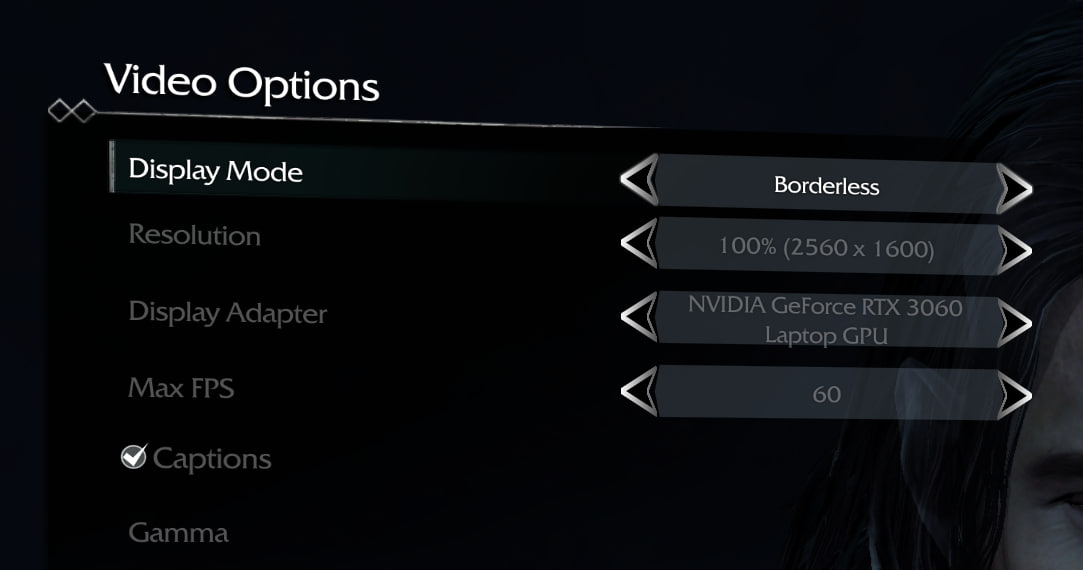
- Open the graphics settings in the game.
- In the "Display Mode" section, select "Borderless".
- Apply the changes.
- After this, the resolution of your monitor should appear in the "Resolution" dropdown.
This method should help the game automatically adjust to your monitor's current resolution.
More Middle-earth™: Shadow of Mordor™ guides
- 100% Achievement Guide★ 5 (2.6k)65k views3.6k ♥23 minUpdated 7 Aug, 2015
- Руководство по всем достижениям!★ 5 (3.2k)42k views3.6k ♥19 minRussianUpdated 13 Oct, 2021
- 7 Beginner’s Tips For Shadow Of Mordor★ 5 (592)42k views418 ♥4 minUpdated 3 Jul, 2017
- 100% Achievement Guide: Shadow of Mordor★ 5 (1.3k)38k views2.7k ♥112 minUpdated 15 May
- How to skip Shadow of Mordor's intro videos★ 5 (617)31k views275 ♥1 minUpdated 11 Oct, 2014
- A Guide, Tips, Tricks, Harder Difficulties, Runes, and more.★ 5 (221)24k views307 ♥16 minUpdated 4 Oct, 2014


🔥 Popular guides
- Upgrading to PremiumTeam Fortress 2★ 5 (20k)1441k views11k ♥6 minUpdated May 11, 2022
- No More Room in Hell Official ManualNo More Room in Hell★ 5 (2.8k)569k views2.1k ♥29 minUpdated Apr 22, 2019
- NMRiH Community Hosting GuidesNo More Room in Hell★ 5 (526)351k views653 ♥1 minUpdated Aug 10, 2022
- ULTIMATE GUIDE FOR GAME DEV TYCOONGame Dev Tycoon★ 5 (5.8k)326k views10k ♥4 minUpdated 23 Jan, 2014
- How to 'Git Gud' Soon™MORDHAU★ 5 (2k)318k views3k ♥68 minUpdated Nov 16, 2024
- Лучшие кооперативные игры SteamPAYDAY 2★ 5 (1.5k)315k views2.1k ♥56 minRussianUpdated Apr 27, 2025






This guide was created by its original author on the Steam Community. Are you the author and want it removed? Request removal.