Simple and Fast Load Order Guide
Introduction and what is mod Weight method
Lets Consult the Graph
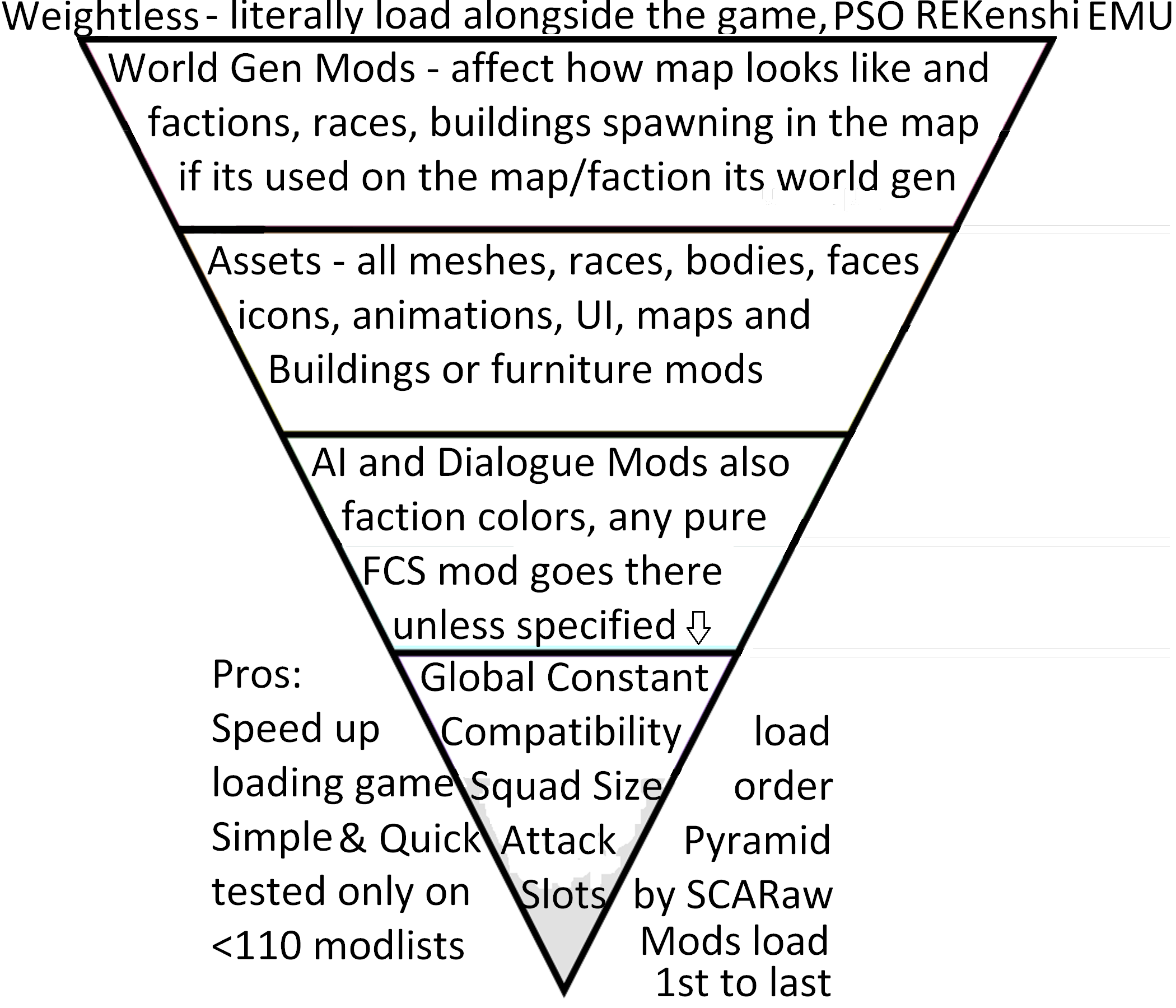
We can now tag our mods accordingly
- [Free]
- [World]
- [Asset]
- [FCS]
- [Global]
Core of the idea
Lets say you wanna build tower of rocks:- 1st you place Big Rock
- 2nd you place Medium Rock
- 3rd you place Small Rock
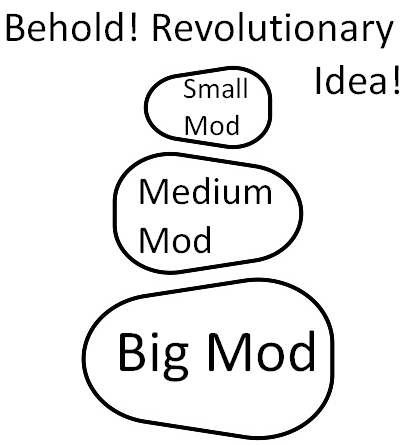 WOW, nobody ever thinked of that
Now you just invert the Rocks because kenshi load 1st on the list as 1st to load
Order of Loading things in kenshi
- Splash Screens
- Title Screen
- UI
- Loading Screen
- Map shape
- Visual config
- World Generation
- Assets (as they are called)
- AI, Squads, Dialogues
- Global Constants

By this logic you can see the Exception to Asset Category
- Splash Screens
- Title Screen
- UI
- Loading Screen
- Map shape
- Visual config
so whenever you load them will not drastically affect anything
with real exception of:
- Map shape - Simple Map Fixes - need REKenshi to load
- Visual config - native stylise / Shader SSAO / Shader Fix
Some Assets can be loaded as weightless mods
Simply replace the original texture/ui files and roll with it :)most of the times this operation is seamless
unless you have conflicting ui mods
in this case load preferred UI in Asset Category and hope for the best
FCS Colors:
Loading mods in FCS can indicate info with colors
- Red: item has been deleted in a previous mod
- Blue: the active mod in FCS has changed the item
- Green: a new item the active mod in FCS has added
- Orange: an item added by a later mod in the load order
- Grey: a previously added item that has been deleted by the FCS active mod
Source
https://kenshi.fandom.com/wiki/FCS:_Load_Order_%26_Color_Definitions
How is this guide better than other approach
Mod managers
Often sort mods alphabetically if everor have to contain sorting rules towards each individual mod
making them always outdated by day literally
Other load order methods
Whenever you consider mod or guide you should check what else person have donemost unfinished and crash heavy asset flip?
Assigning similar mods to same categories is not revolutionary,
this is the basics of organization
Chose what makes your game more stable, not whats most popular
Number of Mods is not good indicator for changes
Captain obvious with more common sense
Whenever you browse mod collections you see name, image, number of mods
Sadly said number does not really mean anything
its fair to assume
10x 1KB mods load faster than 2x 3GB mods
yet its fair to believe 2 mods will have more changes and edits that can potentially collide with things
More About Weightless Mods
i like to call them Mods that doesn't load
They are most common on Nexus or Githubsome of them can do it on steam in form of diet version
benefits of weightless mods
- Load significantly faster than .mod counterparts
- Does not require load order
- does not conflict with other mods in regular way (rather than crashes you can stack too many ui changes or textures with UV/MIPMAPS which cause lags (you can do the same by staying steam only, just keep installing 30 texture mods and see how it goes...))
- Provide unique benefits and possibilities to the game - Some mods can only be possible to implement like this
- Replacing or editing files directly avoid double-loads or loading bar going backwards
Potential risk
- You might install UI mod on top of ui mod causing your text to be invisible or hard to read
- Whenever you wanna remove such mod you need to either have backup or verify integrity of the files
- Any .mod mod that edit similar thing might remove benefits of the weightless mod
World Generation
Game load faster when you load big scale edits 1st
here we have:- zone files
- Foliage editors
- non-PSO weather editors
- City Tweaks
- World overhauls
- New Factions with base
its easy to mistake them with assets due to how some modders deal with map fixes
for example:
Better Crop Fences is World Gen mod (zone files)
Little Better Farm Fences is Asset mod (no zone files)
Exception: Mod Dependency
Lets just say Mod A add Race to the gameand mod B make Race spawn in brand new faction
in this case:
Mod B - World Gen lifts
Mod A - Asset right above itself :)
Thus Correct Load Order Being:
Mod A
Mod B
Assets is quite Wide category
Here is how i weight assets
- New mesh and new texture for new object
- New mesh and new texture for existing object
- New Meshes
- New Textures
- New Animations
- New Icons
There is no need to stress too much about them
If asset is called previously its dependency or small size mod (less than 10mb)if asset is big, its good idea to get it out of the way now
Eventually just replace vanilla assets or tangle them together into 1 big mod
out of sight = out of mind :)there is nothing to worry about or reason to spend hours categorizing assets to lighter and heavier if you don't know it immediately
AI & Dialogues - Pure FCS mods
Pure FCS mods usually looks like this:
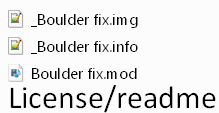 You have image file - what you see in workshop front of the mod
you have description - mouse over the mod in load order :)
you have mod file itself - the actual mod
Optionally you can see Readme or License file or even example image
Global Constant - final adjustments
Compatibility patches
By all logic they should be right next to lightest mod they changehowever due to people making mistakes and by going with the rule:
Better safe than Sorry, i listed it here
- Once again goal of the guide is to get your list sorted, not ponder with it for hours
Global Constant
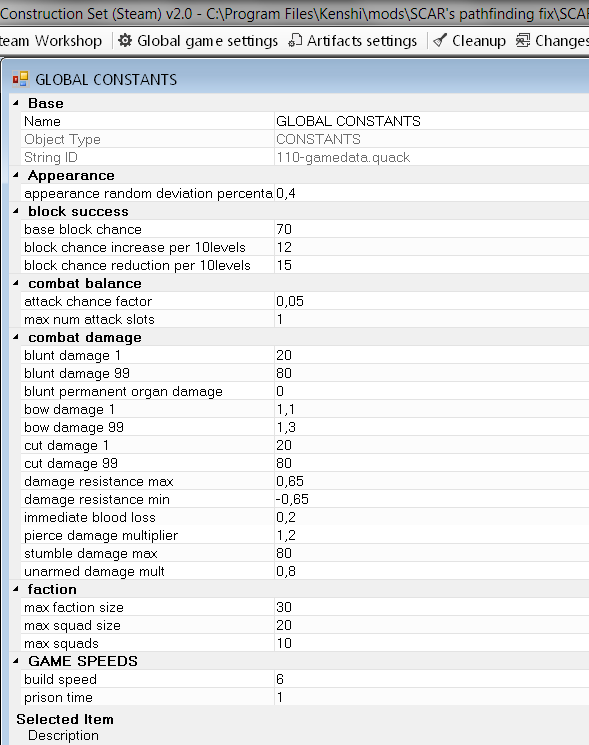
its category in FCS changes
night darkness scale
Squad and Faction size for player
Attack slots
mods that delve into this changes are tiny 0-1Kb + image
Closure
Load Order is not that hard
there are configurations of mods where things breaks no matter whatpondering load order might not be able to fix it for you
Biggest load order mistakes
People trying to make work mods that even authors said will conflictPeople double/triple dipping same changes with different mods
People don't even read what the mods do, just follow modlist/recommendations
Players take whatever is popular without checking when it was last updated
People misinterprets what QoL and bugfixing mods actually are or if said bug wasn't patched in 2019
More Kenshi guides
- Proper Load Order & You.★ 5 (1.8k)78k views3.6k ♥10 minUpdated 20 Oct, 2022
- Save Editing 101★ 5 (729)51k views1.6k ♥28 minUpdated 16 Aug, 2025
- Roadmap for New Players and Basebuilding (Up-to-date)★ 5 (807)51k views2.4k ♥76 minUpdated 23 Apr, 2019
- Tips and Tricks of a Veteran Kenshi Player★ 5 (551)38k views1k ♥15 minUpdated 18 Nov, 2024
- Quickstart Newbie Walkthrough 1.0★ 5 (562)35k views1.5k ♥54 minUpdated 20 May, 2025
- Новички, я научу Вас выживать и наслаждаться КЕНШИ!★ 5 (380)23k views789 ♥34 minRussianUpdated 28 Oct, 2025


🔥 Popular guides
- Upgrading to PremiumTeam Fortress 2★ 5 (20k)1441k views11k ♥6 minUpdated May 11, 2022
- No More Room in Hell Official ManualNo More Room in Hell★ 5 (2.8k)569k views2.1k ♥29 minUpdated Apr 22, 2019
- NMRiH Community Hosting GuidesNo More Room in Hell★ 5 (526)351k views653 ♥1 minUpdated Aug 10, 2022
- ULTIMATE GUIDE FOR GAME DEV TYCOONGame Dev Tycoon★ 5 (5.8k)326k views10k ♥4 minUpdated 23 Jan, 2014
- How to 'Git Gud' Soon™MORDHAU★ 5 (2k)318k views3k ♥68 minUpdated Nov 16, 2024
- Лучшие кооперативные игры SteamPAYDAY 2★ 5 (1.5k)315k views2.1k ♥56 minRussianUpdated Apr 27, 2025






This guide was created by its original author on the Steam Community. Are you the author and want it removed? Request removal.