T.16000M FCS Flight Pack Controller Profile
Purpose of This Guide
The Profile Itself and How to Install it
First and foremost, you'll need the profile itself. That can be obtained from the link here[drive.google.com].
Next, you'll have to install it. In order to do this, navigate to the games documents folder. By default this will probably either be C:\Users\name\Documents\Egosoft\X4, or C:\Users\name\OneDrive\Documents\Egosoft\X4.
You'll want to open the folder here with all the numbers. I'm not really sure what the numbers mean or if they are different for different people, but it should be the only folder here other than "extensions".
Once you are here, simply go ahead and drop the new xml file in. If you already have a file named "inputmap_1", you'll want to change that "1" at the end of our new file to the next available number.
Now you should be good to go. Plug in your controllers, boot up the game, and load the new controller profile under settings, controls, load profile, T.16000M FCS Flight Pack!
Profile Overview
Now that we have our new profile installed, let's quickly go over it. Below is a visual layout for the scheme. NOTE that not pictured are the rudder controls. The rudder controls are as follows;
Rotate Left Pedal: Toggle Turret Arming
Rotate Right Pedal: Toggle Drone Launching
Slide Left Pedal: Wing Resume Assignment
Slide Right Pedal: Wing Attack My Target
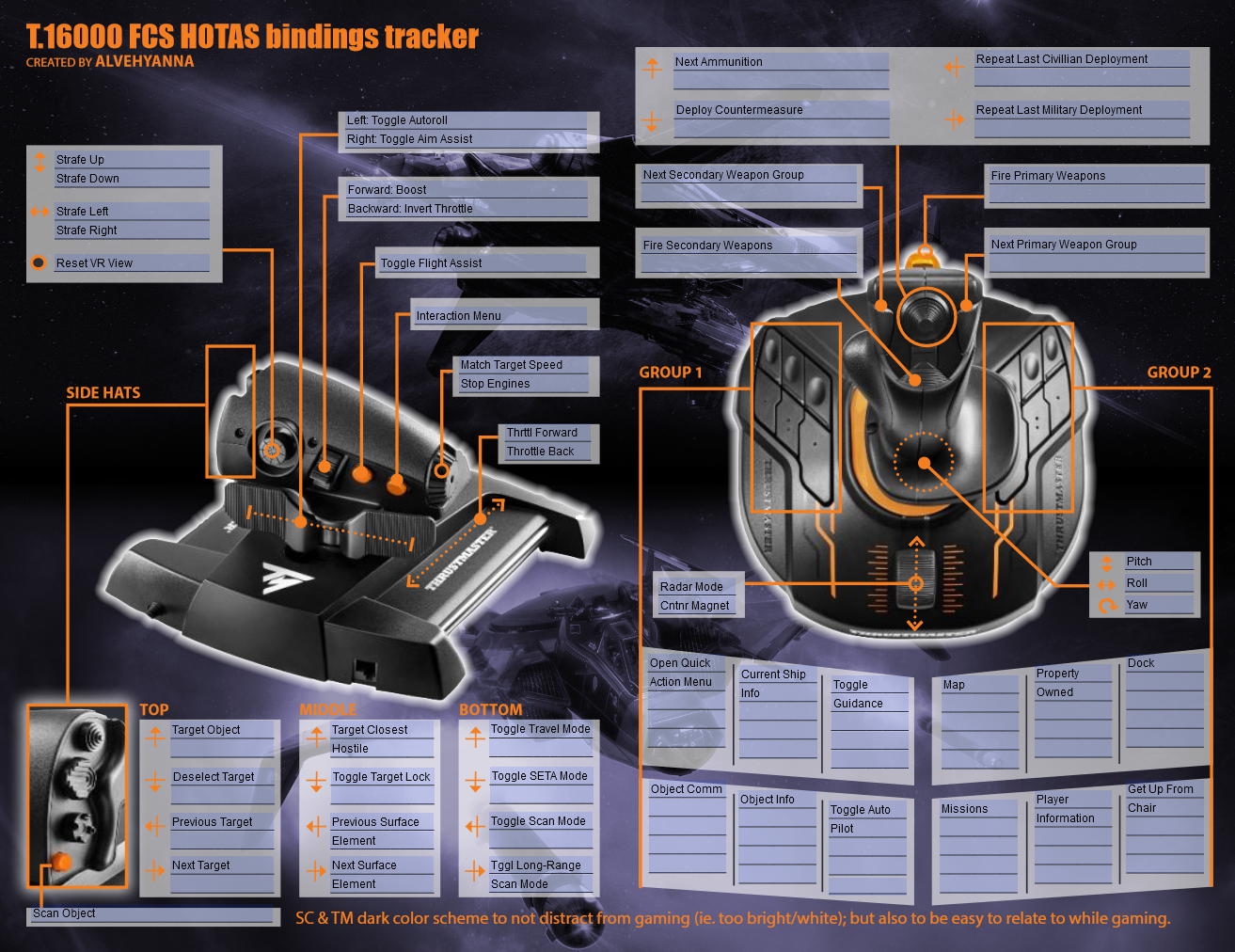
Lastly, you'll find attached at the following link a pdf version of this chart for you to make edits with. While the control scheme is my own creation, credit to the form fillable pdf I used goes to Alvehyanna from the Star Citizen forums. Link to the filled form fillable pdf here[drive.google.com], and link to credit here[robertsspaceindustries.com].
No Pedals? No Problem!
"But wait, I don't have rudder pedals, just a stick and throttle! How am I supposed to use this profile?" Well worry not! Here is an alternate scheme that forgoes the rudder pedals by consolidating and replacing less necessary commands! Worry not however, for this scheme has been extensively tested too!
Control profile here[drive.google.com].
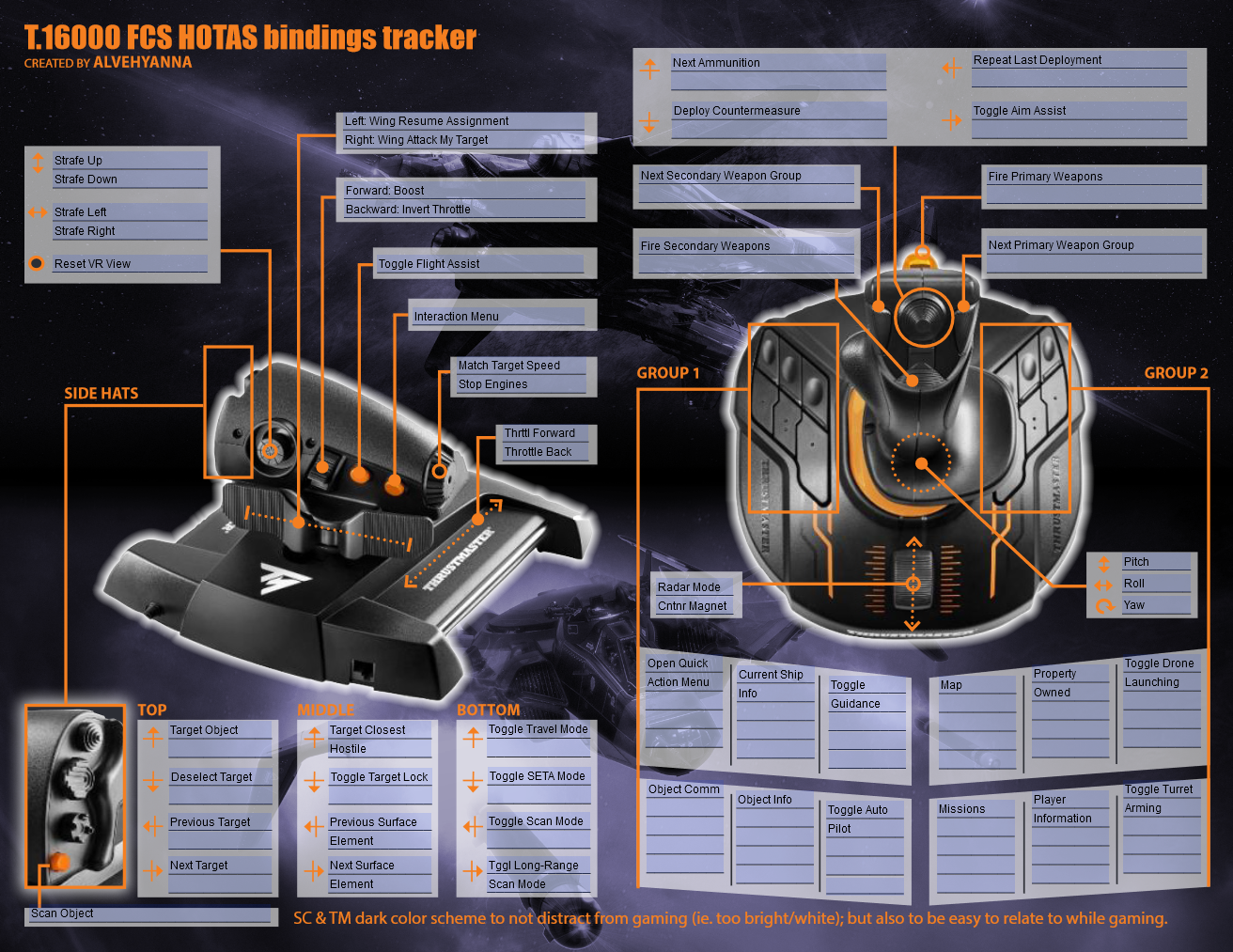
Filled form fillable pdf here[drive.google.com].
- X4 Full Map [Timelines][7.0]★ 5 (579)46k views1.2k ♥1 minUpdated Jun 22, 2024
- A Guide to Game Starts★ 5 (209)28k views437 ♥27 minUpdated 7 Jan
- X4 Beginner Guide 5.1★ 5 (393)27k views1.2k ♥22 minUpdated 7 Mar, 2023
- All Ownerless Ships in X4: Foundations (9.00 Base Game + All DLCs)★ 5 (453)27k views1.1k ♥10 minUpdated 10 Jun
- X4 Ultimate Weapons Guide. [NOW ON THE WIKI]★ 5 (343)23k views768 ♥104 minUpdated Jul 8, 2024
- X4 sector map★ 4 (146)22k views207 ♥1 minUpdated 6 Dec, 2018


- Upgrading to PremiumTeam Fortress 2★ 5 (20k)1441k views11k ♥6 minUpdated May 11, 2022
- No More Room in Hell Official ManualNo More Room in Hell★ 5 (2.8k)569k views2.1k ♥29 minUpdated Apr 22, 2019
- NMRiH Community Hosting GuidesNo More Room in Hell★ 5 (526)351k views653 ♥1 minUpdated Aug 10, 2022
- ULTIMATE GUIDE FOR GAME DEV TYCOONGame Dev Tycoon★ 5 (5.8k)326k views10k ♥4 minUpdated 23 Jan, 2014
- How to 'Git Gud' Soon™MORDHAU★ 5 (2k)318k views3k ♥68 minUpdated Nov 16, 2024
- Лучшие кооперативные игры SteamPAYDAY 2★ 5 (1.5k)315k views2.1k ♥56 minRussianUpdated Apr 27, 2025






This guide was created by its original author on the Steam Community. Are you the author and want it removed? Request removal.