Transfer Vita saves to PC!
Vita saves to PC
 First of all, this guide is credited to u/RottedRabbitAgain from Reddit (Original post here - https://www.reddit.com/r/JRPG/comments/h8jbvu/psa_how_to_transfer_persona_4_golden_ps_vita/). I am simply posting the guide here to make it more known for those who have a Vita save and wish to bring it over to continue where they left off.
 You can do this with or without a modded Vita! I will give both ways to do so.
WARNING - There appears to be an issue when doing this with New Game Plus saves. It may or may not work for those. Be sure to back up all ur saves!
Modded Vita Walkthrough
You need a modded vita, a Hex Editor, and an FTP client, and to make a save data on PC (You also must transfer the same data slot, i.e. save in slot 5 if you are transfering a save from it).
1. Open Vitashell, Navigate to Ux0:user/00/savedata/GAMEID (for my persona 4 this is PCSB00245 but I think it varies by region).
2. Hover over the GAMEID and press triangle then select open decrypted
3. Connect to your pc via ftp and copy over. (alternatively copy the saves to your ux0 root on your vita and transfer via usb)
4. Navigate to C:\Program Files (x86)\Steam\userdata\USERID\1113000\remote and copy the save there
5. Get the MD5 checksum of the data file ( you can do this here - https://emn178.github.io/online-tools/md5_checksum.html )
6. open DATAXXXX.binslot (corresponding with your save file number) and replace these highlighted characters with the MD5 checksum: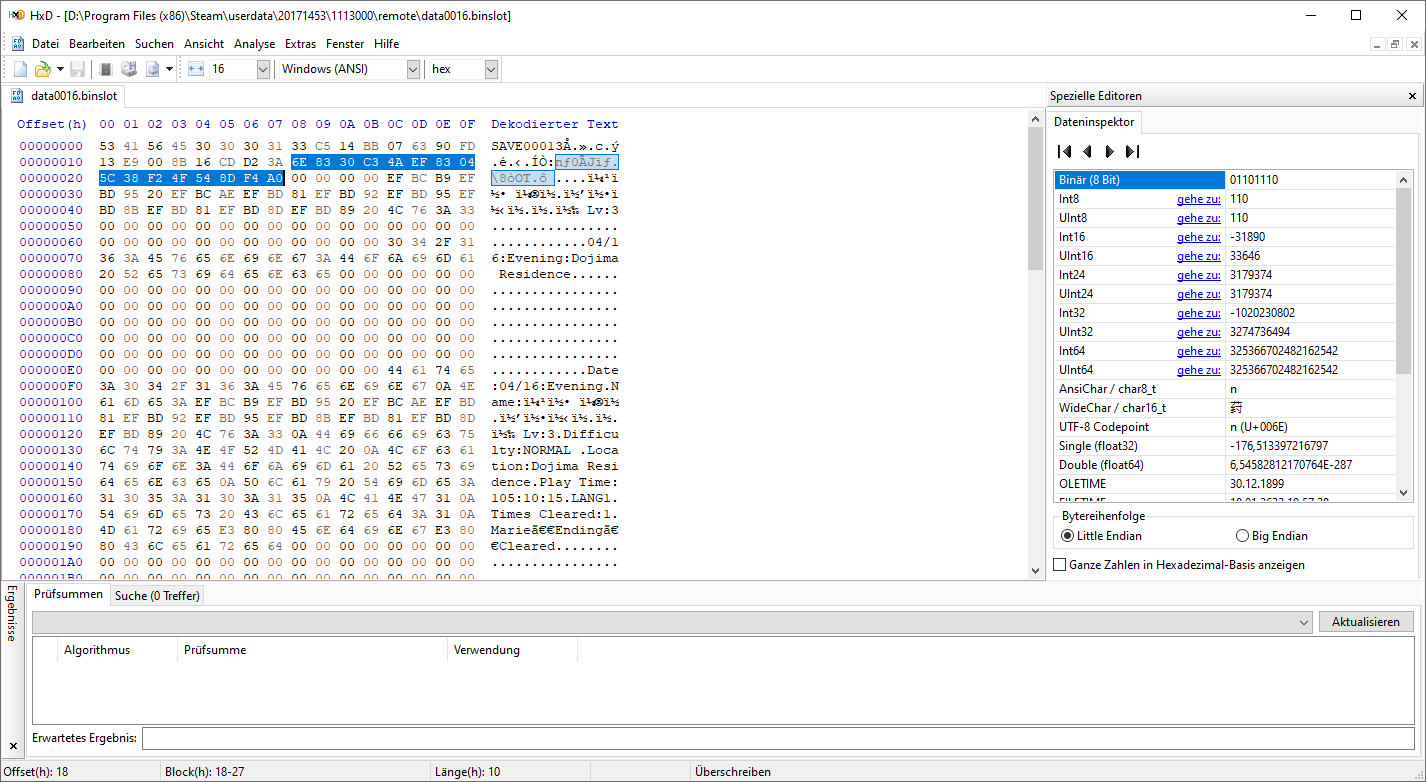
7. Launch the game and load the file (dont worry if it says the same name and date as before)
8. You will get an error message, click off it and the game should load fine. Save over the file and you're done!
1. Open Vitashell, Navigate to Ux0:user/00/savedata/GAMEID (for my persona 4 this is PCSB00245 but I think it varies by region).
2. Hover over the GAMEID and press triangle then select open decrypted
3. Connect to your pc via ftp and copy over. (alternatively copy the saves to your ux0 root on your vita and transfer via usb)
4. Navigate to C:\Program Files (x86)\Steam\userdata\USERID\1113000\remote and copy the save there
5. Get the MD5 checksum of the data file ( you can do this here - https://emn178.github.io/online-tools/md5_checksum.html )
6. open DATAXXXX.binslot (corresponding with your save file number) and replace these highlighted characters with the MD5 checksum:
7. Launch the game and load the file (dont worry if it says the same name and date as before)
8. You will get an error message, click off it and the game should load fine. Save over the file and you're done!
Vanilla Vita Walkthrough
Credit for reddit user u/Tjoeb123 for giving this info
1. Backup the game using Content Manger (this also works if you have a physical copy; only difference is much less files to copy/decrypt),
2.then use psvimgtools-frontend (NOT the EasyFrontEnd version) to decrypt the resulting .psvimg files
3. Once you have done that, navigate to the output folder and start from step 5 of original guide
1. Backup the game using Content Manger (this also works if you have a physical copy; only difference is much less files to copy/decrypt),
2.then use psvimgtools-frontend (NOT the EasyFrontEnd version) to decrypt the resulting .psvimg files
3. Once you have done that, navigate to the output folder and start from step 5 of original guide
More Persona 4 Golden guides
- The Hardcore Risette Fan Experience™️★ 5 (489)32k views985 ♥48 minUpdated Aug 7, 2020
- Recommended level for every boss and their affinities. No spoilers★ 5 (730)32k views1.9k ♥7 minUpdated Jun 30, 2025
- Persona 4 Golden 100% Achievements Guide | 2020 (This is not a strict-Everyday-Guide)★ 5 (706)30k views1.7k ♥58 minUpdated Dec 25, 2020
- 100% Achievements Guide for Persona 4 Golden★ 5 (1.2k)29k views3.6k ♥87 minUpdated Feb 23, 2025
- 100% Day By Day Guide by Hurricanehaon★ 5 (1.3k)28k views4.2k ♥102 minUpdated Oct 4, 2023
- All Social Links Guide★ 5 (1.4k)26k views4.6k ♥95 minUpdated Nov 22, 2020






🔥 Popular guides
- Upgrading to PremiumTeam Fortress 2★ 5 (20k)1441k views11k ♥6 minUpdated May 11, 2022
- No More Room in Hell Official ManualNo More Room in Hell★ 5 (2.8k)569k views2.1k ♥29 minUpdated Apr 22, 2019
- NMRiH Community Hosting GuidesNo More Room in Hell★ 5 (526)351k views653 ♥1 minUpdated Aug 10, 2022
- Лучшие кооперативные игры SteamPAYDAY 2★ 5 (1.5k)315k views2.1k ♥56 minRussianUpdated Apr 27, 2025
- Desert Eagle Heat Treated | Blue GemCounter-Strike 2★ 5 (1.6k)292k views1.5k ♥2 minUpdated Jan 16
- Treasure Hunt Puzzle SolutionsTotal War: WARHAMMER II★ 5 (6.9k)281k views15k ♥3 minUpdated Aug 19, 2021






This guide was created by its original author on the Steam Community. Are you the author and want it removed? Request removal.