Ultra-Widescreen Fix (no mods)
Step 1.
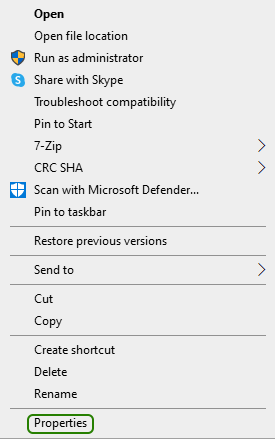
Find AC4BFSP.exe in the game installation directory (...\Steam\steamapps\common\Assassin's Creed IV Black Flag\), right-click it, and click on Properties:
Step 2.
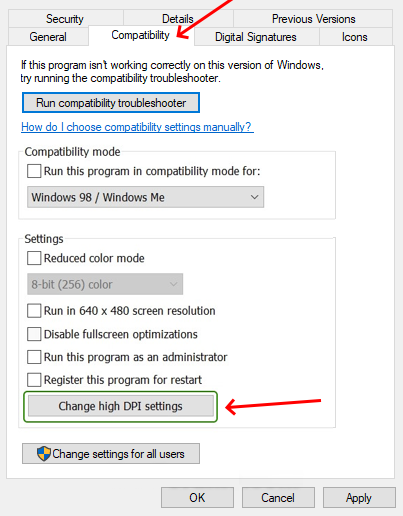
Go to Compatibility tab and click Change high DPI settings:
Step 3.
Click the Override high DPI scaling behavior checkbox and select Application, then hit OK.
*you can play around with this setting as it didn't immediately work for me
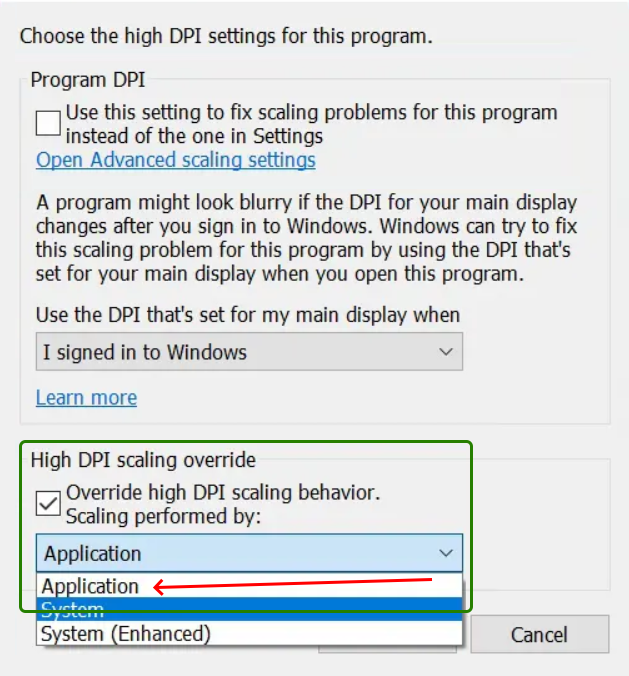
*you can play around with this setting as it didn't immediately work for me
More Assassin's Creed IV Black Flag guides
- How to remove stutter and lag from the game + Fix for the Vsync bug★ 5 (277)23k views568 ♥5 minUpdated Jan 31
- Multiplayer achievements with Cheat Engine★ 4 (152)13k views369 ♥3 minUpdated May 19, 2023
- Все достижения в Assassin's Creed IV: Black Flag (Uplay)★ 5 (245)12k views637 ♥13 minRussian
- AC4 story or multiplayer crashes on startup or loading and freezes fix★ 4 (91)10k views114 ♥1 minUpdated Dec 10, 2024
- Величие Эдварда Кенуэя★ 5 (511)9.4k views336 ♥16 minRussianUpdated Feb 4, 2021
- ⭐Снятие ограничения 60 FPS Assassin's Creed IV Black Flag⭐★ 4 (46)8.3k views71 ♥1 minRussian


🔥 Popular guides
- Upgrading to PremiumTeam Fortress 2★ 5 (20k)1441k views11k ♥6 minUpdated May 11, 2022
- No More Room in Hell Official ManualNo More Room in Hell★ 5 (2.8k)569k views2.1k ♥29 minUpdated Apr 22, 2019
- NMRiH Community Hosting GuidesNo More Room in Hell★ 5 (526)351k views653 ♥1 minUpdated Aug 10, 2022
- ULTIMATE GUIDE FOR GAME DEV TYCOONGame Dev Tycoon★ 5 (5.8k)326k views10k ♥4 minUpdated 23 Jan, 2014
- How to 'Git Gud' Soon™MORDHAU★ 5 (2k)318k views3k ♥68 minUpdated Nov 16, 2024
- Лучшие кооперативные игры SteamPAYDAY 2★ 5 (1.5k)315k views2.1k ♥56 minRussianUpdated Apr 27, 2025






This guide was created by its original author on the Steam Community. Are you the author and want it removed? Request removal.