Unachievable EASIEST Way (NO FILES) 2026
Abridged version
- Go to Steam library and click "The Stanley Parable"
- Right-click then click "Properties" (or gear icon on deck)
- Under "Launch Options" put -console
- Open the game and begin the game
- Press `/~/tilde to open console
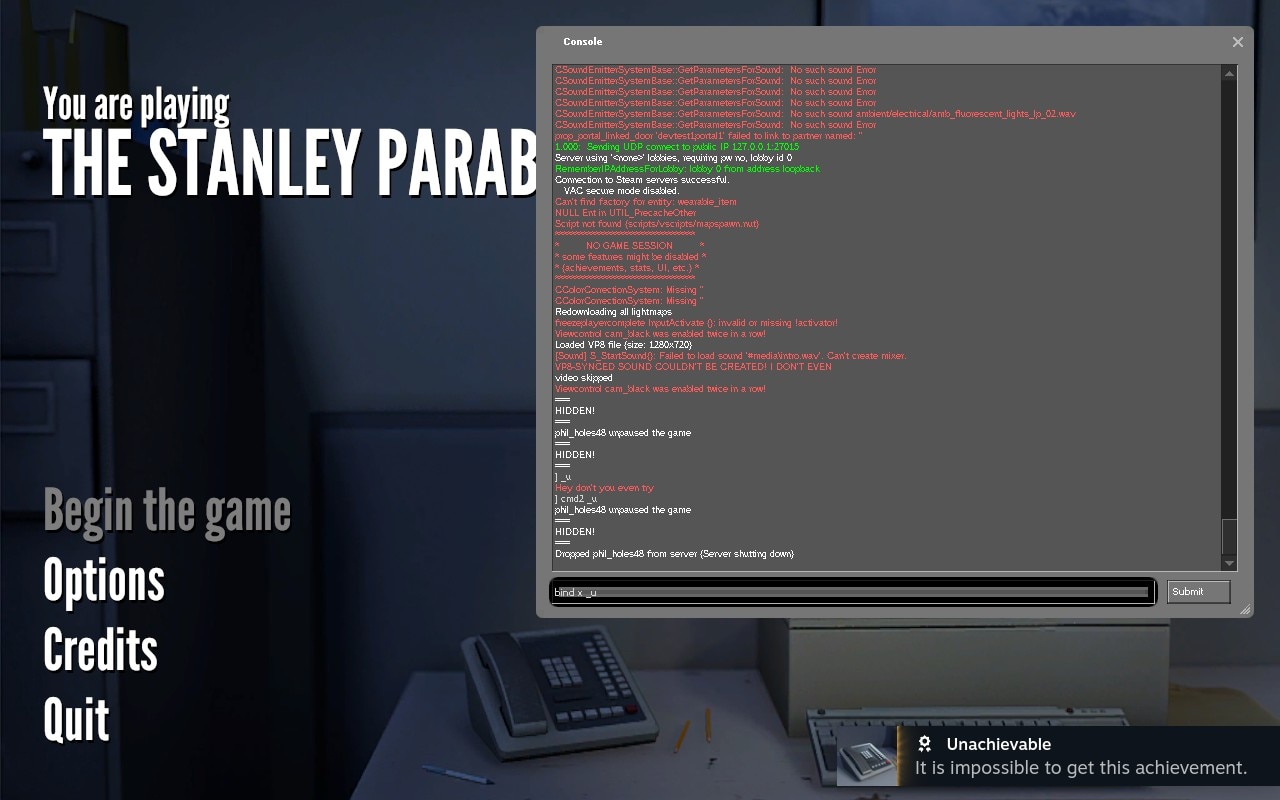
- Type cmd2 _u
- Close console and resume game
- Quit to menu
How I did it
- Go to Steam library and click "The Stanley Parable"
- Right-click then click "Properties" (or gear icon on deck)
- Under "Launch Options" put -console
- Open the game and begin the game
- Press `/~/tilde to open console
- Type _u
- Type cmd2 _u
- Close console and resume game
- Quit to menu
- Open console again and type bind x _u
Why it works
_u is what triggers the achievement. Typing it into console alone will typically not grant the achievement, instead triggering "Hey don't you even try". Putting cmd2 _u instead should bypass this. You can also try putting bind x _u or whatever key you want. If none of these work you can of course edit the config files which just binds a key to _u anyways. cmd2 _u alone should be all you need.
My results
More The Stanley Parable guides
- Endings, Achievements, and Secrets [Spoilers]★ 5 (1.6k)102k views1.8k ♥12 minUpdated Feb 4, 2015
- The Stanley Parable- Achievement Guide★ 5 (1.5k)90k views1.5k ♥4 minUpdated Nov 7, 2014
- Achievement Commitment Guide★ 5 (404)47k views227 ♥1 minUpdated Jan 9, 2014
- Все 10 достижений★ 5 (1.6k)38k views1.3k ♥5 minRussianUpdated Aug 31, 2017
- The Stanley Parable - The Guide To All Achievements★ 5 (574)36k views707 ♥4 minUpdated Jul 4, 2017
- The Stanley Parable - All Endings and Secrets★ 5 (336)30k views294 ♥1 minBulgarian



This guide was created by its original author on the Steam Community. Are you the author and want it removed? Request removal.