Update broke mods!!! >:(
Why do mods break?
 There's two reasons why mods break.
Either Beat Saber had an update that changed a part of the game that a mod required so now the mod's code needs to be updated.
OR
The person who is managing the mod hasn't tested his mod on the latest version yet so you can't install it via the Mod Assistant.
THIS DOES NOT MEAN THE MOD IS BROKEN.
It simply means that the mod creator hasn't changed the supported game version number, you can still install it manually. This guide will show you how to do so, it will only take a minute.
Manually install mods
Since the mods aren't in the mod manager you need to reinstall them manually, luckily you updated so you likely already have all the mods downloaded so we can continue.
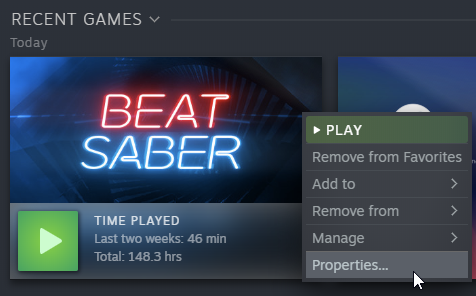 Second, after you've done the dreaded updating you want to LAUNCH THE GAME, this way we can make sure you actually updated the game and nothing is interfering. Your game should be unmodded right now so you can EXIT. I recommend adding `fpfc` to your launch options as this will launch Beat Saber into non-vr mode. (It'll launch faster and is great for testing.)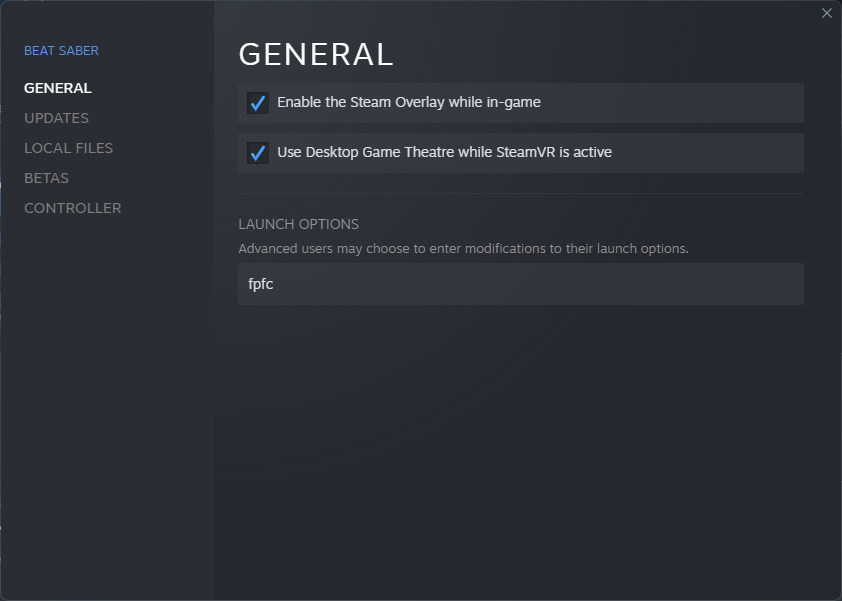
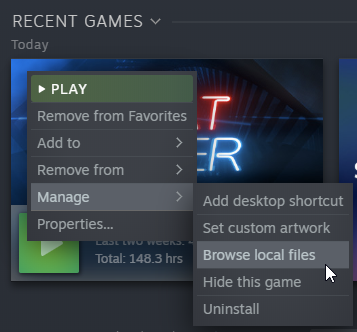 Third, you need to launch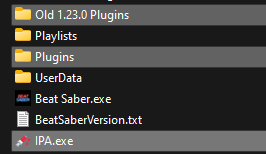
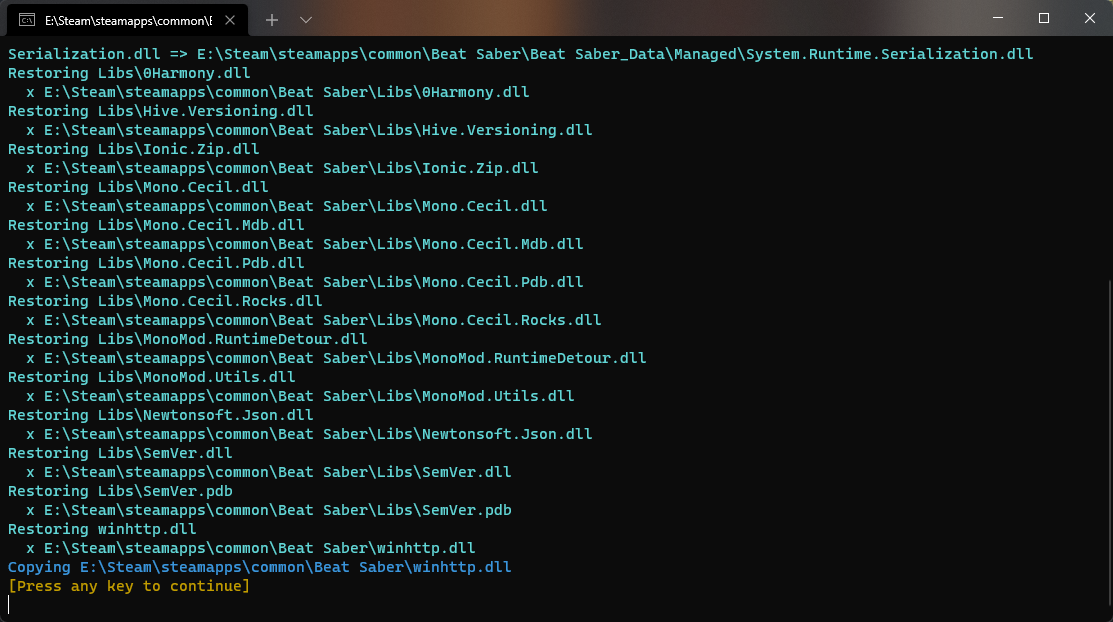 You should be seeing something like this, if you get an error then something went wrong and I won't be giving support for this, otherwise your game is modded and you can move your plugins!
IPA should automatically rename your old plugin folder to `Old 1.xx.x Plugins` and create a new and empty, `plugins` folder. All you need to do is copy paste the mods from the old folder into the new folder.
You should be seeing something like this, if you get an error then something went wrong and I won't be giving support for this, otherwise your game is modded and you can move your plugins!
IPA should automatically rename your old plugin folder to `Old 1.xx.x Plugins` and create a new and empty, `plugins` folder. All you need to do is copy paste the mods from the old folder into the new folder.NOTE THAT SOME MODS MAY STILL NOT WORK AND CAUSE YOUR GAME TO CRASH.
Now my game is crashing...
This is easy to fix, it simply means one of your mods ACTUALLY broke this time and is causing the game to crash.
This will get fixed with time but for now you need to figure out what mod caused it and remove it.
I recommend removing half your plugins, if the game still crashes the mod is within your plugins folder, if it stopped crashing, its one of the mods you deleted so you can press CTRL+Z to undo and delete half of the original half, aka 1/4th. And continue this until all crashing has stopped.
Keep in mind that multiple mods might be broken and causing issues.
And until a mod is fully updated and supports the game version you're on, all bugs and issues you encounter aren't Beat Games or the modders fault but fully your own as the game and the mod both don't officially support the game version or mods you're playing on/with.
Afterword
Other guides you should be checking out
- How to install older versions of Beat Saber using Steam★ 5 (1.4k)90k views2.4k ♥11 minUpdated May 28
- Beat Saber Modding Guide [upd. 2019/03/26]★ 4 (149)58k views240 ♥1 minUpdated Aug 5, 2021
- How to prevent Beat Saber from updating★ 5 (369)28k views719 ♥2 min
- Beat Saber - Добавление музыки и модов в игру с помощью Mod assistant★ 4 (77)22k views149 ♥1 minRussianUpdated Sep 30, 2024
- How to get better at Beat Saber★ 5 (457)21k views84 ♥1 minUpdated Nov 12, 2020
- 🩺 Quick Warm-Up for Beat Saber (2 mins)★ 5 (1.1k)18k views1.7k ♥4 minUpdated Jan 31, 2023



- Upgrading to PremiumTeam Fortress 2★ 5 (20k)1441k views11k ♥6 minUpdated May 11, 2022
- No More Room in Hell Official ManualNo More Room in Hell★ 5 (2.8k)569k views2.1k ♥29 minUpdated Apr 22, 2019
- NMRiH Community Hosting GuidesNo More Room in Hell★ 5 (526)351k views653 ♥1 minUpdated Aug 10, 2022
- How to 'Git Gud' Soon™MORDHAU★ 5 (2k)318k views3k ♥68 minUpdated Nov 16, 2024
- Лучшие кооперативные игры SteamPAYDAY 2★ 5 (1.5k)315k views2.1k ♥56 minRussianUpdated Apr 27, 2025
- Desert Eagle Heat Treated | Blue GemCounter-Strike 2★ 5 (1.6k)293k views1.5k ♥2 minUpdated Jan 16





This guide was created by its original author on the Steam Community. Are you the author and want it removed? Request removal.