1001 Nights Achievement Help/Guide
Breakdown of Mechanics
From my recent understanding via a 10 year old forum post. The cycle is tracked across all save files with the same counter. Merely a game hour counter that can be sped up or slowed down.
Said item link: https://forum.paradoxplaza.com/forum/threads/1001-nights-one-saved-game-how-many-currently.891227
This shared counter though can be irreversibly broken if any of your saves is modded during some point; From launch (2015) or when a certain workshop mod was downloaded (Whenever). Such was in my case.
Step by Step Guide
Step 1:
Download a Hex editor.
I've personally use Hxd on multiple occasions and will be shown in this guide. (Note: The official website looks very outdated)
Said item link: https://mh-nexus.de/en/hxd
Step 2:
Navigate to the Cities Skylines main folder.
C:/Users/Account Name/AppData/Local/Colossal Order/Cities_Skylines
Note: (Turn on "show hidden files,folders and drives" in windows folder options under the view category)
Scroll to find the file userGameState.cgs. Open the file with the hex editor.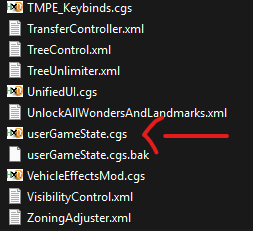
Step 3:
Locate the following text.
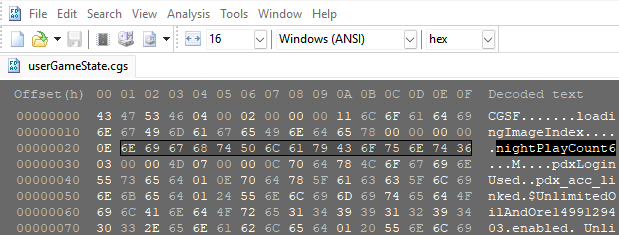
Now only highlight the number section or whatever symbol comes after the previous text.
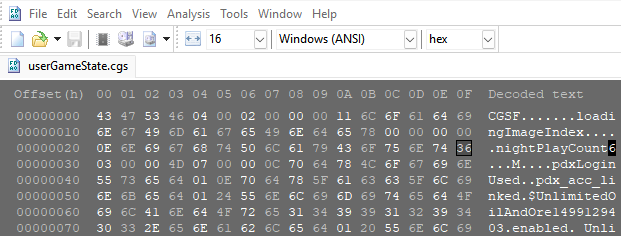
On the right, you will see the amount of days or nothing/INVALID. Invalid in my case.
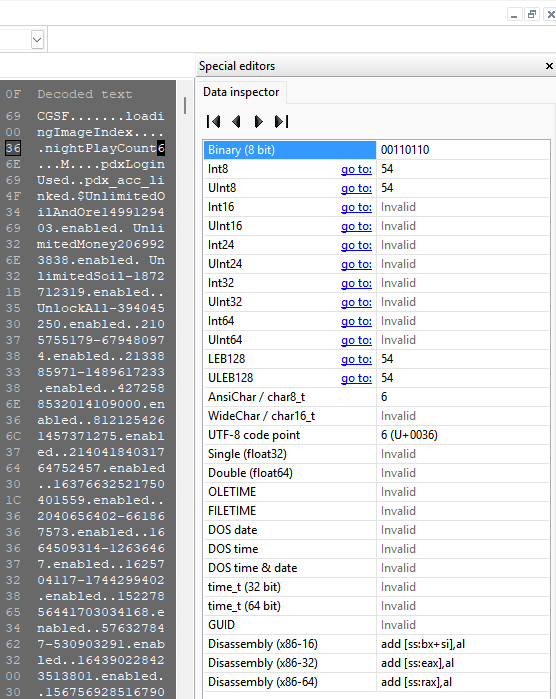
Now at this point, You can save a original copy this file elsewhere if you want, before the change takes place.
Now simply put this binary sequence into the Binary (8 bit) area. 11100111
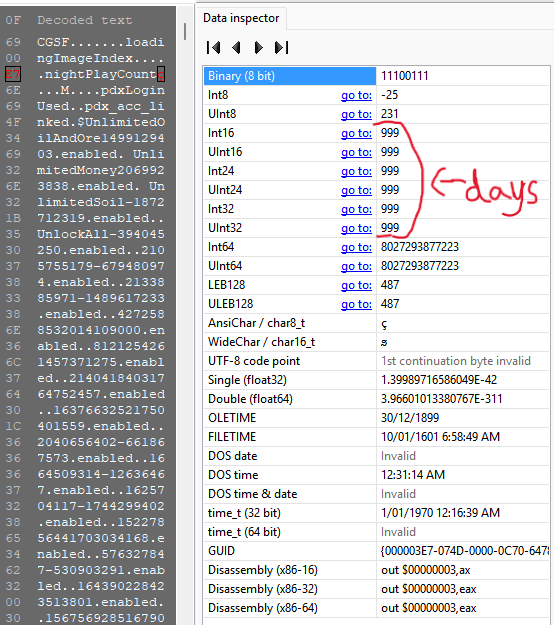
I've given a 2 cycle spacing incase you saved your game, just before the 'switch over' and or 'count up'. Now go save and overwrite the file, then load into your desired save game and play. You should see a change soon.
(I recommend you set the game at max speed)
If you don't see a change, please comment down below for help.
Beat Cities: Skylines's achievements?
Flex it — let your friends know you pulled it off.
- The Beginner's Guide to Traffic★ 5 (5.9k)167k views13k ♥27 minUpdated Sep 26, 2015
- HOW TO TRAFFIC★ 5 (3.5k)95k views5.2k ♥33 minUpdated Mar 26, 2017
- 都市天际线模组推荐指南V5.1★ 5 (1.9k)67k views6.5k ♥29 minSimplified ChineseUpdated Dec 26, 2023
- Cities Skylines: An In-Depth Beginner's Guide & Walkthrough★ 5 (926)66k views2.8k ♥37 minUpdated Apr 9, 2015
- Traffic Planning Guide for Realistic Cities★ 5 (1.4k)59k views3.1k ♥30 minUpdated Jul 20, 2017
- Cities Skylines | A Beginner's Guide To Using Mods & Custom Content★ 5 (898)47k views2k ♥28 minUpdated May 21, 2023




- Upgrading to PremiumTeam Fortress 2★ 5 (20k)1441k views11k ♥6 minUpdated May 11, 2022
- No More Room in Hell Official ManualNo More Room in Hell★ 5 (2.8k)569k views2.1k ♥29 minUpdated Apr 22, 2019
- NMRiH Community Hosting GuidesNo More Room in Hell★ 5 (526)351k views653 ♥1 minUpdated Aug 10, 2022
- ULTIMATE GUIDE FOR GAME DEV TYCOONGame Dev Tycoon★ 5 (5.8k)326k views10k ♥4 minUpdated 23 Jan, 2014
- How to 'Git Gud' Soon™MORDHAU★ 5 (2k)318k views3k ♥68 minUpdated Nov 16, 2024
- Лучшие кооперативные игры SteamPAYDAY 2★ 5 (1.5k)315k views2.1k ♥56 minRussianUpdated Apr 27, 2025






This guide was created by its original author on the Steam Community. Are you the author and want it removed? Request removal.