[9.0] A Scrappy Guide on Scrap
Disclaimer
I don't charge for guides. If you see this reposted elsewhere then feel free to report it. I only post on Steam.
Disclaimer: This majority of this guide was wrote for 5.1. Concepts have remained the same through multiple releases. Allographyne has it's own section to highlight key changes. I haven't tested it extensively so the next part applies doubly for that.
As always, if you see an error please let me know as not all version changes are always documented, and not all documented changes are caught by me.
Beware of general gameplay mechanics spoilers.
----
Changes to watch:
9.0 Allographyne added as a substitute item in production lines. Resource patch generation reworked. Verify all previous scrapping operations.
8.0 Added a new sector if you own the Envoy DLC.
7.6 Doesn't appear to change anything in the guide.
Changes for 7.5 appear to mainly be bug fixes related to scrapping.
This line: "Changed production materials for Hull Parts and Claytronics production modules."
didn't change requirements or times of scrapping.
No significant changes appear to have been made for 7.1.
The major changes for 7.0 are solar % changes throughout the galaxy. Check your previous production lines if you consulted this guide before then.
The Ships
Manticore -The Manticore is the M Class scrapping vessel classified as a Tug. It comes with three Scrap Tractors which allow it to tug M Class and below wrecks as well as scrap blocks created by the Teuta. When manually flying use the F key while targeting scrap to begin tugging it. While tugging you will move at a decreased speed but can still enter travel drive. When you reach a scrap processor that is available to take scrap you are given the prompt to press F again to deposit the scrap. Do this 100 times for an achievement.
Locations to buy Manticore:
Alliance of the Word(ALI) - Trinity Sanctum VII
Riptide Rakers(RIP) - Avarice -- Tides of Avarice DLC
Segaris Pioneers(PIO) - Brennan's Triumph -- Cradle of Humanity DLC
Teladi Company(TEL) - Ianamaus Zura IV
Scale Plate Pact(SCA)* - Hewa's Twin IV
The corresponding faction representatives will also have the Manticore blueprint and related scrapping module blueprints.
*SCA can only sell Manticores if you force a Wharf onto a station you build for them.
---------------------------------------------------------------------------------------
Teuta - The Teuta is the L class scrapping vessel classified as a Compactor. The Teuta uses build drones to deconstruct L,XL, and station wrecks as well as natural scrap into scrap blocks for the Manticore to haul away. The Teuta cannot be manually piloted to scrap these items.
Locations to buy Teuta:
Riptide Rakers(RIP) - Avarice -- Tides of Avarice DLC
The corresponding faction representative will also have the Teuta blueprint.
---------------------------------------------------------------------------------------
Default Behavior - Auto Salvage
Auto Salvage is a Default Behavior that requires a Two Star Pilot to set. This behavior will make Manticores look for scrap in their local area(2 jumps default) and sell to processors in that local area. Teutas will look for L,XL, and station wrecks as well as natural scrap in their local area(2 jumps default).
Auto Salvage cannot be set up as a fleet with the order "Mimic Commander" at the time of this writing.
Auto Salvage is the default behavior when you set a ship to "Salvage for Commander" on a station.
This now only works for Manticores. Attempting to do it with Teutas, including the old work around, makes the Teuta defend for commander.
---------------------------------------------------------------------------------------
Salvage at Position
Salvage at Position is a new command that was added with 6.0. It will give a modifiable radius for a ship to salvage at similar to defend position. This command allows for you to better control where you collect scrap at without the use of a blacklist. I suggest using this command when using a Teuta to salvage naturally occurring scrap as it will allow the Teuta to stay closer to your stations.
Salvage at position can also be used with Repeat Order. This is most commonly used with the Manticore. After adding salvage at position to the queue you then right click on your station and select deliver scrap.
The Sectors
In the game there is a naturally occurring resource called Raw Scrap. The Raw Scrap comes in two forms, both of which will show up as blue on your map. One form is a wreck which is used by the Teuta and the other is a scrap piece used by the Manticore.
The main information to pay attention to in this next part is sectors where scrap is located. As the AI doesn't field large scrap fleets it will be hard for the player to exhaust all the scrap in the area. Feel free to build in as many sectors as you like and adjust scrap needs as the situation changes.
---------------------------------------------------------------------------------------
These are the sectors that have naturally occurring scrap listed in highest concentration to lowest concentration. Approximate values are based on my common gate activity and what is listed in my encyclopedia:
Silent Witness XII - 4,881,000
Getsu Fune - 4,171,000
Matrix #101 - 2,662,000 - Timelines
Hewa's Twin V - 1,634,000
Ore Belt - 1,387,000 - Timelines
Windfall IV - 1,263,000 - Tides of Avarice
Family Nhuut - 1,259,000 - Split Vendetta
Rhy's Defiance - 1,119,000 - Split Vendetta
Ocean of Fantasy - 828,000 - Kingdom End
Faulty Logic I - 305,000
Circle of Deceit - 279,000
Scale Plate Green I - 246,000
Fires of Defeat - 173,000 - Split Vendetta
Matrix #79B - 92,377
Heretic's End - 56,412
Scarlet Star- 26,733 - Envoy
Tharka's Cascade XV - 8,924
Grand Exchange III - 8,461
The Modules
There are three modules used specifically for scrapping. The processor, the recycler, and the Terran recycler. These modules are classified as Processing Modules but can be obtained via EMP. (Thanks Oksamis!)
The processor takes scrap from Manticores and turns that raw scrap into scrap metal. Each processor can only process one piece of raw scrap at a time with the maximum value of the scrap processed per cycle being 150 and each cycle taking one minute. The scrap metal is classified as a solid and needs the corresponding solid storage.
*IMPORTANT*
To automate a scrap processor it is necessary to have a valid docking area for M ships.
Factions to buy processor blueprint from:
Alliance of the Word
Riptide Rakers -- Tides of Avarice DLC
Segaris Pioneers -- Cradle of Humanity DLC
Teladi Company
Scale Plate Pact
---------------------------------------------------------------------------------------
The recycler takes scrap metal produced by the processor and turns that scrap metal into Hull Parts and Claytronics in alternating cycles. It is possible to create only one of these products by limiting the container storage for the undesired product to one unit.
Factions to buy recyler blueprint from:
Alliance of the Word
Riptide Rakers -- Tides of Avarice DLC
Teladi Company
Scale Plate Pact
---------------------------------------------------------------------------------------
The Terran recyler works in much the same way as the recycler. It takes scrap metal produced by the processor and turns it into Computronic Substrate and Silicon Carbide in alternating cycles. If you wish to create only one of these products then you can do so by limiting the other product to only one unit in the container storage.
Factions to buy recyler blueprint from:
Segaris Pioneers -- Cradle of Humanity DLC
The Ratios(Math)
So this is probably the real reason you're here. Well then let me give you the TL;DR then I'll go into more detail. These numbers assume 100% solar and 100% uptime.
Alternating Mode(Default):
Processor:Scrap Recyler:Solar - 1:4:44
Processor:Terran Scrap Recycler:Solar - 1:1.2:19.88
Processor:Terran Scrap Recycler:Terran Solar - 1:1.2:69.6
Hull Parts only (24,000 per hour)
Processor:Scrap Recycler:Solar - 1:10:48.57
Claytronics only (1,800 per hour)
Processor:Scrap Recycler:Solar - 1:2.5:42.86
Computronic Substrate only (600 per hour)
Processor:Terran Scrap Recyler:Solar - 1.33:1:25.68
Processor:Terran Scrap Recycler:Terran Solar - 1.33:1:89.9
Silicon Carbide only (4,320 per hour)
Processor:Terran Scrap Recycler:Solar - 1:3:22.28
Processor:Terran Scrap Recycler:Terran Solar - 1:3:78
---------------------------------------------------------------------------------------
Ok so here are the numbers
Scrap Processor - 1,500 Energy Cells + 150 Raw Scrap = 150 Scrap Metal per minute
Solar - 10,500 Energy Cells per Hour
Terran Solar - 3,000 Energy Cells per Hour
Scrap Recyler (5 minutes per cycle)
-Hull Parts: 3,500 Energy Cells + 75 Scrap Metal = 200 Hull Parts per Cycle
-Claytronics: 12,000 Energy Cells + 300 Scrap Metal = 60 Claytronics per Cycle
Terran Scrap Recycler (5 minutes per cycle)
-Computronic Substrate: 12,500 Energy Cells + 1,000 Scrap Metal = 50 Computronic Substrate per Cycle
-Silicon Carbide: 4,000 Energy Cells + 250 Scrap Metal = 360 Silicon Carbide per Cycle
Number Crunching:
Scrap Processor - Multiply everything by 60 to get a per Hour breakdown
90,000 Energy Cells + 9,000 Raw Scrap = 9,000 Scrap metal per Hour
Alternating Cycle(Default)
Hull Parts - 6 cycles (30 minutes)
Claytronics - 6 cycles (30 minutes)
Hull Parts - 21,000 Energy Cells + 450 Scrap Metal per Hour
Clayronics - 72,000 Energy Cells + 1,800 Scrap Metal per Hour
1 Recyler - 93,000 Energy Cells + 2,250 Scrap Metal per Hour
9,000 Scrap Metal(from processor) / 2,250 Scrap Metal(per Recycler) = 4
90,000 Energy Cells(from processor) + 4 * 93,000 Energy Cells(from Recyler) = 462,000 Energy Cells
Divide by 10,500 = 44 Solars
So 1:4:44
I leave the other calculations for you to do at home.
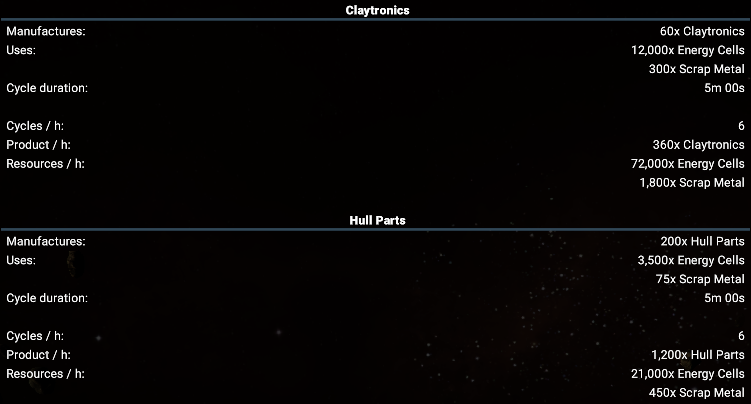
Due to the large amount of math in this post I won't be doing calculations based off of workforce. I will however note that recyclers will top out at 134% workforce efficiency meaning 480 Claytronics per cycle and 1608 Hull Parts per cycle.
Theory Crafting
Ok so at this point we've seen where the scrap is guaranteed to be and we've seen the ratios needed to make that scrap into something useful. So it's time now to look at what we can do with this information.
Natural scrap fields are great places to collect scrap. Other good sources of scrap are places where large battles take place; either that be Xenon gates or war fronts. So we are most likely to build a scrap processing facility near/in these sectors. At first glance it looks like there is a lot of solar needed to turn scrap into something useful so let's look at the energy cell needs.
One processor is 90,000 Energy Cells. There's no getting around this and you'll probably want to be processing onsite due to the slow travel time of the Manticore. So at 100% solar 90,000 Energy Cells is approximately 9 Solars. That means if we're doing a full production chain with 100% efficiency you need approximately the following amount of solars to do recycling:
Alternating Universal - 36
Hull Parts only - 40
Claytronics only - 35
Alternating Terran - 12
Computronic only - 15
Silicon Carbide only - 14
(Divide those numbers by your solar % to get the amount required for your selected sector. As shown below.)
So obviously there's a lot of Solar Panels needed ... if we're in 100% solar. What if we're in Solar greater than 100%? Enter Avarice.
Avarice has a solar value of 1390%. That's 13.9x greater than standard meaning one solar produces 10,500 * 13.9 = 145,950 Energy Cells per hour. So let's take a look at our recyclers again but with Avarice solar.
Alternating Universal - 36/13.9 = 2.58
Hull Parts only - 40/13.9 = 2.88
Claytronics only - 35/13.9 = 2.52
Alternating Terran - 12/13.9 = .86
Computronic only - 15/13.9 = 1.08
Silicon Carbide only - 14/13.9 = 1.01
Now THOSE number are a lot better. So given we'd like local processing yet also have Avarice numbers that leads to the obvious conclusion of splitting the chain.
The Plan
So here's what we do:
We process locally with a simple 1 Processor, 1 Dock, 1 Container Storage, 1 Solid Storage, 9 Solar(if 100% solar), 1 Pier(optional)

We recycle in Avarice with a simple setup of 1 Protectyon Shield, 1 Dock, 1 Container Storage, 1 Solid Storage, 1 Pier(optional) and however many Recyclers and Solars we want.
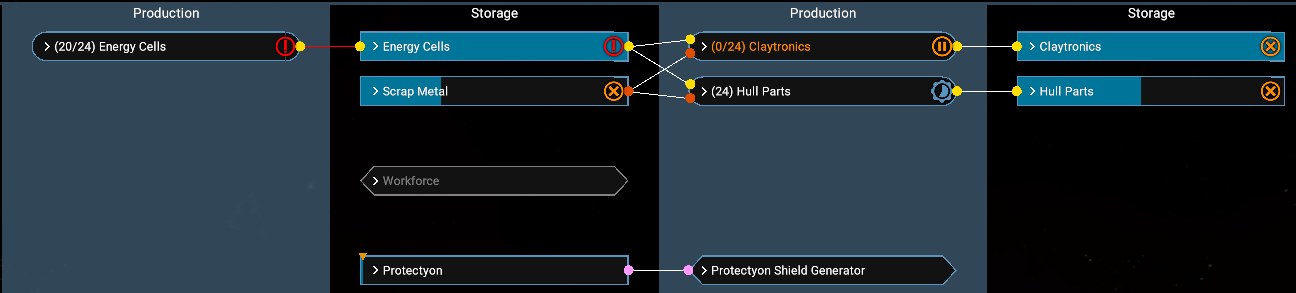
We set up a Miner to haul the solid Scrap Metal from our local processing stations to the central recycling station. This is accomplished with a one star pilot and the "Repeat Order" behavior.
Right click processing sector -> Buy In -> Scrap Metal
Right click Avarice sector with recycling -> Sell In -> Scrap Metal
The sell in Avarice command also allows you to get some cash from the Riptide Rakers processing stations that buy Scrap Metal.
Now the crux of this issue is you must progress far enough in the Riptide story where a protectyon supply isn't an issue for you. If you wish to avoid Avarice I'll list some alternate high solar sectors but remember that you'll need to adjust the required power accordingly.
Blacklist
So if we're going to be doing local processing then we want to set up a blacklist for our Manticore/Teuta that are assigned to salvage.
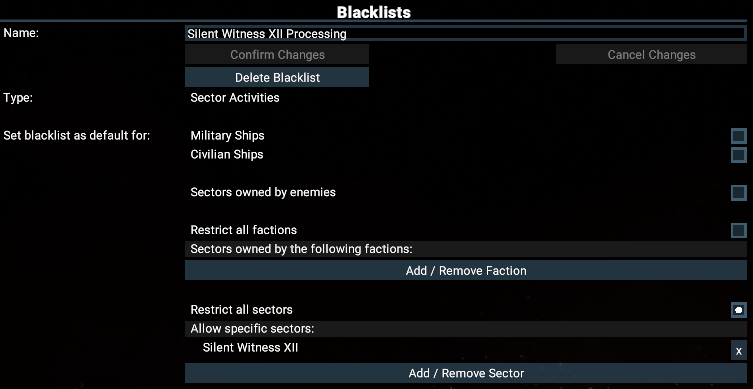
Blacklist -> New Blacklist -> Sector Activities -> Restrict All Sectors
This will change the list to allowed sectors. In this list we want to put the sector we are processing in, for example Silent Witness XII. I then like to name the Blacklist "Silent Witness XII Processing".
You now go to the behavior tab for subordinates (if station traders) or the ship and uncheck default Sector Activity. You then put in the new blacklist you created. This blacklist will keep your salvage crew from wandering off.
Alternate High Solar % Sectors
Mercury - 714 - Cradle of Humanity
Matrix #101 - 408 - Timelines
The Reach - 367
Menelaus' Oasis - 271 - Kingdom End
Scarlet Star - 266 - Envoy
Heart of Acrimony II - 245 - Split Vendetta
Family Kritt - 239 - Split Vendetta
Matrix #79B - 239
Freedom's Reach - 221 - Timelines
Zyarth's Dominion IV - 210 - Split Vendetta
Gaian Prophecy - 208 - Cradle of Humanity
Holy Vision - 208
Bright Promise - 204
Matrix #451 - 201
Applications
Scrapping in the base game provides extra hull parts and claytronics which are used heavily in station building. Hull parts are also heavily used in ship building. Scrapping starts shining when you have the Tides of Avarice DLC
Closed Loop Economy
Closed Loop, or CL for short, is a new economy and build method introduced with the Tides of Avarice DLC. Closed Loop allows for many Argon based items to be built using only Energy Cells, Hull Parts, and Claytronics. These items include weapons, shields, turrets, drones, deployables, and missiles. This means that many commonly used items such as shield components, turret components, drone components, advanced electronics, and missile components are no longer needed to create them.
Sample list of closed-loop applications:
Ship building
Station drones
Auxillary resupply
Missile / Torpedo fighters
Defense platforms (with missile turrets)
Crafting Advanced Satellites and selling them to factions for premium
Alternate Production chain that can save vastly on modules - See Erei's Calculations in comments for full breakdown
Allographyne
New with 9.0, Allographyne is a substitute item you can use in production lines. Given that Allographyne is an addition to the scrap system, I will assume you are familiar with scrapping in general and will just be highlighting the key points. The key places to get it are from recycling Kha'ak ships and the few natural fields.
Allographyne is used as a substitution for items based on average ware cost of the missing items rounded up. The average price of Allographyne is 1,400.
Example substitutions:
Energy Cell (Average 16) : 1 Allographyne replaces 87.5 Energy Cells
Computronic Substrate(Average 8,280) : 6 Allographyne to replace 1 Computronic Substrate
---------------------------------------------------------------------------------------
Allographyne scrap processor is the same requirements as normal scrap processor, 10 Energy Cells per Allographyne Scrap, maxing out at 150 Allographyne Scrap per minute (9,000 per hour)(Theoretically).
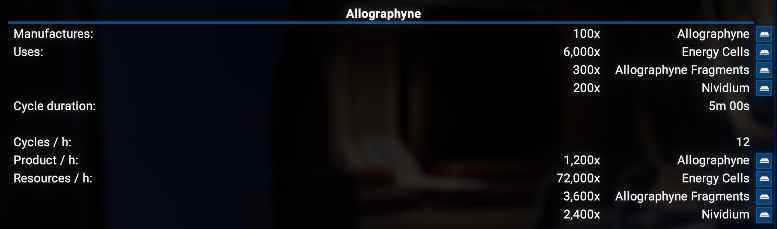
Given the rates, if you can somehow hit it, then the Optimal ratio is:
1 Allographyne Scrap Processor : 2.5 Allographyne Scrap Recycler : 25.7 Energy Cell Production at 100% solar. Given the scarcity of everything involved in the Allographyne process I don't expect this to be hit.
Easier to Read:
1 : 2.5 : 25.7 - Optimal
1 : 1 : 10.28 - Alternate 1
1 : 2 : 20.57 - Alternate 2
---------------------------------------------------------------------------------------
Places to buy Allographene Modules:
Processor:
Hatikvah Free League
Teladi Company
Free Families - Split Vendetta
Queendom of Boron - Kingdom End
Segaris Pioneers - Cradle of Humanity
Recycler:
Hatikvah Free League
Teladi Company
Free Families - Split Vendetta
Queendom of Boron - Kingdom End
Segaris Pioneers - Cradle of Humanity
---------------------------------------------------------------------------------------
Allographyne Scrap Sectors:
These values are based on what was current in my Encyclopedia. Values may vary but should give an idea of relative ranking and where to look.
Getsu Fune - 48,341 - Cradle of Humanity
Matrix #101 - 43,742 - Timelines
Circle of Deceit - 44,625
Silent Witnexx XII - 37,798
Family Nhuut - 6,267 - Split Vendetta
Basic Troubleshooting
There are a few issues that come up every now and then so I'll add just some basic troubleshooting steps here. These are in no way exhaustive and there could be more complex issues you run into. If you do, help is usually available on Egosoft's Discord or the Steam forums where you can post screenshots. Trying to troubleshoot through the comment section will be painful for all involved.
- Check there are small wrecks or cubes available. A natural scrap field can vary in what is available. The best case scenario is a Teuta assigned to that field with the Manticore grabbing scrap cubes.
- Check the processor. It can only hold one item at a time and Manticores won't deposit more when they're busy.
- Check there's a Medium dock that is fully built. Manticores won't deposit without a medium dock even though they don't physically land.
- If it's an enemy controlled space where you don't have docking permissions, Manticores may not behave as expected. - Reported by forster339
- AI logic can be very wonky here. Check all of your blacklists to see if your Manticores are under one that is "Hazardous Regions". You may have to take them off of automated scrapping on the station and put them on manual / repeat scrap runs.]
- Make sure it has construction drones as those are needed to break down large wrecks.
Closing and Acknowledgements
That's it! Scrapping is a base mechanic that can be enjoyed by anyone, no DLCs required. The only thing you miss out on is the Teuta and Avarice's high solar %.
If you have any questions, suggestions, or corrections please let me know and I'll do my best to address it. If you would like to see pictures associated with sections I can try and get those added also.
Acknowledgements:
Egosoft for this awesome game
Anzal on Twitch for showing me how to get Teutas to Auto Salvage for a station
Oksamis for confirming Processor and Recycler blueprints can be obtained with EMP bombs.
Aotearas for double checking my math and pointing out my errors.
WolfTooth on Discord for helping spot missing Zyarth's Dominion solar %
Sentenced from https://www.qsna.eu for exact scrap values of sectors
ANGELA26312 from Egosoft Discord for workforce efficiency and Advanced Satellites suggestions
Bert-Person for catching my slip up on 7.0 transition
Doom for pointing out that Teutas can no longer be assigned to stations in salvage mode.
Erei - For breakdown of using scrapping as an alternate to normal production chains. (Comment Section)
forster339 - Information about possible bug when scrapping in enemy territory.
Other guides:
https://steamcommunity.com/sharedfiles/filedetails/?id=2968249103
- A Guide to Game Starts★ 5 (209)28k views437 ♥27 minUpdated Jan 7
- X4 Beginner Guide 5.1★ 5 (393)27k views1.2k ♥22 minUpdated Mar 7, 2023
- All Ownerless Ships in X4: Foundations (9.00 Base Game + All DLCs)★ 5 (453)27k views1.1k ♥10 minUpdated Jun 10
- X4 Ultimate Weapons Guide. [NOW ON THE WIKI]★ 5 (343)23k views767 ♥104 minUpdated Jul 8, 2024
- Production Chain Simplified with Pictures★ 5 (471)16k views1.1k ♥7 minUpdated Mar 7, 2024
- [9.0] Economy Primer★ 5 (225)14k views601 ♥17 minUpdated Jun 14



- Upgrading to PremiumTeam Fortress 2★ 5 (20k)1441k views11k ♥6 minUpdated May 11, 2022
- No More Room in Hell Official ManualNo More Room in Hell★ 5 (2.8k)569k views2.1k ♥29 minUpdated Apr 22, 2019
- NMRiH Community Hosting GuidesNo More Room in Hell★ 5 (526)351k views653 ♥1 minUpdated Aug 10, 2022
- Лучшие кооперативные игры SteamPAYDAY 2★ 5 (1.5k)315k views2.1k ♥56 minRussianUpdated Apr 27, 2025
- Desert Eagle Heat Treated | Blue GemCounter-Strike 2★ 5 (1.6k)292k views1.5k ♥2 minUpdated Jan 16
- Treasure Hunt Puzzle SolutionsTotal War: WARHAMMER II★ 5 (6.9k)281k views15k ♥3 minUpdated Aug 19, 2021






This guide was created by its original author on the Steam Community. Are you the author and want it removed? Request removal.