Bayonetta - How to mod the game
Step by step
For this guide, I’ll be using a pre-existing mod as an example to demonstrate how to install mods in Bayonetta. (There's no need to extract zip files)
 Step 1: Open the Game Files
First, open Bayonetta’s local files and hop into the data folder.
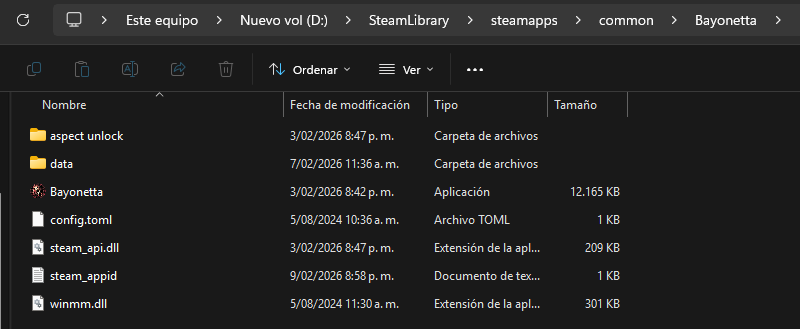 Step 2: Create the Required Folders
Inside the data folder, you’ll need to create new folders with the exact names shown by the arrows below.
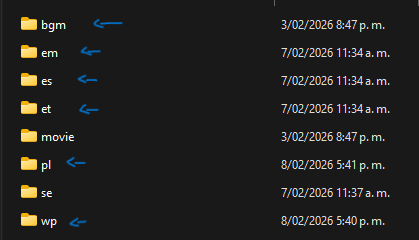 Folder meanings:
Step 1: Open the Game FilesFirst, open Bayonetta’s local files and hop into the data folder.
Step 2: Create the Required FoldersInside the data folder, you’ll need to create new folders with the exact names shown by the arrows below.
Folder meanings:
bgm — Background music
em — Special music (Serious Mode and Climax sounds)
es — Special sound effects
et — Special techniques
pl — Player / character
wp — Weapons
Make sure the folder names are written exactly as shown, or the mods will not work.
Step 3: Install the Mods
Place each mod file into its corresponding folder.
Once everything is in the correct location, simply launch the game.
If done correctly, your mods should now be active.
Bayoessentials
Download Bayoessentials here[gamebanana.com]
This is an essential mod, as it acts as a foundation for many other mods, making them much easier to use. It also automatically skips the intro, allowing you to jump straight into the game menu.
After downloading Bayoessentials, simply open the ZIP file and paste the .dll file into the game’s local files.
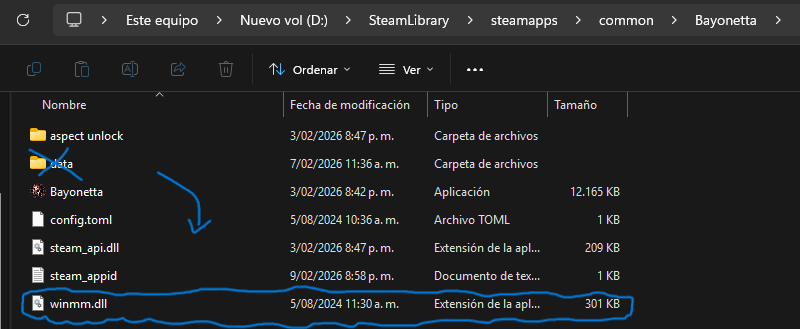 Don’t put the .dll file into the “data” folder or I’m going to touch you.
This is an essential mod, as it acts as a foundation for many other mods, making them much easier to use. It also automatically skips the intro, allowing you to jump straight into the game menu.
After downloading Bayoessentials, simply open the ZIP file and paste the .dll file into the game’s local files.
Don’t put the .dll file into the “data” folder or I’m going to touch you.Mod Websites
Here are some links to sites where you can download mods:
GameBanana[gamebanana.com]
InfernalWarks[infernalwarks.boards.net]
NexusMods[www.nexusmods.com]
Please rate my guide and show some love in the comments.

GameBanana[gamebanana.com]
InfernalWarks[infernalwarks.boards.net]
NexusMods[www.nexusmods.com]
Please rate my guide and show some love in the comments.
More Bayonetta guides
- Русификатор для Bayonetta (v1.00)★ 5 (719)40k views968 ♥3 minRussianUpdated Aug 22, 2017
- Русификатор для нашей любимой ведьмочки Bayonetta★ 5 (441)25k views933 ♥1 minRussianUpdated Jun 8, 2020
- Upgrades and Secrets★ 5 (626)17k views1.4k ♥22 minUpdated Jul 24, 2018
- Bayonetta - Telephone cheats and Secrets★ 5 (276)17k views588 ♥3 min
- Learning to get better at Bayonetta [INCOMPLETE]★ 5 (623)16k views984 ♥11 minUpdated Jul 11, 2019
- Bayonetta Hidden Verse List★ 5 (504)15k views1.2k ♥3 minUpdated Jul 21, 2020



🔥 Popular guides
- Upgrading to PremiumTeam Fortress 2★ 5 (20k)1441k views11k ♥6 minUpdated May 11, 2022
- No More Room in Hell Official ManualNo More Room in Hell★ 5 (2.8k)569k views2.1k ♥29 minUpdated Apr 22, 2019
- NMRiH Community Hosting GuidesNo More Room in Hell★ 5 (526)351k views653 ♥1 minUpdated Aug 10, 2022
- Лучшие кооперативные игры SteamPAYDAY 2★ 5 (1.5k)315k views2.1k ♥56 minRussianUpdated Apr 27, 2025
- Desert Eagle Heat Treated | Blue GemCounter-Strike 2★ 5 (1.6k)292k views1.5k ♥2 minUpdated Jan 16
- Treasure Hunt Puzzle SolutionsTotal War: WARHAMMER II★ 5 (6.9k)281k views15k ♥3 minUpdated Aug 19, 2021






This guide was created by its original author on the Steam Community. Are you the author and want it removed? Request removal.