Call Of Duty: Black Ops | How To Change Fov And Unlock Fps
How To Change Fov (Story Mode)
To change the fov simply go to this folder⬇️
(YourDrive):\SteamLibrary\steamapps\common\Call of Duty Black Ops\playersOpen the CONFIG file with the notepad
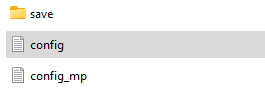
at the end of this file paste the following command⬇️
bind P "cg_fov 100"
I recommend to use 100 as maximum as a higher value could cause problems and graphic bugs
*⚠️NOTE⚠️*
I remind you that during the story after each movie the fov will reset to 80 so you will have to press "P" every time to put it back to 100
How To Unlock Fps (Story Mode)
⚠️Note⚠️
You Can't Unlock your fps in multiplayer Mode————————————————————————————————————————————
to unlock fps go to this folder ⬇️
(YourDrive):\SteamLibrary\steamapps\common\Call of Duty Black Ops\playersOpen the CONFIG file with the notepad
look for the command
seta com_maxfps and change the value to the number of fps you prefer
*example* seta com_maxfps "144"More Call of Duty: Black Ops guides
- Zombie Mode Weapon Damage/Health/Data Guide★ 5 (802)41k views811 ♥5 minBulgarianUpdated Apr 11, 2017
- Zombies Weapons Guide★ 5 (735)37k views649 ♥53 minUpdated Dec 26, 2015
- Terminal Codes★ 5 (424)36k views863 ♥2 minUpdated May 21, 2022
- How to play Zombies without internet connection.★ 5 (475)33k views801 ♥1 minUpdated Feb 3, 2017
- Config Commands and How to Use Config Commands★ 5 (183)26k views576 ♥5 minUpdated Mar 25, 2025
- 100% achievements guide★ 5 (706)23k views1.5k ♥15 minUpdated Aug 25, 2020




This guide was created by its original author on the Steam Community. Are you the author and want it removed? Request removal.