CSNZ | "Disabling" Whispering
Disabling the Whispering...
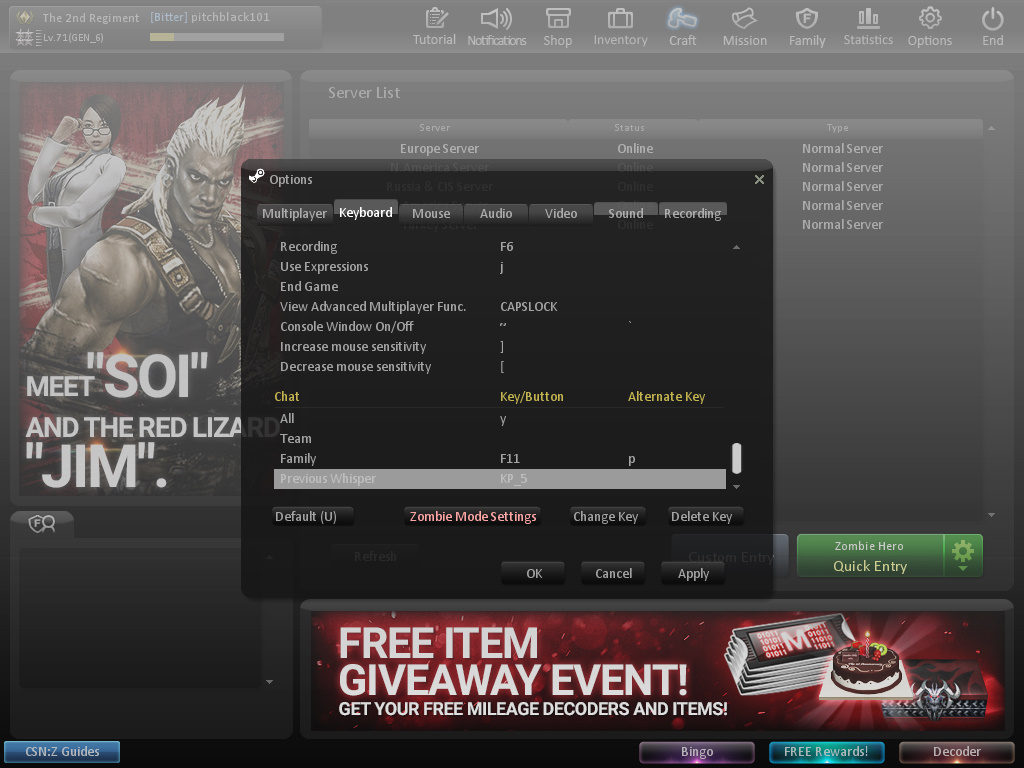
- Open CSNZ
- Go to Options >> Keyboard
- Scroll all the way down (to chat options)
- Delete every key you have for "All", "Team", "Family", and "Previous Whisper" (do this by clicking on the key/button and alternate key and press the option to "Delete Key"
- Simply click on the empty spaces below "Key/Button" and press the option to "Change Key"
- Now when the empty space is highlighted yellow, press what key on your keyboard that you want it to be. For example I set "All" to "y" and Previous Whisper to "num_pad 5", it's important that you set a key for "Team", "Family", and "Previous Whisper" because if you don't it will set it back to its default key, and that's not what you want to happen
More Counter-Strike Nexon guides
- Recommended/useful console commands★ 5 (254)11k views292 ♥1 minUpdated 28 Jun, 2015
- Большое руководство по медалям в CSN:S (264 / 264)★ 5 (358)7.7k views363 ♥419 minRussianUpdated 13 Apr, 2024
- Основа из основ (Описание, Обзор, Гайд)★ 4 (216)7.2k views122 ♥9 minRussianUpdated 2 Jul, 2016
- Как "быстро" выполнить достижение [Мастер Клинка]★ 4 (134)4.1k views99 ♥1 minRussianUpdated 1 Nov, 2014
- Conquistas de Counter-Strike Nexon Zombies★ 5 (221)3.7k views153 ♥1 minPortugueseUpdated 1 Aug, 2020
- The pistols you should own in Counter-Strike Nexon: Zombies★ 4 (60)3.7k views44 ♥2 minUpdated 26 Jun, 2015




🔥 Popular guides
- Upgrading to PremiumTeam Fortress 2★ 5 (20k)1441k views11k ♥6 minUpdated May 11, 2022
- No More Room in Hell Official ManualNo More Room in Hell★ 5 (2.8k)569k views2.1k ♥29 minUpdated Apr 22, 2019
- NMRiH Community Hosting GuidesNo More Room in Hell★ 5 (526)351k views653 ♥1 minUpdated Aug 10, 2022
- How to 'Git Gud' Soon™MORDHAU★ 5 (2k)318k views3k ♥68 minUpdated Nov 16, 2024
- Лучшие кооперативные игры SteamPAYDAY 2★ 5 (1.5k)315k views2.1k ♥56 minRussianUpdated Apr 27, 2025
- Desert Eagle Heat Treated | Blue GemCounter-Strike 2★ 5 (1.6k)293k views1.5k ♥2 minUpdated Jan 16





This guide was created by its original author on the Steam Community. Are you the author and want it removed? Request removal.