EN | UA DayZ Arma 2 DLC ACR
Introduction | Вступ
EN:
UA:
You have purchased the ACR expansion pack, but it is not loading with the game.
You purchased the ACR expansion pack, but it is not loading with the DayZ Launcher.
Sometimes the ACR expansions will not load with Arma 2 OA or DayZ Launcher even though it is installed.
This guide will show you how to fix it.
You purchased the ACR expansion pack, but it is not loading with the DayZ Launcher.
Sometimes the ACR expansions will not load with Arma 2 OA or DayZ Launcher even though it is installed.
This guide will show you how to fix it.
Ви придбали доповнення ACR, але воно не завантажується з грою.
Ви придбали доповнення ACR, але воно не завантажується з DayZ Launcher.
Доповнення ACR інколи не завантажується разом з Arma 2 OA або DayZ Launcher, хоча встановлене.
У цьому посібнику розповідається як це виправити.
Ви придбали доповнення ACR, але воно не завантажується з DayZ Launcher.
Доповнення ACR інколи не завантажується разом з Arma 2 OA або DayZ Launcher, хоча встановлене.
У цьому посібнику розповідається як це виправити.
Installing | Встановлення DLC
EN:
UA:
Install the DLC you purchased.
Launch Arma 2 to the main menu and exit.
Launch Arma 2 OA to the main menu and exit.
Launch Arma 2 to the main menu and exit.
Launch Arma 2 OA to the main menu and exit.
Встановіть DLC, що ви придбали.
Запустіть Arma 2 до головного меню і вийдіть.
Запустіть Arma 2 OA до головного меню і вийдіть.
Запустіть Arma 2 до головного меню і вийдіть.
Запустіть Arma 2 OA до головного меню і вийдіть.
If the installed DLCs are not automatically added to the game after launching Arma 2 OA, launch each DLC separately.
Launch each DLC to the main menu and exit.
Launch each DLC to the main menu and exit.
Якщо після запуску Arma 2 OA, до гри автоматично не додались встановлені DLC, запустіть кожну окремо.
Треба запустити кожне DLC до головного меню і вийти.
Треба запустити кожне DLC до головного меню і вийти.
Manual installation of DLC:
Navigate to the folder using the path below.
Each folder contains the file datacachepreprocessor.exe.
Run each of these files in each folder (to the main menu and exit).
Navigate to the folder using the path below.
Each folder contains the file datacachepreprocessor.exe.
Run each of these files in each folder (to the main menu and exit).
Ручне встановлення DLC:
Перейдіть до теки за шляхом, що вказаний нижче.
У кожній теці є файл datacachepreprocessor.exe.
Запускаєте кожен з цих файлів у кожній теці (до головного меню і вихід).
Перейдіть до теки за шляхом, що вказаний нижче.
У кожній теці є файл datacachepreprocessor.exe.
Запускаєте кожен з цих файлів у кожній теці (до головного меню і вихід).
D:\Games\Steam\steamapps\common\Arma 2 Operation Arrowhead\DLCsetup
Installing ACR | Встановлення ACR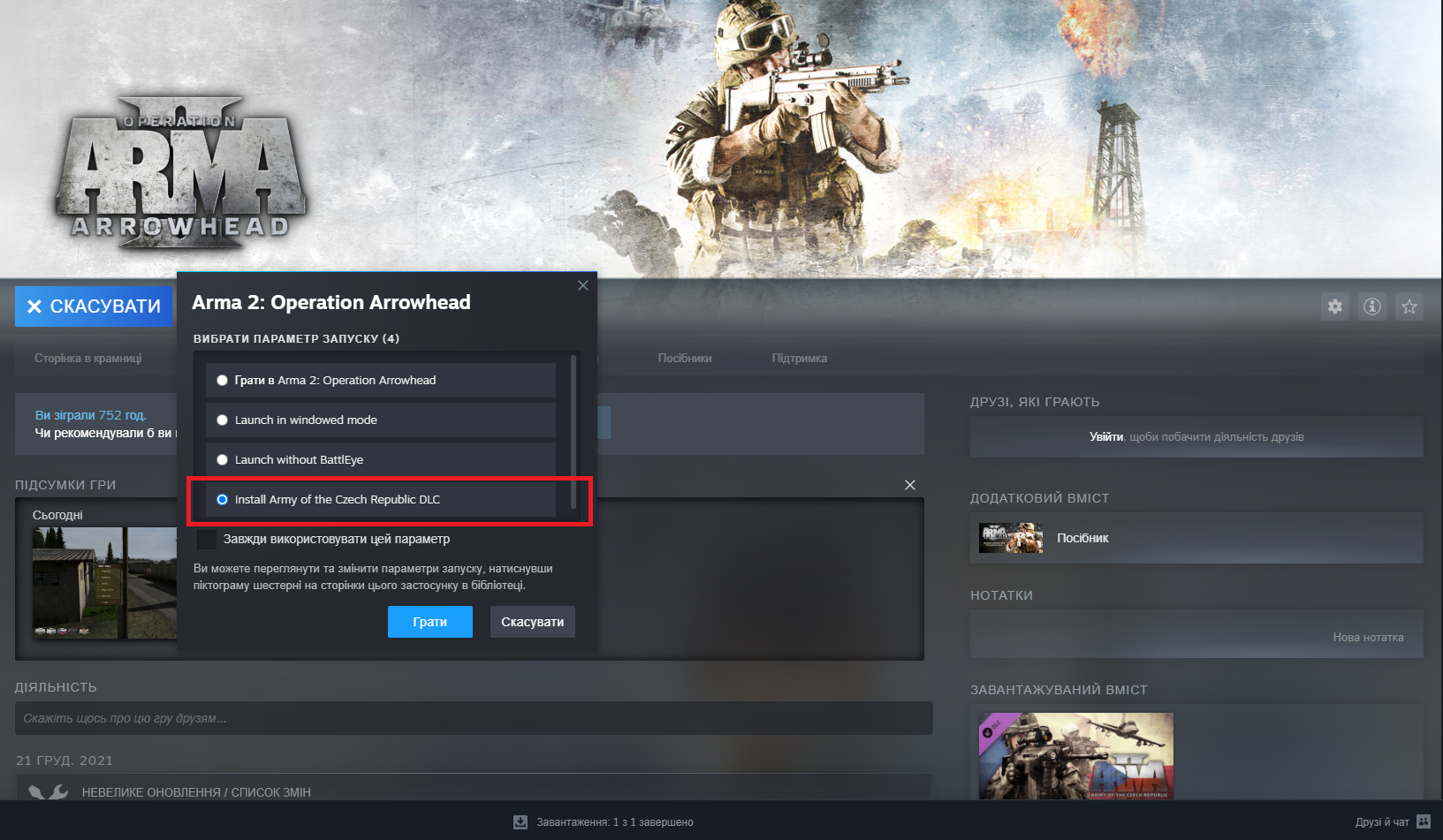
If you are not offered a choice, go to the game settings (Right-click on the game (Library) -> Settings -> Startup options).
Якщо не пропонується вибір, зайдіть в налаштування гри ( Правий Клік по грі (Бібліотека) -> Налаштування -> Параметри запуску.
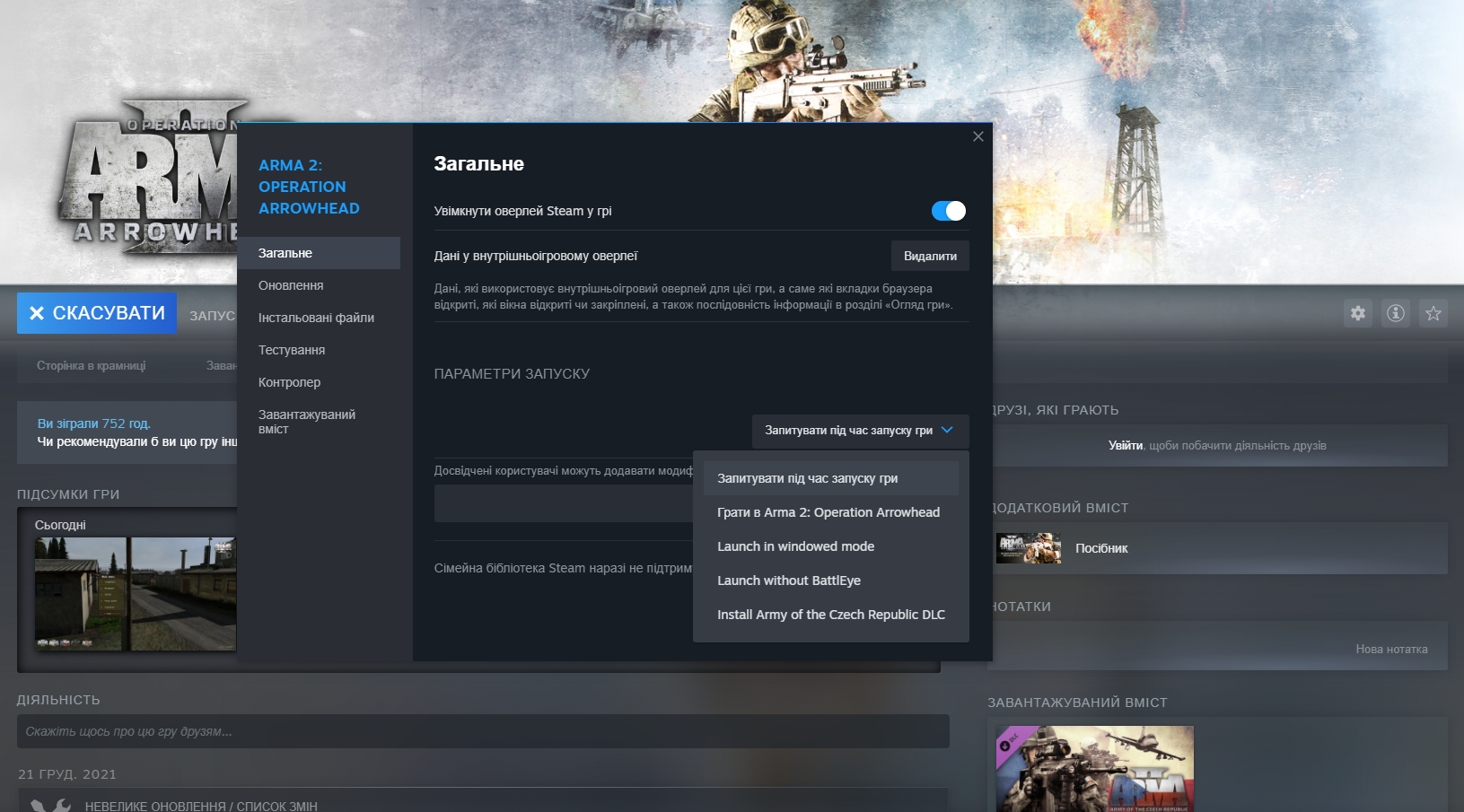
There should be no errors during installation. If an error occurs during installation, go to the official Bohemia Interactive website and find out about the problem.
При встановленні не має бути жодних помилок. Якщо при встановленні виникла помилка, перейдіть на офіційний сайт Bohemia Interactive і дізнайтеся про проблему.
Issues with Arma 2 OA | Проблеми з Arma 2 OA
EN:
UA:
Issue: Arma 2 OA is launching without ACR.
Проблема: Arma 2 OA запускається без ACR.
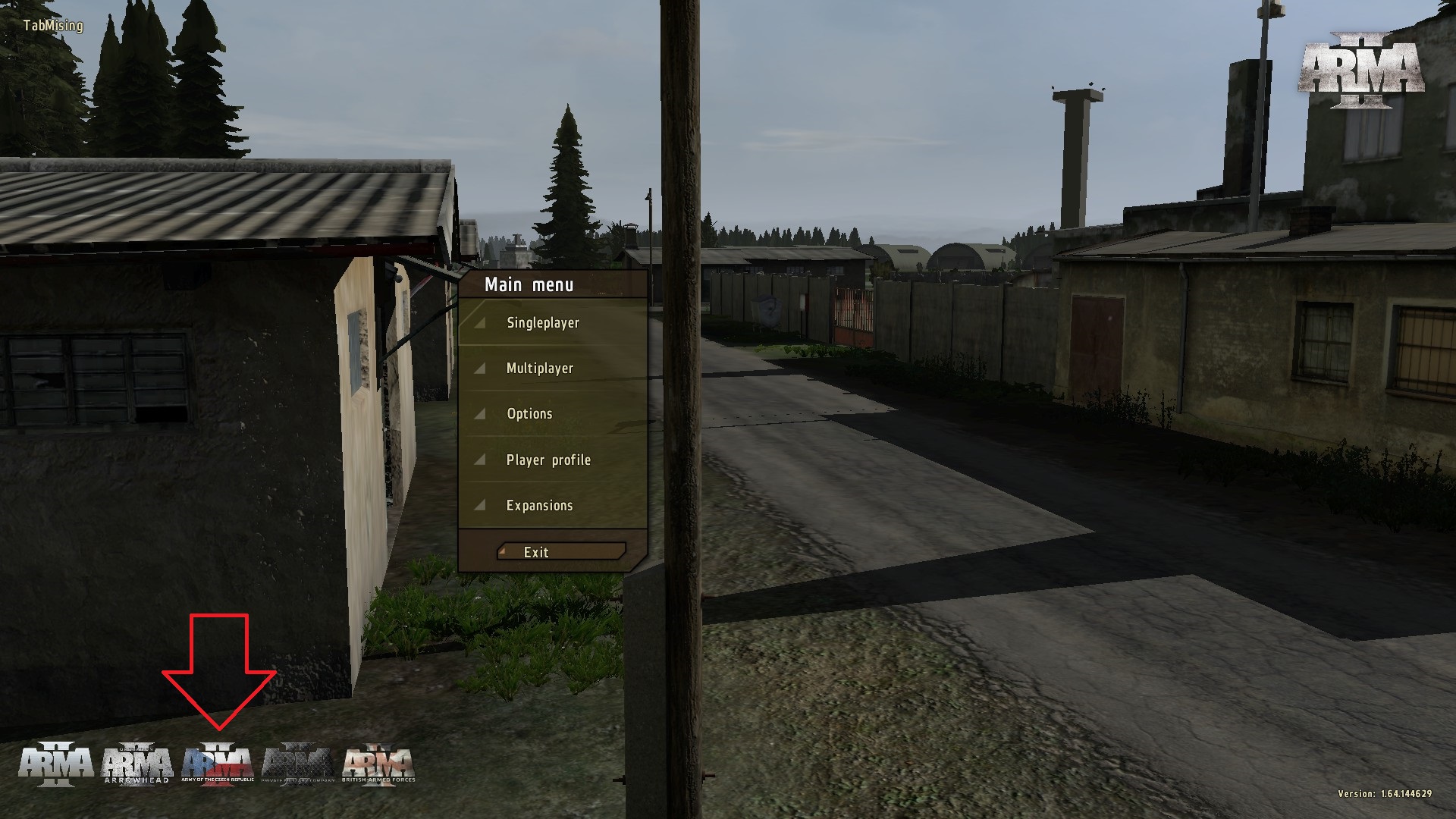
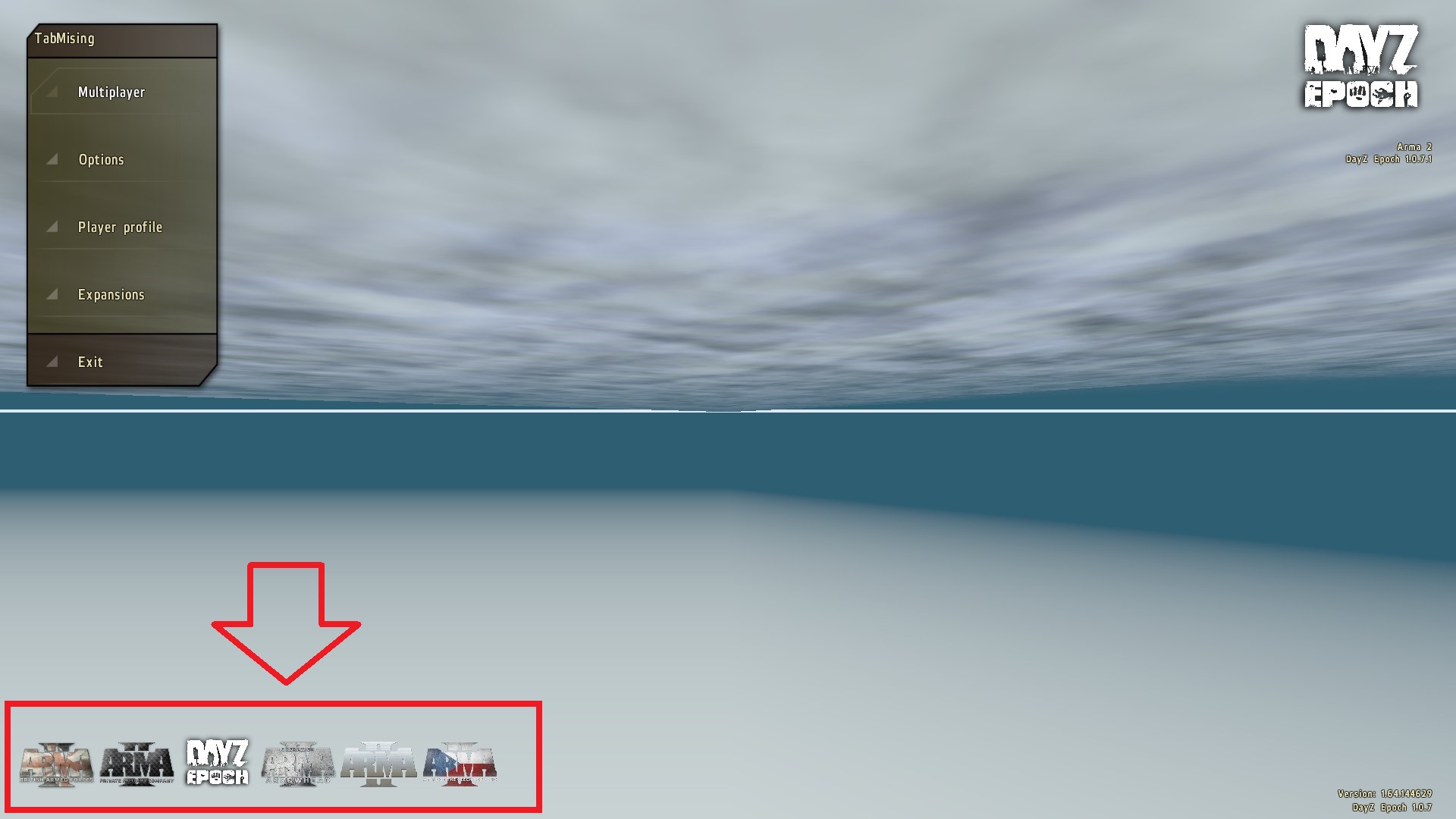
If you don't see the DLC icon in the main menu after launching Arma 2 OA, then the game has been loaded without it.
Depending on the DLC you have purchased and the mods you have installed, this icon may appear in a different sequence. You can also check the DLCs downloaded with the game in the main menu, the Expansions button.
Depending on the DLC you have purchased and the mods you have installed, this icon may appear in a different sequence. You can also check the DLCs downloaded with the game in the main menu, the Expansions button.
Якщо після запуску Arma 2 OA у вас у головному меню не з'явився значок DLC, значить гра завантажилась без нього.
В залежності від придбаних DLC та встановлених модів, цей значок може бути у іншій послідовності. Також перевірити завантажені з грою DLC можна у головному меню, кнопка Expansions.
В залежності від придбаних DLC та встановлених модів, цей значок може бути у іншій послідовності. Також перевірити завантажені з грою DLC можна у головному меню, кнопка Expansions.
If the game is downloaded without ACR.
- Navigate to the folder using the path below.
- Find the files "_runA2CO.cmd" and "_runA2CO_beta.cmd".
- Right-click and edit.
- At the bottom there is a line ":run" "-mod=%_ARMA2PATH%;EXPANSION;ca;"
- Add ACR as in the example below in both of these files.
-mod=%_ARMA2PATH%;EXPANSION;ca;ACR
- Save and run the game.
Якщо гра завантажилась без ACR.
- Перейдіть до теки за шляхом нижче.
- Знайдіть файли "_runA2CO.cmd" та "_runA2CO_beta.cmd".
- Правий клік і редагувати.
- Внизу є рядок ":run" "-mod=%_ARMA2PATH%;EXPANSION;ca;"
- Додайте ACR як на прикладі нижче в обох цих файлах.
-mod=%_ARMA2PATH%;EXPANSION;ca;ACR
- Збережіть та запустіть гру.
D:\Games\Steam\steamapps\common\Arma 2 Operation Arrowhead
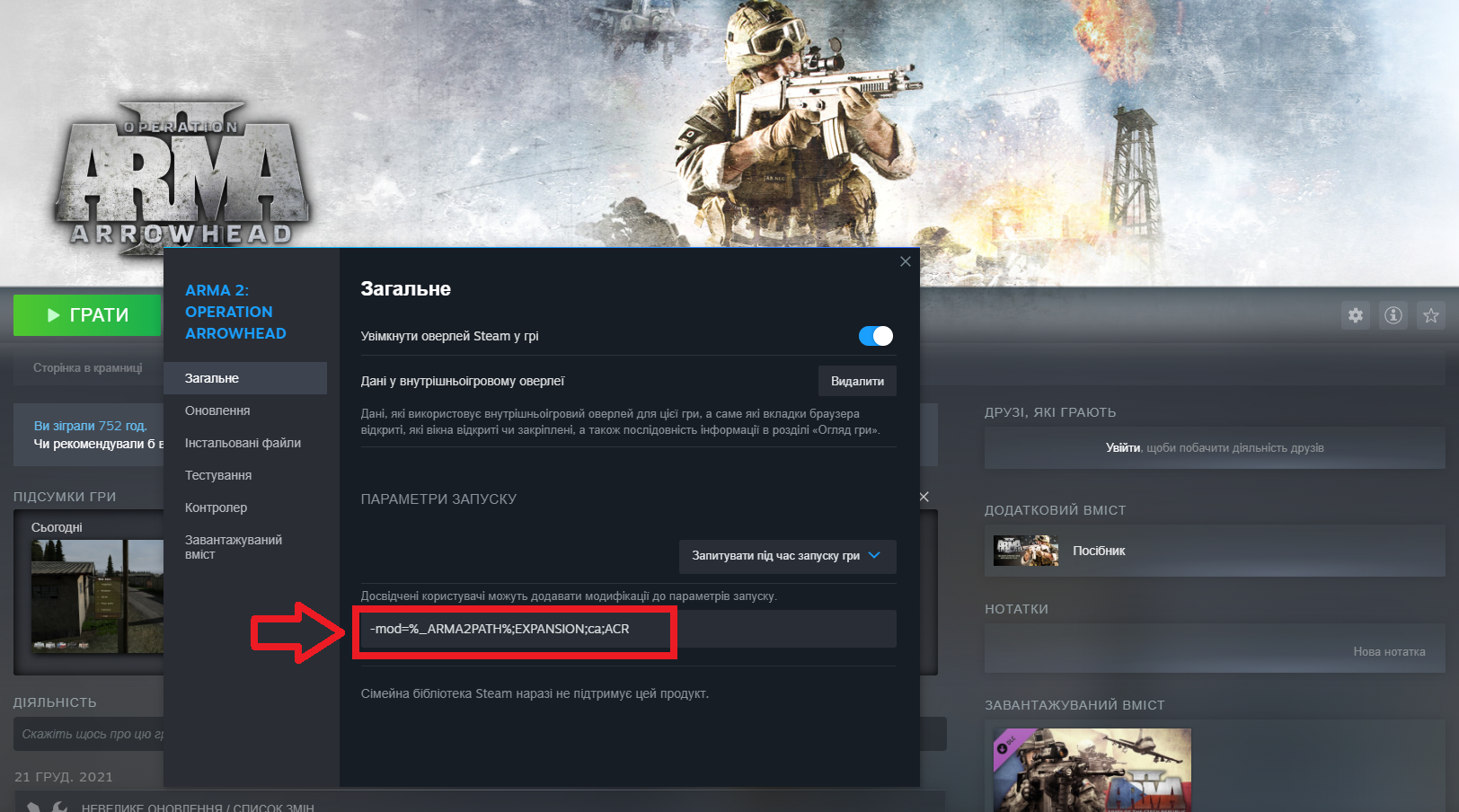
If after that the game still loads without ACR, add the game startup option on Steam.
Якщо після цього все одно гра завантажилась без ACR, додайте параметр запуску гри у Steam.
-mod=%_ARMA2PATH%;EXPANSION;ca;ACR
Issues with DayZ Launcher | Проблеми з DayZ Launcher
EN:
UA:
DayZ Launcher launches the game without ACR.
DayZ Launcher запускає гру без ACR.
For some unknown reason, DayZ Launcher sometimes launches the game without ACR and you have blurry textures in the game, even though you have purchased the DLC. If you have this problem, you need to add launcher startup option.
З невідомих причин, DayZ Launcher інколи запускає гру без ACR і у вас у грі розмиті текстури, хоча DLC придбана. Якщо у вас саме така проблема, то необхідно додати до параметру запуску графу з DLC.
-mod=%_ARMA2PATH%;EXPANSION;ca;ACR
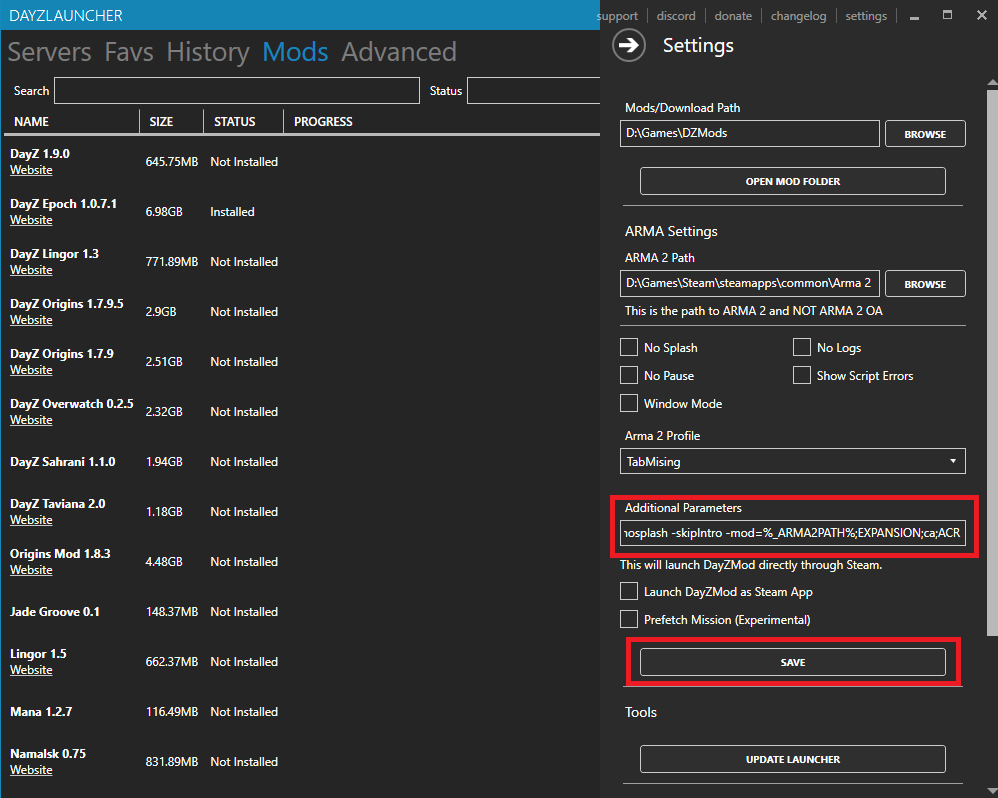
After that, the DayZ Launcher will force launch the game with this DLC.
Після цього DayZ Launcher запускатиме гру примусово з цією DLC.
- ACR Problem
- DayZ Launcher run without ACR DLC
- DayZ Launcher launching without ACR DLC
- ACR low textures
- ACR Arma 2
More Arma 2: Operation Arrowhead guides
- Снайперское искусство.★ 5 (627)22k views722 ♥2 minCzechUpdated May 14, 2015
- Гайд для новичка DayZ. С чего начать?★ 5 (363)19k views305 ♥8 minRussian
- How to Read PGO-7 Optical Sights★ 4 (115)14k views150 ♥4 minUpdated Aug 3, 2014
- Advanced AI Squad Commanding★ 5 (224)14k views331 ♥38 minUpdated Apr 17, 2016
- Фракции Arma 2.★ 5 (352)12k views224 ♥6 minRussianUpdated Apr 3, 2015
- Святое писание Армы.★ 5 (432)10k views184 ♥1 minRussianUpdated Jul 7, 2015


This guide was created by its original author on the Steam Community. Are you the author and want it removed? Request removal.