Goods, Assets, Data (Elite Dangerous)
About Goods, Assets and Data
- Loot during a mission on foot
- Reward for a (foot-)misson
You have an inventory for each type when on foot. The size of the inventory depends on the type and the upgrades of your suit.
In the beginning you should probably have
- 15 slots for goods
- 30 slots for assets and
- 10 slots for data.
You get goods and assets by running around and taking them when you see them laying around. Sometimes just on top of boxes, very often inside of containers and lockers.
If you open a container and there are items inside, then all are of the same type.
Either assets or goods.
You get "data" from data access points at walls.
Each item, be it good, asset or data, can be sorted into one of three categories:- Currently in your wishlist, you need it for something you want to create as soon as possible.
- Is part of a recipe, could be useful later if you ever want to use that recipe. Or used as gift to enable engineers.
- Not part of a recipe and not used as gift. Useless. BUT can be valuable on it's own. Money!
After asking in the forum and googling and having a hard week trying to understand what is trash and has to be kept I am currently advocating the use of two tools and notepad.
Really.
Goods
Needed:
Worthless:
As you can see, the "worthless" goods can be quite valuable.
Assets
There are three types of assets.
You don't get any info about this before picking them up.
But you can see in your backpack a small icon in front of the item.
Later you will be able to barter with the bartender within these three types of assets.
That is the reason you want to learn which one is of which type, so you can ignore the ones where you don't need anything and only take the ones where you'd like to trade for one.
These are the three asset types:
- Graphene
- Aerogel
- Chemical Catalyst
- Chemical Superbase
- Epoxy Adhesive
- Viscolelastic Polymer
- RDX
- Oxygenic Bacteria
- Epinephrine
- PH Neutraliser
- Circuit Board
- Circuit Switch
- Electrical Fuse
- Electrical Wiring
- Metal Coil
- Micro Supercapacitor
- Micro Transformer
- Motor
- Optical Fibre
- Electromagnet
- Microelectrode
- Ion Battery
- Carbon Fibre Plating
- Encrypted Memory Chip
- Memory Chip
- Micro Hydraulics
- Micro Thrusters
- Optical Lens
- Scrambler
- Titanium Plating
- Transmitter
- Tungsten Carbide
- Weapon Component
Data
Every "sell to bartender" to unlock Mr. X works only AFTER you know about Mr. X, meaning, he has to be in your list of engineers.
Needed:I don't see a reason to collect all the worthless data in a table when I am just using ed-odyssey-materials-helper [github.com] to tell me if the data is trash or not while looking at it in game. No need to open a browser or remember anything. The helper adds a HUD to your game if you open a datapad and shows color coded and with text if you look at trash, something wishlisted or something which might be useful some day. Worthless:
A lot more worthless ones.
Get EdDiscovery to see in-game if data is trash.
Tools
- ed-odyssey-materials-helper [github.com]
- EDDiscovery[github.com]
I'd like to only use one tool, but I only know so far only these two tools and each of them does part of the needed job for now.
In "Materials Helper" you add everything you want to create in the wishlist and open your current short term goal on the left side.
In EdDiscovery you create a shopping list with all ground weapon and suit upgrades and modules AND you create a "Resources" popout with Tf, Fill rectangle (Top most) and with Elite in borderless mode.[github.com].
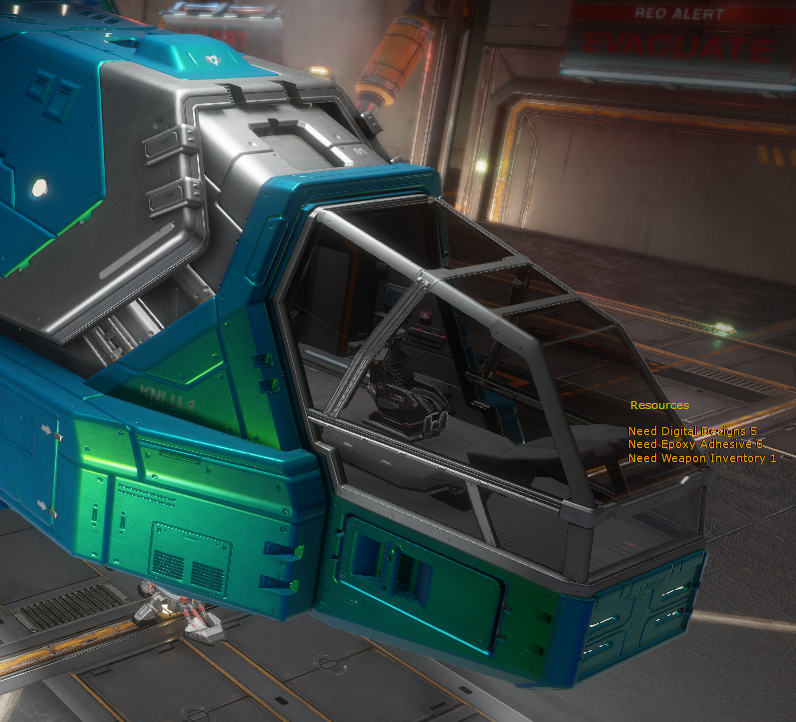
You see on the right what you need for your current goal.
You set your current short term goal in EdDiscovery in the Wishlist by setting the "wanted" value to "1" and then on the top you select "Push items wanted to Resource panel". That is the one which you popped out to be able to see it during gameplay and mission selection. If you have a 2nd monitor you can look at the two tools like this:
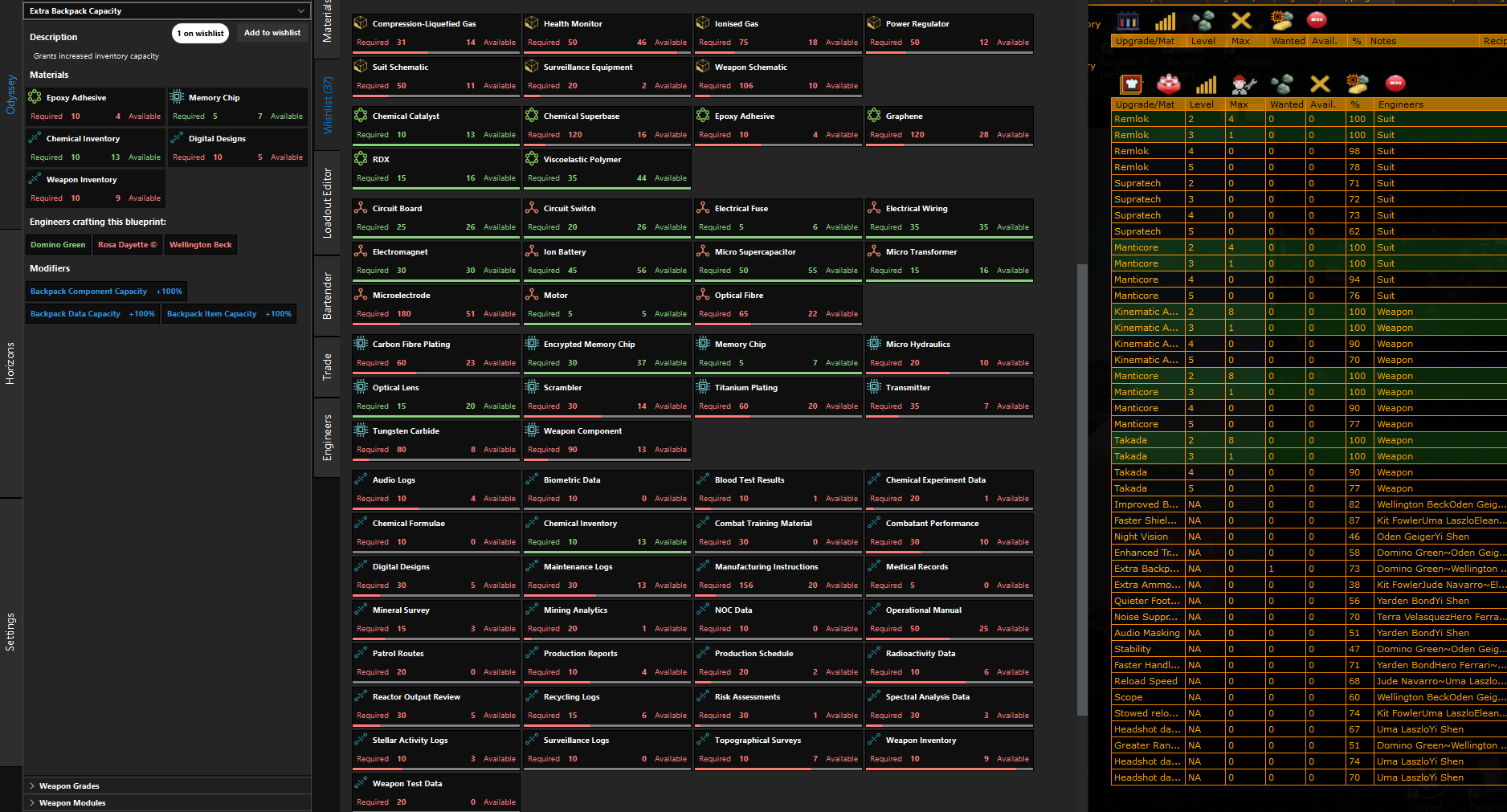
You see on the left side the needed and missing materials for the one current goal you have, for example for the mod "Extra Backpack Capacity".
You see in the middle all goods, assets and data you will need for all your long term goals.
This can be used when trading with the bartender. Now you know how many of each item you need and which ones you don't need at all. So you can trade and have less items AND you don't have to find the items if you trade for them.
On the right you see all possible recipes and the ones which are possible at least once are in green.
This is bad as I have to manually set the same short term goal in both tools. Which is about ... 10 seconds? After which you play for some days to get there.
This is good because you now have an idea what you are doing.
Final Result
You probably realized by now that you have a LOT of space for goods, assets and data, 1000 each in ... your ... ... ship? It is "somewhere".
Don't care! Just use it.
If you do a ground mission and have a full backpack, just fly your ship or use a taxi somewhere and your backpack will be emptied into that large inventory with space for 1000 items of each type.
This will be not enough after a while, so you can start trading with the bartender to get more of these you need and generally less. Or you can just sell some for money.
If you want to, you can during a ground mission walk to your ship and put looted stuff into your ship and have an empty backpack again.
The funny thing is, this even works with taxis. Get a shuttle to a local target, then put your stuff into the taxi and cancel the taxi. You will even get your 100 credits back :-)
- Goods, you have to decide yourself with the manual list I showed above.
- Assets, you just take all of them, I think. Later you trade with the barkeeper.
- Data: Materials Helper will show IN the datapad, before you are downloading, if the data is in your wishlist, is otherwise useful, or if it is trash.
- SCP = Smear Campaign Plans
- You know if it is a "good" or an "asset" because of the maximum inventory. They always differ, so in the beginning you just look, is it x/15 then it is a good, is it x/30 then it is an asset.
A more elegant and easier way?
Just one tool to loot them all! That would be nice.
Problems while collecting stuff
Then I added them to the tools I mentioned above and decided on the importance of certain mods.
For me, it was clear that this were the first ones I needed:
- 1x Silencer-indoor (Noise supressor)
- 2x Silencer-outdoor (Audio Masking)
- 1x Extra Backpack Capacity
- 2x Improved Battery Capacity 2x
But I knew what materials I needed for all 2x4 + 4x4 = 24 mods + the needed upgrades for the weapons and suits, so I kept everything I would need on my way to have 2 suits and 4 weapons upgraded to tier 5 and each with 4 mods.
This is not possible.
You need more materials than you can have in storage for that.
You need even more materials than these because you need to first learn about engineers and then enable them. These two actions need a lot of specialized materials too.
So... what to do?
Currently I think you have to prioritize extremely. And I mean EXTREMELY!
You need high level weapons / suits first, because you can't put mods into low level weapons / suits.
So, plan for one weapon or suit and one mod at a time. Not more. If more happens to be possible, good. But you should / must concentrate on one thing at once. Otherwise you will have inventory problems AND you will go crazy.
Ignore long term.
You want these 6x4 = 24 mods. Yes. You have the list.
But depending on your enabled engineers you can currently only do certain ones of them, possibly even ones you don't want to have as first mods.
Do them! Start with the ones which are in your list and which are possible NOW!
Engineers are a fun thing in the game but if you want something to happen now you would have to grind. Nobody wants to grind. So don't do it.
Do what is possible now, then go for the next goal.
Like, enable an engineer or get her the drugs she wants to point you to the next one.
Do NOT collect for everything at once! Only for a small manageable goal.
- Efficient Keyboard and Mouse Controls★ 5 (817)48k views1.8k ♥13 minUpdated 10 Oct, 2024
- The Guide for Almost Everything★ 5 (1.5k)42k views2.9k ♥131 minUpdated 14 Aug, 2018
- Все об Elite Dangerous (гайд и справочник)★ 5 (1.1k)26k views2.6k ♥218 minRussianUpdated 15 Nov, 2020
- ~How to Adjust your HUD Colors~★ 5 (361)23k views645 ♥2 minUpdated 25 Dec, 2017
- ШАХТЕРСТВО★ 5 (735)17k views1.3k ♥11 minRussianUpdated 15 Feb, 2021
- Помощь новичкам - как получить ускоритель Стражей★ 5 (716)13k views1k ♥7 minRussianUpdated 25 Aug, 2021




- Upgrading to PremiumTeam Fortress 2★ 5 (20k)1441k views11k ♥6 minUpdated May 11, 2022
- No More Room in Hell Official ManualNo More Room in Hell★ 5 (2.8k)569k views2.1k ♥29 minUpdated Apr 22, 2019
- NMRiH Community Hosting GuidesNo More Room in Hell★ 5 (526)351k views653 ♥1 minUpdated Aug 10, 2022
- Лучшие кооперативные игры SteamPAYDAY 2★ 5 (1.5k)315k views2.1k ♥56 minRussianUpdated Apr 27, 2025
- Desert Eagle Heat Treated | Blue GemCounter-Strike 2★ 5 (1.6k)292k views1.5k ♥2 minUpdated Jan 16
- Treasure Hunt Puzzle SolutionsTotal War: WARHAMMER II★ 5 (6.9k)281k views15k ♥3 minUpdated Aug 19, 2021






This guide was created by its original author on the Steam Community. Are you the author and want it removed? Request removal.