Hero Siege - Multiplayer Server Setup
Computer Configuration
Windows Firewall
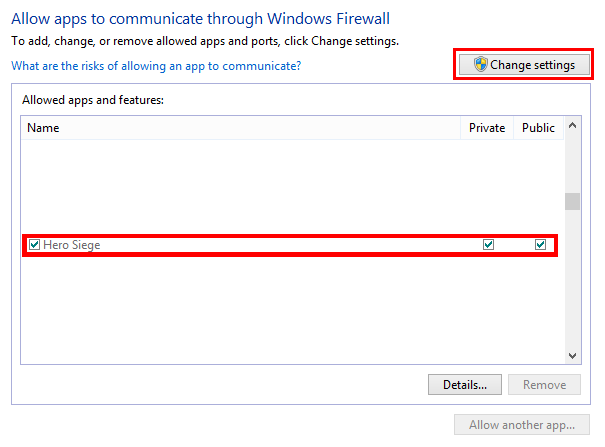
We need to complete a couple of steps in order to allow us to host a Hero Siege Multiplayer Server. Firstly, we must make sure we are allowing the game through our PC Firewall.
To access your Firewall, the easiest way is to press your Windows key and in the search, type 'firewall'. Then navigate to 'Allow a Program through Windows Firewall'. Click 'Change Settings' then find Hero Siege in your list and ensure both Private and Public are ticked.
Finding our Internal IP Address
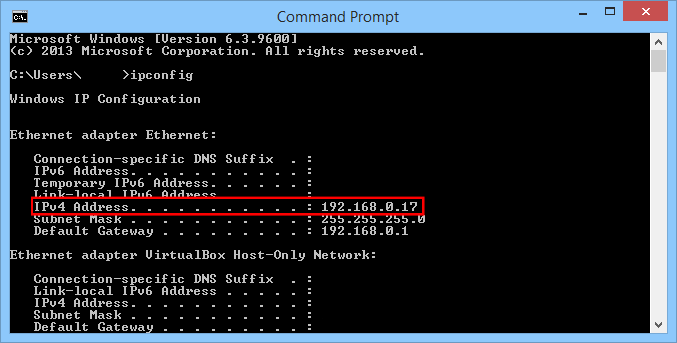
Next we need to find out or internal IPv4 address. We can quickly find this out by opening up Command Prompt (press Windows key and search 'cmd')
Then type 'ipconfig'. Note down your IPv4 Address, we will need this when configuring our router.
Router Configuration
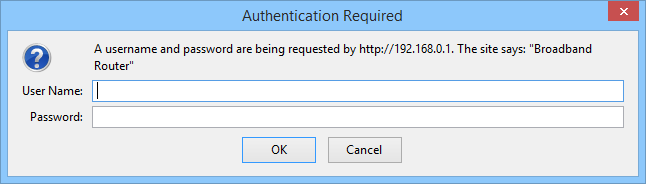
Log in to your router. This is most commonly done by typing it's IP into your web browser. For example, Sky Router (UK) address is: 192.168.0.1. It is different for every make and model, if you are unsure, check your router User Manual.
Once you have the typed the IP into your web browser, it will ask for a Username and Password. Again, check your User Manual - a common factory setting username and password is:
Username: admin
Password: admin
Create a new Service/Open a Port
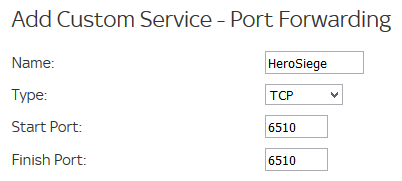
Once logged in, navigate to your Port Forwarding Section, this could be in a section called 'Services' or it could have it's own section.
- Add a New Service
- Name: HeroSiege
- Type: TCP
- Start Port: 6510
- Finish Port: 6510
- Apply
Create Inbound and Outbound Services for your Routers Firewall
Navigate to your Router's Firewall section and create Inbound and Outbound rules for your Firewall.
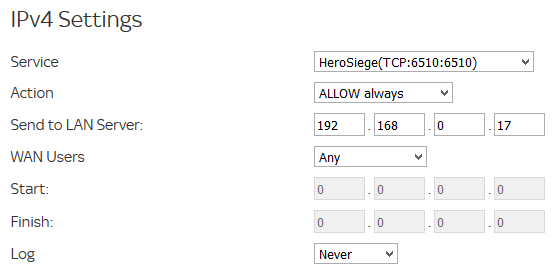
Inbound Service- Add Service - Look in your dropdown list and select 'HeroSiege(TCP:6510)'
- Action: Allow
- Send to LAN Server: <Your PC IP found from CMD>
- Apply
 Outbound Service
- Find your HeroSiege Service from the dropdown list
- Allow all actions
- Apply
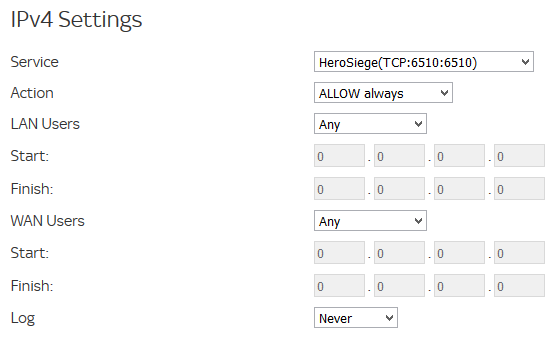
Save all of your settings and log out of your router. Fire up Hero Siege and away you go!
- Руководство по старой <2.0★ 5 (1.1k)44k views866 ♥19 minRussianUpdated 15 Feb, 2024
- Relics★ 5 (512)24k views779 ♥1 min
- Реликвии★ 5 (431)15k views597 ♥10 minRussianUpdated 18 Sep, 2019
- Runes★ 4 (60)12k views58 ♥3 minDanishUpdated 8 Feb, 2018
- Взлом Hero Siege (без посторонних программ)★ 4 (165)11k views150 ♥1 minRussianUpdated 1 Sep, 2017
- The Key to Your Success★ 4 (82)9.7k views65 ♥5 min



- Upgrading to PremiumTeam Fortress 2★ 5 (20k)1441k views11k ♥6 minUpdated May 11, 2022
- No More Room in Hell Official ManualNo More Room in Hell★ 5 (2.8k)569k views2.1k ♥29 minUpdated Apr 22, 2019
- NMRiH Community Hosting GuidesNo More Room in Hell★ 5 (526)351k views653 ♥1 minUpdated Aug 10, 2022
- ULTIMATE GUIDE FOR GAME DEV TYCOONGame Dev Tycoon★ 5 (5.8k)326k views10k ♥4 minUpdated 23 Jan, 2014
- How to 'Git Gud' Soon™MORDHAU★ 5 (2k)318k views3k ♥68 minUpdated Nov 16, 2024
- Лучшие кооперативные игры SteamPAYDAY 2★ 5 (1.5k)315k views2.1k ♥56 minRussianUpdated Apr 27, 2025






This guide was created by its original author on the Steam Community. Are you the author and want it removed? Request removal.