How to increase AI Unit cap
Getting started!
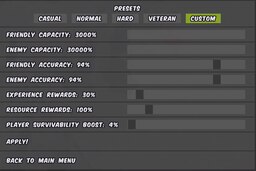
To change this number navigate to C:\Users\Usernamehere\AppData\Roaming\Running with rifles\savegames\AITEST.save
or wherver you have your game saved!
Open Metagame_Invasions.xml and scroll to the bottom of the page it should look similar to this!
</item_delivery_organizer>
<settings continue_as_new_campaign="0" enemy_ai_accuracy="0.940000" enemy_capacity="300.000000" faction_choice="1" fellow_ai_accuracy="0.940000" fellow_capacity="30.000000" initial_rp="50.000000" initial_xp="0.000000" max_rp="-1.000000" player_damage_modifier="-0.038220" preset_id="custom" rp_factor="1.003193" savegame="AITEST" username="KAZYU THE AVALI" xp_factor="0.300000" />
</saved_metagame>
you can change enemy_capacity="300.000000" to whatever youd like but i wouldnt suggest anything over 300, your milage may vary with your pc hardware. As for allied count you can set that to what youd like as well. Keep in mind this game was not balanced for AI over the 96 cap so you as a solo soldier with a squad will not feel as effective when in a battle with 1000 units total.
Not quite done
Right now if you try and make a new campaign you should see the percentile of units when using the custom setting sliders. DO NOT TOUCH THEM. moving those sliders will reset your changes made to the XML file.
Now to make these changes last forever!
Navigate to O:\steam\steamapps\common\RunningWithRifles\media\packages\vanilla
and open up the file called package_config.XML
As we did before we can edit almost anything in this file but for now we only need to edit the custom difficulty. it should be all the way at the bottom and look like this!
<preset text="Presets:Custom" help="Help:Presets:Custom" id="custom"
friendly_capacity="3"
friendly_accuracy="0.94"
enemy_capacity="10"
enemy_accuracy="0.94"
xp_multiplier="0.3"
rp_multiplier="1.0"
player_damage_modifier="0.3"
/>
</campaign_options>
</package>
This file uses a different method math wise and if you use the 300 enemy to 10 allied ratio, it is very likely you are to crash as the total units on screen would be roughly 288,000? Im not good at math but i did crash my game with 1 frame generating every 4 minutes. Literally unplayable. Anyways you should be good to go now!
Whats the catch?
Anyways that concludes this guide! If you find a way of editing rp drop rates or reducing how much blood is spawned let me know in the comments below. For any extra help feel free to ask relevant questions and i'll do my best to answer.
- Opt_0™: Starter Guide to RUNNING WITH RIFLES.★ 5 (472)28k views457 ♥33 minUpdated 23 Mar, 2023
- Secret Crates and Cars in RWR / The Tracker challenge guide★ 5 (1k)26k views2k ♥4 minUpdated 27 Jun, 2020
- Private to Commander: Guide to Running With Rifles★ 5 (460)25k views454 ♥78 minUpdated 27 Jan, 2020
- Running With Rifles: Weapons and Equipment Guide★ 5 (186)13k views352 ♥78 minUpdated 18 Jul, 2021
- 【中文指南】如何在潜行中把作者充满恶意的设计按在地上摩擦★ 5 (570)13k views531 ♥1 minSimplified ChineseUpdated 1 Oct, 2018
- Single player chat codes★ 5 (226)11k views528 ♥4 minUpdated 18 Aug, 2020


- Upgrading to PremiumTeam Fortress 2★ 5 (20k)1441k views11k ♥6 minUpdated May 11, 2022
- No More Room in Hell Official ManualNo More Room in Hell★ 5 (2.8k)569k views2.1k ♥29 minUpdated Apr 22, 2019
- NMRiH Community Hosting GuidesNo More Room in Hell★ 5 (526)351k views653 ♥1 minUpdated Aug 10, 2022
- How to 'Git Gud' Soon™MORDHAU★ 5 (2k)318k views3k ♥68 minUpdated Nov 16, 2024
- Лучшие кооперативные игры SteamPAYDAY 2★ 5 (1.5k)315k views2.1k ♥56 minRussianUpdated Apr 27, 2025
- Desert Eagle Heat Treated | Blue GemCounter-Strike 2★ 5 (1.6k)293k views1.5k ♥2 minUpdated Jan 16





This guide was created by its original author on the Steam Community. Are you the author and want it removed? Request removal.