How to install older versions of Hero Seige using Steam
Introduction
Have not tested multiplayer and do not know how it will act to join old versions of the game. Does not seem to work, but honestly would not suggest trying as I don't believe the servers exist for the older versions anymore.
0. Fixing the "Manifest not available" check
(Copy pasted from Beat Saber Guide.)
In February 2020, Valve released a Steam Client update that arbitrarily prevents downloading older versions of games from the Steam Console. Fortunately, ways to circumvent this exist. The most popular way is Depot Downloader, however we will specifically focus on the built-in Steam Console downloader as it does not require you to provide your Steam credentials, is a simple patch, and easy to use.
Download SteamDepotDownpatcher.exe: https://github.com/fifty-six/zig.SteamManifestPatcher/releases
(you might have to click "save anyway" if you are using Microsoft Edge)
Run the program once. If everything is good, you should see "Wrote the patch to memory" at the end. You can then press ENTER to close the window.
⚠️ Running the program is required everytime you freshly (re)start Steam if you wish to download older versions, so keep it around and check back here for any updates. If you are getting the "Manifest not available" error when trying to downgrade, that means you have not yet run the patcher in the current session. Steam must be running in order for the patcher to work as no files on your disk are modified, only the running process memory.
This is an unfortunate requirement as Valve no longer officially allows downgrading thanks to the checks introduced in February 2020. You run the program at your own risk.
1. Choosing the version to download
In order to downgrade we first need to know what version we want to install. Version numbers (1.0.0, 1.1.0 etc.) are not used in the Steam database, so we have to refer to dates and Manifest IDs instead.
There are 766 manifests, updates, for HeroSeige over the last 7 years. To encompass the majority of readers this will be limited to the start of seasons along with the first release.
- The release of season 10 was warned not to work on Mac.
- Season 6 was a Halloween Event.
- Season 4 was a Christmas Event.
2. Accessing the Steam Console
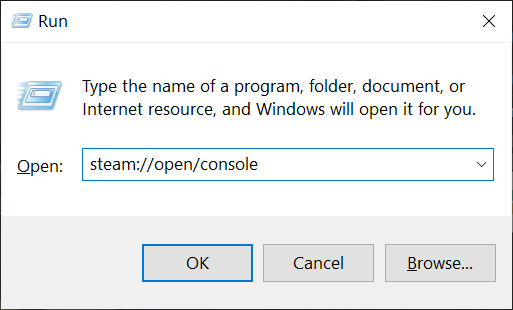
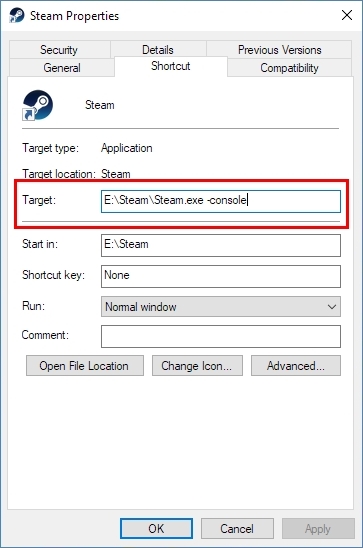
If done correctly, you should see 'Console' tab after your Steam username on the client.
3. Starting the download
Now that we are in the Steam Console, we can start the download of the version you have chosen.
The example included will be for Season 1, however the only variable that needs to change would be the Manifest ID, the other two numbers are static in this case. They relate to the app ID, and the depot ID.
This will begin the download. You will not see this visible besides maybe in task manager. Don't fret over it, as it is downloading.

Keep note of the folder path after the words "Depot download complete". That is where the downloaded files are.
Any messages besides these are debug messages, don't worry about them.
If you are getting the "Manifest not available" error, please check Section 0 of this guide!
4. Managing the downloaded content
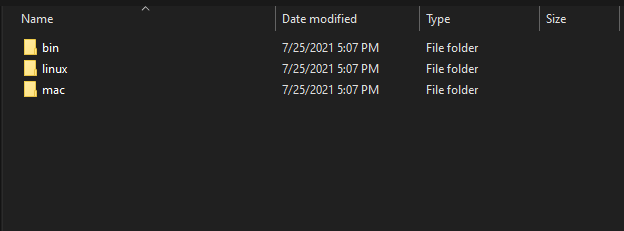
Now that the download is complete, perform the following:
- Copy the resulting path you got in the console and paste it into the Windows Explorer's address bar (example above). *
- You can now select and copy the files.
- Go up the directory tree, back to steamapps. Then open common -> HeroSeige.
Now paste the downloaded folders into the directory, accepting the overwrite prompt.
You have now downgraded the game. Everything should now be playable.
* This is the entire installation of the game at the time of that version (and not just the update's changes). Do NOT run the EXE from the "depot_269211" folder directly. It will not work and you will be redirected to the main HeroSeige directory and exe in steamapps\common which probably still has the latest version.
A different guide just in case
I personally found this guide to be complex but if my guide does not work for you, this guide should.
https://steamcommunity.com/sharedfiles/filedetails/?id=2353930763
Hyperlinked earlier, but the beat saber guide this is pretty much just a copy paste of except with Hero Seige information.
https://steamcommunity.com/sharedfiles/filedetails/?id=1805934840
If people need help, I'll try to answer questions in the comments.
- Руководство по старой <2.0★ 5 (1.1k)44k views866 ♥19 minRussianUpdated 15 Feb, 2024
- Relics★ 5 (512)24k views779 ♥1 min
- Реликвии★ 5 (431)15k views597 ♥10 minRussianUpdated 18 Sep, 2019
- Runes★ 4 (60)12k views58 ♥3 minDanishUpdated 8 Feb, 2018
- Взлом Hero Siege (без посторонних программ)★ 4 (165)11k views150 ♥1 minRussianUpdated 1 Sep, 2017
- The Key to Your Success★ 4 (82)9.7k views65 ♥5 min



- Upgrading to PremiumTeam Fortress 2★ 5 (20k)1441k views11k ♥6 minUpdated May 11, 2022
- No More Room in Hell Official ManualNo More Room in Hell★ 5 (2.8k)569k views2.1k ♥29 minUpdated Apr 22, 2019
- NMRiH Community Hosting GuidesNo More Room in Hell★ 5 (526)351k views653 ♥1 minUpdated Aug 10, 2022
- ULTIMATE GUIDE FOR GAME DEV TYCOONGame Dev Tycoon★ 5 (5.8k)326k views10k ♥4 minUpdated 23 Jan, 2014
- How to 'Git Gud' Soon™MORDHAU★ 5 (2k)318k views3k ♥68 minUpdated Nov 16, 2024
- Лучшие кооперативные игры SteamPAYDAY 2★ 5 (1.5k)315k views2.1k ♥56 minRussianUpdated Apr 27, 2025






This guide was created by its original author on the Steam Community. Are you the author and want it removed? Request removal.