How to Install the HealthBar in Cuphead
Downloading HealthBar
Step 1. Get the mod folder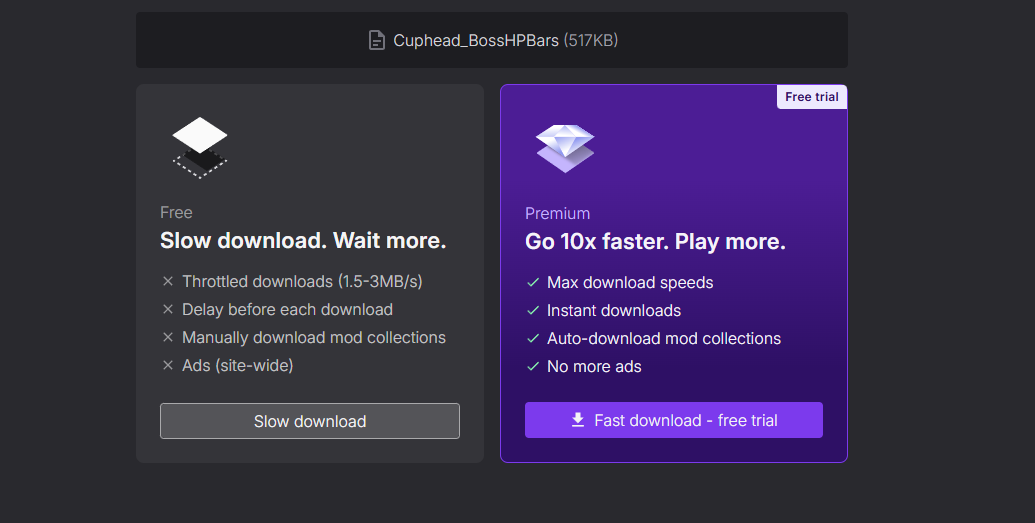
- Click the link[nexusmods.com]
- Click Slow download (create an account if required).
- Once the folder has finished downloading, proceed to the next step.
Installing the Mod
Step 2. Place the folder into the game directory
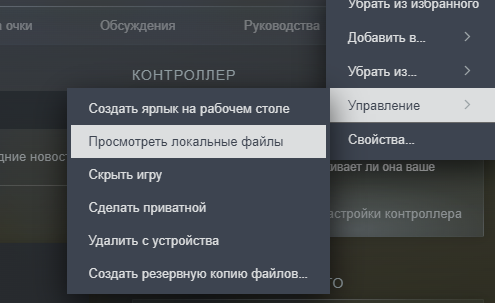
- Open the game directory (as shown in the screenshot).
- Copy the contents of the downloaded folder into the game directory.
- Restart the game.
✅ Done — the mod is now installed!
More Cuphead guides
- Гайд по Достижениям [100%]★ 5 (953)40k views1.9k ♥6 minRussianUpdated Mar 12, 2024
- Русификатор от ZoG★ 5 (560)33k views522 ♥1 minRussianUpdated Apr 5, 2024
- Cuphead S-Rank Guide★ 5 (458)27k views886 ♥4 minUpdated Apr 13, 2023
- 100% Achievements Guide [Cuphead]★ 5 (529)23k views1.2k ♥24 minUpdated Jul 31, 2023
- Как играть с другом по сети в Cuphead?!★ 4 (75)18k views118 ♥1 minRussianUpdated 4 Jul
- Как успокоится после очередного поражения★ 5 (638)17k views231 ♥1 minRussianUpdated Aug 30, 2020





🔥 Popular guides
- Upgrading to PremiumTeam Fortress 2★ 5 (20k)1441k views11k ♥6 minUpdated May 11, 2022
- No More Room in Hell Official ManualNo More Room in Hell★ 5 (2.8k)569k views2.1k ♥29 minUpdated Apr 22, 2019
- NMRiH Community Hosting GuidesNo More Room in Hell★ 5 (526)351k views653 ♥1 minUpdated Aug 10, 2022
- ULTIMATE GUIDE FOR GAME DEV TYCOONGame Dev Tycoon★ 5 (5.8k)326k views10k ♥4 minUpdated 23 Jan, 2014
- How to 'Git Gud' Soon™MORDHAU★ 5 (2k)318k views3k ♥68 minUpdated Nov 16, 2024
- Лучшие кооперативные игры SteamPAYDAY 2★ 5 (1.5k)315k views2.1k ♥56 minRussianUpdated Apr 27, 2025






This guide was created by its original author on the Steam Community. Are you the author and want it removed? Request removal.