How to Lick 10,000 Things
Quadlicking
If you're using the keyboard and mouse for player 1 and three controllers with Steam Input enabled for players 2–4, you may have to reorder the controllers to avoid a problem where one controller controls two goats while another controls the same goat as the keyboard and mouse:
- Open the Steam Overlay while in game.
- Open Controller Settings.
- Select Reorder Controllers.
- Set your three controllers to positions 1, 2, and 3 instead of positions 2, 3, and 4.
Once your four goats are in the game, it's not time to lick things just yet. Bring an object like a barrel to an open area with no NPC traffic and have one goat stand on it. Now, whenever you lick the object with any of the goats, the lick will immediately be cancelled, allowing you to lick it again sooner. Have the other three goats face the object, and spread them out a bit so they don't lick each other. Now you're free to spend about 40 minutes repeatedly licking the object with all four goats simultaneously. It should look something like this:
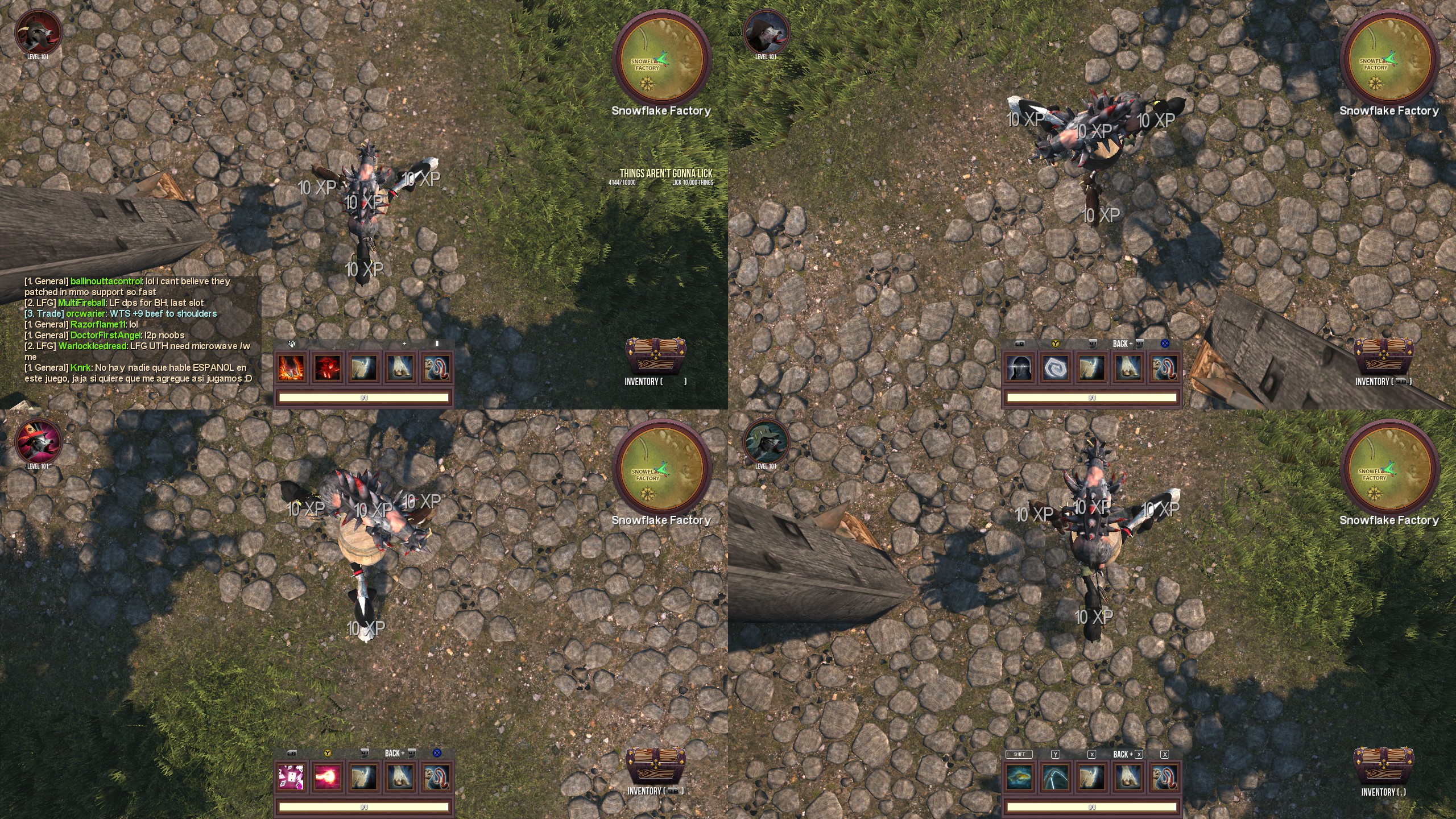
Turbo
- Open the Steam Overlay while in game.
- Open Controller Settings.
- If it's not already enabled, enable Steam Input.
- If more than one controller is connected, select the controller you want to modify.
- Select Edit Layout.
- Select the gear icon next to the lick button.
- Select Settings.
- Turn on Hold to Repeat (Turbo) and Toggle.
- Repeat steps 4–8 for each other controller you want to modify.
You can't use Steam Input to enable Turbo for the lick key on your keyboard, but you can use it to rebind a controller button to the lick key and enable Turbo for that button. To rebind a controller button to the lick key, select the command the button is bound to in the Edit Layout menu, select Keyboard, then select the lick key.
I haven't tested this strategy since I personally don't use Turbo in games, but I included it anyway for those who'd like to use it.
Be Patient
Now that you have some strategies under your belt, all that's left is to wait it out. Watch a video or listen to a podcast. I found it entertaining to read the fake in-game chat. If you get bored, you can always quit to the main menu to save your progress and continue later.
Thanks for reading. Let me know whether these strategies work for you or if you know of any more.
- How to create content for the Workshop★ 5 (1.8k)273k views1.4k ♥8 minUpdated Oct 18, 2017
- Goat Simulator - Achievements Guide (2026 Up to date, BFF help)★ 5 (1.2k)42k views2k ♥49 minUpdated Jun 24
- Получаем все достижения в игре Goat Simulator [127/127]★ 5 (1.5k)24k views2.2k ♥41 minRussianUpdated Aug 11, 2025
- Старое руководство по Goat Simulator★ 5 (1k)19k views840 ♥5 minUpdated Nov 25, 2025
- All golden collectibles guide [PAYDAY DLC]★ 5 (539)15k views463 ♥3 minUpdated May 20, 2023
- How to get the Builder Goat achievement★ 5 (242)14k views196 ♥1 minUpdated Nov 8, 2015





- Upgrading to PremiumTeam Fortress 2★ 5 (20k)1441k views11k ♥6 minUpdated May 11, 2022
- No More Room in Hell Official ManualNo More Room in Hell★ 5 (2.8k)569k views2.1k ♥29 minUpdated Apr 22, 2019
- NMRiH Community Hosting GuidesNo More Room in Hell★ 5 (526)351k views653 ♥1 minUpdated Aug 10, 2022
- ULTIMATE GUIDE FOR GAME DEV TYCOONGame Dev Tycoon★ 5 (5.8k)326k views10k ♥4 minUpdated 23 Jan, 2014
- How to 'Git Gud' Soon™MORDHAU★ 5 (2k)318k views3k ♥68 minUpdated Nov 16, 2024
- Лучшие кооперативные игры SteamPAYDAY 2★ 5 (1.5k)315k views2.1k ♥56 minRussianUpdated Apr 27, 2025






This guide was created by its original author on the Steam Community. Are you the author and want it removed? Request removal.