How to make your Call of Duty Modern Warfare 4 playable in 2026 [UPDATED]
1) Game files
So to fix your game you need to have it already installed .You must have a clean install of the game and not modded. For those who are new with Steam and don't know where your game files are you can find it pretty easily, I will show 2 options : 1) Right click on the game properties/browse local files
2) Click on Files Manager/ This Computer choose the drive you have steam installed for most people is named C: then / Program Files (x86) / Steam / Steamapps / Common / Call of Duty 4 ( That's the folders name) Click on it.
2) Click on Files Manager/ This Computer choose the drive you have steam installed for most people is named C: then / Program Files (x86) / Steam / Steamapps / Common / Call of Duty 4 ( That's the folders name) Click on it.
2) Download the Multiplayer fix
Now that you are in the CoD 4 folder you need the Multiplayer fix. I recommend you use some type of app to unpack the files like RAR or 7-Zip File Manager. I personally use RAR but 7-Zip works just fine. I will upload the files from my Google Drive so that you don't have to suffer from corrupt files or fake files and a ton of ads or worse (viruses) I would never send suspicious sites because I care for the community so here is the link from my Google Drive : CoD4X 21.4 Setup (Updated) [Last version 21.1][drive.google.com]
3) "Installing" the Multiplayer fix for CoD4 MW
After downloading the zip folder ( or RAR, 7-Zip ). Now open the cod4x client folder and the only thing you have to do is take all the files from the folder and put them in your Call of Duty 4 folder. If it shows you the pop up to replace files PLEASE REPLACE ALL OF THEM. And that's it BUT to have the best results restart your computer and then play the game. Now you can enjoy it like it never had a problem. Enjoy different servers and save your favourite ones
4) Last touch before enjoying
I forgot to tell you that after you replace the files there is a file called install it's cmd file. Click on it and it will say press any key to continue just press SPACE and that's it. Now you can play. Sorry again , click on the link of the image to see the pic.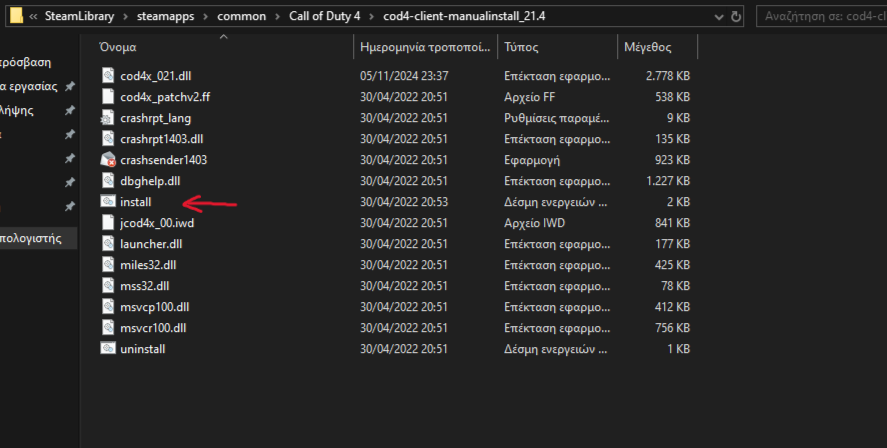
More Call of Duty 4: Modern Warfare (2007) guides
- Русификатор Call of Duty 4: Modern Warfare [v1.7.568]★ 5 (953)38k views1.4k ♥1 minRussianUpdated Jul 20, 2024
- How to change your Field Of View in Call of Duty 4.★ 5 (333)34k views495 ♥1 minUpdated Dec 4, 2018
- Intel Laptops locations★ 5 (653)18k views1.1k ♥8 minUpdated Jul 3, 2023
- How to install and play Star Wars: Galactic Warfare★ 5 (245)17k views527 ♥3 minUpdated May 17, 2017
- PezBOT Setup: How to play Bot Matches offline!★ 5 (319)16k views713 ♥3 minUpdated Nov 26, 2019
- COD4 Console Commands & CFGs★ 4 (126)14k views255 ♥1 minUpdated Jun 15, 2025


This guide was created by its original author on the Steam Community. Are you the author and want it removed? Request removal.