How to run the game with an absurd amount of mods
This tutorial is jarona approved.
The DOs

RimSort
If you aren't using RimSort yet there are two possible reasons for that:
- You haven't heard of it till now
- You hate yourself
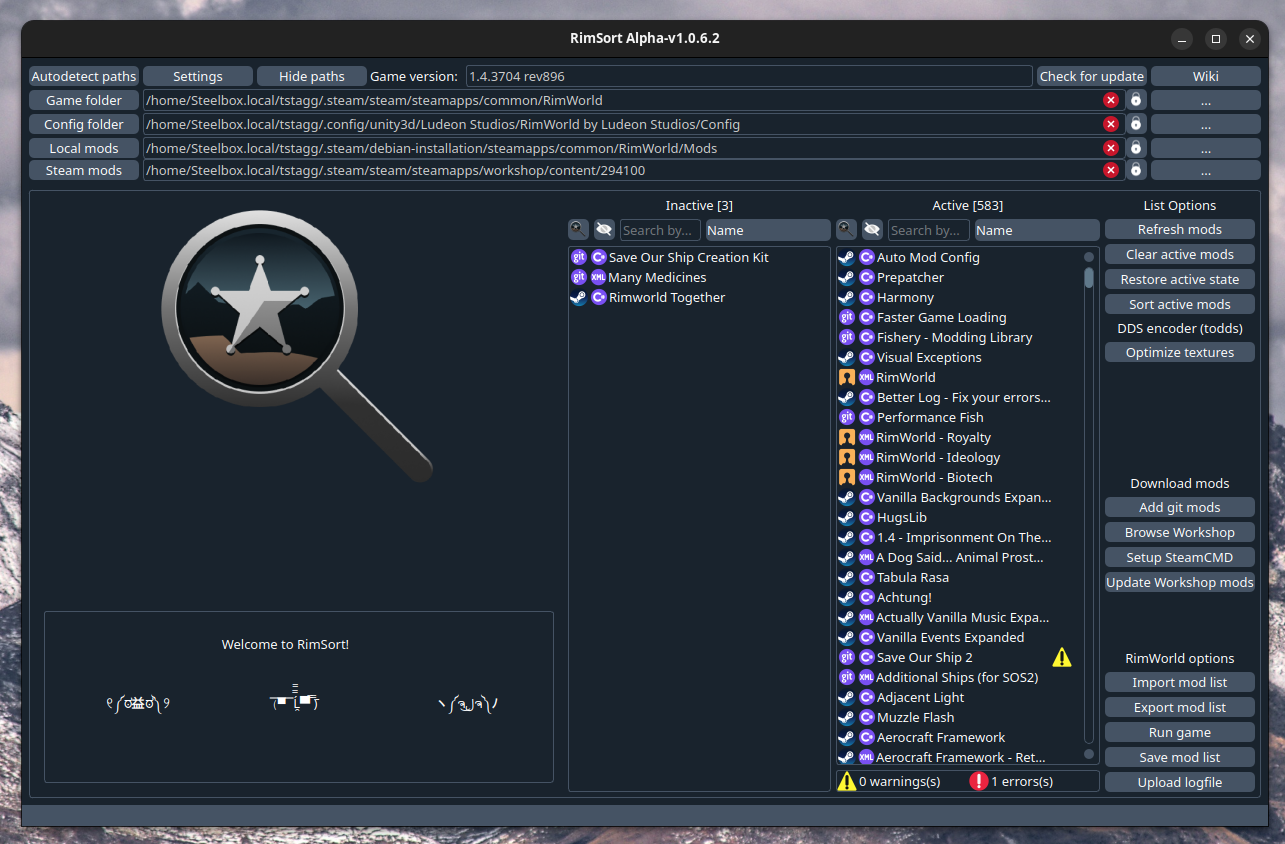
RimSort is an external mod manager for you that can do 2 wonderful things for you:
- Let you change your mod order and enable/disable mods without launching the game
(And more)
 If you are on Windows there is one way to get it:
- Download it from their Github https://github.com/RimSort/RimSort/releases
If you are on Linux there are two ways to get it:
- Download it from their Github https://github.com/RimSort/RimSort/releases
- Download it from the AUR (Arch-based only) https://aur.archlinux.org/packages?O=0&K=rimsort-bin
If you are on a Mac:
- Check what CPU you have, Intel (i386) or Apple Silicon (arm)
- Download the appropriate version https://github.com/RimSort/RimSort/releases
The ability to change your mod load order from outside the game saves you some very long load times and can help you recover your game if it won't load. Very nice. The auto sorting function can very often turn a broken load order into a fully functioning load order and save you hours of finagling. Also very nice. RimSort also has various other features that will help you manage and optimize your very very long modlist into something resembling a functioning game!
Cherry picker
https://steamcommunity.com/sharedfiles/filedetails/?id=2633276599
Cherry Picker lets you remove parts of a mod to get that perfect coherent gameplay you've always wanted!
Prune your modlist
 Chances are you have a few mods in there you really don't use. I don't dare imply that your 200+ quality of life mods are unnecessary of course. I completely agree that the game is literally unplayable if you're missing even a single one! But do you really need all of those feature mods? Do you actually use what that mod is adding? For example, I had the Rimefeller mod installed for a very long time. Great mod, very cool stuff, only problem is that I literally never used its features. I just thought it was neat. Removing that and other extraneous mods helped me to not only cut down on load times, but also declutter the UI and remove some excess complexity from my already bloated game, and it can help you too! Take the time to go through your modlist and ask yourself if you actually use what that mod is adding.
You can paste your modlist into this website to identify problematic mods that tank performance https://jumli.sysrqmagician.dev/
Get more RAM and VRAM
During loading, RimWorld puts textures into the VRAM (the RAM in your graphics card used to store textures). If it runs out of VRAM, it moves on to the normal RAM. If you, like me, have nearly 400 mods, then you will need LOTS of VRAM and RAM. My desktop has 16GB of VRAM and 32GB of RAM and is easily able to load my mods. However, my laptop only has 4GB of VRAM and 16GB of RAM, and is not able to load RimWorld because it runs out of RAM and crashes. If you're gonna go insane on mods then you need the hardware to support it, either by buying a graphics card with loads of VRAM (expensive but cool option) or by buying more RAM (way cheaper but not as cool option).
If your game is unable to load due to maxing out your RAM you should try closing any open processes that are using RAM or VRAM before loading the game and just trying to squeeze some more room for your RimWorld. Godspeed.
Note: RimPy has a button to optimize textures that should reduce RAM usage.
Note 2: I wrote this guide at a time when RAM was as cheap and plentiful as oxygen. Alas
The DON'Ts

Subscribe to mods all willy nilly like "ooh this looks neat"
Use Combat Extended
CE is known to cause conflicts with a lot of mods due to its complete overhaul of the game's combat system, making your efforts to design a functioning modlist much harder.
CE is a great mod absolutely, but ask yourself, is it truly worth breaking so many other mods? For your sanity you should probably avoid CE and instead use lighter substitute mods like:
https://steamcommunity.com/sharedfiles/filedetails/?id=2014429481&searchtext=This%20mod%20does%20not%20require%20the%20start%20of%20a%20new%20game.%20Mod%20Combat%20Update%20is%20compatible%20with%20mods%20for%20new%20weapons.%20Any%20weapon%20will%20receive%20an%20increase%20in%20the%20chance%20of%20hitting%20and%20other%20bonuses%20from%20the%20mod.%20No%20additional%20compatibility%20patches%20are%20required.
No disrespect to the CE devs, it's a great mod.
No disrespect to people who use CE, you are more powerful than me.
UPDATE 2025: I HAVE TAKEN THE CE PILL
Use outdated mods meant for older versions of the game
Give up

Note from the author

- Colony Building Guide★ 5 (1.4k)60k views3.1k ♥35 minUpdated Apr 4, 2020
- Мультиплеер, Кооп с друзьями в Rimworld★ 5 (282)60k views830 ♥4 minRussianUpdated Mar 29
- Rimpy Mod Manager使用指南——集排序、管理、下载于一身的优秀工具★ 5 (838)57k views2k ♥6 minSimplified ChineseUpdated Jul 14
- A beginner's detailed guide. Up to date for 1.4 (2023).★ 5 (954)54k views2.7k ♥121 minUpdated Sep 15, 2025
- RIMWORLD PERFORMANCE OPTIMIZATION GUIDE (Rimworld 1.4 + All DLCs).★ 5 (616)48k views1.4k ♥35 minUpdated Sep 23, 2024
- A Definitive Guide to Efficient Freezers [1.4]★ 5 (667)37k views1.1k ♥8 minUpdated Nov 7, 2022


- Upgrading to PremiumTeam Fortress 2★ 5 (20k)1441k views11k ♥6 minUpdated May 11, 2022
- No More Room in Hell Official ManualNo More Room in Hell★ 5 (2.8k)569k views2.1k ♥29 minUpdated Apr 22, 2019
- NMRiH Community Hosting GuidesNo More Room in Hell★ 5 (526)351k views653 ♥1 minUpdated Aug 10, 2022
- Лучшие кооперативные игры SteamPAYDAY 2★ 5 (1.5k)315k views2.1k ♥56 minRussianUpdated Apr 27, 2025
- Desert Eagle Heat Treated | Blue GemCounter-Strike 2★ 5 (1.6k)292k views1.5k ♥2 minUpdated Jan 16
- Treasure Hunt Puzzle SolutionsTotal War: WARHAMMER II★ 5 (6.9k)281k views15k ♥3 minUpdated Aug 19, 2021






This guide was created by its original author on the Steam Community. Are you the author and want it removed? Request removal.