How to Zoom Out Farther
Introduction
It really annoyed me how limited the Tropico 4 camera is when zooming out on my islands so I found an easy way to create a one time setting that allows me to zoom out as far as I want so that I can see my islands in all of their glory.
Note: From my experience this modification does not increase CPU or RAM usage.
Here's a comparison..

You can barely zoom out in the vanilla game :(

But wait, there's more..
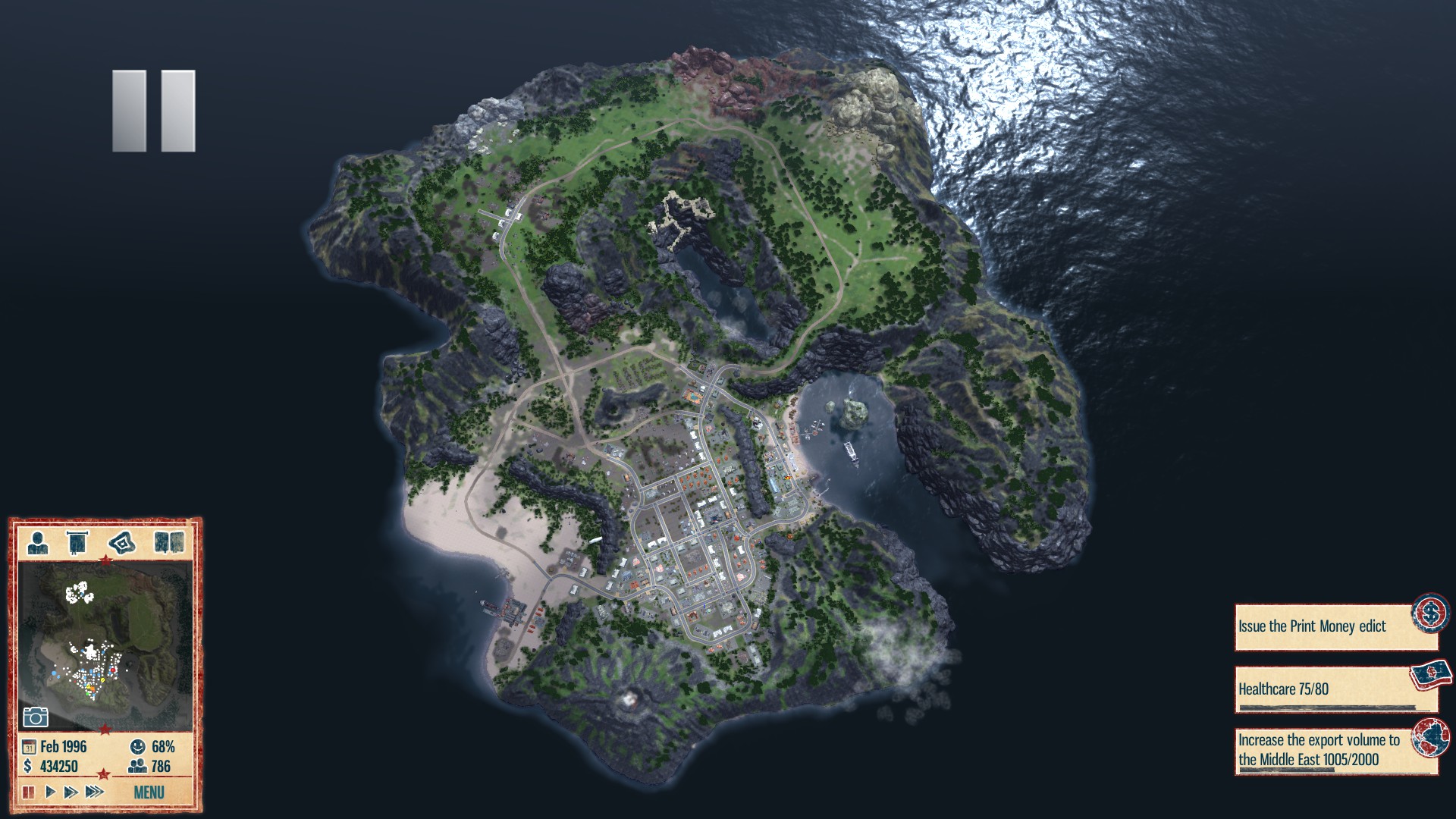
You won't be able to zoom out this far using the scroll wheel - instead, you have to rotate the camera by holding ALT + Left Mouse or pressing and holding the scroll wheel while dragging the mouse.

It's really helpful to use this view to get an overview of natural resources and other things like crime, liberty, etc.
Note: From my experience this modification does not increase CPU or RAM usage.
Here's a comparison..
Before:
You can barely zoom out in the vanilla game :(
After:
But wait, there's more..
Bird's-Eye View:
You won't be able to zoom out this far using the scroll wheel - instead, you have to rotate the camera by holding ALT + Left Mouse or pressing and holding the scroll wheel while dragging the mouse.
It doesn't just look cool, it can also also help you be more efficient!
It's really helpful to use this view to get an overview of natural resources and other things like crime, liberty, etc.
How To
- Open the Tropico 4 directory (C:\Program Files (x86)\Steam\SteamApps\common\Tropico 4\)
- Create a new directory called "Game"
- Open the "Game" directory that you just created
- Create a new text file in the directory you just created - you can name the file whatever you want, I named mine "zoommod"
- Open the file you just created in a text editor like NotePad or NotePad++
- Copy/Paste the following code into the file-- Zoom Mod ZoomMod = function() -- modify camera settings and move fog higher hr.RTSCamera.MaxHeight = 120 -- original: 40 hr.RTSCamera.MaxZoom = 20000 -- original: 7500 hr.FogStartModifier ="5" -- original: "2.0" -- modify rendering settings and render objects from farther distances --hr.ShadowRangeModifier = 20000 -- Shadows --hr.TerrainLODDistanceModifier = 250 -- Grass --hr.BillboardDistanceModifier = 250 -- Trees --hr.DistanceModifier = 250 -- Buildings end -- Only fire once local FiredOnce = false -- UA Set Mode OnMsg.UASetMode = function(actions,mode) -- Fire until fired once if not FiredOnce then -- If we boot, trip it ... if(mode == "Boot") then FiredOnce = true -- Run the thread to bypass it CreateRealTimeThread(function() -- Do mod loading code here. ZoomMod() end) end end end -- T4 (non MT) approach OnMsg.ClassesPreprocess = function() ZoomMod() end
- Save and close the file
- Rename the file extension from ".txt" to ".lua" (file extensions will have to be visible; for help, see https://www.google.com/search?q=how+to+view+file+extensions)
- Launch Tropico 4
There are also parameters to modify the render distance of shadow, grass, trees and buildings. They are commented out with older PCs in mind, but if you have sufficient resources you can enable those settings by removing the "--" at the beginning of the line.
Credits
I came across this solution after searching the web and landing on a thread in the Kalypso forum. You can find the thread at http://forum.kalypsomedia.com/showthread.php?tid=10894.
More Tropico 4 guides
- How to make Tourism Viable Tropico 4 - up to 200k profit a year.★ 5 (626)23k views647 ♥6 minUpdated Apr 23, 2013
- Tropico 4 - The fool proof guide to success that even El Diablo could follow★ 5 (481)21k views780 ♥57 min
- Booze Baron - Easy Money★ 5 (216)21k views172 ♥9 minUpdated Jan 18, 2013
- Tropico 4: How to play without launcher / account registration★ 5 (393)20k views292 ♥2 minGermanUpdated Apr 18, 2025
- Cheat Codes★ 5 (347)18k views527 ♥1 minUpdated Dec 21, 2013
- Building Paradise★ 5 (351)17k views418 ♥14 minUpdated Jul 17, 2013


This guide was created by its original author on the Steam Community. Are you the author and want it removed? Request removal.