Tropico 4: How to play without launcher / account registration
1. Which folder?
First of all you need to go to C -> Windows -> System32 -> drivers -> etc (C:\Windows\System32\drivers\etc)
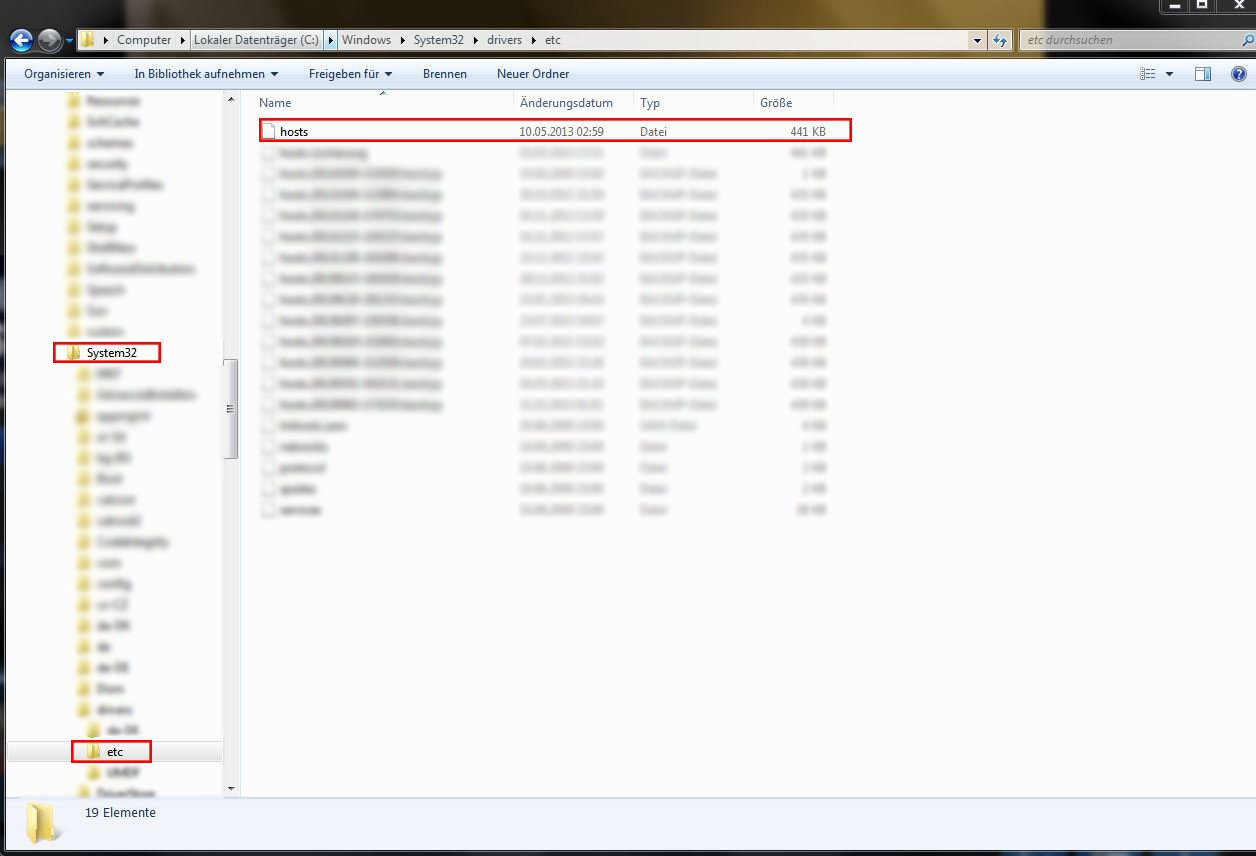
Open the hosts file with your prefered Editor but the Windows wordpad should be enough.
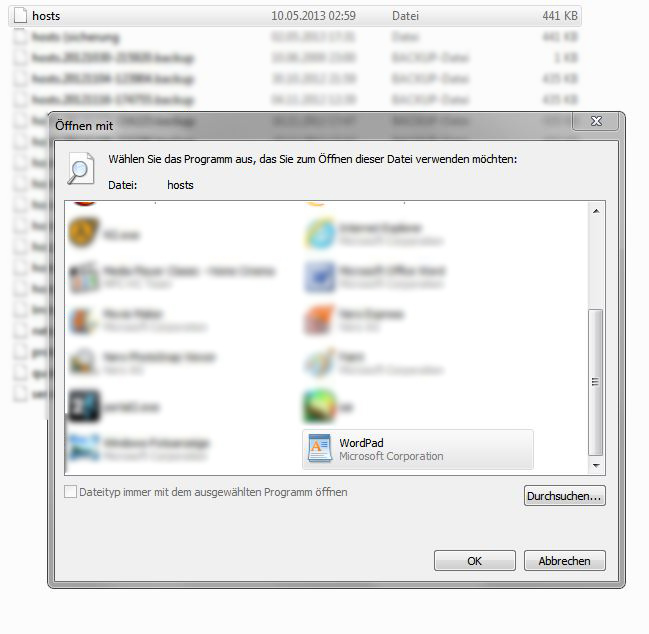
Open the hosts file with your prefered Editor but the Windows wordpad should be enough.
2. Editing the file
In the etc file you will find a text like this:
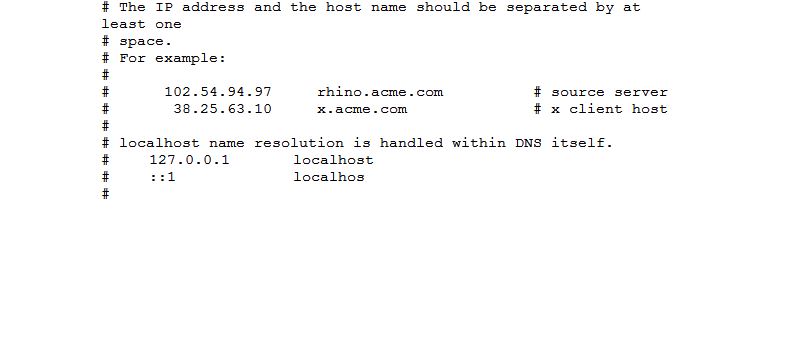
Just add this " 127.0.0.1 launcher01.kalypsomedia.com " one line under the last #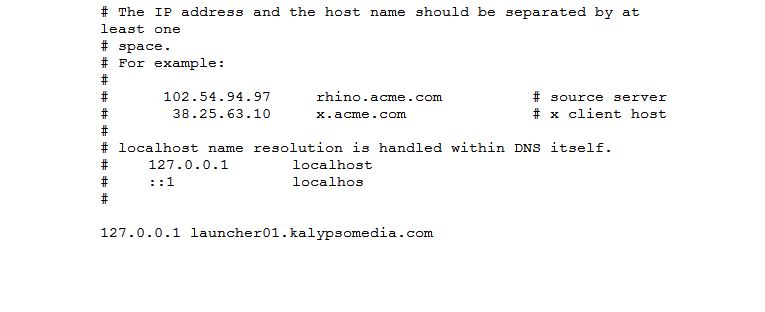
Now save it but remove the ".txt" at the end
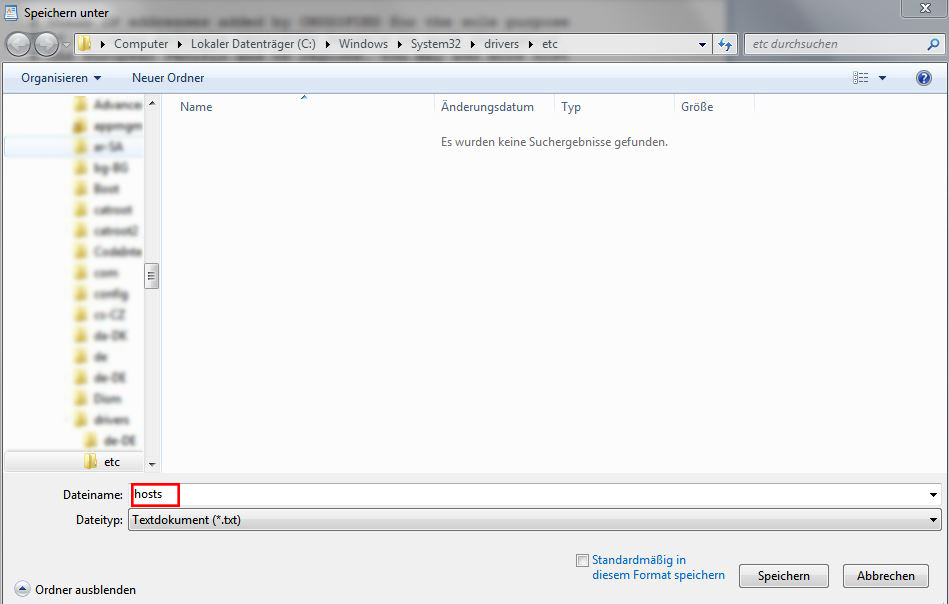
Now you're done with editing. No restart required. Have Fun playing Tropico 4.
Just add this " 127.0.0.1 launcher01.kalypsomedia.com " one line under the last #
Now save it but remove the ".txt" at the end
Now you're done with editing. No restart required. Have Fun playing Tropico 4.
FAQ
Does this work on XP / Win 8 / 10 too?
Yeah this works under XP too. (Thanks to Stef)
Yep works under Windows 8 too. (Thanks to Anakin_the_Green)
And lastly this will work under Windows 10.
Does this work with Tropico 4 DLC's ?
Yep DLC's work. Bought them myself and i can play them all.
I don't get any achievements / cards when i play Tropico 4. Do i still need an account?
You wil get all achievements that you've achieved when you start Tropico 4 again. You get cards normally.
I get everything working until I try to save, it then tells me that I need an administrator, what do I do?
Try to open your editor with right click and "Start as Administrator" this should help,
otherwise you can try this
- > Copy your hosts file somewhere you may work with, e.g. your desktop. Edit the hosts file on your desktop and copy/move it back where it came from. Now confirm replace file and you are good to go. (Thanks to Sam Bartson)
Does this edit anything that could mess up my computer?
You only set the activation from the Kalypso Server to your computer (127.0.0.1).
The Launcher can't find the server and starts the game. (Same process as you would disconnect from the internet and start the game)
Yeah this works under XP too. (Thanks to Stef)
Yep works under Windows 8 too. (Thanks to Anakin_the_Green)
And lastly this will work under Windows 10.
Does this work with Tropico 4 DLC's ?
Yep DLC's work. Bought them myself and i can play them all.
I don't get any achievements / cards when i play Tropico 4. Do i still need an account?
You wil get all achievements that you've achieved when you start Tropico 4 again. You get cards normally.
I get everything working until I try to save, it then tells me that I need an administrator, what do I do?
Try to open your editor with right click and "Start as Administrator" this should help,
otherwise you can try this
- > Copy your hosts file somewhere you may work with, e.g. your desktop. Edit the hosts file on your desktop and copy/move it back where it came from. Now confirm replace file and you are good to go. (Thanks to Sam Bartson)
Does this edit anything that could mess up my computer?
You only set the activation from the Kalypso Server to your computer (127.0.0.1).
The Launcher can't find the server and starts the game. (Same process as you would disconnect from the internet and start the game)
More Tropico 4 guides
- How to make Tourism Viable Tropico 4 - up to 200k profit a year.★ 5 (626)23k views647 ♥6 minUpdated Apr 23, 2013
- Tropico 4 - The fool proof guide to success that even El Diablo could follow★ 5 (481)21k views780 ♥57 min
- Booze Baron - Easy Money★ 5 (216)21k views172 ♥9 minUpdated Jan 18, 2013
- Cheat Codes★ 5 (347)18k views527 ♥1 minUpdated Dec 21, 2013
- Building Paradise★ 5 (351)17k views418 ♥14 minUpdated Jul 17, 2013
- Tropico 4 Achievement Guide★ 5 (706)17k views881 ♥29 minUpdated Sep 21, 2021


This guide was created by its original author on the Steam Community. Are you the author and want it removed? Request removal.