Less Cancerous KF2 Settings
Changelog
Change #1: Added KFGame.ini segment (Credit to Fanta)
Change #2: Added Bad PC Section with Plastic Zeds under the request of CaptainSAWB5
Change #3: Added nostartupmovies, grenade announcement bind, gamma in KFGame.ini, no bullet holes, gore and corpses, and fixed some wording. Added the Optional Cool Stuff Section and KFSystemSettings.ini
Change #4: Added ADS HUD Hide, No hands, and disabling trader voice line.
Change #5: Showed to access to .ini files (Credit to CaptainSAWB5 for my oversight) and how to change KF2 menu background.
Change #6: Got rid of the Suppress feature, non-console gamma, and changed a few things. Changed the Shut Up Stupid Trader Lady segment, added muzzle flash removal.
Change #7: Added FoV change (KFEngine)
Change #8: Adjusted some crap, added the Things that are less cancerous section, but don't really fit under a specific category with Peelz's Crosshair and Controlled Difficulty - Chokepoints Edition
Change #9: Moved Shut Up Stupid Trader Lady
Change #10: Gave Frame Rate it's own category.
Change #11: Separated each Optional Cool Stuff into their own categories and added in-game renames.
Change #12: Time to rotate the Touhou girls, this time, to be more homogenous with the Touhou Popularity Poll 2022[maribelhearn.com]
Change #13: Added "Plastic World"
Change #14: Added section to reduce particles. Taking it away from KFEngine and KFGame segments to make it more accessible. Revamped Touhou girl images. Added "I Hate Myself and Use Linux"
Change #15: Still a Work in Progress (Reorganizing the Touhou girls to be in line with Touhou Popularity Poll 2023, going into specifics into what plastic settings are in KFSystemSettings.ini, and other neat tips and tricks.)
Change #16: Updated the Skin Swap for "Optional Cool Stuff" to include the latest update.
Change #17: Minor changes, rotated the Touhou girls.
Change #18: Happy 2024, adjusted some wording, replaced some example videos as they have gone private, adjusted formatting. Rotated images once again.
Change #19: Had to mock KF3 after it was another DOA UE5 slopshooter.
Change #20: FINAL UPDATE (for KF2). So you can basically not have to worry updating this anymore.
Change #20.5: Replaced Shinki with Aya, it's always these big breasted girls that get to me. Forgot to bring up having reference images to show people visually where to go. Other minor crap.
Change #21: Added Anti-Crashing Segment up top as first, people don't know how unstable this game truly is and second, because 99% it's more than visual changes, it actually improves stability. Replaced Utsuho with Shinki as my irrelevant probably not even canon to Touhou anymore PC-98 demon waifu is more special.
Change #22: Fixed FoV changing. Apologies for misinforming people, even accidentally.
Change #23: Didn't realize it was a year of this guide being up, and working on playing on a custom resolution.
Change #24: Fixed around a few things, credit to Milansta and PoorPocketsMcNewHold telling me about this.
Change #25: 2025 Fixups, nothing major. Made the thumbnail some AI Art of Youmu, because why not.
Change #26: Small updates before 2026, found an even better image of Youmu. KF3 will always be inferior to the previous games.
Change #2: Added Bad PC Section with Plastic Zeds under the request of CaptainSAWB5
Change #3: Added nostartupmovies, grenade announcement bind, gamma in KFGame.ini, no bullet holes, gore and corpses, and fixed some wording. Added the Optional Cool Stuff Section and KFSystemSettings.ini
Change #4: Added ADS HUD Hide, No hands, and disabling trader voice line.
Change #5: Showed to access to .ini files (Credit to CaptainSAWB5 for my oversight) and how to change KF2 menu background.
Change #6: Got rid of the Suppress feature, non-console gamma, and changed a few things. Changed the Shut Up Stupid Trader Lady segment, added muzzle flash removal.
Change #7: Added FoV change (KFEngine)
Change #8: Adjusted some crap, added the Things that are less cancerous section, but don't really fit under a specific category with Peelz's Crosshair and Controlled Difficulty - Chokepoints Edition
Change #9: Moved Shut Up Stupid Trader Lady
Change #10: Gave Frame Rate it's own category.
Change #11: Separated each Optional Cool Stuff into their own categories and added in-game renames.
Change #12: Time to rotate the Touhou girls, this time, to be more homogenous with the Touhou Popularity Poll 2022[maribelhearn.com]
Change #13: Added "Plastic World"
Change #14: Added section to reduce particles. Taking it away from KFEngine and KFGame segments to make it more accessible. Revamped Touhou girl images. Added "I Hate Myself and Use Linux"
Change #15: Still a Work in Progress (Reorganizing the Touhou girls to be in line with Touhou Popularity Poll 2023, going into specifics into what plastic settings are in KFSystemSettings.ini, and other neat tips and tricks.)
Change #16: Updated the Skin Swap for "Optional Cool Stuff" to include the latest update.
Change #17: Minor changes, rotated the Touhou girls.
Change #18: Happy 2024, adjusted some wording, replaced some example videos as they have gone private, adjusted formatting. Rotated images once again.
Change #19: Had to mock KF3 after it was another DOA UE5 slopshooter.
Change #20: FINAL UPDATE (for KF2). So you can basically not have to worry updating this anymore.
Change #20.5: Replaced Shinki with Aya, it's always these big breasted girls that get to me. Forgot to bring up having reference images to show people visually where to go. Other minor crap.
Change #21: Added Anti-Crashing Segment up top as first, people don't know how unstable this game truly is and second, because 99% it's more than visual changes, it actually improves stability. Replaced Utsuho with Shinki as my irrelevant probably not even canon to Touhou anymore PC-98 demon waifu is more special.
Change #22: Fixed FoV changing. Apologies for misinforming people, even accidentally.
Change #23: Didn't realize it was a year of this guide being up, and working on playing on a custom resolution.
Change #24: Fixed around a few things, credit to Milansta and PoorPocketsMcNewHold telling me about this.
Change #25: 2025 Fixups, nothing major. Made the thumbnail some AI Art of Youmu, because why not.
Change #26: Small updates before 2026, found an even better image of Youmu. KF3 will always be inferior to the previous games.
Anti-Crashing Segment and Prelude
For configuring something, if you cannot seem to find it, hit Control and F keys to bring up a search function. That saves alot of time and headaches when compared to not doing so.
SizeOfPermanentObjectPool=0
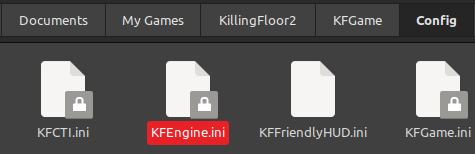
This is the classic fix to play on modded servers (Controlled Difficulty, Zedternal Reborn, etc.) and to be more stable while playing modded content as a whole. Fixes a vast majority of crashing issues, the rest of the usual crashes comes from using NVIDIA FleX and rare one-off situations. I will repeat this again in KFEngine.ini and will probably repeat myself in different segments multiple times because crashing constantly is gay.

Unfinished, abandoned, not worked on by the developers anymore for optimization and stability. You can safely disable this worthless crap. It does it for me by default for running an AMD GPU (I converted to NVIDIA now because RX 6000 series cards gave me framerate issues, my friends who own AMD Radeon 7000 series cards say they don't have those issues). For NVIDIA users, disable Flex unless you enjoy randomly crashing. It's the other 5% of crash issues.
Documents > MyGames > KillingFloor2 > KFGame > Config
MaxObjectsNotConsideredByGC=33476SizeOfPermanentObjectPool=0
This is the classic fix to play on modded servers (Controlled Difficulty, Zedternal Reborn, etc.) and to be more stable while playing modded content as a whole. Fixes a vast majority of crashing issues, the rest of the usual crashes comes from using NVIDIA FleX and rare one-off situations. I will repeat this again in KFEngine.ini and will probably repeat myself in different segments multiple times because crashing constantly is gay.
Boot Up the Game > Options > Video > Look Under Basic
Disable NVIDIA FlexUnfinished, abandoned, not worked on by the developers anymore for optimization and stability. You can safely disable this worthless crap. It does it for me by default for running an AMD GPU (I converted to NVIDIA now because RX 6000 series cards gave me framerate issues, my friends who own AMD Radeon 7000 series cards say they don't have those issues). For NVIDIA users, disable Flex unless you enjoy randomly crashing. It's the other 5% of crash issues.
What if I want to try a Custom Resolution?
Not really much I can put here apart from KF2 will support your custom resolution if you set your game to Fullscreen. Just find it after going through resolutions in the game's video settings.
I have absolutely zero clue on create a custom resolution on Intel-based GPUs. You gotta research that yourself man.
If you made a custom resolution because you played CSGO in the past, KF2 will also support that custom resolution too and will stretch it out.
https://www.amd.com/en/resources/support-articles/faqs/DH3-032.html
https://www.nvidia.com/en-us/drivers/custom-resolutions/
16:10 stretched resolution example (107% FOV):
https://www.youtube.com/watch?v=kPwMLicrkvw&t=381s
I have absolutely zero clue on create a custom resolution on Intel-based GPUs. You gotta research that yourself man.
If you made a custom resolution because you played CSGO in the past, KF2 will also support that custom resolution too and will stretch it out.
https://www.amd.com/en/resources/support-articles/faqs/DH3-032.html
https://www.nvidia.com/en-us/drivers/custom-resolutions/
16:10 stretched resolution example (107% FOV):
https://www.youtube.com/watch?v=kPwMLicrkvw&t=381s
Effects to Change
Steam > steamapps > common > killingfloor2 > KFGame > BrewedPC > Packages > Effects
Delete the following files:
FX_CameraShake_ARCH.upk (Gets rid of most screenshake, primarily used to prevent the "Destroyer of Worlds" skill screenshake since it's unfair you get screwed over cause of some PoS teammate, not because you yourself messed up.) This does not include screenshake from getting hit by Zeds, screenshake generated by shooting.
cough cough Hokagay's "newtech" (GS anti-screenshake exploit) and map-based screenshake. (Nuked)
FX_Wep_Laser_Emit.upk (Gets rid of weapon lasers [EX: M14, Eviscerator])
FX_Wep_Laser_MESH.upk (same as Wep_Laser_Emit)
There are also multiple other files you could theoretically delete, but I don't know what they do exactly, delete them at your own risk.
After deleting the following files, join a non-official whitelisted server (example, Carl's "Huwhyte HoE+" servers) as the game wants to redownload the deleted files before you actually play in multiplayer. Then after it does, you should be good to go joining any servers, including official Tripwire ones.
There is also muzzle flash files in the folder but this drag and drop mod from Necr0Fox is way better instead of having to do the method I said for the other files. https://steamcommunity.com/sharedfiles/filedetails/?id=2782552571
Disclaimer: This gets reverted whenever you verify game files on Steam or something similar that resets all the files.

Console Commands
Unlock your KFInput.ini files and use a whitelisted server or main menu for the setbind commands to stick.
Press tilde (~) while in-game
gamma X (increased gamma or can be used to decrease it (2.2 is the "default brightest" setting), X is a number value ranging from 1 through 5, decimals are allowed. You can see the effects on Volter Manor the best for gamma 5, and gamma 2 (decreased) is best seen on Outpost.)fogdensity 0 (gets rid of all fog, the effect can be seen most prominently on Nuked)
setbind "gba_grenade customstartfire 4 | onrelease customstopfire 4 | say GRENADE OUT"
(lets people know you are throwing a grenade, most helpful when playing Sharpshooter with the freeze grenades, change "GRENADE OUT" into any text you want for funnies. I take absolutely no responsibility if you change it to something inappropriate and get banned off a server.)
getall kfgamereplicationinfo bossindex (0 is Hans, 1 is Patriarch, 2 is KFP, 3 is Abomination, 4 is Matriarch, used to "predict" the boss.)
setbind RightMouseButton "SpectateNextPlayer|GBA_IronsightsHold|Showhud|OnRelease Showhud" (Hides HUD when ADSing.)
setbind MouseScrollUp TossMoney
setbind MouseScrollDown TossMoney (Both go hand in hand, no more spamming B or whatever your dosh throw key is when you can just use the scroll wheel instead.)
setbind Subtract "gamma 5 | fogdensity 0" (Brightens up the map, and removes fog.)
stat FPS (allows you to check your frame rate. Also by the way, this game is heavily affected by FPS, you'll start seeing it manifesting when you start getting above 300 FPS.)
Credit to Milansta for find that I put a (") in the wrong place.
KFEngine.ini
My Documents > My Games > KillingFloor2 > KFGame > Config
Hey why am I getting a feeling of deja vu?
Not Crashing On Modded Servers
Find the following and change the values to:
MaxObjectsNotConsideredByGC=33476
SizeOfPermantentObjects=0
People refer to it as the CD fix but it should work in any modded server, any servers running non whitelisted mods shouldn't crash with this. (Most well known mods for this fix include Controlled Difficulty and Zedternal Reborn.)
Even if you don't intend on playing on servers that require clientsided mods, such as "Huwhyte HoE+," your game has a far lesser chance of crashing with these changes compared to "default" configuration.
No startup AND loading screen videos
bForceNoMovies=true (This does not stop the main menu video from rendering)

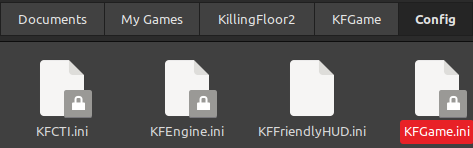
KFGame.ini
My Documents > My Games > KillingFloor2 > KFGame > Config
Manipulate Gravity Scaling (for spares, dosh, and ragdolls)
RBPhysicsGravityScaling=X (X being any number above the default (1), it's meant to stop ragdolls from flying to god knows where after a kill) Also, a high X value will have weapons falling through the floor for Solo, on multiplayer your weapon will render to be missing but it is tied to the server so just don't set it too high unless you want to troll yourself. Mine is personally set to 3 to align with CD: Chokepoints
Disabling gore and limiting corpses
BloodPoolDelay=0
GoreFXLifetimeMultiplier=0.0
BodyWoundDecalLifetime=0.0
BloodSplatterLifetime=0.0
BloodPoolLifetime=0.0
GibletLifetime=0.0
MaxBodyWoundDecals=0
MaxBloodSplatterDecals=0
MaxBloodPoolDecals=0
BloodSplatSize=0.0
BloodPoolSize=0.0
MaxDeadBodies=4
MaxBloodEffects=0
MaxGoreEffects=0
AllowBloodSplatterDecals=False
PersistentSplatTraceLength=0.0
MaxPersistentSplatsPerFrame=0.0
bAllowBloodSplatterDecals=False
For MaxDeadBodies, It specifically has to be 4 as that is the actual lowest value for corpses rendered, me and some friends (namely CaptainSAWB5) have tested this with lower values than 4 and it defaults to 7 corpses. I also believe that the corpses are tied to what you have killed or at least what dies on your screen (not 100% how this works, but that's only what I have noticed.)
Disabling bullet holes
MaxImpactEffectDecals=0
Adjusting FOV slider without being in game (bit more precise FOV):
FOVOptionsPercentageValue=X (1 being 100% in game, 1.1 being 110%, etc)
I apologize for misinforming people for the longest of time with adjusting FOV, the way this appears to work is to multiply the default FOV of 90 x the FOVOptionsPercentageValue, example being 90 default FOV x 1 = 90 FOV, or default FOV x 1.25 multiplier is 112.5 degrees FOV.
Credit to Fanta for telling me about the gravity scaling and corpses.

KFInput.ini
My Documents > My Games > KillingFloor2 > KFGame > Config
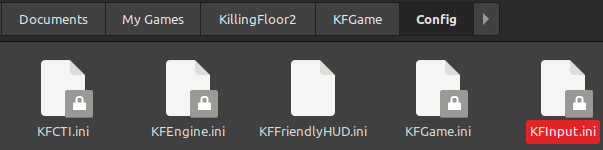
bEnableMouseSmoothing=false
bViewAccelerationEnabled=false
LookRightScale=0
LookUpScale=0
X is a fill-in for a numerical value, you should of been able to learn this in a basic algebra class during secondary school.
MouseSensitivity=X (X is whatever value you actually want your mouse sensitivity to be, as the in-game slider is not accurate compared to modifying the config file itself. For example, I run 1600 DPI and put 2.6 as the sensitivity in the in-game slider, turns out when I was in the config file itself, the number was 8 point a bunch of random ass decimal numbers. You cannot get that accurate value you desire by going off of what's shown in-game by just by using the sensitivity slider.)
ZoomedSensitivityScale=X (Read above, except it's when you ADS, I'm assuming that this is supposed to be a percentage compared to your sensitivity + DPI. I personally use 85 as my X-value, which should mean this is 85% of the total sensitivity of my "normal" one.)
Easy Money Toss Bind
Bindings=(Name="MouseScrollUp",Command="TossMoney",Control=False,Shift=False,Alt=False,bIgnoreCtrl=False,bIgnoreShift=False,bIgnoreAlt=False)
Bindings=(Name="MouseScrollDown",Command="TossMoney",Control=False,Shift=False,Alt=False,bIgnoreCtrl=False,bIgnoreShift=False,bIgnoreAlt=False)
OR In-Game with the console (~)
setbind "MouseScrollUp" "TossMoney"
setbind "MouseScrollDown" "TossMoney"
Hide HUD while ADSing
Bindings=(Name="RightMouseButton",Command="GBA_IronsightsToggle | SpectateNextPlayer | ShowHUD | OnRelease ShowHUD",Control=False,Shift=False,Alt=False,bIgnoreCtrl=False,bIgnoreShift=False,bIgnoreAlt=False)
Set it to read only to make sure the game doesn't screw with your inputs (However, you will be unable to permanently have new binds unless you manually type it in the input file)

KFSystemSettings.ini
My Documents > My Games > KillingFloor2 > KFGame > Config

MotionBlur=False (Disables motion blur. Seriously, who genuinely thinks this needs to be added to any video game? It's the S-tier on the tier list horrible video game features alongside paid DLC in a paid game and battlepasses.)
MotionBlurPause=False
MotionBlurSkinning=0
DepthOfField=False
UseVsync=False (Really, VSync? Just go limit your frames one-handed after reading this guide and having it up on your screen)
Distortion=True (let's you see stalker's "blur" in their invisible phase even on low in-game graphic settings)

Particles, and Reducing Them
Documents > My Games > KillingFloor2 > KFGame > Config
Both KFEngine and KFGame.ini
MaxFluidNumVerts=1
FluidSimulationTimeLimit=0.0
MaxParticleVertexMemory=X
X is a numerical value. With the default being a 7 digit number which is ridiculous as your screen is covered by a gorillion particles. I personally use 384 which drastically reduces all the clutter on the screen (ESPECIALLY with Freeze Grenades and Firebugs). The only issue is after the change, is that Husk fireballs can sometimes be "invisible" so be aware of that.

Plastic World
KFSystemSettings.ini
You primarily use this for game optimization. I recently learned that LODBias is some sort of priority BS or whatever for rendering and -1 is the highest, 10 is the lowest.
TEXTUREGROUP_World=(MinLODSize=1,MaxLODSize=1,LODBias=10,MinMagFilter=Linear,MipFilter=Point,MipGenSettings=TMGS_SimpleAverage)
TEXTUREGROUP_WorldNormalMap=(MinLODSize=1,MaxLODSize=1,LODBias=10,MinMagFilter=Linear,MipFilter=Point,MipGenSettings=TMGS_SimpleAverage)
TEXTUREGROUP_WorldSpecular=(MinLODSize=1,MaxLODSize=1,LODBias=10,MinMagFilter=Linear,MipFilter=Point,MipGenSettings=TMGS_SimpleAverage)

Plastic Zeds (Requested by CaptainSAWB5)
KFSystemSettings.ini
TEXTUREGROUP_Creature=(MinLODSize=1,MaxLODSize=1,LODBias=-1,MinMagFilter=Aniso,MipFilter=Linear,MipGenSettings=TMGS_SimpleAverage)
TEXTUREGROUP_CreatureNormalMap=(MinLODSize=1,MaxLODSize=1,LODBias=-1,MinMagFilter=Aniso,MipFilter=Linear,MipGenSettings=TMGS_SimpleAverage)
TEXTUREGROUP_CreatureSpecular=(MinLODSize=1,MaxLODSize=1,LODBias=-1,MinMagFilter=Aniso,MipFilter=Linear,MipGenSettings=TMGS_SimpleAverage)
Change MaxLODSize to 1
This will show up multiple times in your KFSystemSettings.ini, just copy paste this and replace it. Your zeds will straight up be blocky and monochrome.
Example of Plastic Zeds from CaptainSAWB5
https://www.youtube.com/watch?v=y_pirs8swGc
I know I'm breaking the "Touhou mommies only" mold by posting Remilia, but Captain won't let me hear the end of how much he wants Remilia on this guide.
Other Plastics
I don't consider these less cancerous, but if your PC is that low spec, these may help too. Good to know they at least exist, alongside the other guides for making your PC run this game better (thanks for ruining the game's optimization Tripwire for all these new funny cosmetics and these unoptimized assets!)
All are still in KFSystemSettings.ini
Plastic Characters
TEXTUREGROUP_Character
TEXTUREGROUP_CharacterNormalMap
TEXTUREGROUP_CharacterSpecular
Plastic Weapons
TEXTUREGROUP_Weapon
TEXTUREGROUP_WeaponNormalMap
TEXTUREGROUP_WeaponSpecular
Skybox (Credit to CaptainSAWB5 for helping me with this)
TEXTUREGROUP_Skybox
There are some other things you could make plastic like vehicle but I'm not completely sure what that does as there are no drivable vehicles and the vehicles that are part of the map but those are affected by plastic world.
UI is ABSOLUTELY NO GO with the plastic settings.
Credit to CaptainSAWB5 to see if changing Bokeh does, which happens to be nothing.

All are still in KFSystemSettings.ini
Plastic Characters
TEXTUREGROUP_Character
TEXTUREGROUP_CharacterNormalMap
TEXTUREGROUP_CharacterSpecular
Plastic Weapons
TEXTUREGROUP_Weapon
TEXTUREGROUP_WeaponNormalMap
TEXTUREGROUP_WeaponSpecular
Skybox (Credit to CaptainSAWB5 for helping me with this)
TEXTUREGROUP_Skybox
There are some other things you could make plastic like vehicle but I'm not completely sure what that does as there are no drivable vehicles and the vehicles that are part of the map but those are affected by plastic world.
UI is ABSOLUTELY NO GO with the plastic settings.
Credit to CaptainSAWB5 to see if changing Bokeh does, which happens to be nothing.
Make Frame Rate Align with Monitor Refresh Rate Again
KFEngine.ini
bSmoothFrameRate=True
MinSmoothedFrameRate=X
MaxSmoothedFrameRate=X
MinDesiredFrameRate=X
X being whatever number your monitor's refresh rate is, or if you have a lower-end system, you can cap it to whatever frame rate you can reliably get. bSmoothFrameRate and Min/MaxSmoothedFrameRate show up twice for KFEngine.ini.
KFGame.ini
bSmoothFrameRate=True (In-Game, it's Variable Frame Rate)
MaxSmoothedFrameRate=X
MinSmoothedFrameRate=X
Changed it to True, credit to 'Poor huwhyte Carl for helping me decide on this.
bSmoothFrameRate=True
MinSmoothedFrameRate=X
MaxSmoothedFrameRate=X
MinDesiredFrameRate=X
X being whatever number your monitor's refresh rate is, or if you have a lower-end system, you can cap it to whatever frame rate you can reliably get. bSmoothFrameRate and Min/MaxSmoothedFrameRate show up twice for KFEngine.ini.
KFGame.ini
bSmoothFrameRate=True (In-Game, it's Variable Frame Rate)
MaxSmoothedFrameRate=X
MinSmoothedFrameRate=X
Changed it to True, credit to 'Poor huwhyte Carl for helping me decide on this.
Steam Launch Options
Right Click Killing Floor 2 in your Steam Library > Click on "Properties" > You'll see it
-nostartupmovies (Removes startup movies such as the Hardsuit, Georgia, and TWI video from starting up, if you haven't already changed it so in KFEngine.ini)-dx10 (Uses DirectX 10 instead of 11, if you haven't already changed it so in KFEngine.ini. Allegedly it's more stable for DX10 but I'm not 100% sure, test it yourself it does nothing unless you magically like DX10 more or feel it's better.)
-notexturestreaming (Disables Texture streaming if you haven't already done so in the file)
Workshop Mods that are Less Cancerous
Peelz's Crosshair
Peelz's Crosshair (ReShade)
Anyways if you're on Linux use this to install Reshade:
https://github.com/kevinlekiller/reshade-steam-proton
Controlled Difficulty
Controlled Difficulty - Chokepoints Edition by Fanta
Best CD Version, ever. Solomode and solomodeplus console commands for practice, forced no seasonal zeds, no affliction modifiers by blocking (Scrakes are the biggest offender of blocking as him blocking means f*ck your freeze.) And the best part, absolutely ZERO stolen code, or any used without permission if there is shared code. Additionally, Harder and Nightcore Zeds. For a more challenging Zed type to suit yourself.
The other Editions are okay, but Combined is the only other up-to-date one. Eternal, Blackout, and numerous other builds builds are either outdated and/or private.
Shut the F*ck Up Trader Lady
Mute Trader(s)
Screw You Seasonal Zeds
Piss off Seasonal Zeds

Peelz's Crosshair (ReShade)
Anyways if you're on Linux use this to install Reshade:
https://github.com/kevinlekiller/reshade-steam-proton
Controlled Difficulty
Controlled Difficulty - Chokepoints Edition by Fanta
Best CD Version, ever. Solomode and solomodeplus console commands for practice, forced no seasonal zeds, no affliction modifiers by blocking (Scrakes are the biggest offender of blocking as him blocking means f*ck your freeze.) And the best part, absolutely ZERO stolen code, or any used without permission if there is shared code. Additionally, Harder and Nightcore Zeds. For a more challenging Zed type to suit yourself.
The other Editions are okay, but Combined is the only other up-to-date one. Eternal, Blackout, and numerous other builds builds are either outdated and/or private.
Shut the F*ck Up Trader Lady
Mute Trader(s)
Screw You Seasonal Zeds
Piss off Seasonal Zeds
Optional Cool Stuff: Weapon Skin Swap
KFGame.ini
Feel free to copy-paste this for starters, this includes every weapon inside the base game. You'll eventually learn to find what skin swap YOU want eventually and you have to own the skin beforehand. Paste at the VERY BOTTOM of your KFGame.ini file. to make it easier to track down for future skin swapping and to probably not mess with something.[KFGameContent.KFWeap_Pistol_AF2011]The one I personally do is 3330 (Circuit Glow Mint for HX25), go find a skin that you own and that you like and use some Notepad or whatever. Copy and paste replace 3330 with whatever SkinItemID your preferred skin is, come on, give it a shot. After all those plastic configs given, give your game some soul to it.
SkinItemId=3330
[KFGameContent.KFWeap_Pistol_9mm]
SkinItemId=3330
[KFGameContent.KFWeap_Shotgun_AA12]
SkinItemId=3330
[KFGameContent.KFWeap_AssaultRifle_AK12]
SkinItemId=3330
[KFGameContent.KFWeap_AssaultRifle_AR15]
SkinItemId=3330
[KFGameContent.KFWeap_AutoTurret]
SkinItemId=3330
[KFGameContent.KFWeap_Knife_Berserker]
SkinItemId=3330
[KFGameContent.KFWeap_Pistol_Bladed]
SkinItemId=3330
[KFGameContent.KFWeap_Rifle_Hemogoblin]
SkinItemId=3330
[KFGameContent.KFWeap_Pistol_Blunderbuss]
SkinItemId=3330
[KFGameContent.KFWeap_Thrown_C4]
SkinItemId=3330
[KFGameContent.KFWeap_Flame_CaulkBurn]
SkinItemId=3330
[KFGameContent.KFWeap_Rifle_CenterfireMB464]
SkinItemId=3330
[KFGameContent.KFWeap_Blunt_ChainBat]
SkinItemId=3330
[KFGameContent.KFWeap_Pistol_ChiappaRhino]
SkinItemId=3330
[KFGameContent.KFWeap_Knife_Commando]
SkinItemId=3330
[KFGameContent.KFWeap_Bow_CompoundBow]
SkinItemId=3330
[KFGameContent.KFWeap_Bow_Crossbow]
SkinItemId=3330
[KFGameContent.KFWeap_Blunt_Crovel]
SkinItemId=3330
[KFGameContent.KFWeap_Ice_FreezeThrower]
SkinItemId=3330
[KFGameContent.KFWeap_Pistol_Deagle]
SkinItemId=3330
[KFGameContent.KFWeap_Knife_Demolitionist]
SkinItemId=3330
[KFGameContent.KFWeap_AssaultRifle_Doshinegun]
SkinItemId=3330
[KFGameContent.KFWeap_Shotgun_DoubleBarrel]
SkinItemId=3330
[KFGameContent.KFWeap_Shotgun_DragonsBreath]
SkinItemId=3330
[KFGameContent.KFWeap_AssaultRifle_FAMAS]
SkinItemId=3330
[KFGameContent.KFWeap_Edged_FireAxe]
SkinItemId=3330
[KFGameContent.KFWeap_Knife_Firebug]
SkinItemId=3330
[KFGameContent.KFWeap_Flame_Flamethrower]
SkinItemId=3330
[KFGameContent.KFWeap_Pistol_Flare]
SkinItemId=3330
[KFGameContent.KFWeap_AssaultRifle_FNFal]
SkinItemId=3330
[KFGameContent.KFWeap_Rifle_FrostShotgunAxe]
SkinItemId=3330
[KFGameContent.KFWeap_Pistol_G18C]
SkinItemId=3330
[KFGameContent.KFWeap_AssaultRifle_G36C]
SkinItemId=3330
[KFGameContent.KFWeap_GravityImploder]
SkinItemId=3330
[KFGameContent.KFWeap_Knife_Gunslinger]
SkinItemId=3330
[KFGameContent.KFWeap_Healer_Syringe]
SkinItemId=3330
[KFGameContent.KFWeap_SMG_HK_UMP]
SkinItemId=3330
[KFGameContent.KFWeap_HRG_EMP_ArcGenerator]
SkinItemId=3330
[KFGameContent.KFWeap_HRG_BallisticBouncer]
SkinItemId=3330
[KFGameContent.KFWeap_HRG_BarrierRifle]
SkinItemId=3330
[KFGameContent.KFWeap_HRG_BlastBrawlers]
SkinItemId=3330
[KFGameContent.KFWeap_HRG_Boomy]
SkinItemId=3330
[KFGameContent.KFWeap_HRG_CranialPopper]
SkinItemId=3330
[KFGameContent.KFWeap_HRG_Crossboom]
SkinItemId=3330
[KFGameContent.KFWeap_HRG_Energy]
SkinItemId=3330
[KFGameContent.KFWeap_HRG_Healthrower]
SkinItemId=3330
[KFGameContent.KFWeap_AssaultRifle_HRGIncendiaryRifle]
SkinItemId=3330
[KFGameContent.KFWeap_Rifle_HRGIncision]
SkinItemId=3330
[KFGameContent.KFWeap_Shotgun_HRG_Kaboomstick]
SkinItemId=3330
[KFGameContent.KFWeap_HRG_Locust]
SkinItemId=3330
[KFGameContent.KFWeap_HRG_MedicMissile]
SkinItemId=3330
[KFGameContent.KFWeap_HRG_Dragonbreath]
SkinItemId=3330
[KFGameContent.KFWeap_HRG_Nailgun]
SkinItemId=3330
[KFGameContent.KFWeap_Pistol_HRGScorcher]
SkinItemId=3330
[KFGameContent.KFWeap_HRG_SonicGun]
SkinItemId=3330
[KFGameContent.KFWeap_HRG_Revolver_Buckshot]
SkinItemId=3330
[KFGameContent.KFWeap_AssaultRifle_HRGTeslauncher]
SkinItemId=3330
[KFGameContent.KFWeap_HRG_Vampire]
SkinItemId=3330
[KFGameContent.KFWeap_Pistol_HRGWinterbite]
SkinItemId=3330
[KFGameContent.KFWeap_HuskCannon]
SkinItemId=3330
[KFGameContent.KFWeap_HVStormCannon]
SkinItemId=3330
[KFGameContent.KFWeap_GrenadeLauncher_HX25]
SkinItemId=3330
[KFGameContent.KFWeap_Shotgun_HZ12]
SkinItemId=3330
[KFGameContent.KFWeap_Edged_IonThruster]
SkinItemId=3330
[KFGameContent.KFWeap_Edged_Katana]
SkinItemId=3330
[KFGameContent.KFWeap_Edged_AbominationAxe]
SkinItemId=3330
[KFGameContent.KFWeap_SMG_Kriss]
SkinItemId=3330
[KFGameContent.KFWeap_AssaultRifle_Bullpup]
SkinItemId=3330
[KFGameContent.KFWeap_AssaultRifle_LazerCutter]
SkinItemId=3330
[KFGameContent.KFWeap_Shotgun_M4]
SkinItemId=3330
[KFGameContent.KFWeap_Rifle_M14EBR]
SkinItemId=3330
[KFGameContent.KFWeap_AssaultRifle_M16M203]
SkinItemId=3330
[KFGameContent.KFWeap_GrenadeLauncher_M32]
SkinItemId=3330
[KFGameContent.KFWeap_GrenadeLauncher_M79]
SkinItemId=3330
[KFGameContent.KFWeap_Rifle_M99]
SkinItemId=3330
[KFGameContent.KFWeap_Pistol_Colt1911]
SkinItemId=3330
[KFGameContent.KFWeap_SMG_Mac10]
SkinItemId=3330
[KFGameContent.KFWeap_Shotgun_MB500]
SkinItemId=3330
[KFGameContent.KFWeap_AssaultRifle_Medic]
SkinItemId=3330
[KFGameContent.KFWeap_Blunt_MedicBat]
SkinItemId=3330
[KFGameContent.KFWeap_AssaultRifle_MedicRifleGrenadeLauncher]
SkinItemId=3330
[KFGameContent.KFWeap_Knife_FieldMedic]
SkinItemId=3330
[KFGameContent.KFWeap_Pistol_Medic]
SkinItemId=3330
[KFGameContent.KFWeap_Shotgun_Medic]
SkinItemId=3330
[KFGameContent.KFWeap_SMG_Medic]
SkinItemId=3330
[KFGameContent.KFWeap_AssaultRifle_Microwave]
SkinItemId=3330
[KFGameContent.KFWeap_Beam_Microwave]
SkinItemId=3330
[KFGameContent.KFWeap_Mine_Reconstructor]
SkinItemId=3330
[KFGameContent.KFWeap_Minigun]
SkinItemId=3330
[KFGameContent.KFWeap_ZedMKIII]
SkinItemId=3330
[KFGameContent.KFWeap_AssaultRifle_MKB42]
SkinItemId=3330
[KFGameContent.KFWeap_Rifle_MosinNagant]
SkinItemId=3330
[KFGameContent.KFWeap_SMG_MP5RAS]
SkinItemId=3330
[KFGameContent.KFWeap_SMG_MP7]
SkinItemId=3330
[KFGameContent.KFWeap_Shotgun_Nailgun]
SkinItemId=3330
[KFGameContent.KFWeap_SMG_P90]
SkinItemId=3330
[KFGameContent.KFWeap_Rifle_ParasiteImplanter]
SkinItemId=3330
[KFGameContent.KFWeap_Blunt_Pulverizer]
SkinItemId=3330
[KFGameContent.KFWeap_Shotgun_ElephantGun]
SkinItemId=3330
[KFGameContent.KFWeap_Rifle_RailGun]
SkinItemId=3330
[KFGameContent.KFWeap_Revolver_Rem1858]
SkinItemId=3330
[KFGameContent.KFWeap_SMG_G18]
SkinItemId=3330
[KFGameContent.KFWeap_RocketLauncher_RPG7]
SkinItemIdUtsuho Reiuji=3330
[KFGameContent.KFWeap_Eviscerator]
SkinItemId=3330
[KFGameContent.KFWeap_AssaultRifle_SCAR]
SkinItemId=3330
[KFGameContent.KFWeap_Edged_Scythe]
SkinItemId=3330
[KFGameContent.KFWeap_RocketLauncher_SealSqueal]
SkinItemId=3330
[KFGameContent.KFWeap_RocketLauncher_Seeker6]
SkinItemId=3330
[KFGameContent.KFWeap_Knife_Sharpshooter]
SkinItemId=3330
[KFGameContent.KFWeap_Blunt_MaceAndShield]
SkinItemId=3330
[KFGameContent.KFWeap_ShrinkRayGun]
SkinItemId=3330
[KFGameContent.KFWeap_Blunt_PowerGloves]
SkinItemId=3330
[KFGameContent.KFWeap_LMG_Stoner63A]
SkinItemId=3330
[KFGameContent.KFWeap_Knife_Support]
SkinItemId=3330
[KFGameContent.KFWeap_Knife_Survivalist]
SkinItemId=3330
[KFGameContent.KFWeap_Revolver_SW500]
SkinItemId=3330
[KFGameContent.KFWeap_Knife_SWAT]
SkinItemId=3330
[KFGameContent.KFWeap_RocketLauncher_ThermiteBore]
SkinItemId=3330
[KFGameContent.KFWeap_AssaultRifle_Thompson]
SkinItemId=3330
[KFGameContent.KFWeap_Welder]
SkinItemId=3330
[KFGameContent.KFWeap_Rifle_Winchester1894]
SkinItemId=3330
[KFGameContent.KFWeap_KFWeap_Edged_Zweihander]
SkinItemId=3330
[KFGameContent.KFWeap_Shotgun_S12]
SkinItemId=3330
[KFGameContent.KFWeap_HRG_Warthog]
SkinItemId=3330
[KFGameContent.KFWeap_LMG_MG3]
SkinItemId=3330
[KFGameContent.KFWeap_HRG_93R]
SkinItemId=3330

Optional Cool Stuff: Changing the In-Game Videos
1. Download RAD Video Tools[www.radgametools.com]
2. Download some video which background you like with (preferably 720p or higher)
3. Rename your video to not have any fancy characters (only standard letters and numbers)
4. Bink and Smacker
5. Steam > steamapps > common > killingfloor2 > KFGame > Movies
6. Change whatever you get out of the .bik to whatever KF2 background you are replacing (ex. to MenuBG.bik to change menu background)

2. Download some video which background you like with (preferably 720p or higher)
3. Rename your video to not have any fancy characters (only standard letters and numbers)
4. Bink and Smacker
5. Steam > steamapps > common > killingfloor2 > KFGame > Movies
6. Change whatever you get out of the .bik to whatever KF2 background you are replacing (ex. to MenuBG.bik to change menu background)
Optional Cool Stuff: In-Game Renames
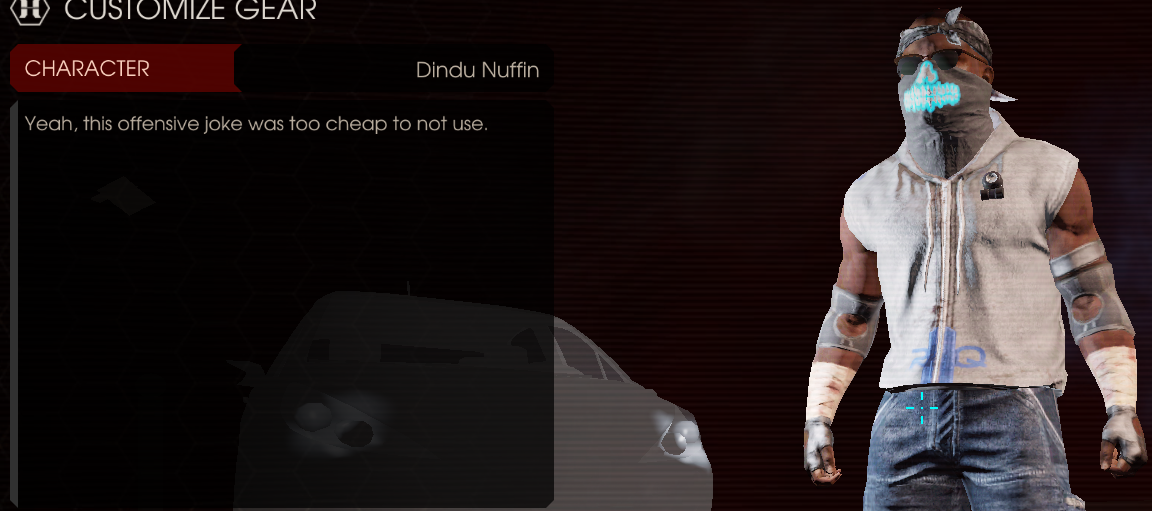
Trigger Warning Ahead: for those who cannot take an offensive joke. You have been warned and I better not get any comments complaining about "le mean joke."
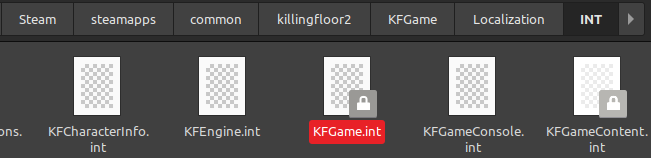
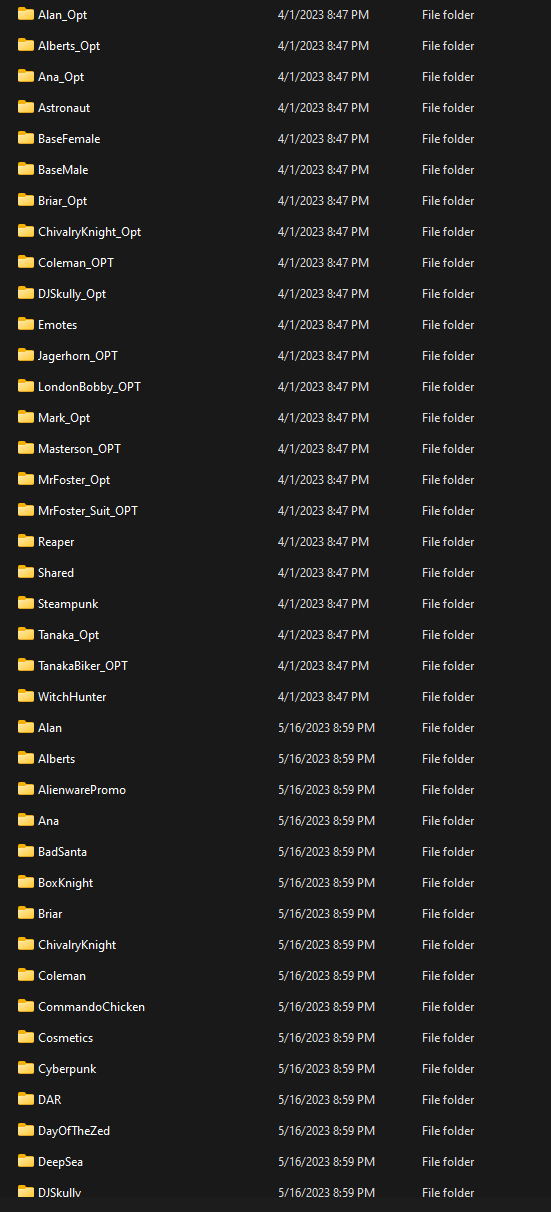
Steam > steamapps > common > killingfloor2 > KFGame > Localization > INT
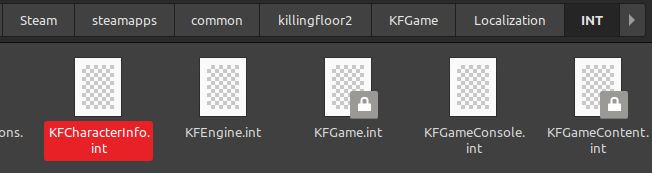
Look inside for the character names, you can change it to whatever you want. And yes, I mean anything.
Donovan's name will be changed here in this example.
KFGame.int
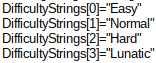
If anyone gets the reference, you damn well know this was coming.
KFGameContent.int
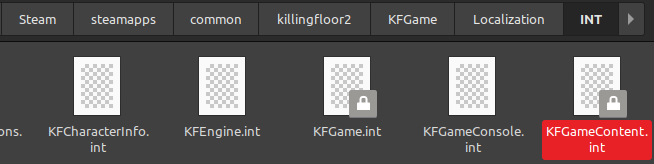
I'll be changing the name of my M14 EBR here.


Optional Cool Stuff: No Hands
Requested from Jary, credit to CaptainSAWB5 for showing me how to do this and the screenshot.

Delete the mesh file the character you play
With different outfits like the Horzine Armor just go to the outfit file.
Video Example from CaptainSAWB5

Steam > steamapps > common > killingfloor2 > KFGame > BrewedPC > Packages > Characters
Delete the mesh file the character you play
With different outfits like the Horzine Armor just go to the outfit file.
Video Example from CaptainSAWB5
Other Great Guides
Not friends with any of these people nor do I know them, I just think their guides are great and worth checking out.
Cool Stuff and Sheeeit
https://steamcommunity.com/sharedfiles/filedetails/?id=1136629337
Optimization and Sheeeit
https://steamcommunity.com/sharedfiles/filedetails/?id=2802127785
https://steamcommunity.com/sharedfiles/filedetails/?id=1115595135
https://steamcommunity.com/sharedfiles/filedetails/?id=439809294
Controlled Difficulty and Sheeeit
https://steamcommunity.com/sharedfiles/filedetails/?id=2513564310
https://steamcommunity.com/sharedfiles/filedetails/?id=2851601924

I Hate Myself and Use Linux
Use Proton
https://www.protondb.com/app/232090Finding what is My Documents for Windows is but you're stuck on Linux
your name > .local > share > Steam > steamapps > compatdata > 232090 > pfx > drive_c > users > steamuser > Documents > My Games > KillingFloor2 > KFGame
Personally, I use Linux Mint right now and cannot speak with 100% certainty for other distros. (Ubuntu, Arch, Manjaro, etc)
Good Linux Launch Command
gamemoderun %command% (Assuming you have it, click the link below if you want to get it)
https://github.com/FeralInteractive/gamemode
Proton-GE
https://github.com/GloriousEggroll/proton-ge-custom
Default Valve Proton works just fine, but Proton GE has more optimizations and stuff like that, when in doubt, just use the GE version for more optimization.

The Single Best Thing You Can Do Playing KF2
A very common complaint brought up literally anywhere that discusses KF2 is that it takes forever to load. I have been there before in the past and I understand the pain, so I present the single best thing to do if you want to keep playing this game (and possibly any other modern game these days due to greedy devs not knowing what optimization is because your wallet is the only thing they seek.)
Estimated Load Times (My Personal Experience)
Hard Drive (HDD): 5-10 Minutes Game Load, ~1-2 Minutes Map Switch (1TB Hard Drive, don't remember it, sorry)
Solid State Drive (SSD): 1-3 Minute Game Load, ~30 Second Map Switch (Western 480GB SATA SSD)
M2 SSD: Literal seconds for both.
NewEgg[www.newegg.com]
Whatever computer parts are from some retailer around you.

Estimated Load Times (My Personal Experience)
Hard Drive (HDD): 5-10 Minutes Game Load, ~1-2 Minutes Map Switch (1TB Hard Drive, don't remember it, sorry)
Solid State Drive (SSD): 1-3 Minute Game Load, ~30 Second Map Switch (Western 480GB SATA SSD)
M2 SSD: Literal seconds for both.
Buy an M2 SSD
Amazon[www.amazon.com]NewEgg[www.newegg.com]
Whatever computer parts are from some retailer around you.
More Killing Floor 2 guides
- Killing Floor 2 Startup Crashes and Startup Problems★ 5 (761)33k views798 ♥8 minUpdated Apr 20, 2023
- Killing Floor 2 все предметы / all collectibles★ 5 (688)17k views676 ♥3 minUpdated Sep 22, 2023
- Equipping Conflicting Accessories v2★ 5 (742)15k views1.2k ♥4 minUpdated Oct 19, 2018
- «От А до Я» или не совсем коротко о перках.★ 5 (642)14k views942 ♥31 minRussianUpdated Oct 3, 2019
- More FPS on ANY Computer | KF2★ 5 (442)14k views570 ♥10 minUpdated Jan 11, 2025
- How to predict which boss★ 5 (362)12k views569 ♥1 minUpdated Mar 21, 2025



This guide was created by its original author on the Steam Community. Are you the author and want it removed? Request removal.